




In this blog we are gonna see about what exactly the ansible galaxy is and how it differs from ansible. You might created a multiple playbook if you know about the ansible , but what if there are large number of playbooks you have to manage. Also you are new to ansible and whant to automate some task. In that case ansible galaxy will help you.
Ansible Galaxy
Ansible galaxy is free and open source repository i can say or a website where differant roles and collection are stored which are developed by commuity. It means we can use those role from the ansible galaxy. Galaxy provides pre-packaged units of work such as roles, and new in Galaxy 3.2, collections You can find roles for provisioning infrastructure, deploying applications, and all of the tasks you do everyday.
Galaxy provides pre-packaged units of work such as roles, and new in Galaxy 3.2, collections You can find roles for provisioning infrastructure, deploying applications, and all of the tasks you do everyday.
To accomplish tasks such as installing roles from Galaxy or any git SCM, creating or removing roles, or performing some tasks on the Galaxy site, we can use the ansible-galaxy command. This command comes pre-installed with Ansible, so you can use it immediately after installing Ansible
Ansible Overview
So you have to think of ansible is another tool for helping in ma. Ansible is a open source infrastructure automation tool. Lets suppose there is an system adminisrator responsible for maintaining the infra for all the diff server within his company, so some of the server may be running apache, or some of the server could be database running or may be different one. So those server are easy to manage . But what if the number of server are very large, and it is the reality that we required large number of server, so it is very difficult to create consistent setup of different infrastructure such as web server and databases individually. So here ansible comes to the rescue and helps you to become an efficient operation team.
Ansible like others system solution such as chef and puppet uses code that you can write and describe the installation and setup of your servers. So you can achieve it repeatedly and deploy your servers consistently into multiple areas. so now you have to have one person for redoing and re-following setup procedure you described in one script. And then each script is executed and have a consistent environment.
Working with Ansible Galaxy
Now lets see how to ansible-galaxy actually work. Will see an example. To use ansible-galaxy commands you must have to install latest ansible version. Now lets open your terminal and execute “ansible galaxy” and you will get all the options available with the Galaxy.
knoldus@INL-F9ZYN93:~/Downloads$ ansible-galaxy
usage: ansible-galaxy [-h] [--version] [-v] TYPE ...
ansible-galaxy: error: the following arguments are required: TYPE

usage: ansible-galaxy [-h] [--version] [-v] TYPE ...

Perform various Role and Collection related operations.

positional arguments:
  TYPE
    collection   Manage an Ansible Galaxy collection.
    role         Manage an Ansible Galaxy role.

optional arguments:
  --version      show program's version number, config file location, configured module search path, module location, executable location and exit
  -h, --help     show this help message and exit
  -v, --verbose  verbose mode (-vvv for more, -vvvv to enable connection debugging)
knoldus@INL-F9ZYN93:~/Downloads$
Firstly, you can start with the init command and create a role. Here I am creating a role ‘testing’. Use the ls command to check if the role has been created successfully. The init command also creates the necessary files inside the testing role directory.
knoldus@INL-F9ZYN93:~/ ansible-galaxy init testing
- Role testing was created successfully
knoldus@INL-F9ZYN93:~$ cd testing/
knoldus@INL-F9ZYN93:~/testing$ ls
defaults  files  handlers  meta  README.md  tasks  templates  tests  vars
knoldus@INL-F9ZYN93:~/testing$
Ansible galaxy is a big and active community where many roles have already been created that you can directly use.
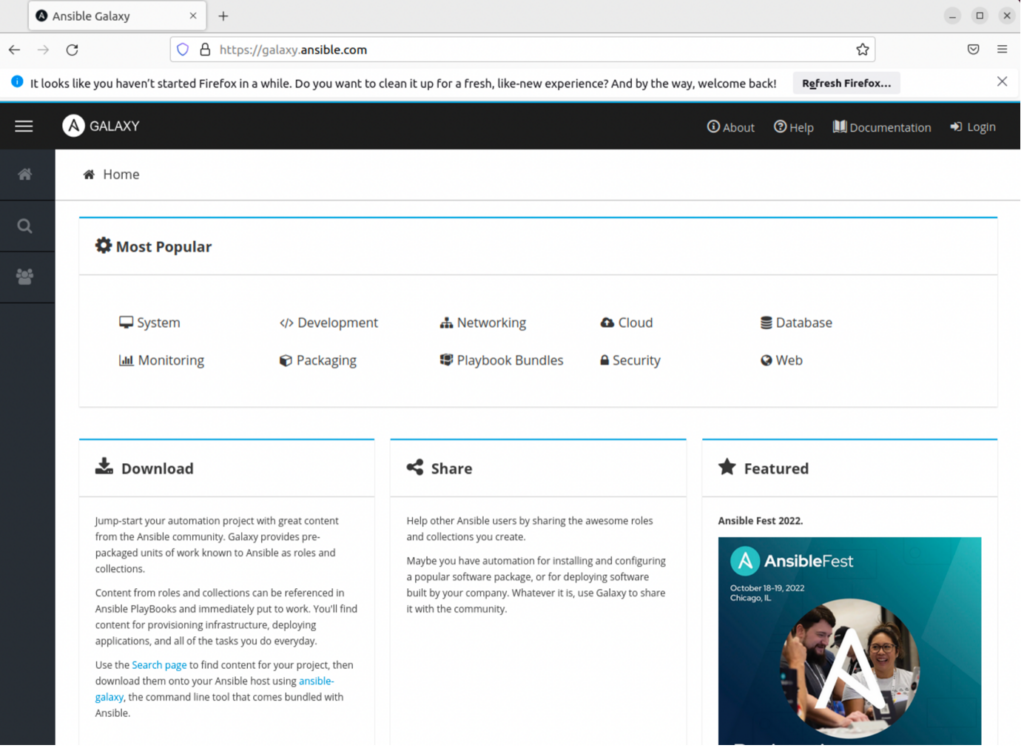
Below is the page that will open when you browse ‘galaxy.ansible.com‘, or we can say it is the homepage of the ‘Ansible Galaxy’ website. We can click on any popular category from the homepage or click on the ‘Search’ button to get more filters to apply a granular search.
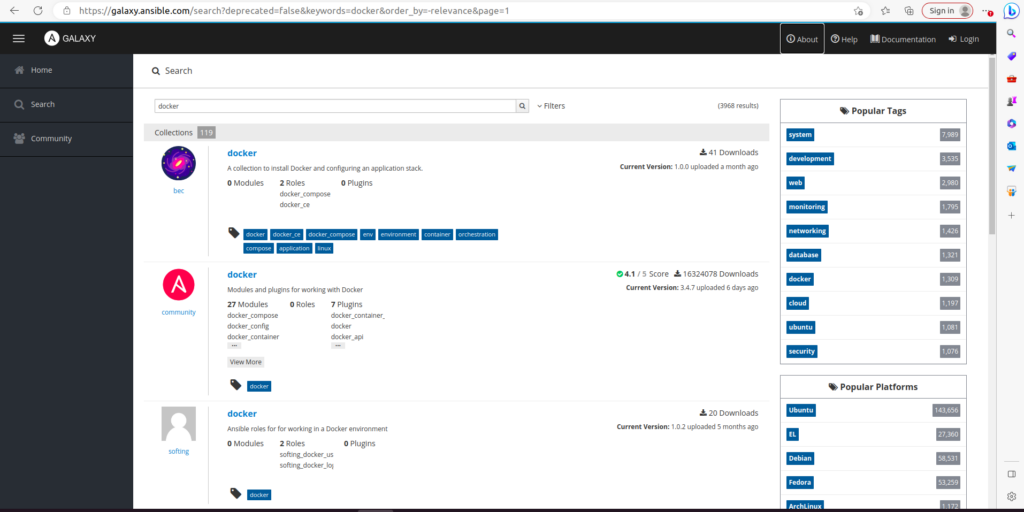
For example, if you are looking for a Docker server role, just search for it and click on the filter button. You can see community has maximum downloads; we can try installing this role. Click on community Docker.
You will then get the installation command to install this role using ansible-galaxy
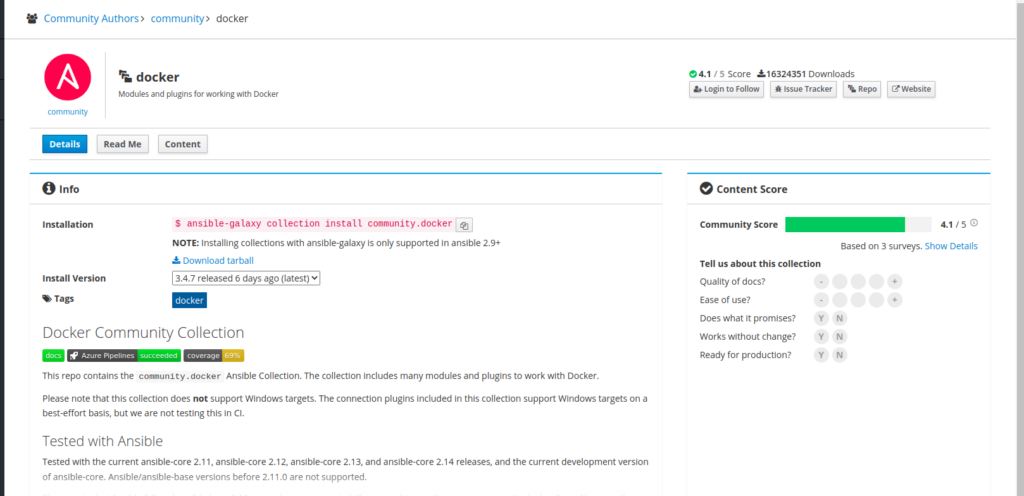
Run the command mentioned in the above snapshot to download and install the DOCKER server role on your machine.
knoldus@INL-F9ZYN93:~/ ansible-galaxy collection install community.docker
knoldus@INL-F9ZYN93:~$ ansible-galaxy collection install community.docker
Starting galaxy collection install process
Process install dependency map
Starting collection install process
Downloading https://galaxy.ansible.com/download/community-docker-3.4.8.tar.gz to /home/knoldus/.ansible/tmp/ansible-local-76116l2kg1__2/tmpbotuegpx/community-docker-3.4.8-2gzkonhb
Installing 'community.docker:3.4.8' to '/home/knoldus/.ansible/collections/ansible_collections/community/docker'
community.docker:3.4.8 was installed successfullyNote: Suppose in case the role is already installed in you machine and you are trying to again install it through the ansible galaxy then you will get the below output.
knoldus@INL-F9ZYN93:~$ ansible-galaxy collection install community.docker
Starting galaxy collection install process
Nothing to do. All requested collections are already installed. If you want to reinstall them, consider using `--force`.
Ansible Galaxy Commands
Below are some commeny used ansible-galaxy command to manage roles and collection.
ansible-galaxy list:This galaxy command displays a list of all the installed roles, with their version numbers.ansible-galaxy remove:This galaxy command removes an installed role on the system.ansible-galaxy info:This galaxy command will provide detailed information about Ansible Galaxy.ansible-galaxy init: This galaxy command can be used to create a role template suitable for submission to Ansible Galaxy.ansible-galaxy import: This galaxy command requires a login to import a role from the official galaxy website.
The above commands (init, import, install, remove) can be used with the ansible-galaxy collection command to manage collections using Ansible galaxy.
Creating role:
If you are not familiar with ansible role please check Ansible Roles.
Now lets see how to create a role with ansible galaxy. To create a new role need to use command init. Or you can use the ansible-galaxy install <name of role>command to install the role.
Before you can use them in playbooks, the role must be downloaded. Once they have been placed in the default directory /etc/ansible/roles, you can find role examples.
For example, the following will create a role directory structure called testingin the current working directory:
$ ansible-galaxy init testingThe testing directory will contain the following:
.travis.yml
README.md
defaults/
    main.yml
files/
handlers/
    main.yml
meta/
    main.yml
tasks/
    main.yml
templates/
tests/
    inventory
    test.yml
vars/
    main.yml
For a full explanation of all subdirectories and files listed above, and how they’re used by Ansible, view the Roles topic at the Ansible docs site
When Galaxy imports a role, the import process looks for metadata found in the role’s meta/main.yml file. The following shows the default metadata file created by the init command:Proudly powered by WordPress