


How to use CSV-JSON Data Files in Postman Collection Runner
– Before starting this session, please review this blog How to automate an API Collection in Postman. – NashTech Insights (nashtechglobal.com) to ensure we are on the same page.
– Regarding CSV/ JSON Data File, Postman allows you to import either a CSV or JSON file, and access data from imported files through variables when using Collection Runner.
– This is particularly useful for testing APIs with various inputs and validating responses against expected results.
* Pre-requisite
– Postman is installed on your machine.
– A Postman collection with requests that include variables.
Prepare CSV/ JSON Data File with the correct format
CSV Data File (*.csv)
– The first row (heading) is used as a variable name in Postman;
– Each row is used as a data row;
– Each row must have the same number of columns;
– The line endings of the CSV file must be in Unix format 
JSON Data File (*.json)
– JSON Data File is an array of key-value pairs.
– Each key is a variable name and each value is the data used in a request. 
2. Add a script in the Tests Tab to access the data file
– For example, we have the request body as a screenshot below: 
– Add a script in Post-re Tab as screenshot below: 
– pm.iterationData.get: to get data from data-file
3. Import Data File in Collection Runner.
– In Collection Runner: In the Collection Runner, select the collection you want to run.
– Select File: Choose the prepared CSV or JSON data file.
– Config Iterations: The Collection Runner will automatically set the number of iterations based on the number of rows in your data file. You can adjust the number of iterations if necessary. 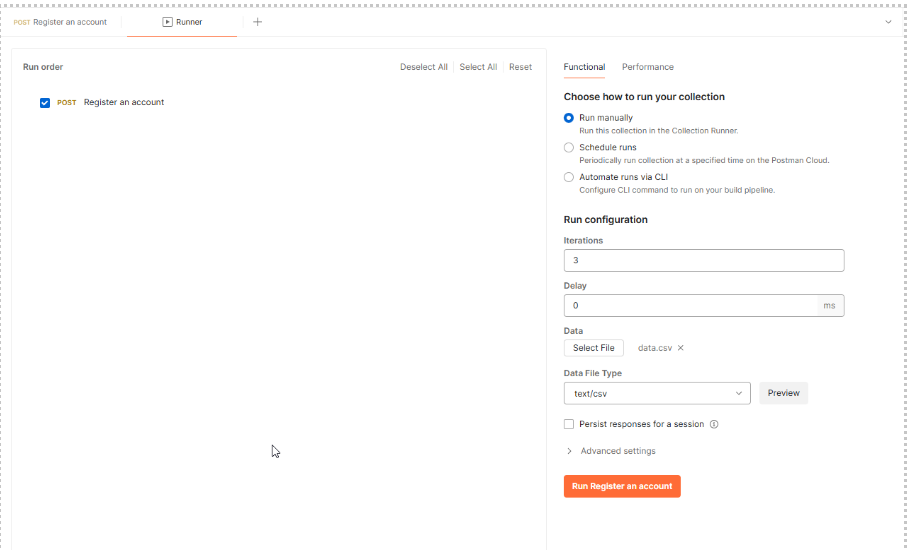
– We can preview data-file before running by clicking on Preview 
– Run and view the result: you can see the request and response details for each iteration 
– Do the same way for the JSON file.
Pros and Cons
Here’s a list of pros and cons of importing CSV/ JSON data files in the Collection Runner of Postman:
Pros
Data Reusability: ensures consistent test execution by using predefined data sets, reducing error.
Efficiency and Automation: automate the process of running tests with multiple datasets, saving time and effort compared to manual testing.
Data-Driven Testing: Allows for running the same set of requests with multiple sets of data. This helps in validating the behavior of the API with different inputs and use cases.
Cons
File Management: Managing and maintaining large data files can become cumbersome, especially if the data changes frequently.
Data Format Limitations: dependency on File Format and errors in the file format (e.g., missing commas in CSV or incorrect JSON syntax) can cause the tests to fail or behave unpredictably.
Data Privacy and Security: Sensitive data in CSV/ JSON files can pose privacy and security risks if not handled properly. Proper measures must be taken to secure test data.
In summary, using CSV/ JSON data files presents both pros and cons. It’s crucial to consider the associated challenges carefully to ensure effective testing practices.
References
https://learning.postman.com/docs/introduction/overview/
https://community.postman.com/