


In today’s data-driven applications, real-time processing is no longer a luxury—it’s a necessity. Kafka Streams, a powerful library from Apache Kafka, makes it easy to build scalable, fault-tolerant stream processing applications in Java. When paired with Confluent Cloud, a fully managed Kafka service, and Spring Boot, it becomes even easier to develop and deploy robust microservices. In this blog, we’ll walk through How to Use Kafka Streams with Confluent Cloud and Spring Boot.
We’ll begin with the fundamentals of Apache Kafka, followed by an introduction to Kafka Streams and its key operations. After that, we’ll take a look at Confluent Cloud and how it simplifies Kafka management.
Finally, we’ll put everything together in a demo by building a Spring Boot-based microservices system that communicate via Kafka Streams on Confluent Cloud.
Whether you’re just getting started with Kafka Streams or planning to integrate it with Spring Boot, this guide will help you hit the ground running..
What is Apache Kafka?
Kafka is an open-source distributed event streaming platform. It means Kafka is designed to handle data that is constantly being generated and needs to be processed as it comes in.
Let’s take an example: there is a social media platform where people are liking, posting, commenting continuously. All these actions are events. These events are being constantly generated. So, what will Kafka do?
Kafka will collect these events, store them temporarily, and distribute them to multiple services. Whether someone wants to analyze the data, Kafka will distribute it to them; if someone’s feed needs to be updated, it will be updated; if a notification needs to be sent, then the notification will go.
Kafka Data Model
- Kafka Topic: Just a named Log, grouping related events.
- Partition: A topic is split into partitions for parallelism and scalability. Each partition is an ordered, immutable sequence of events.
- Key: Determines which partition the message goes to. Messages with the same key go to the same partition → useful for ordering.
- Value: The actual message content (e.g.,
JSON,Avro, plain text).

Key Kafka Concepts
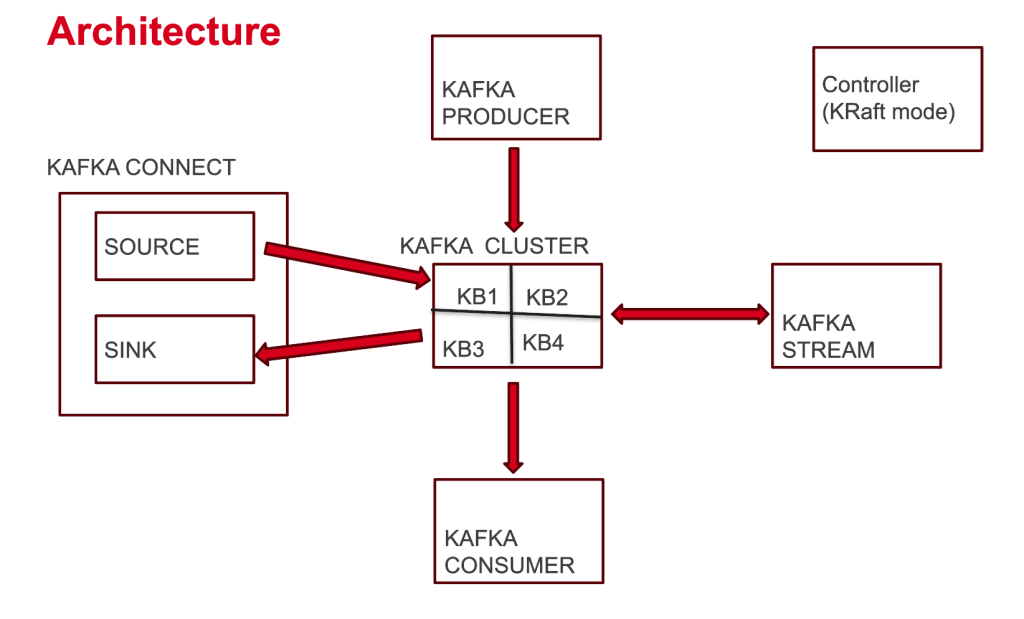
- Kafka Broker: A server running Kafka
- Kafka Cluster: Group of Kafka brokers
- Kafka Producer: Sends data into the Kafka cluster (into the Kafka Topic)
- Kafka Consumer: Pulls data from the Kafka cluster (inside the Kafka Topic)
- Kafka Connect: Moves data in/out of Kafka cluster without writing code
- Kafka Stream: Used for transforming data from and back into Kafka
- Controllers: Nodes that manage cluster metadata
Understanding Kafka Streams
Kafka Streams is a Java client library for building applications and microservices where the input and output data are stored in Kafka clusters. It is specifically designed for data transformation and stream processing. While traditional Kafka applications need you to manually set up consumers and producers, Kafka Streams abstracts away all the consumer/producer plumbing and lets you focus purely on the data transformation logic.
- Kafka Streams reads data from Kafka topics
- and then process the data stored, perform operations like filtering, aggregating, and joining.
- After processing, the data can be written back to a Kafka topic.
KStream Operations
Kafka Streams provides a rich set of transformation operations for processing data streams. These operations define how data flows from input topics to output topics, with all the consumer/producer mechanics handled transparently. Let’s explore the most important transformation patterns:
- peek((k,v)((k,v)((k,v)→void): Log or check records (no change)
- merge(otherStream): Combine two KStreams of same key/value type
- filter(predicate) : Keep records matching the condition. e.g., value.length() > 5
- filterNot(predicate) : Keep records NOT matching the condition.
- map ((key, value) -> KeyValue.pair(newKey, newValue) : Transform both key and value.
- mapValues(v → v’) : Transform only the value.
Confluent Cloud: Kafka as a Service
Confluent Cloud is a fully managed, cloud-native platform for Apache Kafka that simplifies real-time data streaming by eliminating the need to manage Kafka infrastructure. It runs on major cloud providers like AWS, GCP, and Azure, and offers features like elastic scaling, enterprise-grade security, and a wide range of built-in connectors for seamless integration. With support for tools like Kafka Streams, Confluent Cloud enables developers to build event-driven applications and real-time data pipelines quickly and efficiently.
Demo: kafka-stream-with-spring-boot
Prerequisites
- Java 17+
- Maveb or Gradle
- A Confluent Cloud account
Getting Started with Confluent Cloud
- Sign up for Confluent Cloud.
- Create a new Kafka cluster or select an existing one.
- Navigate to Cluster Settings → Endpoints
- Note your bootstrap server’s endpoint
- Generate API keys for authentication,
- If you don’t have generated the API key yet, then go to API Keys in Confluent Cloud and generate new.
- Note the API key and secret.
Spring Boot Project Setup
- Service 1: Order Service: To set up this service, add these dependencies from Spring Initializer:
- Spring Web
- Spring for Apache Kafka
- Service 2: Fraud Detection Service: To set up this service, add these dependencies from Spring Initializer:
- Spring Web
- Spring for Apache Kafka
- and Jackson Databind from maven respository:
<dependency>
     <groupId>com.fasterxml.jackson.core</groupId>
     <artifactId>jackson-databind</artifactId>
</dependency>
Configuration
Configure both services to connect to Confluent Cloud by adding these properties to your application.properties and setting them to the Kafka properties noted from the Confluent Cloud.
# This ensures that the key is serialized as a string and the value (e.g., Order object) is serialized as JSON.
spring.kafka.producer.key-serializer=org.apache.kafka.common.serialization.StringSerializer
spring.kafka.producer.value-serializer=org.springframework.kafka.support.serializer.JsonSerializer

# Required for Confluent Cloud
spring.kafka.properties.sasl.mechanism=PLAIN
spring.kafka.properties.security.protocol=SASL_SSL

# Set your bootstrap server's endpoint to spring.kafka.bootstrap-servers property
spring.kafka.bootstrap-servers=YOUR_BOOTSTRAP_SERVER_ENDPOINT
# Set your api key to the username and secret to the password
spring.kafka.properties.sasl.jaas.config=org.apache.kafka.common.security.plain.PlainLoginModule required username='YOUR_API_KEY' password='YOUR_SECRET';
Order Service (Producer)
This Spring Boot service has a simple REST API to create orders and then that order is sent to the Kafka Cluster (into the Kafka Topic: orders) on Confluent Cloud.
@PostMapping
public ResponseEntity<?> createOrder(@RequestBody Order order) {
    kafkaTemplate.send(AppConstants.ORDER_TOPIC_NAME, order.orderId(), order);
    return new ResponseEntity<>(Map.of("message", "Order posted successfully"), HttpStatus.OK);
}
And a KafkaProducerConfig class, which creates the topic on the Kafka Cluster if it does not exist before, the topic name is defined in the AppConstants file.
  @Bean
    public NewTopic topic() {
        return TopicBuilder
                .name(AppConstants.ORDER_TOPIC_NAME)
                .build();
    }
Fraud Detection Service (Kafka Streams Consumer)
This Spring Boot service implements a simple but effective transformation pipeline:
- Consume orders from the
ordertopic - Filter orders with amounts greater than 1000 as suspicious
- Route suspicious orders to another Kafka topic, named
suspicious-orders
Notice how the code focuses entirely on the transformation logic – there’s no explicit consumer or producer setup.
@Configuration
@EnableKafkaStreams
public class KafkaStreamsConfig {

    @Bean
    public KStream<String, String> kStream(StreamsBuilder builder) {

        ObjectMapper objectMapper = new ObjectMapper();

        // Consuming the "orders" topic with String key and String value
        KStream<String, String> stream = builder.stream(AppConstants.ORDER_TOPIC_NAME, Consumed.with(Serdes.String(), Serdes.String()));


        // Processing the stream
        stream.peek((key, value) -> System.out.println("Received record - Key: " + key + ", Value: " + value))
                .filter((key, value) -> {
                    try {
                        // Parse the value to Order object and check if the amount is greater than 1000
                        Order order = objectMapper.readValue(value, Order.class);
                        boolean isSuspicious = order.amount() > 1000;
                        System.out.println("Order " + key + " is " + (isSuspicious ? "suspicious" : "not suspicious"));
                        return isSuspicious;
                    } catch (Exception e) {
                        System.out.println("Error parsing JSON for key: " + key + ", error: " + e.getMessage());
                        return false;
                    }
                })
                .peek((key, value) -> System.out.println("Sending suspicious record - Key: " + key + ", Value: " + value))
                .to("suspicious-orders", Produced.with(Serdes.String(), Serdes.String()));

        return stream;
    }
}
Code Explanation: KafkaStreamsConfig
There is a KafkaStreamsConfig in the config package, which has the configuration needed to consume and process the orders. It has a kstream method which expects StreamsBuilder object, Spring injects the StreamsBuilder (used to define Kafka Streams logic).
Returns a KStream<String, Order> which is the stream of data being processed.
Configuration Setup
The @EnableKafkaStreams annotation activates Kafka Streams auto-configuration in Spring Boot, while @Configuration marks this as a configuration class that Spring will process during startup.
Stream Processing Pipeline
The kStream method defines the entire data transformation pipeline:
1. Stream Creation
KStream<String, String> stream = builder.stream(AppConstants.ORDER_TOPIC_NAME,
    Consumed.with(Serdes.String(), Serdes.String()));
This creates a KStream that consumes from the “orders” topic. Notice it uses String serialization for both keys and values – the JSON order data comes in as a string that needs to be parsed.
2. Data Inspection with Peek
.peek((key, value) -> System.out.println("Received record - Key: " + key + ", Value: " + value))The peek operation is a non-transforming operation that lets you inspect data flowing through the stream without modifying it. This is perfect for logging and debugging – you can see exactly what data is being processed.
3. Fraud Detection Filter
.filter((key, value) -> {
    try {
        Order order = objectMapper.readValue(value, Order.class);
        boolean isSuspicious = order.amount() > 1000;
        return isSuspicious;
    } catch (Exception e) {
        return false;
    }
})
This is the core fraud detection logic:
- JSON Parsing: Converts the string value back to an
Orderobject using Jackson’sObjectMapper - Business Rule: Applies the fraud detection rule (amount > 1000)
- Error Handling: If JSON parsing fails, the record is filtered out (returns false)
- Boolean Return: Only suspicious orders (true) pass through to the next stage
4. Suspicious Order Logging
.peek((key, value) -> System.out.println("Sending suspicious record - Key: " + key + ", Value: " + value))Another peek operation to log which records are being marked as suspicious before they’re sent to the output topic.
5. Output to Suspicious Orders Topic
.to("suspicious-orders", Produced.with(Serdes.String(), Serdes.String()));The to operation is a terminal operation that sends the filtered suspicious orders to the “suspicious-orders” topic for downstream processing.
Testing the services
Create order
Send a POST request to the Order Service to publish an order to Kafka:
- Endpoint: POST http://localhost:8080/api/orders
- Sample Payload (JSON)
{
"orderId": "order-123",
"userId": "user-001",
"amount": 1500
}- This request will create a Kafka topic
ordersand produce a message to it, you can verify it on the Confluenet Cloud UI.

Verify Suspicious Orders
- The Fraud Detection Service will publish the order greater than 1000 to suspicious-orders, you can verify it on the Confluenet Cloud UI.

Conclusion
In this blog, we covered everything from Kafka fundamentals and key concepts to Kafka Streams operations, the role of Confluent Cloud, and a complete working demo. You’ve seen how stream processing works end-to-end—from ingesting data to transforming and routing it intelligently.
The Kafka Streams + Spring Boot + Confluent Cloud stack empowers you to build production-ready, real-time data pipelines that are both scalable and fault-tolerant. What makes this combination particularly powerful is how it abstracts away the traditional complexities of distributed stream processing, letting you concentrate on solving business problems with clean, maintainable code.
Ready to dive deeper? Check out the GitHub Repository: kafka-stream-with-spring-boot
This repository includes the entire codebase with comprehensive test cases, designed specifically for developers getting started with stream processing. It is intentionally straightforward—you’ll see how data flows seamlessly between topics, gets processed in real-time, and routes to downstream systems with minimal configuration.
Clone it, run it, and experience firsthand how stream processing can be both powerful and surprisingly simple. The future of real-time data processing is at your fingertips!