



Data consistency and compatibility are critical in a distributed system like Kafka. The Schema Registry, a core component of Confluent Kafka, plays a vital role in ensuring these qualities. It provides a centralized repository for managing schemas and enforces compatibility standards, reducing errors and improving system reliability.
In this blog, we will explore how to implement the Schema Registry in Confluent Kafka, discuss best practices, and highlight key use cases with code examples.
What is the Schema Registry?
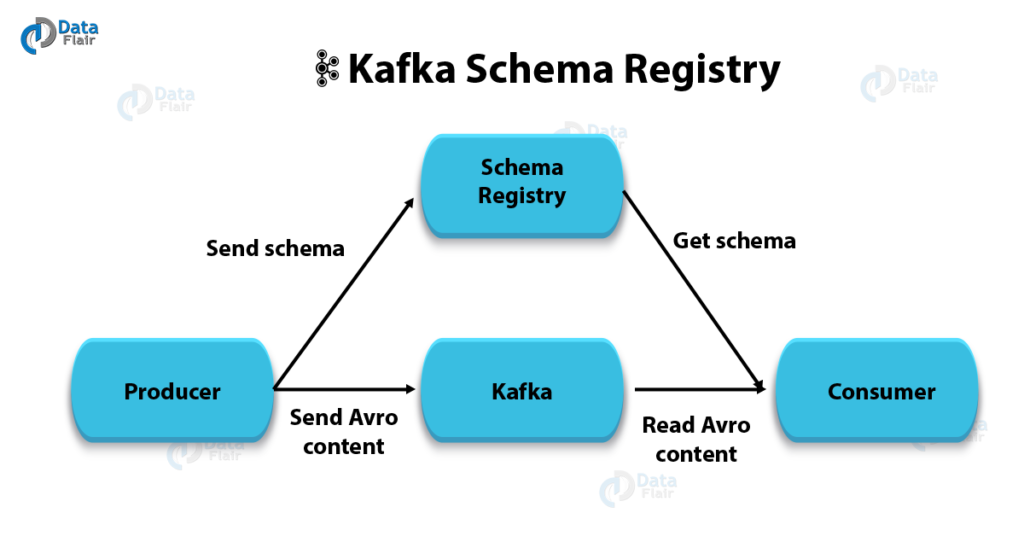
The Schema Registry is a service that manages schemas for Avro, JSON, and Protobuf data formats in Kafka topics. It ensures:
- Data Compatibility: Guarantees that producers and consumers adhere to schema compatibility rules.
- Versioning: Tracks schema evolution.
- Decoupling: Enables data producers and consumers to operate independently without breaking changes.
Setting Up the Schema Registry
The Schema Registry is part of Confluent Platform and can be set up as follows:
Step 1: Install Confluent Platform
Use Docker to install Confluent Kafka and the Schema Registry:
# Pull the Confluent Kafka image
docker pull confluentinc/cp-server

# Run Confluent Kafka with Schema Registry
docker-compose up -d
Step 2: Configure Schema Registry
Update the schema-registry.properties file with the required configurations:
kafkastore.bootstrap.servers=PLAINTEXT://localhost:9092
kafkastore.topic=_schemas
schema.registry.listeners=http://0.0.0.0:8081
Step 3: Start Schema Registry
Run the following command to start the Schema Registry:
schema-registry-start /etc/schema-registry/schema-registry.propertiesUsing the Schema Registry
Step 1: Register a Schema
Schemas define the structure of data. Use the following command to register an Avro schema:
curl -X POST -H "Content-Type: application/vnd.schemaregistry.v1+json" \
  --data '{"schema": "{\"type\":\"record\",\"name\":\"User\",\"fields\":[{\"name\":\"id\",\"type\":\"int\"},{\"name\":\"name\",\"type\":\"string\"}]}"}' \
  http://localhost:8081/subjects/User-value/versions
Step 2: Produce Messages
Use the Avro console producer to send messages to Kafka:
kafka-avro-console-producer --broker-list localhost:9092 \
  --topic users --property schema.registry.url=http://localhost:8081 \
  --property value.schema='{"type":"record","name":"User","fields":[{"name":"id","type":"int"},{"name":"name","type":"string"}]}'
Step 3: Consume Messages
Use the Avro console consumer to retrieve messages:
kafka-avro-console-consumer --bootstrap-server localhost:9092 \
  --topic users --from-beginning --property schema.registry.url=http://localhost:8081
Best Practices for Schema Registry
1. Enforce Compatibility Modes
Set compatibility modes to prevent breaking changes:
- Backward: New schemas must be compatible with old schemas.
- Forward: Old schemas must be compatible with new schemas.
- Full: Both backward and forward compatibility are enforced.
Example:
curl -X PUT -H "Content-Type: application/vnd.schemaregistry.v1+json" \
  --data '{"compatibility": "BACKWARD"}' \
  http://localhost:8081/config/users-value
2. Use Namespaces
Organize schemas using namespaces to avoid conflicts between similar schema names in different domains.
3. Validate Schemas
Validate schemas during development to detect issues early:
curl -X POST -H "Content-Type: application/vnd.schemaregistry.v1+json" \
  --data '{"schema": "{\"type\":\"record\",\"name\":\"Invalid\",\"fields\":[{\"name\":\"id\",\"type\":\"unknown\"}]}"}' \
  http://localhost:8081/subjects/Invalid-value/versions
4. Monitor Schema Registry
Use tools like Confluent Control Center to monitor Schema Registry activity and ensure system health.
Use Cases for Schema Registry
1. Data Pipeline Validation
Ensure all producers and consumers in a data pipeline adhere to the agreed schema. This avoids downstream failures due to unexpected data formats.
2. Schema Evolution
Facilitate schema evolution without breaking existing consumers. For example, adding a new optional field to an Avro schema while maintaining backward compatibility.
{
  "type": "record",
  "name": "User",
  "fields": [
    {"name": "id", "type": "int"},
    {"name": "name", "type": "string"},
    {"name": "email", "type": ["null", "string"], "default": null}
  ]
}
3. Multi-Environment Deployment
Use the Schema Registry to enforce consistency across development, staging, and production environments. This ensures data compatibility throughout the software lifecycle.
4. Real-Time Analytics
Ingest structured data into analytics platforms like Apache Flink or ksqlDB. The Schema Registry ensures that real-time data streams conform to expected formats.
Conclusion
The Schema Registry is an essential component of Confluent Kafka, enabling data consistency, schema evolution, and reliable integration. By following best practices such as enforcing compatibility modes, validating schemas, and monitoring the registry, you can build robust, scalable event-driven architectures. The use cases highlighted here demonstrate how the Schema Registry can simplify real-world data challenges and empower your Kafka-based systems.
That’s it for now. I hope this article gave you some useful insights on the topic. Please feel free to drop a comment, question or suggestion.