


Kafka Connect- Integrating Kafka with external system
OS: LINUX
What is Kafka Connect?
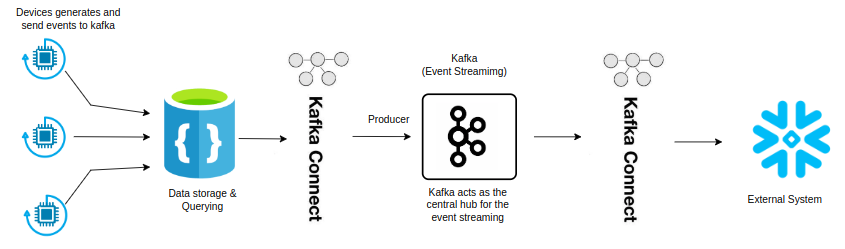
Kafka Connect is an integral component of the Apache Kafka ecosystem that simplifies data integration between Apache Kafka and various data systems. It provides a scalable, reliable way to stream data between Kafka and other systems like databases, message queues, and file systems without writing custom code.
A Kafka Connect process is made up of a series of components: a connector instance, which defines the interaction between Kafka Connect and the external technology, consider a converter which handles the serialization and deserialization of data, and plays a crucial role in the persistence of schemas; and the optional transformation functionality, which sits between connectors and converters, and can perform one or more transformations to data passing through.
Kafka Connect allows you to integrate data from various sources (Source Connectors) into Kafka topics and from Kafka topics to various destinations (Sink Connectors). It supports both standalone and distributed modes, making it flexible for both small-scale and large-scale deployments.
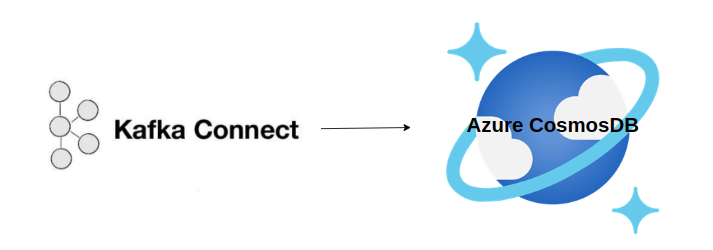
Integration of Kafka Connect with CosmosDB
Prerequisites:
- Install Docker-Desktop.
- Install Kafka using docker-compose
- Install Zookeeper using docker-compose
- Install Kafka-Connect using docker-compose
Create a Docker-Compose.yml for installation.
version: '3.8'

services:
  zookeeper:
    image: wurstmeister/zookeeper:latest
    ports:
      - "2181:2181"

  kafka:
    image: wurstmeister/kafka:2.13-2.8.1
    ports:
      - "9092:9092"
    environment:
      KAFKA_ADVERTISED_LISTENERS: INSIDE://kafka:9093,OUTSIDE://localhost:9092
      KAFKA_LISTENER_SECURITY_PROTOCOL_MAP: INSIDE:PLAINTEXT,OUTSIDE:PLAINTEXT
      KAFKA_LISTENERS: INSIDE://0.0.0.0:9093,OUTSIDE://0.0.0.0:9092
      KAFKA_INTER_BROKER_LISTENER_NAME: INSIDE
      KAFKA_ZOOKEEPER_CONNECT: zookeeper:2181
    volumes:
      - /var/run/docker.sock:/var/run/docker.sock

  kafka-connect:
    image: debezium/connect:1.8
    ports:
      - "8083:8083"
    environment:
      BOOTSTRAP_SERVERS: kafka:9093
      GROUP_ID: connect-cluster
      OFFSET_STORAGE_TOPIC: connect-offsets
      OFFSET_STORAGE_REPLICATION_FACTOR: 1
      CONFIG_STORAGE_TOPIC: connect-configs
      CONFIG_STORAGE_REPLICATION_FACTOR: 1
      STATUS_STORAGE_TOPIC: connect-status
      STATUS_STORAGE_REPLICATION_FACTOR: 1
    depends_on:
      - kafka

  cosmos-emulator:
    image: mcr.microsoft.com/cosmosdb/linux/azure-cosmos-emulator
    ports:
      - "8081:8081"
    mem_limit: 3g
    environment:
      ACCEPT_EULA: "true"
      AZURE_COSMOS_EMULATOR_PARTITION_COUNT: "10"  # Adjust as needed
    volumes:
      - cosmos-data:/data/ssl

    networks:
      - cosmos-network

volumes:
   cosmos-data:

networks:
  cosmos-network:
    driver: bridge
Understanding Docker Compose for Kafka, Zookeeper, Kafka Connect, and Cosmos DB Emulator
This file configures services for Zookeeper, Kafka, Kafka Connect, and the Azure Cosmos DB Emulator. Docker Compose allows us to define and run multi-container Docker applications, making it easier to manage interdependent services.
Zookeeper is a centralized service for maintaining configuration information, naming, providing distributed synchronization, and providing group services. It’s crucial for managing Kafka brokers.
Kafka is a distributed event streaming platform capable of handling trillions of events a day. It uses Zookeeper to manage the cluster.
Kafka Connect is a framework for connecting Kafka with external systems such as databases, key-value stores, search indexes, and file systems.
The Azure Cosmos DB Emulator simulates the Azure Cosmos DB service on your local machine for development and testing purposes.
networks: Creates a custom network `cosmosnetwork` using the `bridge` driver, which is the default networking mode for Docker containers.
This dockercompose.yml file sets up a complete environment for Kafka event streaming, Zookeeper management, and Cosmos DB emulation. By leveraging Docker Compose.
This setup is ideal for local development and testing scenarios where you need a reliable and reproducible environment. Whether you are working on microservices, big data pipelines, or cloudnative applications, Docker Compose offers a powerful way to streamline your workflow.
Verify CosmosDB Emulator is running by accessing:
https://localhost:8081/_explorer/index.html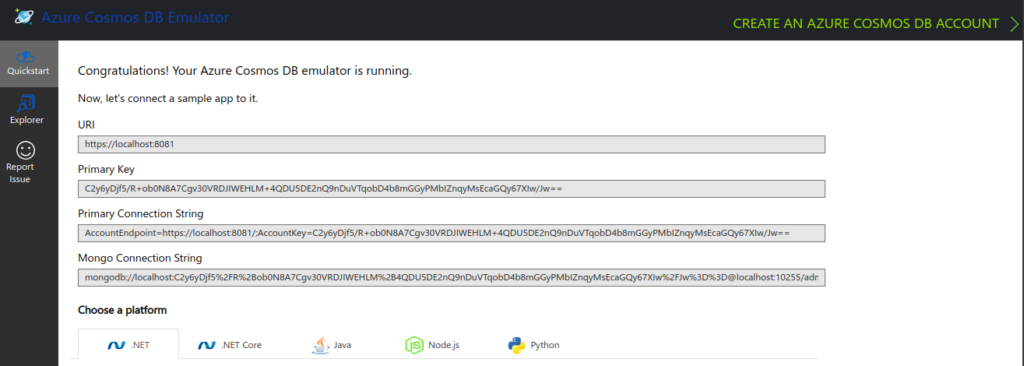
Integrating CosmosDB with Kafka Connect
To integrate CosmosDB with Kafka, First we will set up a connector in distributed mode that writes to cosmosdb.
Create a cosmosdb-sink.json configuration file for kafka connect:
{
  "name": "cosmosdb-sink-connector",
  "config": {
    "connector.class": "com.microsoft.azure.cosmos.kafka.connect.sink.CosmosDBSinkConnector",
    "tasks.max": "1",
    "topics": "Demo-topic",
    "connect.cosmos.connection.endpoint": "https://localhost:8081",
    "connect.cosmos.master.key": "C2y6yDjf5/R+ob0N8A7Cgv30VRDJIWEHLM+4QDU5DE2nQ9nDuVTqobD4b8mGGyPMbIZnqyMsEcaGQy67XIw/Jw=",
    "connect.cosmos.database.name": "kafkaData",
    "connect.cosmos.container.name": "TemperatureData",
    "connect.cosmos.containers.topicmap."Demo-topic#kafkaCollection"
  }
}
// Replace YOUR_MASTER_KEY with the actual key of your CosmosDB Emulator.
Deploy the connectorr using kafka connect:
curl -X POST -H "Content-Type: application/json" --data @cosmosdb-sink.json https://localhost:8081/connectors.Integrating CosmosDB in my Kafka Producer Code
Integrate CosmosDB in Kafka Producer code to insert data into the CosmosDB emulator.
I have created a Kafka Producer App to generate random Temperature and Humidity, I am using same code to integrate with CosmosDB,
Update/Add CosmosDB configuration settings to appsettings,json.
{
    "Kafka": {
        "BootstrapServers": "127.0.0.1:9092", // Replace with yours
        "Topic": "Demo-topic", // Replace with yours
        "ClientId": "KafkaExampleProducer" // Replace with yours
    },
    "Device": {
        "DeviceId": "Raspberry Pi Web Client"
    },
    "CosmosDB": {
        "EndpointUri": "https://localhost:8081", // Replace with yours
        "PrimaryKey": "C2y6yDjf5/R+ob0N8A7Cgv30VRDJIWEHLM+4QDU5DE2nQ9nDuVTqobD4b8mGGyPMbIZnqyMsEcaGQy67XIw/Jw==", // Replace with yours
        "DatabaseId": "KafkaData", // Replace with yours
        "ContainerId": "TemperatureData" // Replace with yours
    }
}
Install the CosmosDB ,NET SDK by running:
dotnet add package Microsoft,Azure.CosmosUpdate your Model class with attributes for CosmosDB serialization, example:
using Newtonsoft.Json;

public class TemperatureData
{
    [JsonProperty("id")]
    public string? MessageId { get; set; }

    [JsonProperty("deviceId")]
    public string? DeviceId { get; set; }

    [JsonProperty("temperature")]
    public double Temperature { get; set; }

    [JsonProperty("humidity")]
    public double Humidity { get; set; }
}
Create CosmosDBClient.cs to handle interactions with CosmosDB:
using System;
using System.Threading.Tasks;
using Microsoft.Azure.Cosmos;

public class CosmosDBClient
{
    private CosmosClient _cosmosClient;
    private Container _container;
    private readonly string _databaseId;
    private readonly string _containerId;

    public CosmosDBClient(string endpointUri, string primaryKey, string databaseId, string containerId)
    {
        _cosmosClient = new CosmosClient(endpointUri, primaryKey);
        _databaseId = databaseId;
        _containerId = containerId;
    }

    public async Task InitializeAsync()
    {
        Database database = await _cosmosClient.CreateDatabaseIfNotExistsAsync(_databaseId);
        _container = await database.CreateContainerIfNotExistsAsync(_containerId, "/deviceId");
    }

    public async Task AddTemperatureDataAsync(TemperatureData data)
    {
        await _container.CreateItemAsync(data, new PartitionKey(data.DeviceId));
    }
}
Update/Add Program.cs to include CosmosDB integration:
using System;
using System.Text.Json;
using System.Threading;
using System.Threading.Tasks;
using Confluent.Kafka;
using Microsoft.Extensions.Configuration;

namespace KafkaProducer
{
    class Program
    {
        static async Task Main(string[] args)
        {
            // Load configuration from appsettings.json
            var configuration = new ConfigurationBuilder()
                .AddJsonFile("appsettings.json", optional: false, reloadOnChange: true)
                .Build();

            var kafkaConfig = KafkaProducerConfig.GetConfig(configuration);
            string topic = configuration["Kafka:Topic"];
            string deviceId = configuration["Device:DeviceId"];

            // CosmosDB configuration
            string cosmosEndpoint = configuration["CosmosDB:EndpointUri"];
            string cosmosPrimaryKey = configuration["CosmosDB:PrimaryKey"];
            string cosmosDatabaseId = configuration["CosmosDB:DatabaseId"];
            string cosmosContainerId = configuration["CosmosDB:ContainerId"];

             // Print CosmosDB configuration values
             Console.WriteLine($"CosmosDB Endpoint: {cosmosEndpoint}");
             Console.WriteLine($"CosmosDB Primary Key: {cosmosPrimaryKey}");

        if (string.IsNullOrWhiteSpace(cosmosEndpoint) || string.IsNullOrWhiteSpace(cosmosPrimaryKey))
             {
                  Console.WriteLine("CosmosDB configuration values are missing or incorrect.");
                  return;
              }

            // Initialize CosmosDB client
            var cosmosClient = new CosmosDBClient(cosmosEndpoint, cosmosPrimaryKey, cosmosDatabaseId, cosmosContainerId);
            await cosmosClient.InitializeAsync();

            using var producer = new ProducerBuilder<Null, string>(kafkaConfig).Build();

            var random = new Random();
            for (int i = 0; i < 1000; i++)
            {
                var data = new TemperatureData
                {
                    MessageId = Guid.NewGuid().ToString(),
                    DeviceId = deviceId,
                    Temperature = random.NextDouble() * 100, // Random temperature between 0 and 100
                    Humidity = random.NextDouble() * 100 // Random humidity between 0 and 100
                };

                var jsonMessage = JsonSerializer.Serialize(data);

                // Produce message to Kafka
                var deliveryReport = producer
                    .ProduceAsync(topic, new Message<Null, string> { Value = jsonMessage })
                    .Result;

                Console.WriteLine($"Produced message to {deliveryReport.Topic} partition {deliveryReport.Partition} @ offset {deliveryReport.Offset}");

                // Insert data into CosmosDB
                await cosmosClient.AddTemperatureDataAsync(data);

                Thread.Sleep(1000); // Simulate a delay between messages
            }
        }
    }
}
Code Explanation:
CosmosDBClient handles the interaction with CosmosdB, Including initializing the database and container, and inserting temp data.
The Kafka Producer generates temperature data, Produce it to kafka and then inserts it into CosmosDB.
Configuration details for Kafka and CosmosDB are loaded from appsetting.json
Run and Verify
dotnet runVerify that data is being sent to kafka and inserted into CosmosDB by checking the emulator.
We’ve extended my Kafka producer application to send data to CosmosDB. This integration allows to store and manage your data efficiently using CosmosDB’s Scalable and flexible NoSQL database capabilities.
Configure Kafka Connect to retrieve data from CosmosDB and send it Kafka topics:
Create a cosmosdb-source.json configuration file:
{
    "name": "cosmosdb-source-connector",
    "config": {
        "connector.class": "com.microsoft.azure.cosmos.kafka.connect.source.CosmosDBSourceConnector",
        "tasks.max": "1",
        "connect.cosmos.connection.endpoint": "https://localhost:8081",
        "connect.cosmos.master.key": "yourkey",
        "connect.cosmos.databasename": "KafkaData",
        "connect.cosmos.containers": "kafkaCollection",
        "connect.cosmos.offset.container": "kafkaOffsets",
        "connect.cosmos.source.topic": "Demo-topic",
        "connect.cosmos.data.adjacency.list": "true"
    }
}
Deploy the source connector:
curl -X POST -H "Content-Type: application/json" --data @cosmosdb-source.json http://localhost:8081/connectorsIn this blog we explored how to setup CosmosDB Emulator on a Linux system using Docker-Compose and integrate it with Kafka_Connect. We modified a producer code to insert data into cosmosDB and retrieve data from CosmosDB to send it to kafka topic.