



Overview
Presently we are in the age of DevOps (CI/CD) and of Automation Testing. CI/CD integrates every step of the life cycle of software development, bringing all the operations together, allowing for fully automated releases. On the other hand, test automation paves the way for faster and more extensive testing by automating repetitive test cases.
Automation thrives on a CI/CD pipeline, which explains the speedy deliveries and feedback loops. However, test automation and continuous testing (CT) are the keys to attaining highly effective CI/CD. While Continuous Integration and Continuous Delivery play a pivotal role in expediting product releases, it is Continuous Testing that substantiates the quality of these accelerated deployment processes.
Benefits and Importance of CI/CT/CD
Underpinned by automation, CI/CT/CD (Continuous Integration, Continuous Testing and Continuous Delivery) has become core to DevOps for delivering software in short cycles of build-configure-deploy-test-release. Some of the numerous advantages that firms gain from this are as follows:
Issue Detection
- Early Detection of Issues: Automation testing allows for quick validation of code changes. By running tests automatically upon each commit or merge, developers can identify issues early in the development process. This prevents bugs from accumulating and becoming harder to fix later on.
- Time and Cost-Efficiency: Automated tests save time and resources by executing tests rapidly and without manual intervention. This frees up developers to focus on other tasks while knowing that the tests are validating the code changes.
- Faster Feedback Loop: Developers receive input from automation testing more quickly. This quick turnaround allows them to promptly address issues, leading to faster development cycles and quicker deployment of reliable code.
- Risk Mitigation: By having a suite of automated tests, you reduce the risk of deploying faulty code into production. It enhances confidence in the deployed changes, thereby diminishing the likelihood of critical issues impacting end-users.
- Facilitates Continuous Deployment: Continuous Deployment relies heavily on automated tests. Having a robust test suite provides the necessary confidence to automatically deploy changes into production, knowing that the automated tests have thoroughly validated the code.
- Regression Testing: Automated tests help in regression testing by quickly running a suite of tests to ensure that new changes have not adversely affected existing functionalities.
Code Quality and Reliability
- Consistency and Reliability: Automation testing ensures consistency in the testing process. They execute the same steps and assertions each time, reducing human error and providing reliable results. This consistency is especially important in complex systems with multiple components.
- Improved Code Quality: Continuous testing helps maintain and improve code quality. It encourages developers to write modular, testable code and enforces good development practices by catching issues early.
- Supports Agile and DevOps Practices: Automation testing is integral to Agile and DevOps methodologies, enabling faster iterations, collaboration between teams, and the ability to release software frequently with high quality.
- Documentation and Code Understanding: Automation testing functions as a form of documentation by illustrating the expected functionality of specific portions of the codebase. They can also aid in understanding the behaviour of different components within a system.
In summary, integrating automated tests into a CI/CD pipeline enhances the overall software development process by ensuring reliability, efficiency, and the delivery of high-quality, stable software.
Integration of Nightwatch.js Automation Testing into CI/CD
Jenkins stands out as the most extensively utilized tool required for the implementation of CI/CD processes. This article will therefore explore integration of Nightwatch.js automated tests into Jenkins CI/CD tool.
Why Jenkins
Jenkins is a popular CI orchestration tool. It offers a wide range of plugins to integrate the test pipeline with various test automation tools and frameworks. Jenkins offers plugins for test automation that facilitate the execution of test suites, the collection of dashboard data, and the provision of failure details.
- Runs Automated Test Suites: Jenkins provides plugins for various test frameworks like Selenium, Cucumber etc. Organizations can integrate these tools into their continuous integration pipelines to execute automated tests with each build.
- Summarizes the results: The majority of plugins additionally include an HTML page with a summary of the test results.
- Provides Trends: Jenkins provides trends by monitoring the data and presenting it in the form of a trend graph. This provides a clearer picture of the tests’ historical performance.
- Display details on Test Failures: Recorded alongside the test results, test failures are aggregated and tallied.
Integration into Jenkins
Jenkins requires a connection to a source code management system, such as Git (alternative systems include Azure, Bitbucket, etc.), in order for it to build and execute an application. And to perform a build deployment or to run automated tests, we would need to create a job in Jenkins.
The job typically contains:
- Source code repository link to the checkout
- Command to run
- Any follow-up tasks, such as gathering test results or disseminating build artifacts
Let’s establish a job by doing the actions listed below:
Creating New Jenkins Job
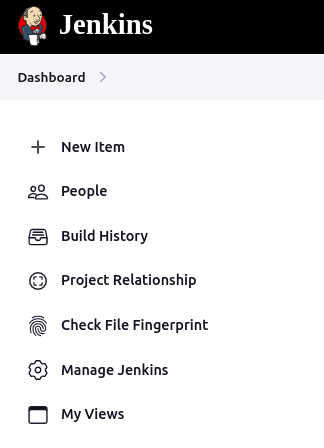
1 – Click on New Item in the Jenkins dashboard.
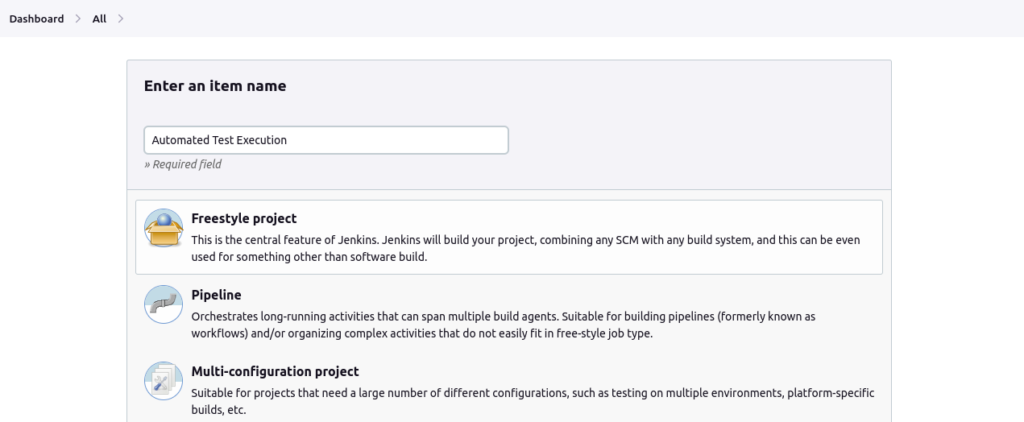
2 – Next enter the Job name, Select Job type as Freestyle project, and click on OK button.
New Job Configuration for Git
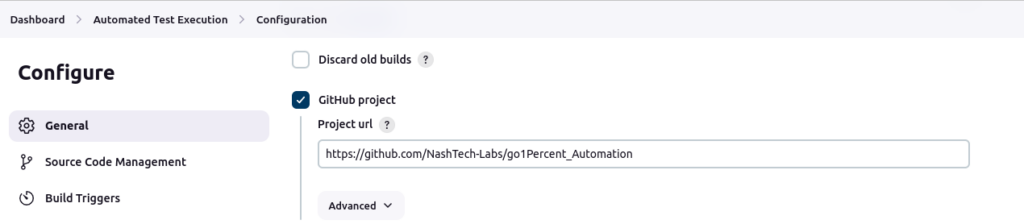
3 – Create a new job and proceed to configure it by Selecting the GitHub project checkbox >> Enter the root URL of the repository.
4 – We need to specify the GIT repo URL by selecting the Git radio button under the Source Code Management section.
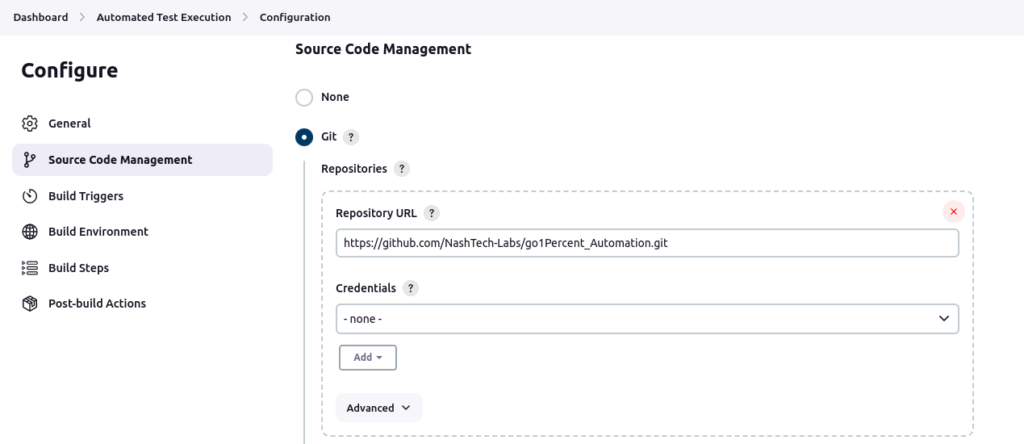
5 – Click on Add button under Credentials and then select Jenkins.
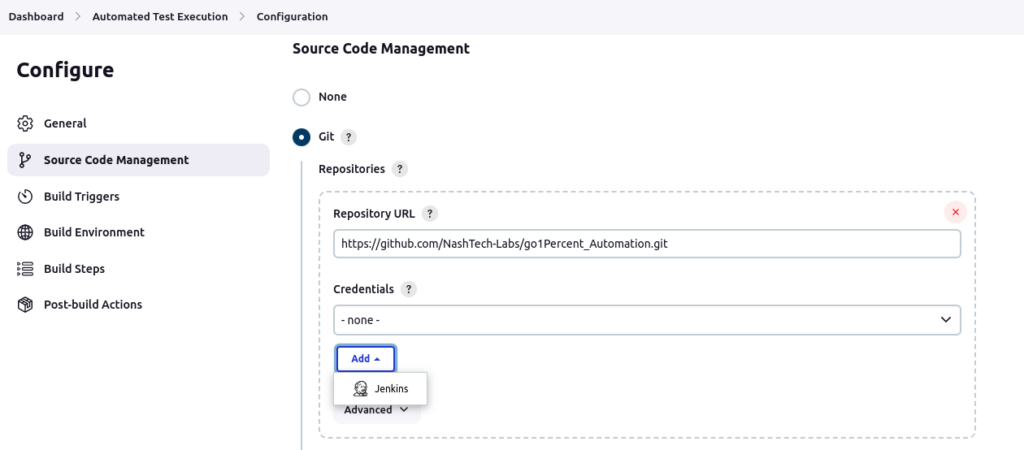
6 – Select ‘Username with password’ under Kind drop-down as seen in the steps below. This is to let Jenkins know what kind of authentication you need Jenkins to perform while accessing Git repository.
- Enter GitHub credentials username as the ‘Username’ value.
- We need to get the Personal access token from Git and Enter that as the ‘Password’ value. You can follow this guide to get a Personal access token in Git.
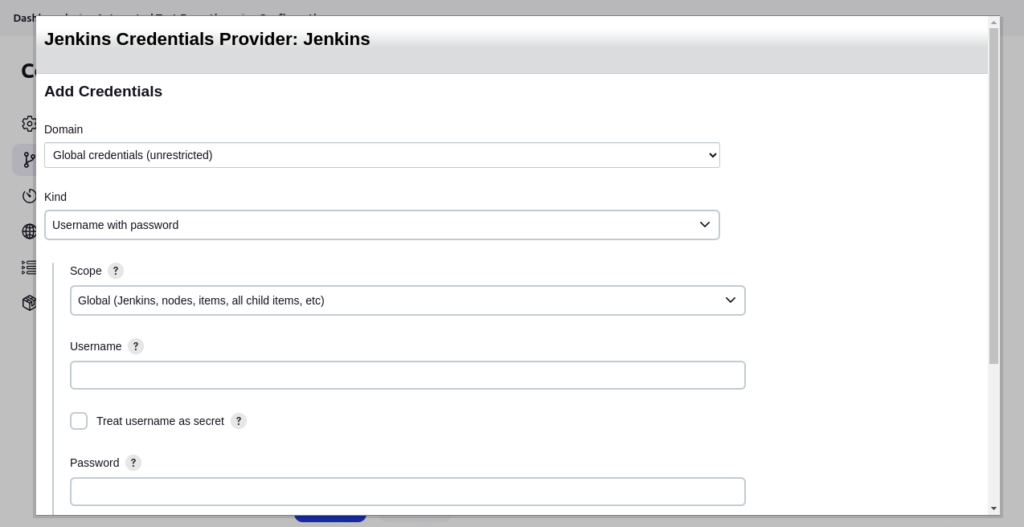
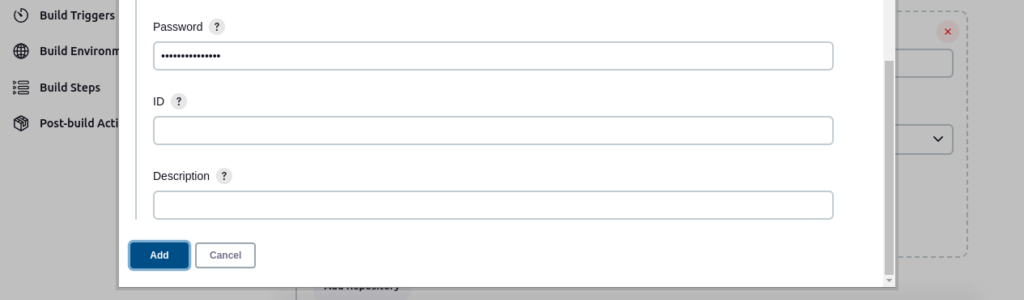
- Enter the secret key (Git personal access token) and ID as shown below
- Click on Add button
7 – Select the newly added credential.
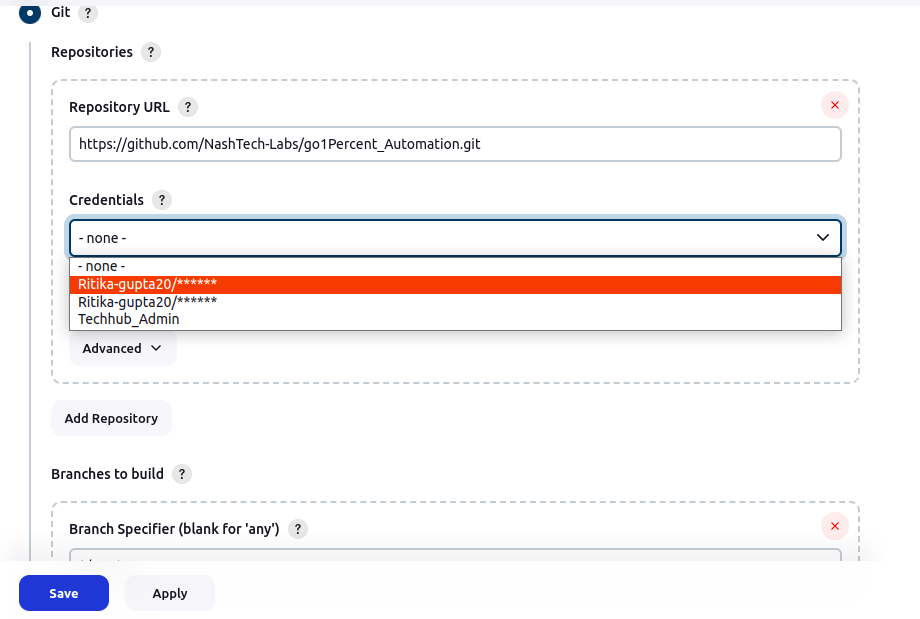
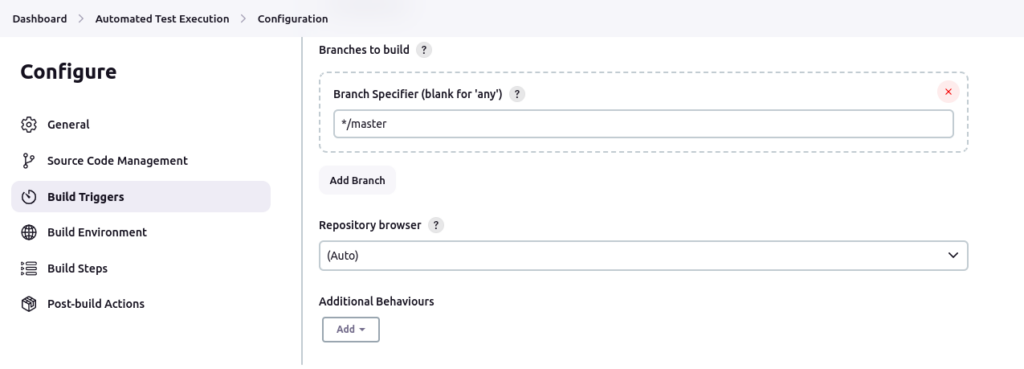
8 – Provide branch information as shown below:
Setting up Build Environment
9 – Set up Build Environment as shown below:
Check ‘Provide Node & npm bin/ folder to PATH’ and select available ‘NodeJS Installation’.
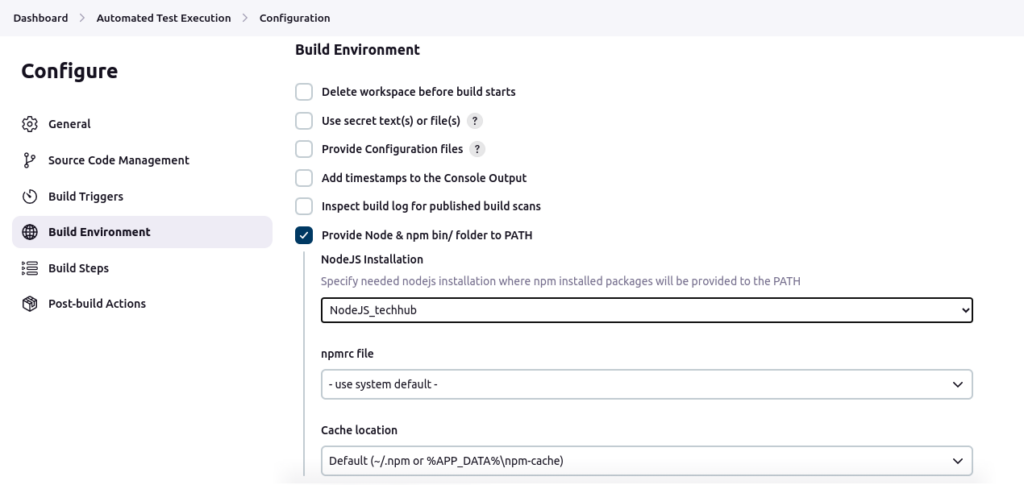
If no NodeJS installations are available, add one by following the below mentioned steps:
- Open Jenkins Dashboard and click on Manage Jenkins, and then click on Tools.
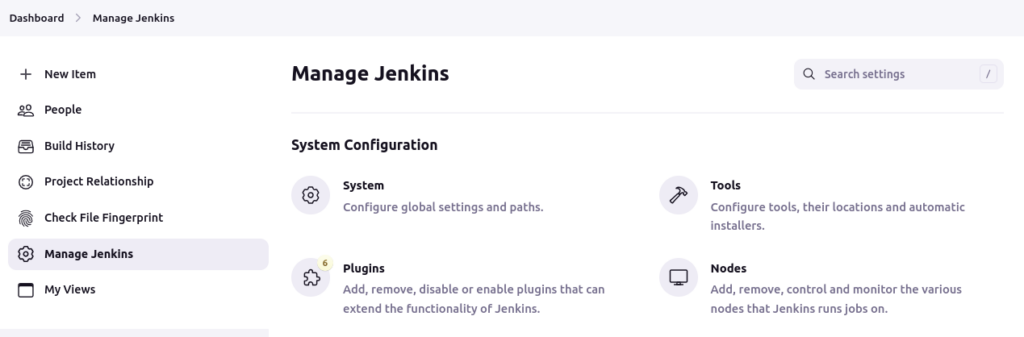
- Scroll down to ‘NodeJS installations’, click on Add NodeJS, provide a name and hit on Save.
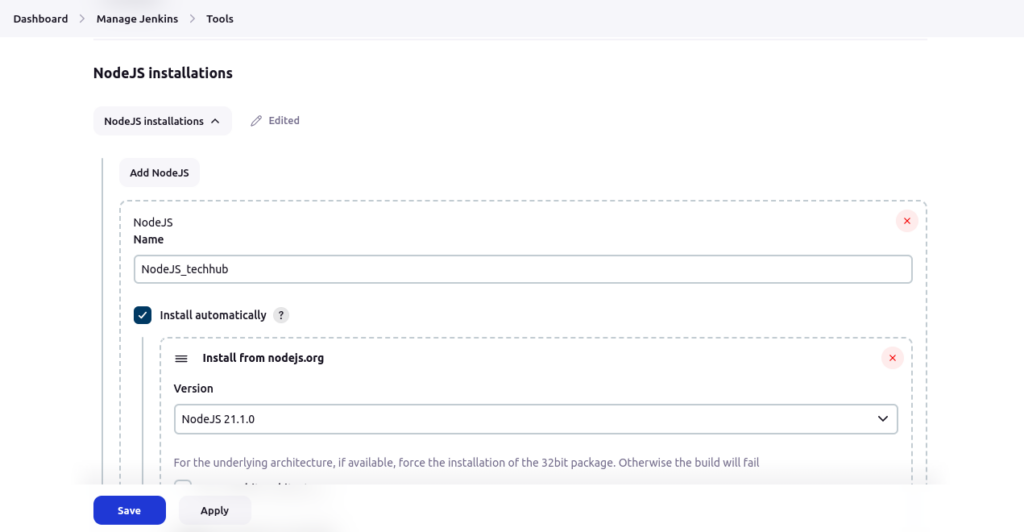
- After adding NodeJS installation, go back to Job Configuration, select the newly added NodeJS Installation and proceed to the next step.
10 – Next step is to add Build Command. Click on ‘Add build step’ and then select Execute shell:
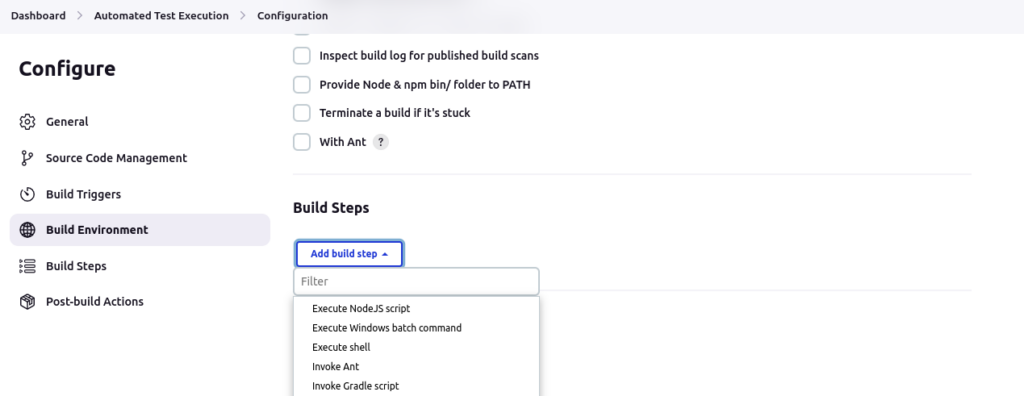
Note: Type of build steps to be added may vary from project to project. For Nightwatch.js, we usually need to run a few shell/script commands, that’s why selecting ‘Execute shell’.
11 – Enter the shell/script commands as shown below:
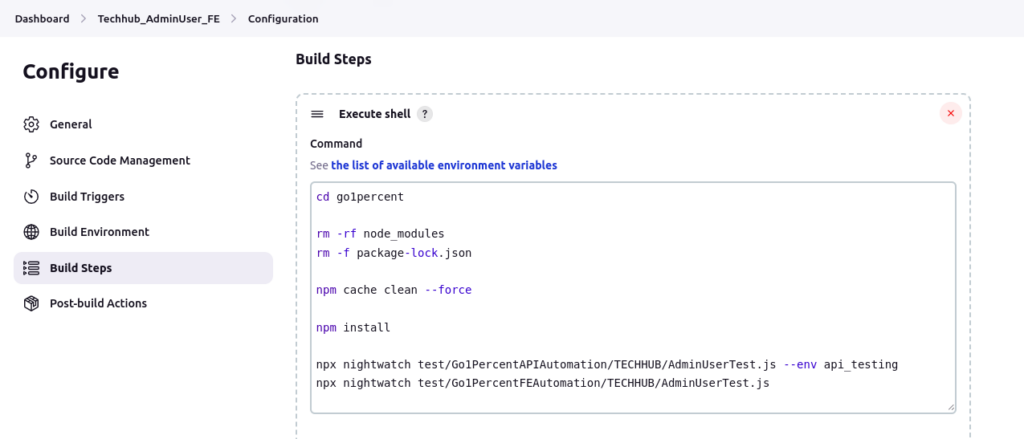
Note: These commands may vary from project to project.
12 – Save the Job configuration by clicking on the Save button.
Executing the Job
To execute the job, Click on Build Now, which will trigger a new build as seen below.
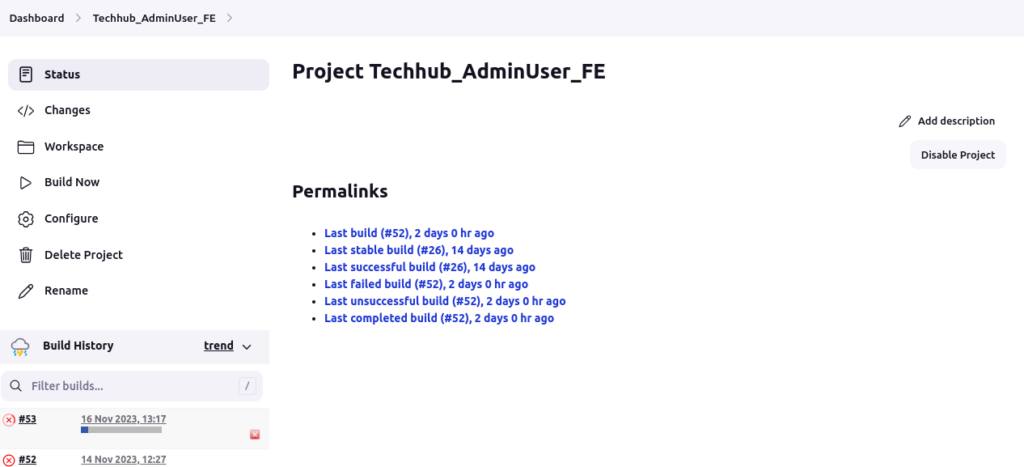
To see the console output or the HTML report (if configured) or other details of the build, click on the Build number (like #53 in this case). It should bring up the details page of the build as shown below:
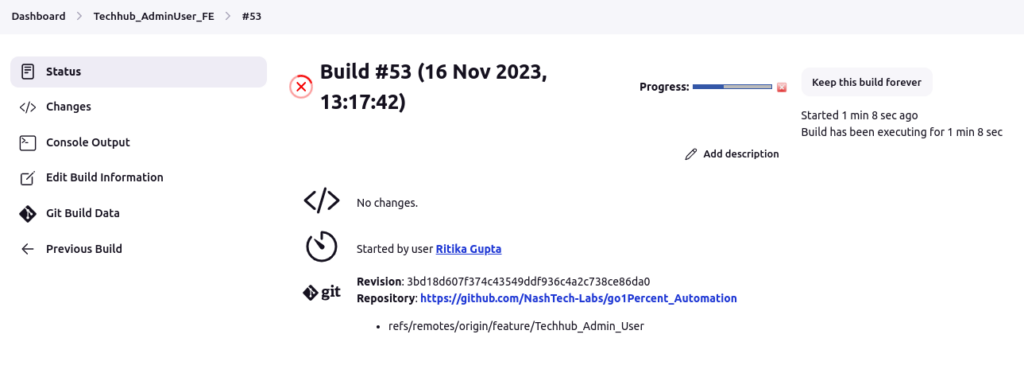
This completes integration of automation tests into the CI/CD through Jenkins.
A Few Technical Things Required
- Make sure to use the latest browser drivers (like Chromedriver).
- Make sure browser application version and browser driver version (like Chrome application version and Chromedriver version) match.
- Provide below mentioned arguments for environment (browser) in the nightwatch configuration file:
chrome: {

      desiredCapabilities: {
        browserName: 'chrome',
        "javascriptEnabled": true,
        "acceptSslCerts": true,
        'goog:chromeOptions': {
          // More info on Chromedriver: https://sites.google.com/a/chromium.org/chromedriver/
          //
          // w3c:false tells Chromedriver to run using the legacy JSONWire protocol (not required in Chrome 78)
          w3c: true,
          args: [
            '--headless',            //for headless mode and Jenkins
            "window-size=1920,1080", //for headless mode and Jenkins
            '--no-sandbox',          //for headless mode and Jenkins
            "disable-gpu",           //for headless mode and Jenkins
            "--disable-dev-shm-usage"  //for headless mode and Jenkins
         ],
         "binary": "/usr/bin/google-chrome"
        }
      },

      webdriver: {
        start_process: true,
        server_path: 'node_modules/.bin/chromedriver',
        port: 9515,
        host: 'localhost',
        ssl: false,
        default_path_prefix: '',
        proxy: undefined,
        cli_args: [
          // --verbose
        ]
      }
    },
Automation Testing in CI/CD: Best Practices
Having several automated test suites developed for distinct uses is crucial. It will only take longer to complete the task if you run a single test suite that covers every case.
Testing Types and CI/CD
The CI/CD pipelines’ respective roles for the testing methods listed below are as follows:
- Unit Tests: Many teams employ the Test Driven Development (TDD) methodology, where developers author unit tests executed during the build process.
- Integration Tests: Following each commit’s build and deployment to the development environment, teams execute these tests to verify the seamless functioning of recently integrated modules and changes. Certain organizations maintain a dedicated environment for conducting integration tests.
- Regression Tests: Nightly execution of regression tests ensures that recent modifications do not adversely impact the existing code. This practice serves to validate the completion of daily tasks and provides prompt feedback for any necessary adjustments.
- Performance and Load Tests: A series of tests is conducted before deploying code to the live environment to evaluate system responsiveness and stability. At the conclusion of each sprint, these tests are carried out on the UAT/Pre-Production environment when deploying the code.
Ideally, all CI/CD pipelines should include these tests, and ideally, they should be automated. And then integrating these automated tests into the CI/CD pipelines will go a long way in assuring speedy releases of a more stable and accurate software.
However, with all the various types of tests that form the CI/CD pipeline and the requirement to merge the code frequently by developers, a challenge of resource and time allocation for running tests is always present. Moreover, as the product grows and offers more features and updates, test cases also increase exponentially, making test suites heavier and more time consuming.
Best Practices to Follow
It is, therefore, absolutely necessary to follow the below mentioned best practices while integrating automated testing into CI/CD pipeline to ensure its effectiveness and efficiency:
- Select Suitable Tests for Automation: Identify tests that are repetitive, time-consuming, critical for functionality, and feasible for automation.
- Use Parallel Testing: Execute automated tests in parallel to save time and expedite the feedback loop.
- Headless Browser: Several advantages of using headless browser:
- Headless browsers don’t render the UI. Moreover, tests don’t require waiting for visual elements to load or render.
- They consume fewer system resources (CPU, memory) because they lack a graphical user interface.
- With their lightweight nature, headless browsers facilitate scaling up test automation by running multiple instances simultaneously.
- Headless browsers can be easily integrated into various operating systems and platforms.
- Maintain Test Independence and Isolation: Ensure that automated tests are independent of each other and can run in any order. They should not rely on the success or failure of other tests for execution.
- Continuous Improvement: Regularly evaluate the effectiveness of automated tests and the CI/CD pipeline. Implement improvements based on feedback to enhance the overall process.
By following these best practices, teams can effectively integrate automated testing into their CI/CD pipelines, enabling faster and more reliable software delivery with high quality.
To summarize, automation testing integration into CI/CD is a boon for developers and software companies, as it provides immediate feedback on how their code is performing. With the ever-evolving tech world, the requirements can also change, and having automated test suites triggered every time changes are pushed can help drastically reduce the cycle time and increase adaptability. Additionally, it guarantees the product will be highly sanitised upon release. Therefore, automation + CI/CD can help an organization gain greater confidence in their software and ensure healthy development and release environment.