


Introduction:
In today’s rapidly evolving technological landscape, artificial intelligence (AI) has become increasingly integrated into various software applications to enhance user experiences, automate processes, and derive valuable insights from data. Azure Cognitive Services, a part of Microsoft’s cloud platform Azure, provides developers with powerful AI capabilities that can be easily integrated into .NET applications. These services enable developers to incorporate vision, speech, language understanding, and decision-making capabilities into their applications without needing deep expertise in AI or machine learning. In this blog we will introduce you to Azure Cognitive Services and demonstrate how to integrate them into our .NET applications.
What are Azure Cognitive Services?
Azure Cognitive Services are a set of APIs, SDKs, and services available on Microsoft Azure that enable developers to add AI capabilities to their applications with minimal effort. These services are designed to be easily accessible and integrate seamlessly into various development environments, including .NET applications. Azure Cognitive Services provide pre-built models and APIs for tasks such as image recognition, speech recognition and synthesis, natural language processing (NLP), text analytics, and more. By leveraging these services, developers can build intelligent applications that understand and interact with the world in natural and meaningful ways.
Key Azure Cognitive Services Capabilities
Azure Cognitive Services offer a wide range of capabilities across different domains of AI:
- Vision: Services like Computer Vision and Face API enable applications to analyze and process images, detect objects and faces, extract text, and understand visual content.
- Speech: Speech-to-Text and Text-to-Speech APIs allow applications to transcribe spoken language into text and convert text into natural-sounding speech.
- Language: Language Understanding (LUIS) and Text Analytics APIs provide natural language processing capabilities for interpreting user intent, sentiment analysis, key phrase extraction, and language detection.
- Decision: Services such as Personalizer and Anomaly Detector help applications make intelligent decisions based on data patterns, preferences, and anomalies
Benefits of Using Azure Cognitive Services with .NET
- Ease of Integration: Azure Cognitive Services provide SDKs for .NET and other programming languages, making it straightforward to incorporate AI capabilities into existing applications or start new projects.
- Scalability and Reliability: Leveraging Azure’s cloud infrastructure ensures high availability, scalability, and reliability of AI services, allowing applications to handle varying workloads and data volumes.
- Pre-built Models and APIs: Developers can utilize pre-trained models and APIs, reducing the need for extensive AI expertise and speeding up development cycles.
- Cost Efficiency: Azure Cognitive Services offer pay-as-you-go pricing, allowing developers to scale usage based on application demand and optimize costs.
Getting Started: Integrating Azure Cognitive Services with .NET
Here’s a step-by-step guide to integrating Azure Cognitive Services into a .NET application:
Step 1: Create an Azure Cognitive Services Resource
- Sign in to Azure Portal: Navigate to the Azure portal (portal.azure.com) and sign in with your Azure account.
- Create a Cognitive Services Resource: Click on “Create a resource”, search for “Cognitive Services”, select the service you want to use (e.g., Computer Vision, Speech, etc.), and follow the prompts to create a new resource.
Step 2: Obtain Subscription Key and Endpoint
Get Subscription Key: Once the resource is created, navigate to the resource and locate the subscription key and endpoint. These will be used to authenticate requests to the Cognitive Services APIs.
Step 3: Install Azure SDK for .NET
Install NuGet Packages: In your .NET project, install the required NuGet packages for the Azure Cognitive Services you intend to use (e.g., Microsoft.Azure.CognitiveServices.Vision.ComputerVision for Computer Vision).

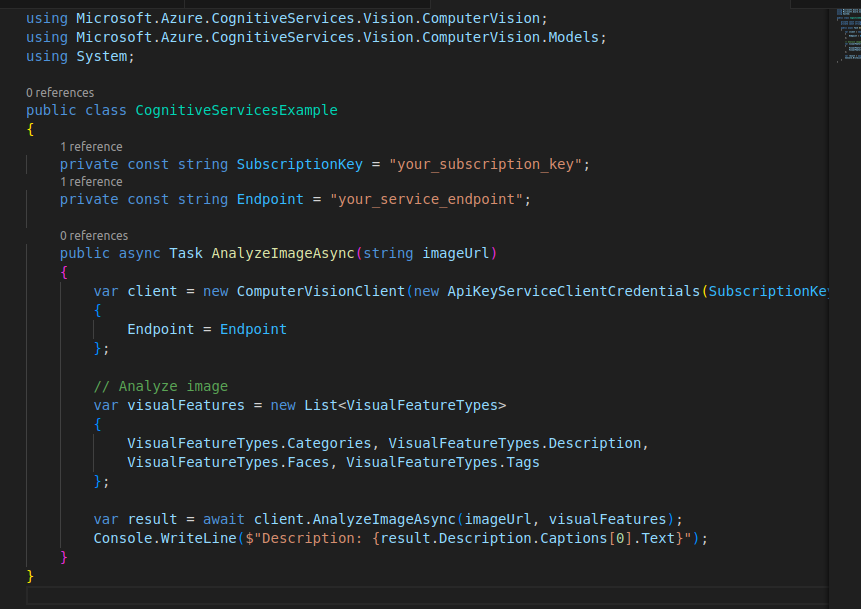
Step 4: Example Usage in .NET Application
Initialize Service Client: Initialize the Cognitive Services client in your .NET application using your subscription key and endpoint.
Step 5: Build and Test
Build and Run: Build your .NET application and test the integration with Azure Cognitive Services APIs to ensure proper functionality.
Conclusion
Azure Cognitive Services empower .NET developers to enhance their applications with powerful AI capabilities such as image recognition, speech recognition, natural language processing, and decision-making. By integrating these services, developers can create intelligent applications that understand, interpret, and interact with users and their environment more effectively. Whether you’re building a new application or enhancing an existing one, Azure Cognitive Services provide the tools and infrastructure needed to incorporate AI into your .NET projects seamlessly, enabling innovation and differentiation in today’s competitive landscape.