


INTRODUCTION
PySpark is the Python API for Apache Spark, which is an open-source, distributed computing system designed specifically for big data processing. It enables data engineers, data scientists, and developers to harness the power of Apache Spark for large-scale data analysis, machine learning, and real-time data processing using the Python programming language.
Apache PySpark is an open-source, powerful, and user-friendly framework for large-scale data processing. It combines the power of Apache Spark with Python’s simplicity, making it a popular choice among data scientists and engineers. Here is the installation process of PySpark on a Linux operating system and provide example code to get you started with your first PySpark project.
1. Install Java Development Kit (JDK)
First, update the package index by running:

Next, install the default JDK using the following command:

Verify the installation by checking the Java version:

Output:

2. Install Apache Spark
Download the latest version of Apache Spark. Choose the package type as “Pre-built for Apache Hadoop 3.2 and later”.
Use the following commands to download and extract the Spark archive:

Move the extracted folder to the /opt directory

3. Set Up Environment Variables
Add the following lines to your ~/.bashrc file to set up the required environment variables:

Source the updated ~/.bashrc file to apply the changes:

4. Install PySpark
Install PySpark using pip:

Output:

5. Verify PySpark Installation

Note: Spark Web UI typically uses port 4040 by default. However, if port 4040 is already in use, Spark will automatically attempt the next available port (4041, 4042, and so on). You can access the Spark Web UI in a web browser by navigating to http://localhost:4040
First Sample Project on PySpark
Create a new Python file called UseCasesofPySpark.py and add the following code:
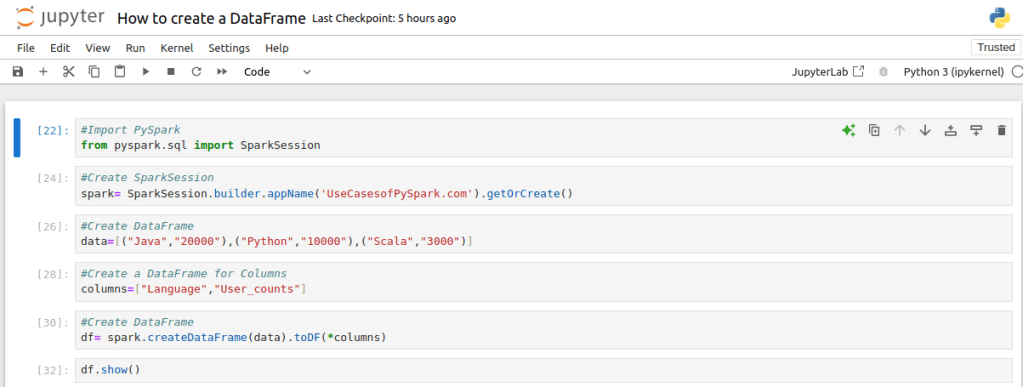
Run the script using jupyter notebook, If everything is set up correctly, you should see the following output:

Conclusion:
In conclusion, installing PySpark on a Linux system requires several key steps. First, you need to set up essential dependencies, such as Java and Scala. Then, download and configure Spark itself. By following these steps, you can establish a robust environment for big data processing and analytics. This setup enables you to leverage PySpark’s capabilities for distributed data processing, making it easier to handle large datasets and complex analytics efficiently.