



What is Semantic Kernel?
Semantic Kernel is an SDK developed by Microsoft that bridges the gap between Large Language Models (LLMs), like OpenAI’s ChatGPT, and the various environments we use to develop software that communicates with this “semantic hardware”.
Semantic Kernel assists in managing access to LLMs by providing a well-defined method for creating Plugins that encapsulate abilities to be executed by LLMs. Semantic Kernel can also select among available plugins to accomplish a desired task, courtesy of the Planner, a key component of Semantic Kernel. It offers a Memory capability, allowing the Planner to retrieve information, from a vector database for instance, and based on that data, distill a Plan of Steps to be executed using certain plugins. This enables us to craft highly flexible, autonomous applications.
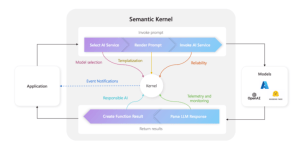
Key Components of Semantic Kernel:
When developing a solution with Semantic Kernel, there are several components available that can enhance the user experience in our application. While not all of them are mandatory, it is recommended to be familiar with them. The components that make up the Semantic Kernel are listed below:
Memories
This component enables our Plugin to provide context to user questions by recalling past conversations. There are three ways to implement Memories:
- Key-value pairs: These are stored similarly to environment variables, with conventional search requiring a direct 1-to-1 relationship between the key and the user’s input.
- Local storage: Information is saved in a file on the local file system. When key-value storage becomes too large, transitioning to this type of storage is recommended.
- Semantic in-memory search: Information is represented as numerical vectors, known as embeddings, allowing for more sophisticated search capabilities.
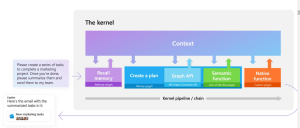
Planner
A planner is a function that processes a user’s prompt and generates an execution plan to fulfill the request. The SDK includes several predefined planners to choose from:
- SequentialPlanner: Constructs a plan with multiple interconnected functions, each having its own input and output variables.
- BasicPlanner: A simpler variant of SequentialPlanner that links functions together in a sequence.
- ActionPlanner: Generates a plan consisting of a single function.
- StepwisePlanner: Executes each step incrementally, evaluating the results before proceeding to the next step.
Connectors
Connectors are crucial in Semantic Kernel, serving as bridges between various components to facilitate information exchange. They can be designed to interface with external systems, such as integrating with HuggingFace models or utilizing an SQLite database for memory in our development.
Plugins
A plugin consists of a set of functions, either native or semantic, that are made available to AI services and applications. Writing the code for these functions is just the beginning; we also need to provide semantic details about their behavior, input and output parameters, and any potential side effects.
There are two types of functions to distinguish between:
- Semantic Functions: These functions interpret user requests and respond in natural language. They rely on connectors to perform their tasks effectively.
- Native Functions: Written in C#, Python, and Java (currently in an experimental phase), these functions manage tasks that AI models are not suited for, such as:
- Performing mathematical calculations.
- Reading and saving data from memory.
- Accessing REST APIs.
Orchestration in Semantic Kernel
The primary unit driving orchestration within Semantic Kernel is a Planner. Semantic Kernel includes built-in planners such as the SequentialPlanner, and you can also create custom planners, as exemplified in the teams-ai package.
A planner operates as a prompt that uses the descriptions of semantic or native functions to determine which functions to execute and in what sequence. Therefore, it is essential that the descriptions of both the functions and their parameters are concise yet informative. Based on the functions available in your app, these descriptions must be customized to ensure uniqueness and relevance to the specific tasks your app needs to perform.
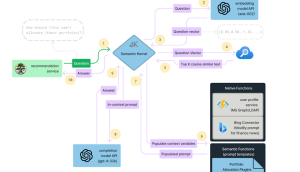
Sample Code Example
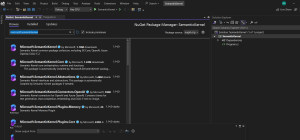
First we need to install Microsoft.SemanticKernel from nuget Package Manager.
In semantic kernel, everything flows through the Ikernel interface, representing the main interaction point with Semantic Kernel.
To create an Ikernel you use a KernelBuilder which follows the builder pattern commonly used in things like ConfigurationBuilder and Iconfiguration elsewhere in .NET.
Here’s a sample that creates an Ikernel and adds some basic services to it:
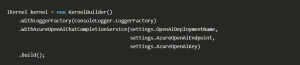
This kernel works with one or more semantic functions or custom plugins and uses them to generate a response.This particular kernel uses a ConsoleLogger for logging and connects to an Azure OpenAI model deployment to generate responses.
Semantic Functions
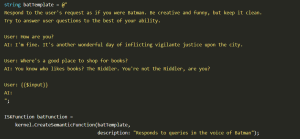
Semantic Functions are templated functions that provide a framework for a large language model to generate responses. In a large project, you might have various semantic functions to support different types of tasks your application needs to handle.
Here is an example of a semantic function that trains the bot to adopt the persona of Batman and respond accordingly:
Invoking Semantic Functions
You can invoke a semantic function by providing the function to the kernel along with a text input.
Here we’ll prompt the user to type in a string and then send it on to the kernel:

This causes the user’s text to be added to the prompt template and the whole string to be sent on to the LLM to generate a response.
Why use Semantic Kernels?
- Integration with Large Language Models (LLMs): The Microsoft Semantic Kernel SDK provides a structured approach to integrating LLMs, such as OpenAI’s GPT, into your applications. This allows you to leverage the powerful natural language processing capabilities of these models without dealing with the complexities of integration.
- Plugin Architecture: SK offers a plugin architecture that allows you to encapsulate specific functionalities into plugins, making it easier to manage and extend the capabilities of your applications. This modular approach promotes code reuse and maintainability.
- Task Planning and Orchestration: With the Planner component of SK, you can define tasks and automatically generate plans to accomplish them using available plugins. This enables the creation of dynamic and adaptive applications that can respond to changing requirements and environments.
- Memory Management: SK includes memory management capabilities that enable your applications to store and retrieve contextual information. This allows for context-aware interactions and decision-making, enhancing the intelligence and autonomy of your applications.
- Flexibility and Scalability: By providing a well-defined framework for managing access to LLMs and orchestrating tasks, SK offers flexibility and scalability in developing AI-driven applications. Whether you’re building a simple chatbot or a complex virtual assistant, SK can adapt to your needs and scale with your project.
- Microsoft Support and Ecosystem: Being developed by Microsoft, SK benefits from the support and expertise of one of the leading technology companies. Additionally, it integrates seamlessly with other Microsoft technologies and services, such as Azure, Visual Studio, and Azure Cognitive Services, enhancing the development experience and interoperability with existing solutions.
- Open-Source and Community-driven: SK is open-source, allowing for transparency, collaboration, and contributions from the developer community. This fosters innovation and ensures that the SDK stays up-to-date with the latest advancements in AI and natural language processing.
Conclusion
The Microsoft Semantic Kernel SDK offers developers a powerful framework to integrate Large Language Models (LLMs) into their applications. With its plugin architecture, task planning capabilities, and memory management features, the SDK enables the creation of intelligent, context-aware applications. Supported by Microsoft’s expertise and ecosystem, it provides flexibility, scalability, and seamless integration with other Microsoft technologies. As an open-source project, it encourages collaboration and innovation, making it a valuable tool for building AI-driven applications that can understand and process human language effectively.