


In a world where our digital lives are increasingly intertwined with the cloud, security becomes paramount. ZeusCloud, a powerful open-source cloud security platform, is here to simplify the complex world of cloud security for beginners. Let’s embark on a journey to understand what ZeusCloud is all about and how it can safeguard your digital space.
What is ZeusCloud
ZeusCloud is like a watchtower that keeps a keen eye on your virtual fortress in the cloud, making sure no sneaky invaders can exploit weaknesses or misconfigurations in your defenses.
Why ZeusCloud
1. Growing Cloud Complexity:
- As more companies shift their operations to the cloud, things get a bit crowded and complex. ZeusCloud helps cut through the confusion, making sure everything is in order.
2. Security Made Simple
- Traditional security tools can be like reading a foreign language for beginners. ZeusCloud is designed to be easy to set up, transparent, and adjustable to your needs. No need to be a tech genius – ZeusCloud is here for everyone.
3. Free to Use:
- The best part? It won’t cost you a dime. ZeusCloud offers its powers for free, ensuring that even those on a tight budget can benefit from top-notch cloud security.
Getting Started with ZeusCloud
Step 1: Prepare AWS Credentials
- ZeusCloud needs to connect with your AWS account(s). You can set up access through an IAM role or IAM user with an access key.
Step 2: Deploy ZeusCloud Locally
1. Clone the Repo:
- Think of this as downloading ZeusCloud’s superhero suit.
git clone https://github.com/Zeus-Labs/ZeusCloud.git 2. Run ZeusCloud
- Now, it’s time to put on the suit and activate ZeusCloud.
Cd Zeuscloud && make quick-deploy - For quick deployment, you should have docker-compose in your system and You have the make command in your system then after that, you make quick deployment of ZeusCloud.
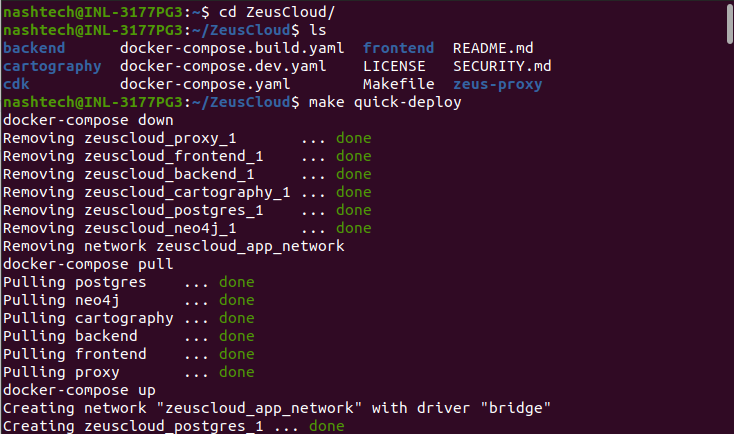
3. Visit the UI:
- Open by visiting http://localhost:80.
Step 3: Connect ZeusCloud to AWS
- Once ZeusCloud is up and running, you need to tell it which areas of your cloud kingdom to watch over. Head to the Settings and add your AWS account.
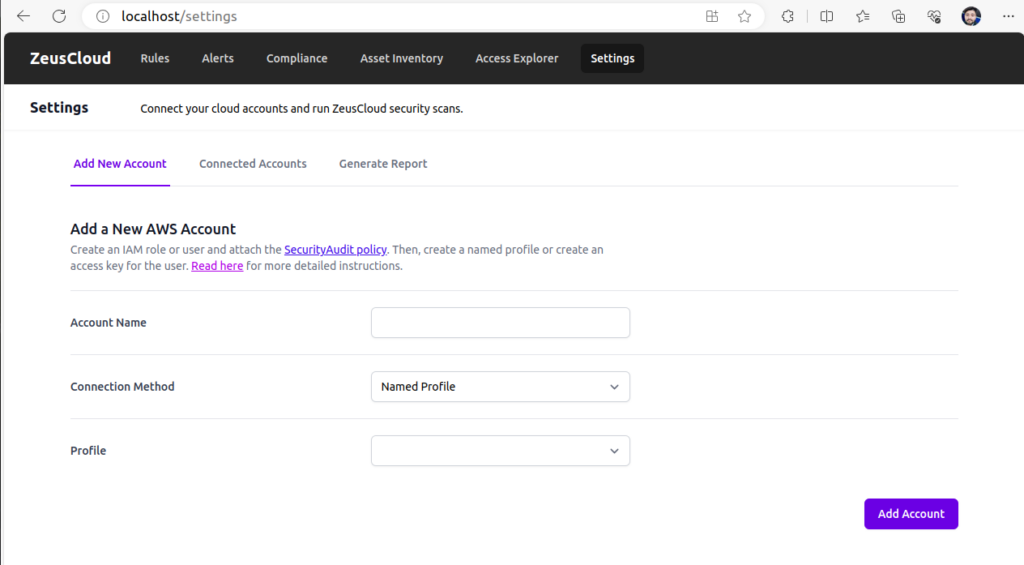
you can add your AWS credential in two ways first is Named Profile or another is you can use User Access key in ZeusCloud.
Waiting for ZeusCloud Scan
- With ZeusCloud connected, It will scan your cloud, looking for potential risks and vulnerabilities. This might take a coffee break’s worth of time, so be patient.
Join the ZeusCloud Adventure
- If you find yourself intrigued and want to be a part of ZeusCloud’s journey, you can even join the team! Just reach out to founders@zeuscoud.io
In conclusion
ZeusCloud might sound like a tech superhero, but it’s your trusty sidekick in the cloud security adventure. No more tech jargon – just straightforward protection for your digital world. So, put on your virtual cape, follow the steps, and let ZeusCloud guard your cloud kingdom.