


Introduction
Performance testing is a crucial part of software development. It helps ensure that websites and applications can handle real-world traffic without slowing down or crashing. Two of the most popular tools for this purpose are K6 and JMeter.
While both tools aim to test performance under load, they approach it differently. K6 is a modern, script-based tool designed for developers and DevOps teams, focusing on automation and cloud testing. JMeter, on the other hand, has been a staple in the industry for years, offering a graphical interface and support for a wide range of protocols.
Let’s take a closer look at K6 and JMeter, highlighting their strengths and weaknesses to guide our choice.
K6 vs JMeter: Detailed Comparison

1. Overview of K6
K6 emphasizes scripting in JavaScript and integrates seamlessly with CI/CD pipelines.
JavaScript scripts + Command Line Interface (CLI)-based execution = very CI/CD friendly.
Strengths:
- Easy scripting: JavaScript-based → http.get(‘https://example.com’)
- CI/CD friendly: Works with Jenkins → run k6 run script.js in pipeline
- High performance: 1000+ virtual users with low CPU → stress test an API endpoint
- Flexible execution: Run locally or in cloud → k6 cloud script.js
- Modern reporting: Grafana dashboards → visualize response times & errors
Weaknesses:
- Limited GUI: Mainly CLI → no drag-and-drop test plan
- Limited protocols: Focused on HTTP/WebSocket → FTP requires workaround
- Smaller community: Fewer plugins/examples → less ready-made support than JMeter
2. Overview of JMeter
Designed for testers & QA, suitable for manual and GUI-based testing. It is mainly used to test how well a system works under load, such as websites and APIs. JMeter uses a graphical interface (GUI), so users can create tests by clicking and configuring components, without writing much code.
2.1 What is JMeter used for?
- Load testing
- Stress testing
- Performance testing of:
- Web applications
- REST / SOAP APIs
- Databases
2.2 Advantages
- Easy to use with GUI: Create tests by drag & drop, no coding required.
Example: Users create a test plan by clicking:
Test Plan
└── Thread Group
└── HTTP Request
└── Listener
No programming is needed—everything is configured through the UI. - Supports many protocols: HTTP, HTTPS, API, Database, FTP, etc.
Example:
– Website → HTTP Request
– REST API → HTTP Sampler
– Database → JDBC Request - Built-in reports: Test results can be viewed immediately.
Example: After clicking Run, JMeter shows:
– Response time graphs
– Throughput
– Error rates - Large community: Many tutorials, plugins, and examples available.
Example:
– Ready-made plugins for reports and charts
– Easy to find answers on forums and blogs
2.3 Disadvantages
- Uses a lot of system resources: Can be slow or heavy for large tests
Example: Running 5,000+ virtual users may cause:- High CPU and memory usage
- Slow or frozen test machine
- Not very CI/CD-friendly: Needs extra setup for automation.
To run in CI/CD, users must:- Disable GUI
- Use command-line mode
- Configure scripts manually
- Hard to maintain large tests: GUI test plans can become complex and messy
- GUI mode affects performance: GUI should not be used for real load tests
Running tests in GUI mode:- Consumes extra resources
- Produces inaccurate performance results
JMeter is excellent for GUI-based and manual performance testing, but it is less suitable for large-scale and CI/CD-driven automation.
Using k6 and JMeter in Practice
Assumed Business Scenario
For this POC (Proof of Concept), we assume an e-commerce system that runs frequent promotional campaigns.
During these campaigns, thousands of users use the system at the same time to log in, browse products, add items to the cart, and complete checkout.
The client wants performance tests to be automated and run in the CI/CD pipeline to make sure each new release does not cause performance issues.
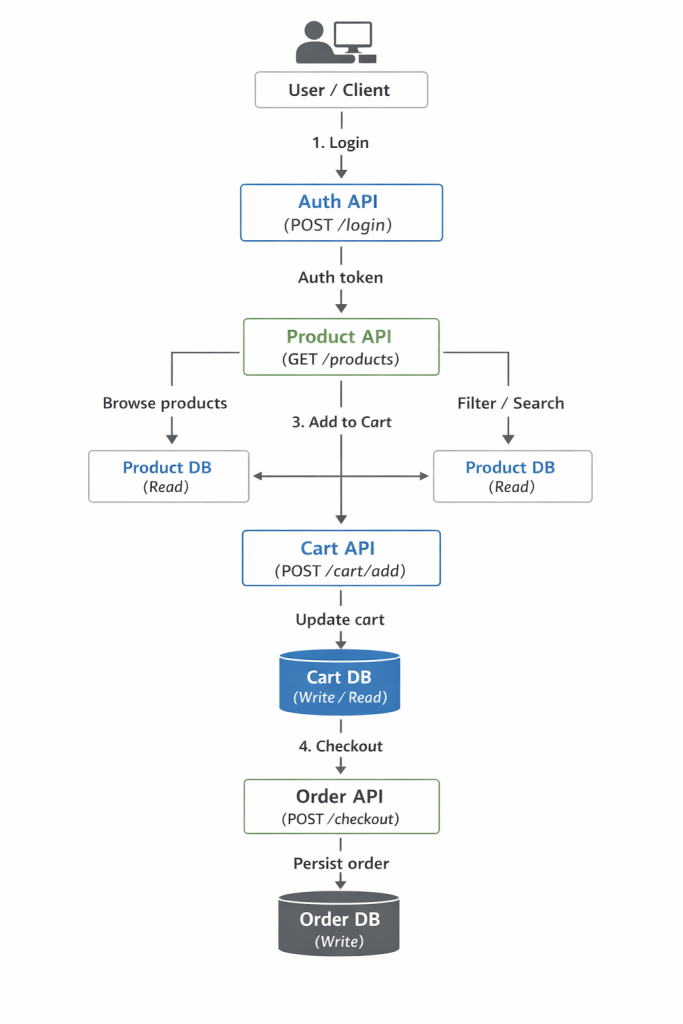
Assumed Technical Architecture
- The backend is split into multiple small services, each handling a specific feature such as login, products, cart, and orders.
- All services communicate using REST APIs.
- The system is deployed using containers like Docker or Kubernetes.
- A CI/CD pipeline is used to automatically run tests and deploy new versions.
Why k6 Fits Our Use Case
- Code-based tests: k6 scripts are easy to store in Git and work well for team collaboration.
- CI/CD friendly: Tests can run automatically on every release in the pipeline.
- Lightweight and scalable: k6 runs efficiently in containers and helps reduce infrastructure cost.
- API-focused: Designed for HTTP/REST APIs, which fits well with modern e-commerce microservices.
- Built-in checks: Performance rules can be defined in code to automatically pass or fail a test.
k6 was selected as the primary tool for performance testing due to its automation capabilities, CI/CD integration, and maintainable code-based scripts. While JMeter is still valuable for multi-protocol testing, k6 aligns better with modern API-driven e-commerce systems.
Conclusion
In the end, both JMeter and k6 are like superheroes—each with its own strengths. The right tool is not about popularity, but about how well it fits the team and the use case. More importantly, good communication with the client comes first. Understanding business goals, traffic expectations, and performance targets is key before choosing any tool.
After that, test data and a realistic test environment matter just as much. Without proper data and a setup that closely matches production, performance test results can be misleading—no matter which tool is used.