


What is the Galen Framework
Galen Framework is a test framework that was originally introduced for testing the layout of web applications in a real browser. Nowadays, it has become a fully functional testing framework with a rich reporting and test management system. It supports both JavaScript and Java tests.
Main feature:
- Layout Testing: Galen Framework specializes in layout testing, allowing you to verify that web elements are positioned correctly and look consistent across different screen sizes and devices.
- Responsive Testing: It enables you to ensure that your web application is responsive by testing its behavior on various viewport sizes, including desktops, tablets, and mobile devices.
- Cross-Browser Testing: You can perform layout testing across different web browsers, ensuring compatibility and consistency across various browser environments.
- Parallel Test Execution: Galen supports parallel test execution, allowing you to run tests concurrently to speed up the testing process and improve efficiency.
- Integration with Testing Frameworks: Galen can be integrated with popular testing frameworks such as JUnit and TestNG, enabling seamless integration into your existing testing workflow
Galen Specs language
Galen specs language is quite flexible and allows you to repress exactly how you want your website to behave on different websites.
Consists of the following entities:
- Page object location definition
- Tagged sections
- Test object
- Test specs
Page object definition
Each Galen spec file normally starts with an object definition. It is the place where you give names to page objects and also define the so-called locators – the way for Galen to find elements on the test page. The available locators are ID, CSS, and XPATH.
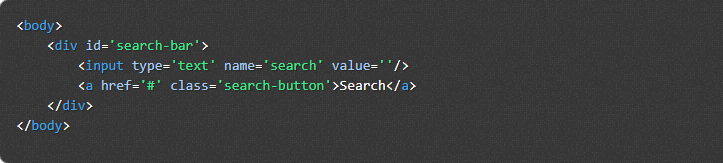
Now let’s try out all available locators in Galen spec for the example above

Multiple object definition: Quite often in HTML we have similar objects that we could fetch with a single locator.


As you can see we used an asterisk in the object name. In this case, Galen will find all elements on the page and will give them names menu_item-1, menu_item-2, menu_item-3, menu_item-4
Object group: you can group objects and iterate over all objects in a specific group
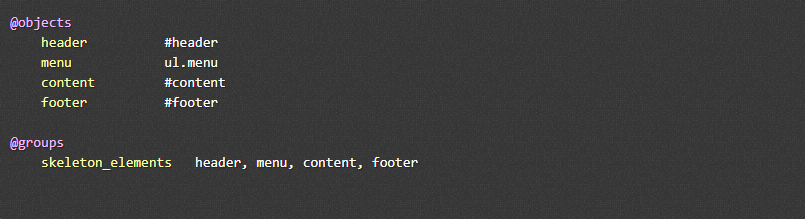
Now we can access all elements in skeleton_elements group by using & symbol:

Tags and Sections
- Sections are declared with the ‘=’ symbol at the beginning and end of the line
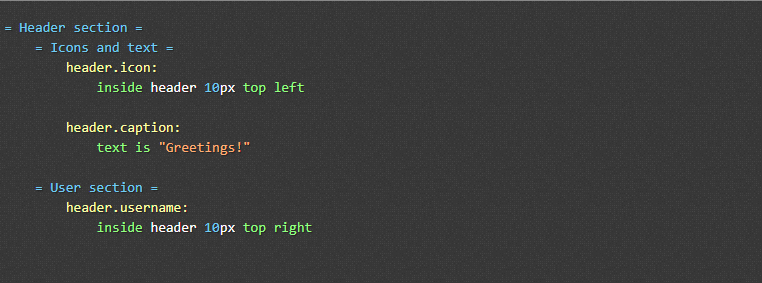
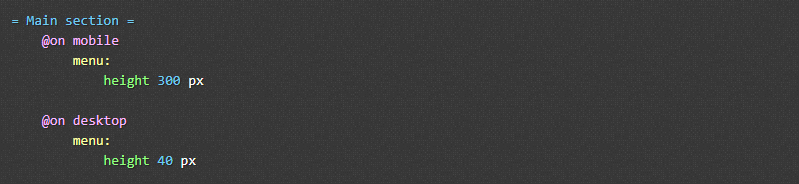
- Tags in the spec file help to manage your layout testing such as mobile, and desktop. You can wrap all your checks inside @on statement like this:
Variable
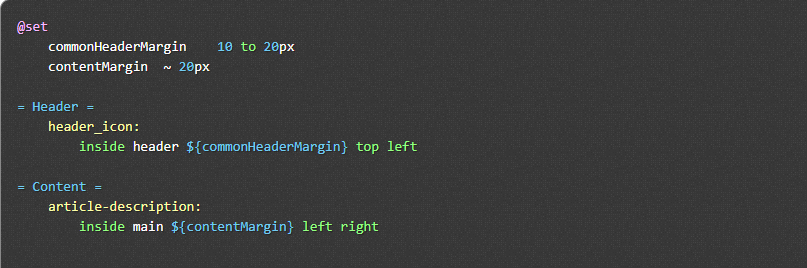
In case you want to use common values for different specs you can declare variables on the page like this:
Range
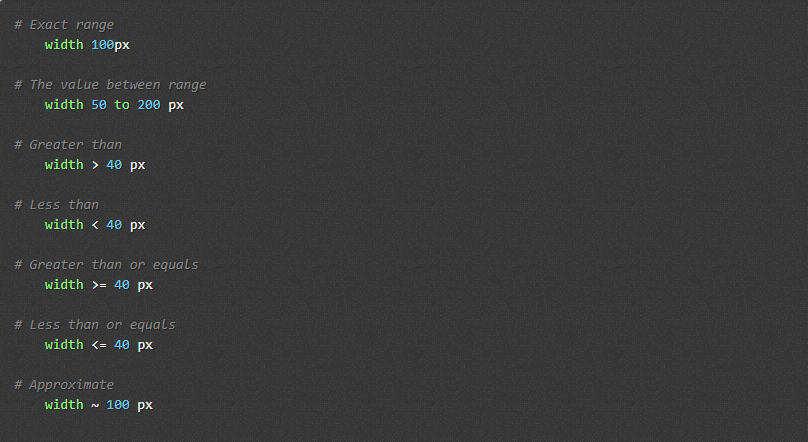
The basis for all specs is a so-called “range”. Range is a format of defining boundaries for any value.
Specs reference
Galen supports the following specs:
- near – checks that the object is located near another object
- below – checks that an element is located below another object
- above – checks that an element is located above another object
- left-of and right-of – check that the object is located near another object from the left or right
- inside – checks that the object is located inside another object
- width – checks the width of the object
- height – checks the height of the object
- aligned – checks horizontal or vertical alignment of an object with other objects on the page
- text – checks the text that is visible on the page
- centered – checks that the object is centered inside another object
- absent – checks that the object is either missing on the page or is not visible
- contains – checks that the object visually contains other objects inside it
- on – checks that an object is visually located on another object
- component – runs a subset of specs from another file within the given object context
- color-scheme – checks the color distribution in the given object area
Install Galen Framework
To use the Galen framework, you need to have a Java version 1.8 or greater installed. Additionally, you download the file from this page and extract it anywhere.
If you are using OS X or Linux, navigate to the folder and run the command “sudo ./install.sh”. For Windows, manually add “galen.bat” to your system variable.
Install for Java test
Besides installing the Galen framework, you need to install some frameworks and tools like below:
- Maven: add a dependence in the pom.xml
- TestNG
- IntelliJ
Configuration
Create a galen.config file in your project by running the command: “galen config”. Depending on the type of browser, you need to download the driver and provide a path to your local driver installation in the config file
- galen.default.browser=chrome
- $.webdriver.gecko.driver= /path/to/geckodriver
- $.webdriver.chrome.driver= /path/to/chromedriver
- $.phantomjs.binary.path= /path/to/phantomjs
Running in the command line
Using the command “check” to perform a single page test and some command line arguments:
- url: a URL of the page for Galen to test on
- javascript: a path for javascript file which Galen will inject into the web page
- include: a comma-separated list of tags for spec sections which will be included in testing
- exclude: a comma-separated list of tags for spec sections to be excluded from the filtered group
- section: a simple filter for the section
- size: dimensions of the browser window. Consists of two numbers separated by “x” symbol
- htmlreport: path to the folder in which Galen should generate HTML reports
- testngreport: path to XML file in which Galen should write TestNG report
- jsonreport: path to the folder in which Galen should generate JSON reports
- junitreport: path to junit xml report file
- config: path to config file
Reporting
When you run a spec file by command line, a test report will be generated with format report.html
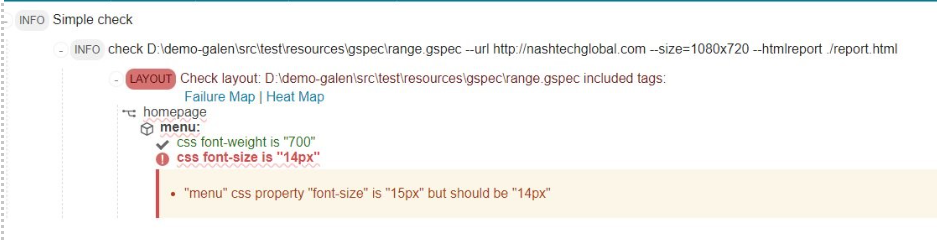
and a heat map feature that highlights the checking elements
Conclusion
Galen Framework is a valuable tool for ensuring responsive design and layout consistency across various devices and screen sizes. Its efficient testing capabilities, and cross-browser compatibility. However, its learning curve and limited support for complex interactions should be considered. Overall, the Galen Framework offers significant benefits for enhancing the quality of web applications but requires careful evaluation to ensure it aligns with project needs.