


Do you ever find yourself staring at a massive, text-heavy file while struggling to see the forest for the trees? Whether you are navigating a sprawling system spec, a complex sprint backlog, or comprehensive certification study notes, text-dense documentation can quickly become overwhelming. Fortunately, there is a solution: Markmap.
Essentially, Markmap is an open-source tool that bridges the gap between structured text and visual thinking by converting your plain-text Markdown files into interactive, clean mindmap diagrams. By transforming static documentation into a dynamic visual canvas, you can unlock immediate clarity, streamline your project planning, and reduce cognitive fatigue.
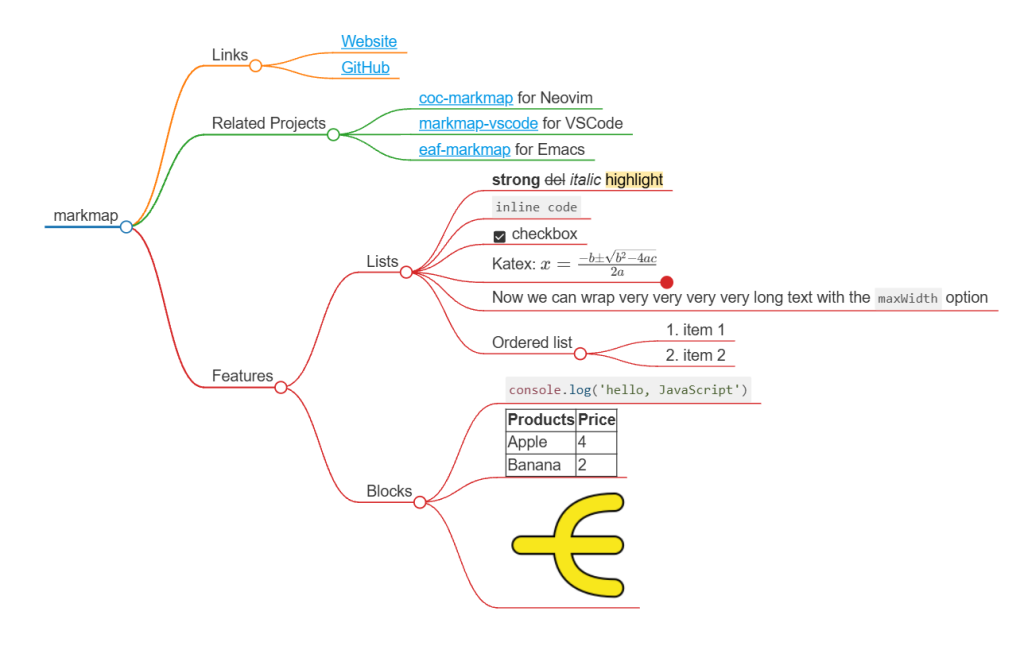
An interactive Markmap rendering complex Markdown elements into a visual mindmap
As shown in the visualization, Markmap goes far beyond simple text trees. It fully respects rich styling, displaying interactive checkboxes, code snippets, links, and even mathematical equations directly inside the branching nodes.
What is Markmap?
Markmap is an open-source tool. It reads your Markdown text and turns it into a clear, interactive mindmap. It uses the D3.js library to build these diagrams automatically.
Unlike traditional mind-mapping software—which requires tedious manual layout adjustments, dragging boxes, and drawing connector lines—Markmap generates your visual tree completely automatically. If you know how to write a simple nested list, you already know how to build a dynamic mindmap.
Resources to Get Started
Here is how you can begin your journey with the tool:
- Visit the Repository: Explore the source code, open issues, and contribute to the project at https://github.com/markmap/markmap.
- Official Documentation: Moreover, check out the official docs to learn about custom rendering, CLI usage, and advanced configuration options.
How to Convert Markdown into a Mindmap
Creating a visual map requires zero design skills. The tool relies entirely on the hierarchical structure inherent to Markdown. Headings (#, ##, ###) and nested bullet points (-) are instantly translated into parent nodes and child branches.
Consider this example of how raw text maps to a visual hierarchy:
# Project Kickoff
## Phase 1: Planning
- Requirements Gathering
- Tech Stack Selection
## Phase 2: Implementation
- MVP Development
- Automated Testing
When processed by Markmap, # Project Kickoff becomes the central root. The ## Phase 1 and ## Phase 2 headers branch out as the primary categories, while the bulleted items branch off further as leaf nodes. Because the output is fully interactive, you can click on any parent node to collapse or expand its children, making it easy to navigate massive datasets.
Seamless Integrations for Your Workflow
You do not need to alter your existing development or writing environment to use Markmap. It integrates smoothly into the tools professionals rely on every day:
1. The Web REPL
For a quick visualization without installing anything, the official web-based Markmap REPL is the fastest option. Paste your text on the left, and watch the interactive diagram render on the right in real time. You can instantly export the result as an interactive, standalone HTML file or a static SVG.
2. VS Code Extension
If you are a developer or a project manager, you will love the vscode-markmap extension. It works right inside your code editor. Just open any .md file and click the button to see your live map in a split-screen view. It updates as you type.
3. Obsidian Plugin
If you use Obsidian for personal knowledge management (PKM) or building a “second brain,” the community Markmap plugin is a powerful addition. It allows you to visualize your interconnected, bi-directional notes instantly, helping you map out complex topics without losing your train of thought.
3 Real-World Use Cases for Professionals
Here is how you can apply this tool practically to improve your daily workflows:
1. Project Planning & Epic Breakdowns
Translating high-level project goals into actionable tasks is often a messy process. Project managers can use Markdown to draft an epic, using H2s for phases, H3s for user stories, and bullet points for technical subtasks. Visualizing this with Markmap gives the entire team a single, glanceable view of project scope and dependencies.
2. Mapping Technical Architecture & System Specs
When designing software systems, microservices, or integration pipelines, visualizing data flow is critical. You can document a system spec detailing components, databases, APIs, and external dependencies. Passing this document through Markmap provides a clean, visual system design diagram that is easy to present to stakeholders.
3. Structured Exam Preparation & Complex Learning
Studying for professional certifications involves digesting massive volumes of technical documentation. Summarizing your study modules into structured Markdown and viewing them as a mindmap allows you to visually trace granular details back to core concepts, significantly improving information retention and recall.
Conclusion
Maximizing productivity is not about working longer hours; it is about reducing the mental friction of understanding complex information. By combining the rapid creation of Markdown with the visual power of an interactive mindmap, Markmap helps you organize your thoughts, design architectures, and plan sprints in a fraction of the time.