



APIs are the foundation of modern applications, and mastering crafting HTTP calls in Postman is essential for accurate requests and smooth communication. While Postman simplifies the process, creating precise requests requires careful attention, a clear understanding of APIs, and thorough testing. This blog offers practical tips to ensure your HTTP calls are both accurate and efficient.
Understanding the Basics of HTTP Calls
Before diving into the best practices, let’s unpack the essentials. HTTP (HyperText Transfer Protocol) is the main system that allows clients (such as browsers or apps) to communicate with servers that host APIs. When you send a request, you’re essentially telling the server what you want. How you make your request determines the kind of response you get.
These are the main parts that make up an HTTP request:
- HTTP Methods: Define the type of action (e.g., GET, POST, PUT, DELETE).
- Request Headers: Supply extra information for the API call, like content type or authentication details.
- Request Body: Carries the data in
POST,PUT, orPATCHcalls, commonly formatted as JSON. - Response Codes: These status codes (e.g.,
200 OK,404 Not Found) tell you if the request succeeded.
Tips for Crafting Accurate HTTP Calls in Postman
1. Clarify the Purpose of your Request
Define the intent of each HTTP call. Whether you are retrieving data, sending information, or modifying resources?
- For data retrieval, use GET.
- For creating resources, use POST.
- For updating existing resources fully, use PUT.
- Select PATCH when you need to change just a specific part of a resource rather than the entire thing.
- For deleting resources, use DELETE.
Misusing these methods can lead to undesired results or no results at all. For example, sending a GET when POST is expected might return a 405 Method Not Allowed. So, we have to make sure that correct method is to be selected.
2. Use Well-Defined API Endpoints
An endpoint is the web address that directs you to the resource you’re trying to reach. Like dialing the right number for customer support, the wrong endpoint takes you nowhere.
Here’s how to ensure your endpoint is bulletproof:
- Always refer to the API docs—they’re your map.
- Avoid common issues like trailing slashes or version mismatches.
- Use variables to modularize paths like : ” https://api.example.com/users/{{userId}} “
Example
Base URL: https://api.example.com
Endpoint: /users
Final URL: https://api.example.com/users
3. Structure Request Headers Properly
Headers play a vital role in API communication. They provide metadata and control various aspects of the HTTP request, ensuring it is processed correctly. Here are some frequently used headers and what they’re used for:
- Content-Type: Tells the server what kind of format your data is using (for example, JSON, XML, or form data).
- Authorization: Used to send API keys, tokens, or user credentials (e.g.,
Bearer <your-token>). - User-Agent: Identifies the software (like a browser or app) making the request, so the server knows how to respond.
- Cache-Control: Provides directives for caching mechanisms (e.g.,
no-cache,max-age=3600). - Cookie: Send cookies to maintain session information.
- Accept: Tells the server what kind of data the client can handle, like JSON or HTML.

If a header is missing or wrong, the server might respond with errors like 400 (Bad Request) or 401 (Unauthorized). Always match header requirements exactly as per documentation.
4. Format the Request Body with Precision
When making POST, PUT, or PATCH requests, the information you’re sending is contained in the main part of the request, which is often called the payload. Here’s how to get it right:
- Use JSON unless specified otherwise.
- Validate your body with tools like JSONLint.
- Ensure the format and keys in your request match exactly what the API requires.
Correct JSON Example:

Common Errors: Missing quotation marks around keys or values or having extra commas at the end of arrays/objects.
5. Choose the Correct HTTP Methods
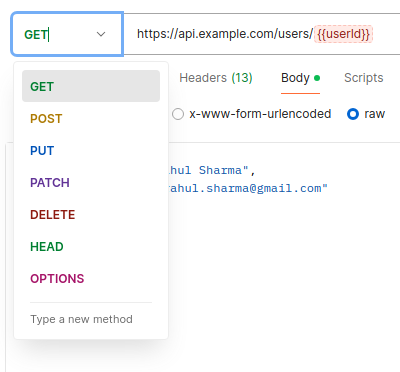
Selecting the correct HTTP method ensures your request fits the API’s intended function. In Postman, you can choose the request method from a dropdown menu:
- GET: Used to retrieve data from the server.
- POST: Used to submit data to create resources.
- PUT: Sends complete data to update resources.
- PATCH: Used to partially update the exis
- DELETE: Removes resources from the server.
6. Leverage Environment Variables
Environment variables in Postman are placeholders that store reusable values, making your API testing more dynamic, efficient, and adaptable to multiple environments (e.g., development, staging, production). By using variables, we can avoid hardcoding values such as base URLs, authentication tokens, or query parameters.
For Instance
- Define a baseUrl variable as https;//api.example.com.

- Use it in your requests: {{baseUrl}}/users

They reduce errors, increase reusability, and make scripts dynamic. We can define
- Global variables (available everywhere)
- Environment variables (specific to workspace)
- Collection variables (scoped to a request set)
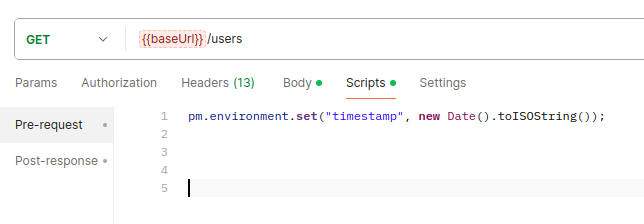
7. Validate Requests with Pre-Request Scripts
Pre-request scripts are small JavaScript codes that run before the request is made. They can:
- Add dynamic headers.
- Generate timestamps or tokens.
- Validate or manipulate data.
Example
The below snippet stores the current timestamp in an environment variable called timestamp.
8. Test Responses with Assertions
Tests validate the accuracy of API responses, ensuring the call succeeded as expected. Go to the Tests tab in Postman to write checks that make sure the response is correct.
Example Tests:

9. Monitor and Debug Your API Calls
Even the best-crafted requests can fail. Here’s how to debug them effectively:
- Open Postman’s Console (View > Show Postman Console) to check the logs and find any errors.
- Make sure your token is valid—if it’s expired or missing, you’ll get a 401 Unauthorized error.
- Review headers and payloads for mismatches.
- Use Postman Monitors to schedule automated checks and alerts.
Bonus Tip: Turn on “Save Responses” for future comparisons and version tracking.
Key Takeaways for Crafting Accurate HTTP Calls in Postman
- Double-check your API endpoints and methods.
- Leverage environment variables for maintainability.
- Structure headers and bodies carefully.
- Use tests (assertions) to check if the response is what you expected and that your request worked properly.
- Use scripts and monitors to automate your workflow.
- Document your requests to simplify debugging and collaboration.
Conclusion
Crafting accurate HTTP calls in Postman is all about attention to detail and a clear understanding of how APIs work. By following these best practices—choosing the right methods, using variables, setting proper headers, and validating responses—you can make your API testing faster, more reliable, and easier to manage. With the right approach, Postman becomes a powerful tool for building stable and efficient API workflows.