



1. Introduction
Automation testing, a crucial aspect of continuous integration, often encounters challenges when dealing with security measures such as captchas. The need for continuous and repetitive test runs may trigger security mechanisms, like Cloudflare captchas, leading to test failures. While it’s possible to disable captchas during test execution, there are scenarios where this might not be feasible. In this blog post, we delve into the world of Cloudflare captchas, focusing on the Standalone Cloudflare Turnstile Captcha and the Cloudflare Turnstile Challenge Page. We will explore the intricacies of these captchas and discuss two effective ways to bypass them in an automated fashion.
2. Understand Cloudflare Captchas
- There are 2 types of Cloudflare turnstile captcha:
- Standalone Cloudflare Turnstile Captcha: The captcha widget is placed on a website page, protecting a form from automated submission. See this example.
- Cloudflare Turnstile Challenge Page: The captcha on websites proxied proxied through Cloudflare. See this example.
3. Bypass Techniques
3.1. Complimentary (Python only):
- Undetected Chrome Driver: Utilizing an undetected Chrome browser allows automation scripts to interact with websites without triggering Cloudflare’s security checks. However, this library is still detected by the latest Cloudflare algorithm.
import undetected_chromedriver as uc

driver = uc.Chrome(headless=True,use_subprocess=False)
driver.get('https://rucaptcha.com/42')
driver.save_screenshot('captcha.png')
- DrissionPage: DrissionPage is a Python library that automates browser interactions and can be employed to navigate through Cloudflare-protected websites without detection.
from DrissionPage import ChromiumPage

page = ChromiumPage()
page.get('https://rucaptcha.com/42')
3.2. Paid Bypass Using 2Captcha:
How does it work?
Send an API to 2Captcha to receive the cf-turnstile-response token. Their workers will bypass this captcha manually and send us the cf-turnstile-response token back. Finally, use this token to bypass Cloudflare by setting the value for the cf-turnstile-response input.
3.2.1. Standalone Turnstile captcha
Step 1: Send turnstile bypass request to 2Captcha with:
- Endpoint: https://2captcha.com/in.php
- Method: POST
- Request body as JSON:
{
  "key": "YOUR_API_KEY", // Go to https://2captcha.com/enterpage and copy your API key and paste it here
  "method": "turnstile",
  "sitekey": "0x4AAAAAAAC3DHQFLr1GavRN", // Each website using an unique sitekey
  "pageurl": "https://2captcha.com/demo/cloudflare-turnstile", // Your website url using CF turnstile
  "json": 1
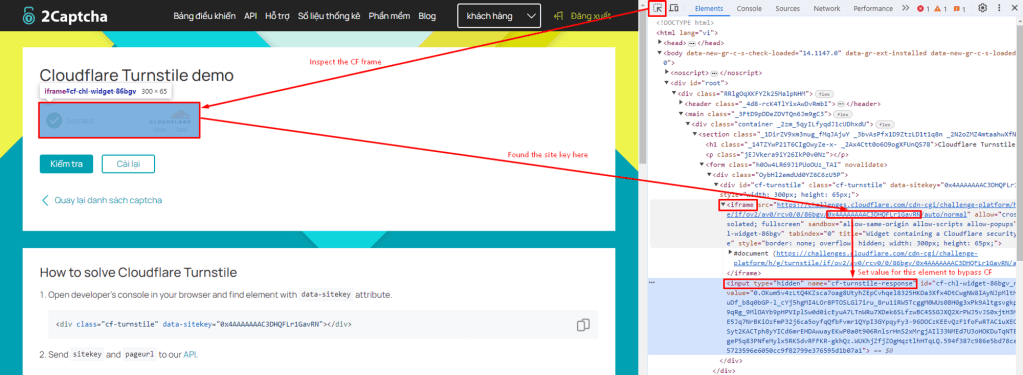
}- How can you take the site key value? In the CF iframe tag, you can take the value from the src attribute. See more details below:
- A sample response:
{

  "status": 1,

  "request": "2122988149" // request Id to get bypass token

}
Step 2: Wait for 10 seconds
- The request at step 1 triggers a job to bypass Cloudflare manually. Therefore, it takes 7-10 seconds to handle the job. You need to wait.
Step 3: Send a GET request to receive the cf-turnstile-response token
- Endpoint: https://2captcha.com/res.php?key=YOUR_API_KEY&action=get&id=2122988149&json=1
- A sample response:
{

  "status": 1,

  "request": "0.WoGeDojxQzHCCk023JRjfxv23olYh37jFdvPrcqmNeQ7PbSYIEuiBTK2SR_GdjfMitYEC23Gm7Vt93U1CPcI6aIFEhG-ffe1i9e6tIfIlYCFtb7OMxTB4tKCyTdpiaA.SP5YT77nuMNdOhZlvoBWAQ.da6448d22df7dd92f56a9fcf6d7138e5ee712bcf7d00c281f419b3bc091cbe64"

}
Step 4: Set the value for cf-turnstile-response input on the console tab of the development tool.
document.querySelector('[name="cf-turnstile-response"]').value = 'TOKEN';Step 5: Captcha is bypassed. Continue with your work.
You can view the latest guidelines for standalone turnstile captcha here. If you’re looking for 2Captcha code samples in C#, PHP, Ruby, Java, Python, or Javascript please go to their git repositories.
3.2.2. Cloudflare Challenge page
Bypass with puppeteer JS
- Firstly, send the same POST request as the standalone turnstile captcha to trigger the 2Captcha bypass job. However, there are 3 more mandatory fields that need to be set, including data, pagedata, and action.
Endpoint: https://2captcha.com/in.php

Method: POST


{

	"key": "YOUR_API_KEY",

	"method": "turnstile",

	"sitekey": "0x0AAAAAAADnPIDROzbs0Aaj",

	"data": "7fab0000b0e0ff00",

	"pagedata": "3gAFo2...0ME1UVT0=",

	"pageurl": "https://2captcha.com/",

	"action": "managed",

	"json": 1

}- How can we grab the value for these fields? You should intercept the window.turnstile.render call by injecting the following JavaScript before the Turnstile widget is loaded.
// This file is named inject.js

console.clear = () => console.log('Console was cleared')

const i = setInterval(() => {

    if (window.turnstile) {

        clearInterval(i)

        window.turnstile.render = (a, b) => {

            let params = {

                sitekey: b.sitekey,

                pageurl: window.location.href,

                data: b.cData,

                pagedata: b.chlPageData,

                action: b.action,

                userAgent: navigator.userAgent,

                json: 1

            }

            // we will intercept the message in puppeeter

            console.log('intercepted-params:' + JSON.stringify(params))

            window.cfCallback = b.callback

            return

        }

    }

}, 50)- In Puppeteer, use the method Page.evaluateOnNewDocument(inject_script) to inject the script whenever there is a new document loaded. Store the JS script above in a file named inject.js, the script to bypass will be:
import { launch } from 'puppeteer'

import { Solver } from '2captcha-ts'

import { readFileSync } from 'fs'


const solver = new Solver(`API_KEY`) // Set your API key here


const example = async () => {

    const browser = await launch({

        headless: false,

        devtools: true

    })

    const [page] = await browser.pages()

		// Load inject.js content

    const preloadFile = readFileSync('./inject.js', 'utf8');

    await page.evaluateOnNewDocument(preloadFile);


    // Here we intercept the console messages to catch the message logged by inject.js script

    page.on('console', async (msg) => {

        const txt = msg.text()

        if (txt.includes('intercepted-params:')) {

            const params = JSON.parse(txt.replace('intercepted-params:', ''))

            console.log(params)


            try {

                console.log(`Solving the captcha...`)

                const res = await solver.cloudflareTurnstile(params)

                console.log(`Solved the captcha ${res.id}`)

                console.log(res)

                await page.evaluate((token) => {

                    cfCallback(token)

                }, res.data)

            } catch (e) {

                console.log(e.err)

                return process.exit()

            }

        } else {

            return;

        }

    })

		// When the page is redirected, there is a log "intercepted-params: ..." in the browser console

    page.goto('https://rucaptcha.com/42')

}

example() // Run the example function above
Bypass with Selenium C#
- C# is just an implementation example. 2Captcha can be implemented in any other language.
- In Selenium, go the same way with Puppeteer. Call the command Page.addScriptToEvaluateOnNewDocument of Chrome Dev Tools instead of page.evaluateOnNewDocument(); to inject the script.
string injectedScripts = File.ReadAllText("inject.js", Encoding.UTF8);

((ChromeDriver)AtataContext.Current.Driver)

    .ExecuteCdpCommand("Page.addScriptToEvaluateOnNewDocument",

    new System.Collections.Generic.Dictionary<string, object> { { "source", injectedScripts } }

);- Load the message containing the text “intercepted-params”. And don’t forget to set logging Preference at all levels to receive log by: chromeOptions.SetLoggingPreference(LogType.Browser, OpenQA.Selenium.LogLevel.All);
// Get the message logged by the inject.js for 2captcha params
LogEntry message = AtataContext.Current.Driver.Manage().Logs.GetLog(LogType.Browser).FirstOrDefault(m => m.Message.Contains("intercepted-params:"));- Handle the params into the Turnstile Captcha request for data, pageData, and action. Finally, call back Cloudflare verification with the token to bypass with the js script $”cfCallback(‘{token}’);”
if (message != null)

{

    string paramString = Regex.Replace(message.Message, @".*intercepted-params:", "")

        .Replace("}\"", "}")

        .Replace("\\", "");

    TwoCaptchaParams param = JsonConvert.DeserializeObject<TwoCaptchaParams>(@$"{paramString}");


    // Solve the CAPTCHA using 2captcha-csharp

    CustomTwoCaptcha solver = new CustomTwoCaptcha(_apiKey);


    TurnstileChallengePage captcha = new TurnstileChallengePage();

    captcha.SetSiteKey(param.SiteKey);

    captcha.SetUrl(param.PageUrl);

    captcha.SetData(param.Data);

    captcha.SetPageData(param.PageData);

    captcha.SetAction(param.Action);

    captcha.SetUserAgent(param.UserAgent);


    var captchaId = solver.SendRequest(captcha).GetAwaiter().GetResult();

    Thread.Sleep(10);

    string token = solver.GetResult(captchaId).GetAwaiter().GetResult();

    // Inject the solved CAPTCHA token

    AtataContext.Current.Driver.AsScriptExecutor().ExecuteScript($"cfCallback('{token}');");

}

else

{

    Console.WriteLine("Console message not found.");

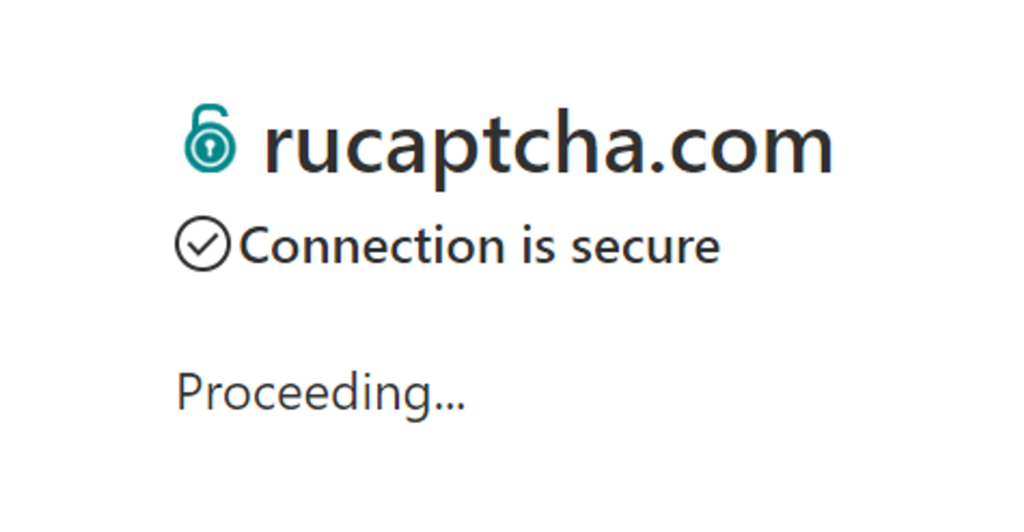
}- Finally, run it and you will bypass CloudFlare successfully. Congratulation!
4. Conclusion
Bypassing Cloudflare captchas in an automated manner requires a nuanced understanding of the different types of challenges presented by the security measures. In this scenario, 2captcha emerges as a dependable and sustainable solution.
It’s important to note that automated bypass techniques should be used responsibly and ethically. I hope this topic proves beneficial for you!
5. References
2Captcha Guideline: https://2captcha.com/blog/bypass-cloudflare-turnstile-captcha