


Introduction
Hello there. Have you ever faced customer complaints about the instability of your automation test case results? Are you spending too much time waiting for test cases to run? A day or even several days? This often leads to decreased scalability and reliability of the test suite. If so, then this article is for you.
Atomic Tests vs. End-to-End Tests
Definition: An atomic test focuses on testing only a single feature, while an E2E test covers an entire workflow. Atomic tests are:
- ✅ Isolated
- ✅ Composable
- ✅ Fast
Let’s illustrate this with clear examples. Here’s a sample E2E test case:
- E2E Scenario: The teacher can search students by name
- Step 1: Access the dashboard
- Step 2: Create a student
- Step 3: The student above is created successfully with the message “Successfully created!”
- Step 4: Access the student board
- Step 5: Search student by the student name
- Step 6: A student is displayed with the name above
And here are the atomic tests(AT) to cover the same scenario:
- AT Scenario 1: The teacher can create students
- Step 1: Access the dashboard
- Step 2: Create a student
- Step 3: The student above is created successfully with the message “Successfully created!”
- AT Scenario 2: The teacher can search students by name
- Step 1: There is a student created with the name called A
- Step 2: Access the student board
- Step 3: Search student by the name A
- Step 4: A student is displayed with the name A
Effectiveness of Atomic Tests
By breaking down scenarios into independent atomic tests, we gain several benefits such as:
- Improved test readability: Focusing on clear testing objectives makes test cases easier to understand.
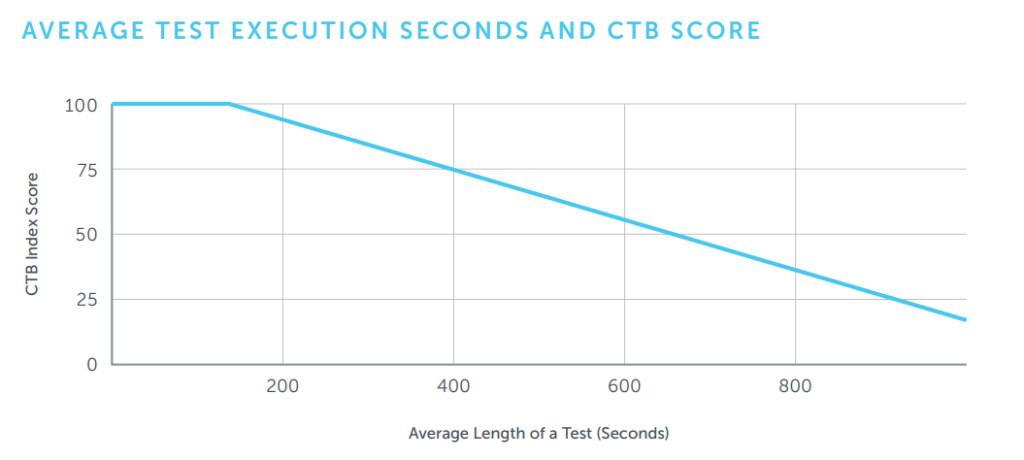
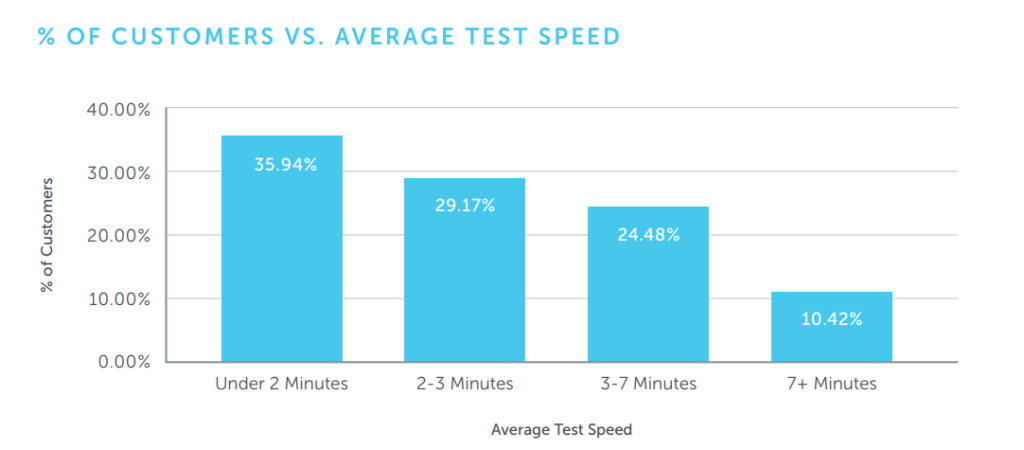
- Faster feedback: Swiftly identifying and fixing errors leads to quicker feedback cycles, with waiting times ideally between 30 to 60 seconds.
- Reduced flakiness: Shorter test durations decrease the likelihood of test failures due to unstable factors, enhancing test reliability. Refer to SauceLabs’s report below:
- Independence of tests: Even if one atomic test fails, others remain unaffected, thus improving test coverage.
- Faster test execution: Shorter atomic tests and rapid data preparation contribute to significant time savings, especially when running tests in parallel.
Challenges in Writing Atomic Tests and Solutions
While advantageous, there are also some challenges in implementing tests for development teams with limited experience.
Manipulating Test Data
- In the example of searching for students, one might wonder how it’s possible to search for a student without creating one first. Indeed! We create a student, but we avoid using time-consuming Selenium commands. Atomic tests need to run quickly and reliably.
- The solution to this is injecting data using various techniques:
- Injecting data by sending web requests (API)
- Injecting data by using JavaScript (e.g., setting sessionStorage)
- Injecting data into the database to establish the expected state
- Injecting data by using cookies
- You may already be familiar with these techniques, so I’ll only explain the unfamiliar ones.
Manage App State using JavaScript
- I’ll demonstrate using the website https://vnexpress.net/ to adjust the weather forecast location.
- For example, if I’m in Hanoi, the forecast will appear as follows:

- If I change the session storage with the following command, the forecast will display for a different province. Specifically, An Giang:
((IJavaScriptExecutor)_driver).ExecuteScript("window.sessionStorage.setItem('weather_province', 'An Giang')");
_driver.Navigate().Refresh();

- By changing the current session data like this, you can achieve the desired app state to ensure that the app is functioning correctly for testing purposes.
Considerations when Running Atomic Tests
- An atomic test should typically run for under 30 seconds and at most 2 minutes (the number of such scenarios should be limited to no more than 10 tests) in an ideal environment.
- Why 30 seconds? Basically, a job should be run in 20 minutes. Therefore, if each test takes 30s to run and runs in parallel with 5 drivers at the same time, then there are only 200 test cases that can be run = 20(minutes) * 60(seconds) * 5(parallel drivers) / 30(seconds).
- If you want to clear all data at OneTimeTearDown – after all tests, consider doing so at OneTimeSetUp – before all tests. This helps you avoid scenarios where the system encounters issues leading to interruptions in job execution, causing errors in subsequent runs.
- Ensure that the entire team understands the tasks for automated UI tests and other test levels, as well as distinguish the responsibilities of automated tests and manual tests for optimal collaboration.
- It’s advisable to run tests in parallel: Everyone knows the only way to speed up testing is to remove unsuitable test cases and run all tests in parallel mode. However, to run effectively in parallel, you should also note that to enhance the scalability and stability of the test system:
- Tests must be independent of each other.
- Avoid using the static keyword.
- Unused data should be cleared afterward.
Conclusion
Through this article, we have explored a new technique for automating test cases. However, achieving success in an automation project requires more than just tools, techniques, and processes—it requires collaboration. Prioritizing teamwork and implementing these techniques appropriately will enhance the optimization of your project.
Thank you for taking the time to read this article. If you found it useful, please like and share it with others.
In the next article, I’ll go deep dive into automation testing methods such as BDD, POM, testing pyramid, and more. I hope these insights will contribute to the improved efficiency of your software development.