


In our previous blog series Akka Agentic AI: Secret to Planning a Perfect Trip, we built our first fully autonomous trip/activity planner using Akka Agentic AI. It’s a nice way to develop a fully autonomous application which can work and adapt to Users’ preferences without human intervention.
However, an agentic application has few flaws embedded into its design:
- It can handle only transactional tasks (e.g., booking, payments, planning) which needs strict pre-defined workflows
- It needs structured data, since transactional tasks cannot work with unstructured data
- Last but not the least, performance is key, so that it can replace Non-Agentic APIs
To overcome these challenges, Akka Agentic AI has another tool in it’s toolbox. It’s called RAG, short for Retrieval-Augmented Generation. It can work with both – unstructured/structured data, provides better contextual responses, and it can scale to wide variety of tasks without needing a pre-defined workflow.
What is RAG?
RAG has a very useful design. It combines retrieval of knowledge base from a vector database (e.g., Mongo Atlas, pgvector (Postgres Vector)) with a Large Language Model (like GPT, Gemini) to generate contextual responses.
This article will guide us through building a Retrieval-Augmented Generation (RAG) chat agent called AgenticRAG. This RAG application will have an AI Agent that will use latest Akka Agentic AI documentation as its knowledge base to answer queries from different User(s). To begin with, we will start with a very simple agent that streams responses from a LLM.
Add the AskAkkaAgenticAI Agent
import akka.javasdk.agent.Agent;
import akka.javasdk.annotations.Component;

@Component(id = "ask-akka-agentic-ai-agent", name = "Ask Akka Agentic AI", description = "Expert in Akka Agentic AI")
public class AskAkkaAgenticAiAgent extends Agent {

  private static final String SYSTEM_MESSAGE =
    """
    You are a very enthusiastic Akka Agentic AI representative who loves to help people!
    Given the following sections from the Akka Agentic AI documentation, answer the question
    using only that information, outputted in markdown format.
    If you are unsure and the text is not explicitly written in the documentation, say:
    Sorry, I don't know how to help with that.
    """.stripIndent();

  public StreamEffect ask(String question) {
    return streamEffects()
      .systemMessage(SYSTEM_MESSAGE)
      .userMessage(question)
      .thenReply();
  }
}
As seen in previous articles, system message provides system-level instructions to the AI model and establishes its role. Next, the user message (question) represents the specific query, instruction, or input that needs to be processed by the model to generate a response.
Note: To stream the response to the client (User) via SSE (server-sent events) we are using StreamEffect.
Create an Endpoint
import akka.ask.agent.application.AskAkkaAgenticAiAgent;
import akka.http.javadsl.model.HttpResponse;
import akka.javasdk.annotations.Acl;
import akka.javasdk.annotations.http.HttpEndpoint;
import akka.javasdk.annotations.http.Post;
import akka.javasdk.client.ComponentClient;
import akka.javasdk.http.HttpResponses;

@Acl(allow = @Acl.Matcher(principal = Acl.Principal.INTERNET))
@HttpEndpoint("/api")
public class AskHttpEndpoint {

  public record QueryRequest(String userId, String sessionId, String question) {}

  private final ComponentClient componentClient;

  public AskHttpEndpoint(ComponentClient componentClient) {
    this.componentClient = componentClient;
  }

  /**
   * This method runs the search and streams the response to the UI.
   */
  @Post("/ask")
  public HttpResponse ask(QueryRequest request) {
    var sessionId = request.userId() + "-" + request.sessionId();
    var responseStream = componentClient
      .forAgent()
      .inSession(sessionId)
      .tokenStream(AskAkkaAgenticAiAgent::ask)
      .source(request.question);

    return HttpResponses.serverSentEvents(responseStream);
  }
}
Time to ask Question!
1. Set OpenAI API Key as environment variable
set OPENAI_API_KEY=<your-openai-api-key>2. Start the service locally
mvn clean compile exec:java3. Use curl/postman to call the Endpoint
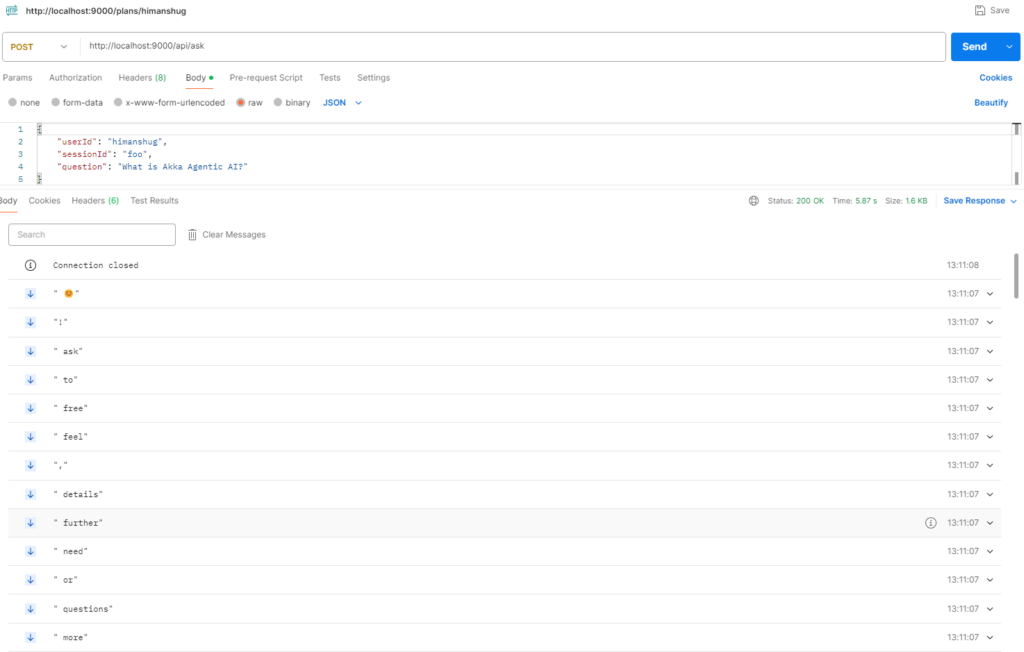
Since, the response is streamed, hence it is visible incrementally, instead of the entire response ready at once.
Next Steps
Each time a user submits a query to the agent, the AskAkkaAgenticAiAgent agent streams responses from a LLM (OpenAI/GPT). But a better approach would be perform a semantic search over a vector database which can provide a better contextual response. To populate the vector database with all the knowledge that we want to make available to the agent, we will be exploring Knowledge Indexing feature in upcoming blogs, hence, stay tuned 🙂