


Welcome back to our journey to AgenticRAG! The last article, Meet AgenticRAG: Asking Meaningful Questions to the AI Agent, provides a step-by-step guide to wire the embeddings (indexed documents), present in MongoDB Atlas, into a RAG search query of AskAkkaAgenticAiAgent.
With the wiring in place, the next step is to build interactive UI endpoints for conversational interaction with the AI Agent. This article, will guide us on adding the endpoints to provide a client-friendly API in front of all of the RAG components we have built in previous articles.
Integrate Session History View
LLM’s by design are stateless. Their response to anything is directly proportional to the prompt submitted. However, web-interface provided by services like Chat-GPT, Google Gemini, or Microsoft Copilot, keeps a history of User conversation to maintain the context across multiple prompts.
Similarly, an Akka Agent has a built-in session memory to store both – User Message (prompt) and response of the AI Model (Chat-GPT, Google Gemini, etc.). These stored messages are then included as additional context in subsequent requests to the model (prompts), to refer previous parts of the conversation.
To achieve this we need a way to pull a conversation history for a given user. Hence, we need a ConversationHistoryView that will help us in viewing the chat log (history).
@Component(id = "view_chat_log")
public class ConversationHistoryView extends View {

  public record ConversationHistory(List<Session> sessions) {}

  public record Message(String message, String origin, long timestamp) {}

  public record Session(
    String userId,
    String sessionId,
    long creationDate,
    List<Message> messages
  ) {
    public Session add(Message message) {
      messages.add(message);
      return this;
    }
  }

  @Query(
    "SELECT collect(*) as sessions FROM view_chat_log " +
    "WHERE userId = :userId ORDER by creationDate DESC"
  )
  public QueryEffect<ConversationHistory> getSessionsByUser(String userId) {
    return queryResult();
  }

  @Consume.FromEventSourcedEntity(SessionMemoryEntity.class)
  public static class ChatMessageUpdater extends TableUpdater<Session> {

    public Effect<Session> onEvent(SessionMemoryEntity.Event event) {
      return switch (event) {
        case SessionMemoryEntity.Event.AiMessageAdded added -> aiMessage(added);
        case SessionMemoryEntity.Event.UserMessageAdded added -> userMessage(added);
        default -> effects().ignore();
      };
    }

    private Effect<Session> aiMessage(SessionMemoryEntity.Event.AiMessageAdded added) {
      Message newMessage = new Message(
        added.message(),
        "ai",
        added.timestamp().toEpochMilli()
      );
      var rowState = rowStateOrNew(userId(), sessionId());
      return effects().updateRow(rowState.add(newMessage));
    }

    private Effect<Session> userMessage(SessionMemoryEntity.Event.UserMessageAdded added) {
      Message newMessage = new Message(
        added.message(),
        "user",
        added.timestamp().toEpochMilli()
      );
      var rowState = rowStateOrNew(userId(), sessionId());
      return effects().updateRow(rowState.add(newMessage));
    }

    private String userId() {
      var agentSessionId = updateContext().eventSubject().get();
      int i = agentSessionId.indexOf("-");
      return agentSessionId.substring(0, i);
    }

    private String sessionId() {
      var agentSessionId = updateContext().eventSubject().get();
      int i = agentSessionId.indexOf("-");
      return agentSessionId.substring(i + 1);
    }

    private Session rowStateOrNew(String userId, String sessionId) {
      if (rowState() != null) return rowState();
      else return new Session(
        userId,
        sessionId,
        Instant.now().toEpochMilli(),
        new ArrayList<>()
      );
    }
  }
}Note: Here we are retrieving the full history of all sessions of a User. However, for efficiency purpose you can retrieve last 5 or 10 messages. Since, maintaining history of all sessions of all Users might overload the application.
Append Users API
/**
 * Endpoint to fetch user's sessions using the ConversationHistoryView.
 */
@Acl(allow = @Acl.Matcher(principal = Acl.Principal.INTERNET))
@HttpEndpoint("/api")
public class UsersEndpoint {

  private final ComponentClient componentClient;

  public UsersEndpoint(ComponentClient componentClient) {
    this.componentClient = componentClient;
  }

  @Get("/users/{userId}/sessions/")
  public ConversationHistoryView.ConversationHistory getSession(String userId) {
    return componentClient
      .forView()
      .method(ConversationHistoryView::getSessionsByUser)
      .invoke(userId);
  }
}
Next we need to append an endpoint which we can use to get the list of sessions of a User.
Append the UI Endpoint
Lastly, we need to append an endpoint that will serve the static UI (index.html). The index.html file will help us view the response in a user-friendly manner instead of being visible incrementally, like in previous articles.
@HttpEndpoint
@Acl(allow = @Acl.Matcher(principal = Acl.Principal.ALL))
public class UiEndpoint {

  @Get("/")
  public HttpResponse index() {
    return HttpResponses.staticResource("index.html");
  }
}
Lets Ask Question!
1. Set OpenAI API Key as environment variable
set OPENAI_API_KEY=<your-openai-api-key>2. Start the service locally
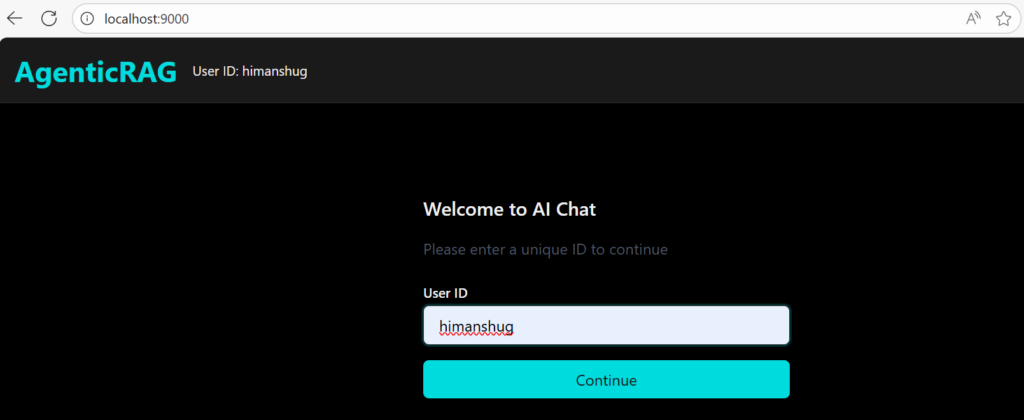
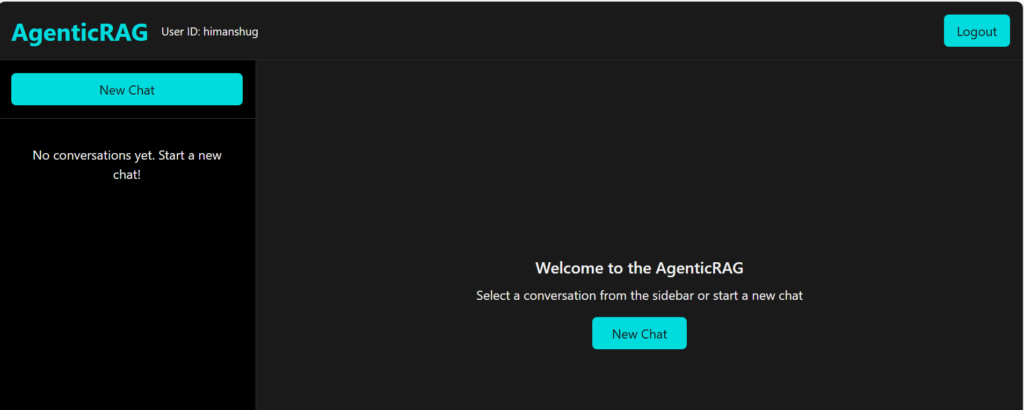
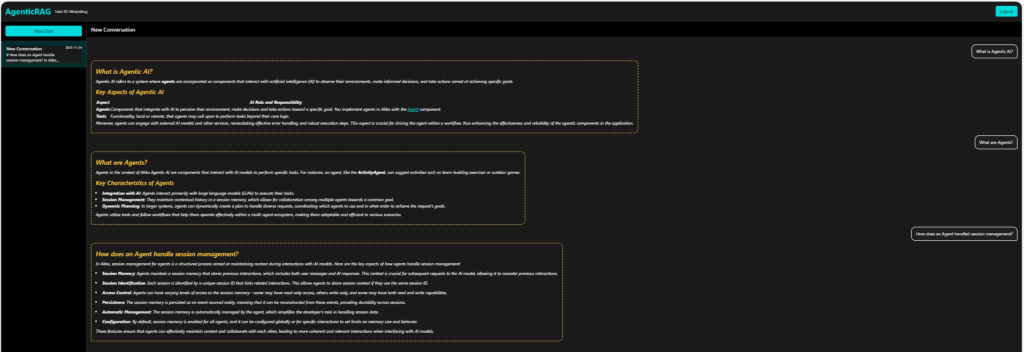
mvn clean compile exec:java3. Use Browser to Ask Question
Conclusion
With this article, we have gone through the process of building a RAG application using Akka Agentic AI. Now, you can play with it, break it, or even use it for a whole new scenario. The idea is to get your hands dirty with it and learn a whole lot of different features Akka Agentic AI offers. For those who would like to deep dive into code, they can refer to the following link – Akka Agentic RAG.