


Recently, in the “mixed hotpot” world of JavaScript—with countless frameworks and fancy approaches to building web applications—there’s a buzzword related to architecture that has been popping up everywhere: Micro Frontend 🤯
Why is it so mind-bending? Because at first glance, it feels like the frontend team is just saying:
“Backend has microservices, so we’ll also have micro frontends” 😃
But obviously, that’s not the whole story.
In reality, micro frontend has been around for quite a while—probably about 5 years or so. Still, back then, I personally felt it wasn’t quite the right time to design a system like this.

However, things have changed. Technology has evolved significantly, and today we have many tools and frameworks that support breaking down applications into smaller parts for better maintainability and scalability. Thanks to that, micro frontend seems to be making a comeback.
Let’s take a look at some strengths and weaknesses of designing an application using the micro frontend approach.
Strengths
• Multiple frameworks and libraries can coexist, even with different versions.
(This requires fairly complex configuration. I’ll share a GitHub boilerplate that I’ve built—and yes, I’ve already fixed almost all related issues 😎)
• Clear separation of application parts.
(That said, if it’s not absolutely necessary, I recommend splitting by route rather than by tiny components to avoid unnecessary complexity.)
• Gradual migration from legacy applications.
You can migrate piece by piece instead of rewriting everything at once—this is extremely valuable in today’s fast-changing tech landscape.
• CI/CD per micro frontend.
Each part can be deployed independently, reducing risk. If one feature breaks, the whole system won’t go down, and rollback is much faster compared to a monolithic app.
Weaknesses
• Complex and sometimes unstable configuration/setup.
Production issues can still happen. When multiple teams use different frameworks, it’s often hard to standardize things like linting, Git workflows, or coding conventions.
• Global state management becomes challenging
when the application is split across multiple micro frontends.
• Security concerns
Some backend knowledge is required. If not handled carefully, users may still access a micro frontend even when they’re not authenticated.
• Duplicate JavaScript and CSS
This can happen across micro frontends. However, if you’ve already chosen this architecture, this is often an acceptable trade-off.
• Asset handling requires extra configuration
Assets may need to be shared via a CDN or a dedicated asset server.
By default, when a micro frontend is loaded into the shell, relative paths like /assets/example.png may break because they resolve against the shell’s origin instead of the micro frontend.
• Designing shared components is complicated
Especially when multiple frameworks are involved.
• And probably many other issues I haven’t discovered yet 🙄
Loading Micro Frontends into the Shell
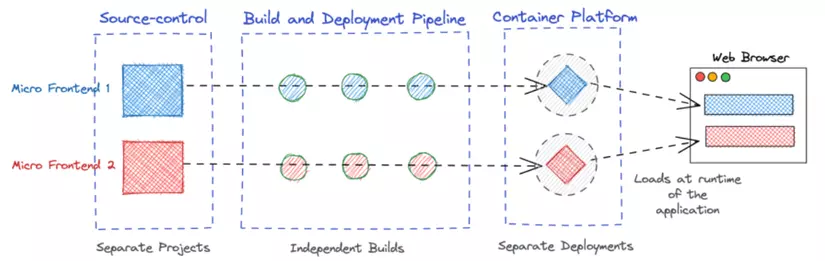
Ignoring some older (and possibly outdated) ways of loading micro frontend apps into a shell application, the currently recommended approach is using Module Federation to load micro frontend JavaScript at runtime.
However, Module Federation alone is not enough.
Why? Because frontend frameworks were never designed to work together within the same application. Even DOM management differs greatly:
• Native DOM
• Virtual DOM
• Incremental DOM
The risks are high. Sometimes, even using the same framework with different versions can cause runtime issues when JavaScript bundles from multiple micro frontends are merged.
Solution
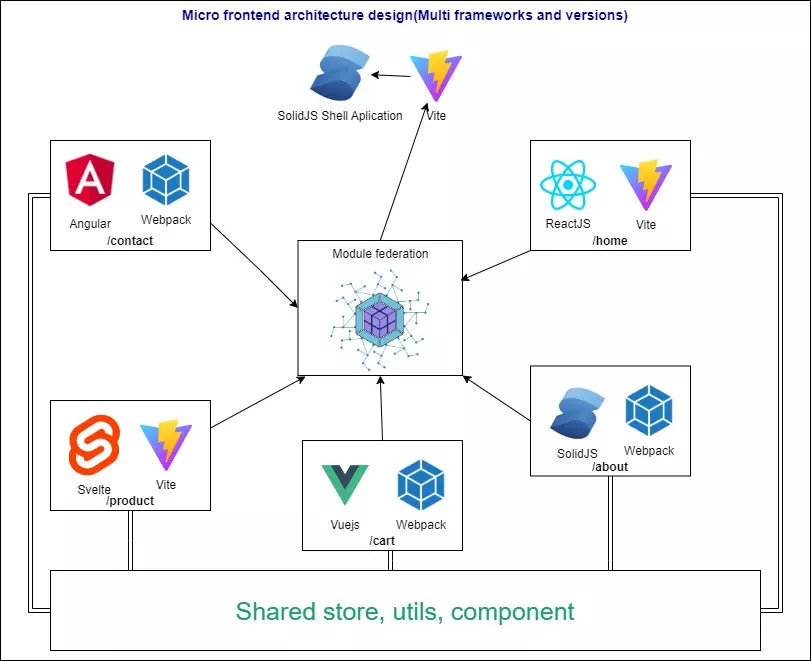
Micro frontends should be designed to be isolated—both in JavaScript and CSS.
The approach I chose is using Web Components, which allow proper isolation and can be used across any framework.
You can even design a set of shared components using this method.
Additionally, with a route-based micro frontend strategy, each route loads only one micro frontend into the shell application.
Bundling with Module Federation
You can combine Module Federation with either bundler:
• Module Federation with Vite
• Module Federation with Webpack
State Management
For state management, I currently use RxJS with a publish/subscribe model—mostly because I’m very familiar with it 😎
Of course, you can also use solutions like Redux, Flux, etc., for shared state management. Personally, I’m not a fan of heavy setups, so RxJS feels like a faster and cleaner choice for me.
Conclusion
In this article, I’ve shared some practical pros and cons of implementing micro frontend architecture, along with solutions to common issues.
There’s still plenty that can be optimized.
So the final takeaway is:
• If you can live with the downsides (and there are quite a few 😅), micro frontend can be a refreshing change worth trying.
• If, after careful consideration, it doesn’t fit your use case—feel free to skip it.
Switching back doesn’t cost much time anyway 😃
GitHub Boilerplate
Oh, almost forgot—here’s the GitHub boilerplate:
https://github.com/quangnv13/micro-frontend-multi-framework-boilerplate
In this repo, you’ll see that each framework has some setup that overrides its default bootstrap process. Some frameworks natively support creating web elements, while others require manually extending and overriding Web Component API lifecycles.
If you find the repo useful, feel free to give it a ⭐ on GitHub—it would be a great motivation for me :3