


MICROSOFT FABRIC: INTRODUCING TO MATERIALIZED LAKE VIEWS (MLVs)
Materialized Lake Views (MLVs) are Microsoft Fabric’s newest, SQL-first way to build declarative transformations directly on your Lakehouse. Think of them as views where the results are physically materialized in OneLake, enabling fast, reusable analytics.
MLVs are new and in preview as of September 2025, announced earlier this year. In this article, I’ll introduce what MLVs are and why they matter, then cover how they work under the hood, how to author and operate them in a Lakehouse, how they perform versus standard views, and where they shine in real data-engineering workflows. All guidance is current as of September 2025.
Context & Problem
While the Lakehouse has simplified the process of ingesting raw data at scale, the real challenge lies in transforming that raw data into clean, reusable, and high-performance analytics tables. In practice, engineers juggle a mix of ad-hoc SQL views, Spark notebooks, and scheduled jobs that must run in the right order, at the right time, with the right guardrails. A few recurring pain points show up across projects:
- Standard views don’t scale for heavy reuse: Non-materialized views re-compute every time you query them. With multi-million-row joins and aggregations, performance becomes inconsistent, dashboards stall, and compute costs spike unpredictably.
- Power BI & Direct Lake prefer physical tables: Direct Lake reads Delta/Parquet data directly from OneLake. Plain SQL views aren’t first-class citizens there, so teams duplicate logic into physical tables or maintain brittle export jobs.
- Pipeline orchestration sprawl: When transformations live across notebooks, SQL scripts, and one-off jobs, you must hand-craft dependency order (Bronze → Silver → Gold), schedule them, and recover from partial failures, often without a single source of truth for the DAG.
- No built-in data quality gates: Validations (not-nulls, domain checks, key integrity) get sprinkled across code, if they exist at all. Bad rows slip downstream and break reports, and in the worst case, they silently corrupt metrics.
- Redundant work, duplicated logic: The same expensive join or aggregation is re-implemented in multiple places (and re-computed repeatedly), making changes risky and reviews painful.
- Governance & lineage gaps: It’s hard to answer, “what feeds this metric?” or “what changed yesterday?” when dependencies and business rules aren’t declared in one place and tracked automatically.
What’s missing is a declarative, SQL-first way to define transformations as modular steps, have the platform materialize results into OneLake, manage the DAG and refresh order for you, skip recomputation when sources haven’t changed, and enforce data quality where the logic lives. That’s the gap Materialized Lake Views (MLVs) are designed to close.
What are Materialized Lake Views (MLVs) and How It Works
Materialized Lake Views (MLVs) are Fabric‑native, SQL‑defined views whose results are precomputed and stored in your Lakehouse (Delta/Parquet). Downstream reads hit persisted data rather than re‑executing heavy logic. They are designed to make medallion‑style pipelines (Bronze → Silver → Gold) declarative and operable, with scheduling, lineage, and optional data‑quality checks, and are in preview (Sept 2025).
Lakehouse‑native storage & execution
An MLV is a SQL transformation whose output is materialized into OneLake as Delta/Parquet and exposed in your Lakehouse like a managed table. You read the persisted result (not the live query), so downstream tools treat it as a physical dataset. Fabric runs the compute on a managed Spark runtime (serverless from the author’s perspective); you don’t size or operate clusters, just focus on SQL.
What this implies
- Results land under the Lakehouse and appear in the Explorer alongside tables by schema.name (e.g.,
silver.mlv_cleaned_orders,gold.mlv_sales_by_day_product).
- MLVs are read‑only artifacts: you don’t
INSERT/UPDATEthem; you refresh them from sources.
- Because the output is Delta/Parquet, the same artifact can be consumed by Spark, SQL endpoints, and Power BI Direct Lake.
Dependency graph & lineage
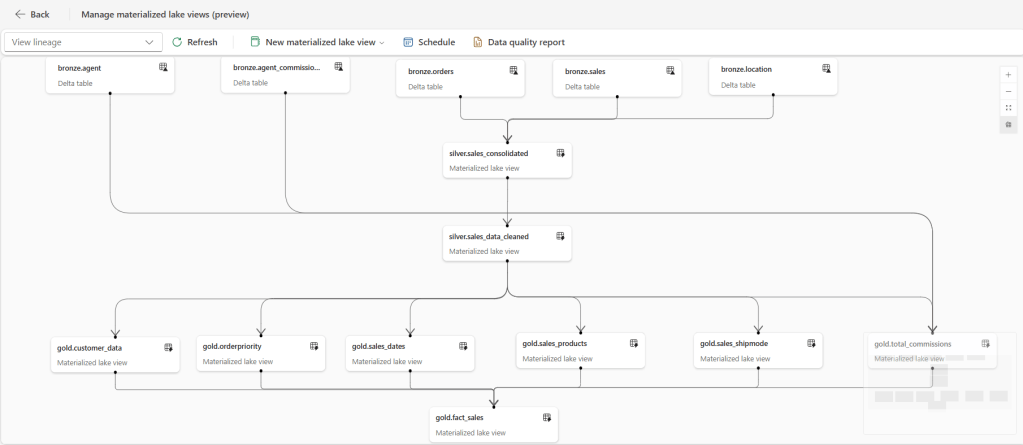
When you reference tables/MLVs inside another MLV, Fabric infers a DAG (directed acyclic graph) of dependencies. The platform uses this graph to:
- Order refreshes (e.g., Bronze → Silver → Gold).
- Parallelize independent branches for faster end‑to‑end runs.
- Provide lineage views that show upstream/downstream relationships so you can reason about the pipeline at a glance.
- Record run history and basic metrics per node (duration, success/failure, dropped rows from constraints, etc.).
Refresh semantics
After creation, you configure a schedule from the lineage UI; Fabric then runs refreshes automatically. Current behaviors:
- Full refresh when source tables changed.
- No refresh (skipped) when no upstream change is detected.
- You can also trigger a manual REFRESH MATERIALIZED LAKE VIEW from SQL, or call preview REST APIs to run on-demand and to programmatically create schedules (limits apply, e.g., one active schedule per lineage).
Execution model
- The engine walks the DAG topologically; independent subgraphs may run in parallel.
- If a node is skipped, its dependents are also skipped unless any of their other inputs changed.
- Failures at an upstream node prevent its dependents from running in that cycle and surface in lineage/history.
Preview behavior (Sept 2025): Either Full refresh (recompute if upstream changed) or Skip (no refresh when nothing changed). Incremental refresh isn’t available yet; plan SLAs accordingly.
Data‑quality at the point of compute
You can embed row‑level checks directly in the definition, like this example code:
CREATE MATERIALIZED LAKE VIEW silver.customers_cleaned
(CONSTRAINT non_null_name CHECK (customer_name IS NOT NULL) ON MISMATCH DROP)
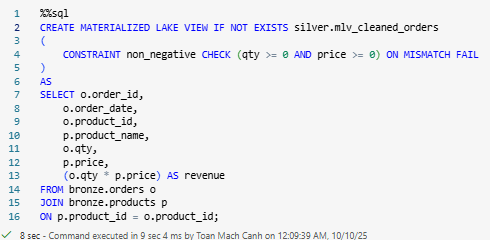
AS SELECT * FROM bronze.customers;- CHECK evaluates during materialization; choose ON MISMATCH DROP to keep the pipeline flowing (and log counts) or ON MISMATCH FAIL to stop on violation.
- If multiple constraints are present and both behaviors are specified, FAIL takes precedence.
- Violations and counts appear in lineage/run details, so you can alert on quality regressions.
Scope & current limitations (Preview)
MLVs are still in preview, so a few guardrails apply:
- Single‑Lakehouse scope: Sources and their dependent MLVs need to live in the same Lakehouse for lineage and execution. Cross‑Lakehouse wiring isn’t available yet.
- SQL‑only authoring: You define MLVs with Spark SQL today. Declarative PySpark isn’t there yet.
- No in‑place DML: You cannot
UPDATE,MERGE, orDELETErows inside an MLV. Think of it as the materialized result of aSELECTthat the service recomputes. Some constructs are not allowed in the definition (e.g., temporary views, UDFs, Delta time‑travel).
- Changing logic: If the query logic changes, drop and recreate the MLV, then update anything downstream that depends on it.
Hands‑on demo
Prerequisites
- A schema‑enabled Lakehouse in a Fabric workspace/capacity.
- You’re in a Notebook attached to that Lakehouse. Use %%sql for each block below.
Bronze tables (Orders, Products)

Silver MLV with a constraint (FAIL on violation)
Gold aggregation MLV

Schedule & monitor
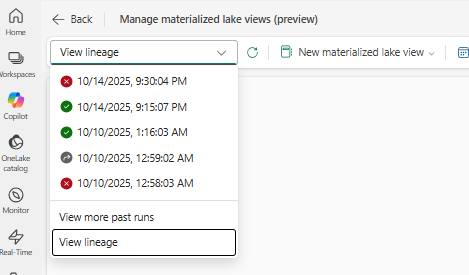
After successfully creating the MLVs in the Lakehouse, open Manage Materialized Lake Views to view the lineage and schedule a refresh cadence (e.g., hourly, nightly).


Scenario – Failure when data violates the constraint
Introduce a bad row (with a negative quantity) and try to refresh again.

Then refresh the lineage
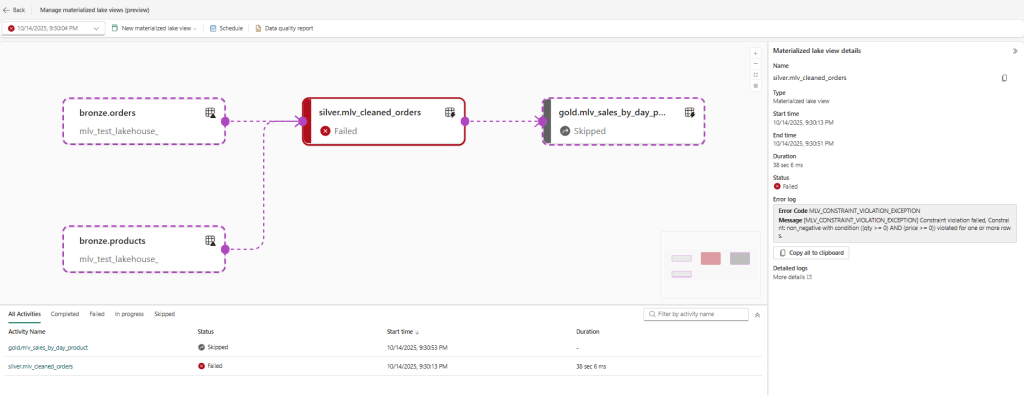
silver.mlv_cleaned_orders) fails on refresh, and the downstream Gold MLV is skipped automatically.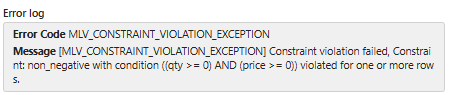
MLVs × Direct Lake: how they fit, and why they exist
Direct Lake expects physical Delta tables in OneLake. When a semantic model queries Delta tables directly, the VertiPaq engine can load only the necessary columns into memory for fast, Import-like performance without copying the entire dataset. That’s the Direct Lake sweet spot. If you base a table on a SQL view (via a Lakehouse/Warehouse SQL endpoint), Power BI often falls back to DirectQuery, losing those performance gains.
This is precisely where MLVs come in. A Materialized Lake View takes your SQL logic and materializes it as Delta/Parquet in OneLake. From Power BI’s perspective, that MLV output is a physical table, so your Direct Lake model can consume it without hitting a SQL view and triggering fallback. Microsoft’s guidance is explicit: Direct Lake on OneLake doesn’t support tables based on non-materialized SQL views; use a lakehouse materialized view instead because it creates Delta tables.
What this means for Power BI developers
- Model on MLV “Gold” tables. Define business logic in Silver/Gold MLVs, schedule their refresh in Fabric, then add those materialized tables to your Direct Lake (on OneLake) semantic model. You get curated, BI-ready tables with no SQL-view fallback and consistent performance. (Direct Lake on OneLake never falls back; the SQL-endpoint flavor can fall back when views/RLS are involved.)
- Better medallion flow, less orchestration code. MLVs let you express the medallion layers declaratively; the platform handles lineage and refresh order, so Power BI sees stable, pre-shaped “fact” and “dimension” tables. Microsoft even calls Direct Lake “ideal for the gold analytics layer.”
- Know the refresh interplay. MLVs refresh on their schedule (today: full refresh or skip if sources unchanged). Direct Lake “refresh” is framing – a lightweight metadata operation that points the model to the latest Parquet files. In practice: refresh MLVs first, then frame (or rely on automatic updates) so the model references the newly written files.
- Watch for fallback signals. If you accidentally model over a SQL view (or hit capacity guardrails/RLS on SQL endpoints), queries can switch to DirectQuery. Use the Direct Lake diagnostics to confirm mode and fix the cause (e.g., replace the view with an MLV).
MLVs exist to bridge robust, SQL-defined transformations with Direct Lake’s requirement for physical Delta tables. Materialize your logic once in the Lakehouse, let Fabric orchestrate updates, and let Power BI read those artifacts at speed, so no SQL-view fallback, no duplicate ETL tables, and a cleaner medallion-to-analytics handoff.
Performance & Benefits vs. Standard Views
Regular views are virtual: each read re‑executes the full query plan. By contrast, a Materialized Lake View precomputes and stores the result in your Lakehouse, so readers hit a prepared table. That single change drives most gains in speed, stability, and cost.
Why it feels faster
- Precomputed results → low‑latency reads: Downstream queries scan materialized Delta/Parquet rather than running long join/aggregate plans.
- Refresh only when needed: If upstream data hasn’t changed, Fabric skips the run; when it has, the service performs a full refresh (incremental isn’t available in preview).
- Lineage‑driven orchestration: The platform executes the DAG in order and parallelizes independent branches, reducing wall‑clock time.
- Quality gates at compute time: CHECK … ON MISMATCH DROP/FAIL keeps bad rows out and prevents slow, silent data corruption.
- Made for Direct Lake: The materialized output is a physical table, which Power BI can read at speed without view fallback.
| Aspect | Standard View | MLV |
| Execution model | Recomputes on every query | Reads precomputed data |
| Latency under load | Variable, often high | Low & predictable |
| Refresh control | N/A | Scheduled + manual, skip if no change |
| Orchestration | Scripts/jobs | Lineage/DAG managed by Fabric |
| Data quality | External logic | Constraints in definition |
| Direct Lake fit | Often falls back to DirectQuery | Physical tables for fast Direct Lake |
Can MLVs replace “traditional ETL”?
Treat Materialized Lake Views (MLVs) as your default, declarative transformation layer in the Lakehouse. They can replace a large slice of SQL-centric pipelines (the “T” in ETL/ELT) and much of the orchestration you’d normally hand-build. But they don’t remove the need for ingestion/CDC/streaming , and they’re not (yet) a drop-in for stateful, incremental, MERGE-heavy workflows.
Where MLVs shine
- Declarative transforms, not orchestration code: Author SQL once; Fabric materializes to OneLake and manages lineage/DAG, scheduling, and parallel branches, skipping refresh when sources haven’t changed.
- Medallion made simple: Bronze → Silver → Gold as a chain of reusable SQL modules you can version, test, and review.
- Data quality built in: CHECK … ON MISMATCH DROP|FAIL makes every step a quality gate; violations surface in lineage/run history.
- Direct Lake–friendly outputs: MLV results are physical Delta/Parquet tables, ideal for Power BI Direct Lake (no SQL-view fallback).
- SLA & cost control: Push heavy joins/aggregations into scheduled refresh windows; keep user queries fast and predictable.
Prefer pipelines/notebooks when
- Ingestion & change capture: Copy/ADF, streams, or notebooks to land Bronze; MLVs start after data is in the Lakehouse.
- Stateful, incremental patterns (today): MLV refresh is full (or skipped) in preview; ultra-fresh micro-batches/CDC and SCD-style upserts are better in pipelines/notebooks.
- Procedural or non-SQL logic: Complex branching/loops, UDFs, external calls/ML, or heavy Python codes.
- Cross-Lakehouse dependencies: Current scope is a single Lakehouse for execution/lineage.
Quick decision guide
| Requirement / Pattern | Prefer MLV | Prefer Pipeline/Notebook |
| Joins, aggregations, window functions at scale | ✅ | |
| Reusable Silver/Gold layers (Medallion) | ✅ | |
| Enforce data quality inline (DROP/FAIL) | ✅ | |
| Serve BI via Direct Lake at speed | ✅ | ✅ |
| Ingestion from sources / CDC / streaming | ✅ | |
| SCD2 upserts, MERGE-heavy, row-by-row state | ✅ | |
| Procedural branching, custom code, UDFs, ML | ✅ | |
| Cross-Lakehouse lineage/execution | ✅ |
An “MLV-first ETL” pattern that works
- Land Bronze with Copy/ADF/streams (or notebooks).
- Declare Silver/Gold as MLVs: cleanse, conform, aggregate; add CHECK constraints where it matters.
- Schedule the lineage (one schedule per graph); let Fabric skip unchanged branches.
- Expose Gold MLVs to Power BI in Direct Lake for fast, stable models.
MLVs won’t replace every ETL/ELT job. Still, for the majority of SQL-driven transformations you run repeatedly, they provide a cleaner, faster, more governable path, especially when your endgame is a Gold layer served to Direct Lake.
Conclusion
In conclusion, Materialized Lake Views (MLVs) in Microsoft Fabric offer a powerful solution for building declarative, efficient transformation pipelines directly within your Lakehouse. By materializing query results and storing them as Delta/Parquet tables, MLVs help you bypass the repetitive, compute-heavy processes that slow down traditional views. This brings substantial benefits in terms of speed, cost-efficiency, and data governance, especially when building Medallion architectures or preparing data for Direct Lake consumption in Power BI.
Although MLVs are still in preview as of September 2025, their ability to automate refresh schedules, handle data-quality checks, and reduce operational overhead makes them a valuable tool for data engineers looking to streamline ETL processes. While they can’t replace every part of a traditional pipeline, such as incremental refresh, CDC, or complex, procedural logic, they offer an ideal solution for SQL-centric workflows that need repeatable, fast, and reliable results.
As the feature matures, MLVs will likely become a cornerstone for building scalable, reusable, and easy-to-maintain data pipelines in Microsoft Fabric. For now, they provide a flexible, SQL-first approach to making data transformations both fast and easy to manage, and represent a solid step forward in the world of Lakehouse data engineering.
References
- https://learn.microsoft.com/en-us/fabric/data-engineering/materialized-lake-views/overview-materialized-lake-view
- https://learn.microsoft.com/en-us/fabric/data-engineering/materialized-lake-views/get-started-with-materialized-lake-views
- https://learn.microsoft.com/en-us/fabric/data-engineering/materialized-lake-views/create-materialized-lake-view
- https://learn.microsoft.com/en-us/fabric/data-engineering/materialized-lake-views/refresh-materialized-lake-view
- https://learn.microsoft.com/en-us/fabric/fundamentals/direct-lake-overview
- https://www.serverlesssql.com/genmlv/
- https://sparkle.consulting/declarative-data-pipelines-in-fabric-with-materialized-lake-views/