




Introduction
Traditionally, building apps for different platforms meant separate codebases and development efforts. .NET resolved this with the introduction of .NET MAUI. This framework helps in cross-platform development, offering a unified approach to creating native apps across various platforms.
.NET MAUI emerges as a game-changer in multi-platform app development. This innovative framework allows you to craft native mobile and desktop applications using a single C# codebase. Imagine the efficiency boost – reaching users across iOS, Android, macOS, and Windows with minimal code duplication. This empowers developers to focus on core functionalities and deliver a seamless user experience across all platforms.
Setting Up the Development Environment
- Developing native, cross-platform .NET Multi-platform App UI (.NET MAUI) apps requires Visual Studio 2022 17.8 or greater, or Visual Studio 2022 for Mac 17.6.
- To build, sign, and deploy .NET MAUI apps for iOS, you’ll need A Mac with latest version of Xcode.
Create your first .NET MAUI App
- Open Visual Studio and click “Create a new project.”
- Search for “.NET MAUI App” and select the template.
- Name your project (e.g., MyFirstMauiApp) and choose a location.
- Select your desired .NET Framework version in the Framework drop-down, then select Create to create the app.
Build your App (Android)
- From the Tools menu, select Android and then select Android Device Manager. If a prompt appears to ask for permissions, select Yes.
- In the Android Device Manager window, select + New.
- In the New Device window select the Pixel 3a (+ Store) base device, select the API 30 OS, and select Create.
- When the device is created, go to toolbar, in the Debug configuration, select the Android Emulators profile, and select the pixel_3a-api_30 device you created.
- Click the Start Debugging icon with your device profile, this will build, deploy and run the app on the Android Emulator.
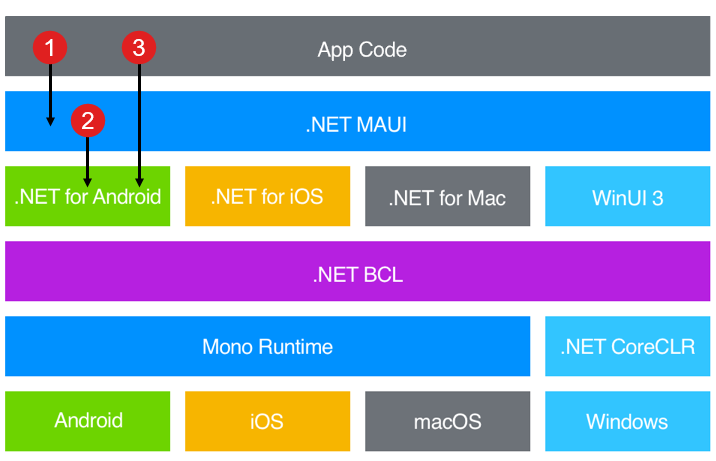
Understanding the .NET MAUI Architecture
 space
space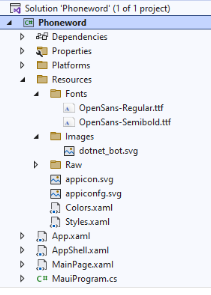
Project Structure
- App.xaml – This file sets up the resources that the app will use in its layout. The default resources are stored in the “Resources” folder and include colors and styles for all the built-in controls in .NET MAUI.
- App.xaml.cs – This code-behind corresponds to the App.xaml file, defining the App class. This class represents your application when it’s running. In its constructor, it initializes the initial window and sets it to the MainPage property. This property dictates the first page displayed when the app starts. Moreover, it allows you to customize common platform-independent lifecycle events like OnStart, OnResume, and OnSleep, which are part of the Application base class.
- AppShell.xaml – This file is the main file of a .NET MAUI application. The .NET MAUI Shell offers various features useful for multi-platform apps, such as styling, URI-based navigation etc. In the default template, there’s a single page that appears when the app launches.
- MainPage.xaml – This file holds the UI layout. There are several controls in the UI layout which can be organized using a StackPanels within a ScrollView. Replace the contents of this file with your own UI design. If you have a multi-page app, you can define additional XAML pages.
- MainPage.xaml.cs – This is the code-behind for the page. In this file, you define the logic for the various event handlers and other actions that are triggered by the controls on the page.
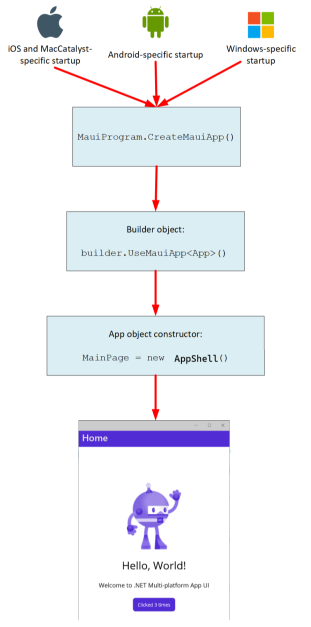
- MauiProgram.cs – In each platform, there’s a unique entry point responsible for creating and initializing the application. You’ll locate this code in the “Platforms” folder within the project. Although platform-specific, this code eventually calls the CreateMauiApp method from the static MauiProgram class. With the CreateMauiApp method, you configure the application by setting up an app builder object. The app builder also offers methods for various tasks like registering fonts, setting up services for dependency injection, and registering custom handlers.
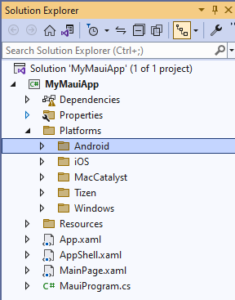
- Platforms – This folder holds platform-specific initialization code files and resources. It includes folders for Android, iOS and Windows platforms. During runtime, the app starts up in a platform-specific manner. The code files in these folders allow for custom initialization. After initialization is done, the platform-specific code invokes the MauiProgram.CreateMauiApp method, which then creates and runs the App object.
- Flow of control of .NET MAUI app start up:
Designing the User Interface
Understanding XAML for UI Definition
- Declarative Language: XAML (eXtensible Application Markup Language) serves as a declarative language for defining UI elements and their properties in .NET MAUI apps.
- Adaptive Layouts: Utilize XAML to create layouts that seamlessly adapt to various screen sizes and orientations, ensuring consistent user experiences across devices.
Leveraging Layout Controls for Flexibility
- StackLayout, GridLayout, FlexLayout: These layout controls offer flexibility in arranging UI elements, facilitating the creation of complex and responsive layouts.
- Constraints and Alignment: Understand the role of constraints and alignment properties to achieve precise control over element positioning and spacing.
Enhancing UI Responsiveness
- Asynchronous Programming: Incorporate asynchronous programming techniques to maintain UI responsiveness, especially during resource-intensive operations.
- Reactive UI Patterns: Implement reactive UI patterns to create responsive and fluid user interfaces that remain performant under heavy load.
- Data Binding and Command Binding: Utilize data binding and command binding to enable seamless interaction between UI elements and underlying data models.
Customization for Unique Designs
- Custom Styles and Templates: Customize the look and feel of .NET MAUI apps with support for custom styles and templates.
- Platform-Specific APIs: Leverage platform-specific APIs and native UI components to ensure a native look and feel across different platforms, enhancing user familiarity and usability.
Best Practices
Modular Architecture for Scalability
- Modularization: Design your .NET MAUI apps with a modular architecture to facilitate scalability and maintainability.
- Separation of Concerns: Adopt the principles of separation of concerns to decouple different parts of your application, making it easier to manage and extend.
Utilizing Dependency Injection for Loose Coupling
- Dependency Injection (DI): Implement DI to achieve loose coupling between components, enhancing testability and flexibility.
- Service Abstraction: Abstract platform-specific services with interfaces to enable easy swapping of implementations and improve code maintainability.
Error Handling and Logging for Reliability
- Error Handling: Implement robust error handling mechanisms to gracefully handle exceptions and provide informative error messages to users.
- Logging: Incorporate logging frameworks such as Serilog or Microsoft.Extensions.Logging to capture and track application events for troubleshooting and analysis.
Conclusion
- Official .NET MAUI Documentation – https://learn.microsoft.com/en-gb/dotnet/maui/?view=net-maui-8.0
- C#Corner .NET MAUI – https://www.c-sharpcorner.com/article/introduction-to-net-multi-platform-app-ui-maui-an-overview/
- LogRocket Demo – https://blog.logrocket.com/dotnet-maui-guide-complete-overview-demo/