Welcome to my blog! I’m truly grateful you’ve stopped by. Ready to learn something new? Stay curious, stay objective, get inspired—and most importantly, have fun!
We’ve all been there, the tests are green, the coverage report looks shiny, and you lean back thinking, “Nice, I got the green light.” Then production happens. And suddenly, that 100% coverage doesn’t feel as bulletproof as it looked. Let’s be real: code coverage tells you how much of your code runs during tests, but not how well those tests actually protect you from sneaky bugs.
That’s where mutation testing steps in — the ultimate reality check for your test suite. It doesn’t politely ask if your tests are doing their job; it breaks your code on purpose to see if they even notice. If the tests fail, great, they’re alert. If not, your code just got away with murder. In this post, we’ll explore Stryker.NET, the tool that brings this chaos to the .NET world. You’ll learn how to set it up, run it, and make your tests tougher than ever. Because if your code’s going to get wrecked, better it happens in your IDE than in production.
1. Mutation Testing: Going Beyond Code Coverage
1.1 What is Mutation Testing?
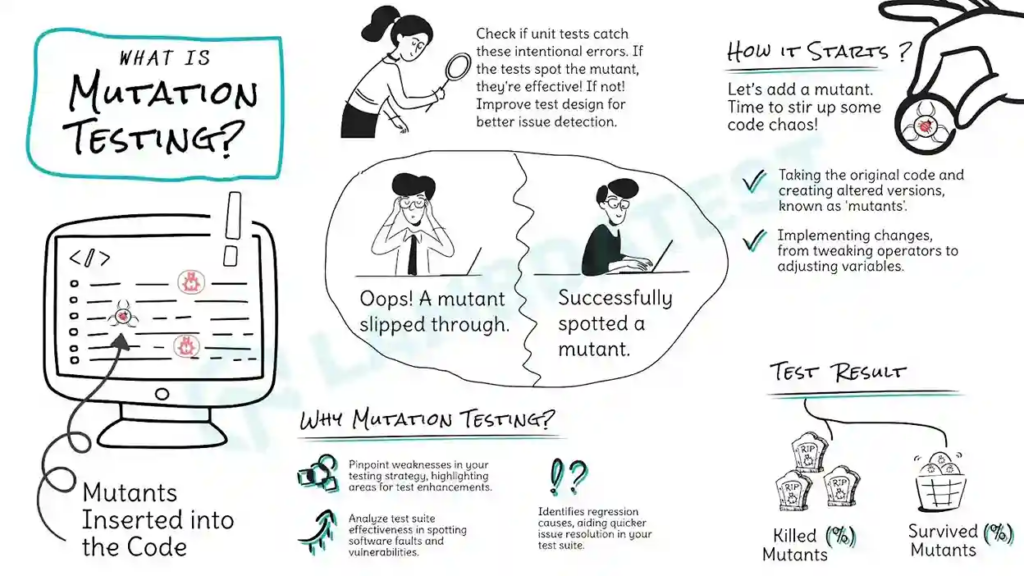
Mutation testing is a software testing technique used to evaluate the effectiveness of your test suite. Instead of simply checking whether your code works, it asks a deeper question: Can your tests detect when something goes wrong?
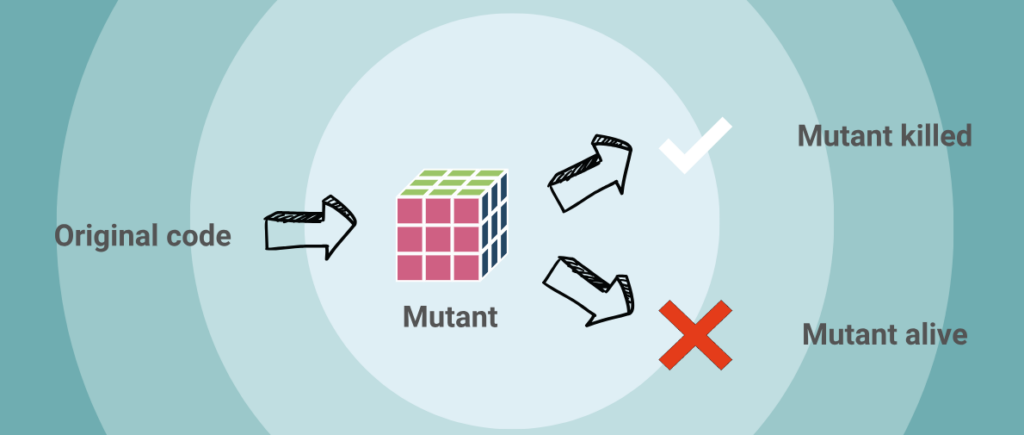
Here’s how it works: the system creates mutants — small, deliberate changes in your source code, such as flipping a > to <, changing a true to false, or altering an arithmetic operator like + to -. These mutations simulate potential bugs that might appear in real-world scenarios. Once the mutants are created, your existing tests are executed against them:
If a test fails, the mutant is killed, meaning your tests successfully detected the change.
If all tests pass, the mutant survived, indicating that your test suite didn’t catch the issue.
In short, mutation testing acts as a stress test for your test suite. It measures how sensitive your tests are to small but meaningful changes in your code, ensuring that your “green checks” truly reflect a reliable and resilient codebase.
1.2 Mutation Testing vs Code Coverage
Both mutation testing and code coverage aim to improve software quality, but they focus on very different questions.
Code coverage measures how much of your code is executed during testing. It shows which lines, branches, or methods your tests have touched. High coverage (like 90–100%) might look impressive, but it doesn’t necessarily mean your tests are effective — it only confirms that the code ran, not that it was properly verified. In other words, code coverage measures quantity, not quality.
Mutation testing, on the other hand, measures how well your tests can detect real issues. It deliberately introduces small faults into your code (mutations) and then reruns the tests. If the tests catch these changes, great — they’re strong and meaningful. If not, the surviving mutants reveal weak spots or missing scenarios in your test suite. To put it simply:
Code coverage asks, “Did my tests run through this code?”
Mutation testing asks, “Would my tests notice if this code broke?”
Feature
Mutation Testing
Code Coverage
Focus
Test quality
Test quantity
Detects weak tests
✅ Yes
❌ No
Can be fooled by trivial tests
❌ No (it’s smarter)
✅ Yes (e.g., tests that run but don’t assert)
Performance
🐢 Slower (more intensive)
🐇 Faster
Tool examples
Stryker (C#), PIT (Java)
Istanbul (JS), JaCoCo (Java), Coverage.py (Python)
2. Meet Stryker.NET
Stryker.NET doesn’t hate your code — it just wants to make your tests stronger.
2.1 What is Stryker.NET?
Stryker.NET is a mutation-testing tool for .NET projects (both .NET Core and .NET Framework). It helps you test your tests by introducing deliberate changes (mutations) in your production code and then running your unit test suite to see how many of these mutated versions the tests catch.
2.2 Key Features & Purpose
It automatically generates mutants small modifications like flipping > to <, changing logical operators, altering arithmetic operations, etc. to simulate potential bugs. Then it runs your existing test suite against each mutated version.
If a test fails, the mutant is killed (good → your tests detected the change).
If a test passes, the mutant survived (warning → your tests did not detect the injected change).
It produces detailed reports (including an HTML report) showing which mutants survived, which were killed, and a mutation score that reflects how strong your tests are.
It supports .NET test frameworks (like MSTest, NUnit, xUnit) and integrates with your existing test projects without needing a completely new test tool.
2.3 Why Use Stryker.NET?
Traditional metrics like code coverage only tell you how much of your code is executed by tests, not how well your tests detect errors. Stryker.NET fills that gap by measuring the effectiveness of your tests, if a mutant survives, it reveals a blind spot you should address.
Stryker.NET helps you elevate your test suite from just running to actually verifying that your code behaves correctly even when unexpected changes (mutations) occur.
3. Setting Up Stryker.NET
3.1 Install Stryker.NET
The first step was to add Stryker. Net to our project. Stryker.NET is a dotnet tool, so installing it is straightforward.
You can install a .NET tool either globally for your user account or locally for a specific project. Installing it locally ensures that anyone who clones the repository can run Stryker commands, even if they don’t have Stryker installed globally.
Local install:
dotnet new tool-manifest
dotnet tool install dotnet-stryker
This lets everyone who clones the repo run Stryker without a global install. Don’t forget to commit the dotnet-tools.json file.
Global install:
dotnet tool install -g dotnet-stryker
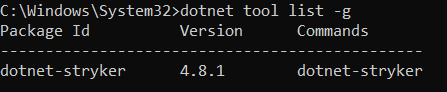
After Stryker.NET is installed, let’s verify the installation by running:
dotnet tool list -g
This command checks if Stryker is installed correctly and displays the installed version.
3.2 Running mutation tests
You might look at your code and feel confident because you’ve written many tests and your code coverage report shows 100% green; every line appears to be covered.
But does that really mean your code is bug-free? Let’s find out by running Stryker.
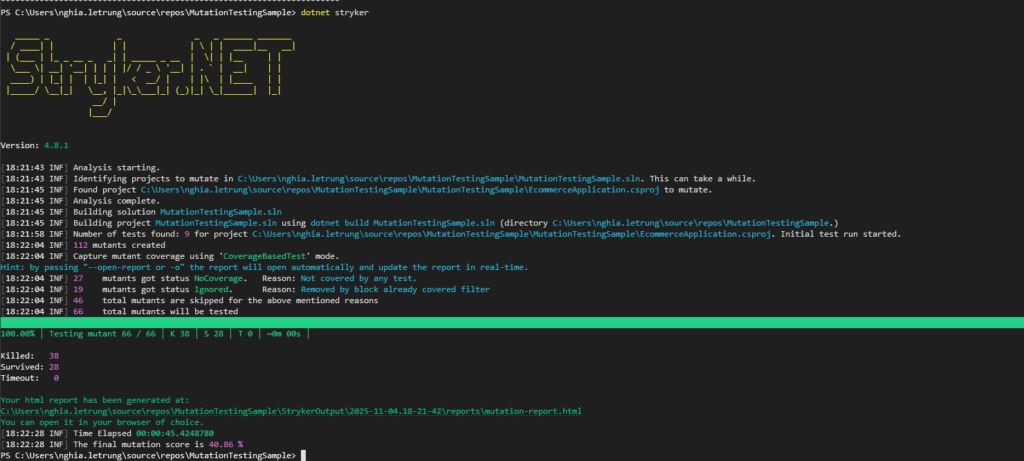
To run Stryker, simply execute this command in your terminal. You’ll then see a neat, easy-to-read summary of the results right in the CLI.
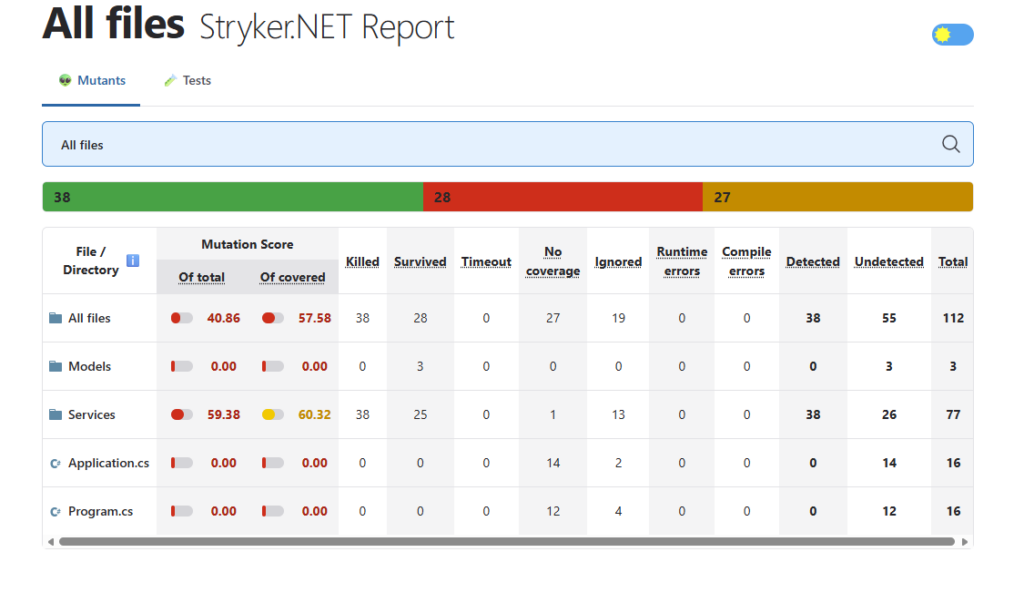
Near the end of the report, my mutation score showed 40.86%. In other words, a few pesky mutants made it out alive. But no worries — Stryker kindly generates an HTML report so we can see exactly where they’re hiding.
4. Understanding the Mutation Report
Now, let’s take a look at the HTML report that Stryker generated.
The HTML report provides a clean, visual overview of all the files that were analyzed, along with their individual results. In our case, there’s only one file — EcommerceService.cs. So, let’s click on it.
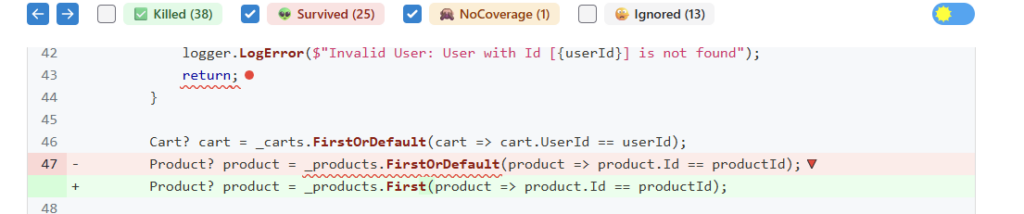
In this section, we can see which mutations survived — meaning our tests didn’t detect the change. Clicking on one shows the reason it managed to survive.
Here’s where mutation testing really shows its value. Stryker made small but meaningful tweaks — like changing a + to a -, flipping a == to !=, or modifying a LINQ method, etc. These mutations completely change the logic, so our tests shouldhave failed. But they didn’t, which means the problem isn’t in our code, it’s in our tests.
5. Improving Your Tests with Mutation Feedback
Now that we’ve seen which mutants survived, it’s time to turn those insights into action. Each surviving mutation points to a potential blind spot in our tests. A case we didn’t cover, an assertion that’s too weak, or logic that’s not being truly validated.
Start by reviewing the mutants that survived and ask yourself:
Did my test actually check the output of this logic?
Am I asserting the right conditions, or just running the code?
Are there any missing edge cases I should include?
By writing stronger, more specific assertions or adding missing test cases, you can make sure those surviving mutants get “killed” in the next mutation run.
The idea isn’t to chase a perfect 100% mutation score — that’s rarely practical. Instead, use the feedback as a guide to strengthen the areas of your code that matter most. Mutation testing helps you write tests that don’t just execute your code — they challenge it.
5.1 Spotting Surviving Mutations
To make this concrete, let’s grab some of the surviving mutations and figure out what went wrong — and how to fix it.
The first mutant is one of those sneaky troublemakers. Stryker swapped a == for a !=. That tiny change completely flipped the logic of our condition. Instead of checking whether an item already exists in the cart, the code now does the exact opposite. Basically, it forgot how equality works.
The second one is even nastier — Stryker turned a + into a -. That single tweak reversed the math entirely. The function should increase the quantity when user add the same item again, but with this mutation, it actually reduces it. Our tests should’ve screamed in protest, but instead, they just smiled and passed. Clearly, it’s time to make them a little more alert.
5.2 Strengthening Our Tests
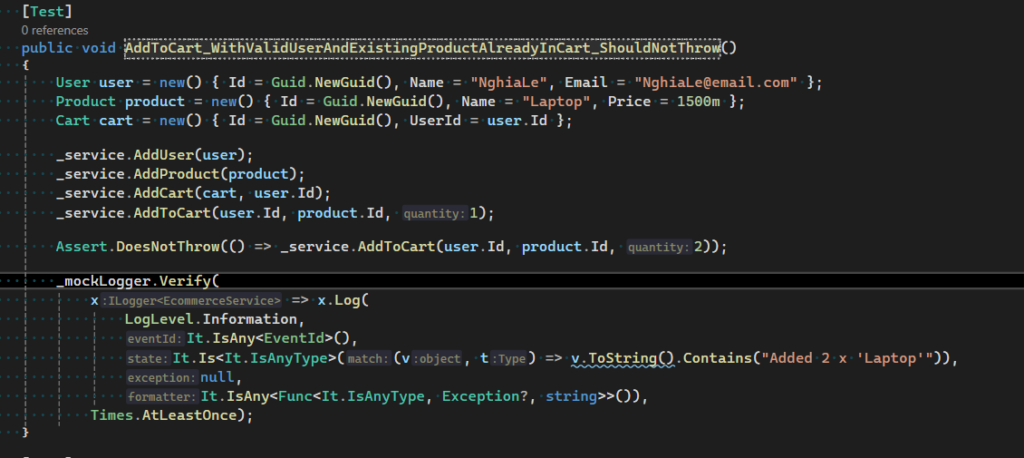
Right now, our test doesn’t assert the quantity of items already in the cart, so it never checks whether that number actually goes up when the same product is added again or even verifies if the existing item can be found. Time to make our test a bit smarter! Let’s add an assertion for the quantity field, run Stryker once more, and take another look at the HTML report.
Success! Our mutation score has inched up to 43.48%. The two red lines are gone, the kill count’s up to 40, and only 22 mutants are still standing.
Hopefully, this example makes the concept of mutation testing clearer — and maybe even a little more enjoyable to explore.
6. Benefits of Mutation Testing
Mutation testing goes beyond traditional metrics like code coverage by focusing on the quality of your tests, not just the quantity:
Reveals Weak or Missing Tests It exposes areas where your tests fail to detect real issues, helping you find blind spots that coverage reports can’t show.
Improves Test Suite Quality By forcing your tests to “catch” intentional code changes, you naturally strengthen your test logic and validation criteria.
Builds Confidence in Your Codebase When your tests kill most of the mutants, you can be confident that they’re truly protecting your code before every deployment.
Encourages Better Test Design It motivates developers to write more meaningful and precise tests rather than simply chasing high coverage numbers.
Complements Code Coverage Mutation testing doesn’t replace coverage — it enhances it. Together, they provide a complete picture of your test effectiveness.
7. Common Challenges & Best Practices
Mutation testing is a powerful way to measure test effectiveness, but it comes with some practical challenges. Knowing what to expect and following good practices will help you use it effectively.
Because mutation testing runs your entire test suite multiple times (once per mutant), it can be slow on large projects. Best practice: Start small. Run Stryker.NET on a single project or module first, then expand gradually. You can fine-tune configuration later for better performance.
Equivalent Mutants Some mutants don’t actually change the program’s behavior, even though we modify the code. These equivalent mutants can make results seem worse than they are. Best practice: Don’t aim for 100% mutation score. Focus on meaningful surviving mutants that highlight real weaknesses in your tests.
Interpreting the Mutation Score A low mutation score doesn’t mean your code is bad—it just shows where tests can improve. Best practice: Treat the score as a guide, not a grade. Use it to find weak spots and track progress over time.
Team Adoption Teams used to relying on coverage metrics may find mutation testing unfamiliar or time-consuming. Best practice: Start with examples that show the real bugs Stryker.NET uncovers. Seeing missed cases in action helps build buy-in quickly.
CI/CD Integration Running mutation tests on every build can slow down your pipeline. Best practice: Run Stryker.NET on a schedule (like nightly builds) or only for key modules. This keeps results meaningful without slowing development.
8. Final Thoughts on Mutation Testing
Mutation testing pushes your test suite beyond surface-level confidence. Instead of asking, “Did my tests run?”, it asks, “Would my tests catch real bugs?” That’s a powerful shift in mindset. Stryker.NET makes it practical to bring this level of rigor into .NET projects without much setup. By running it regularly, you’ll uncover weak spots, write sharper tests, and gain true confidence in your code quality.
In the end, mutation testing isn’t about breaking your code for fun. it’s about building software that’s strong enough to survive anything you throw at it.