


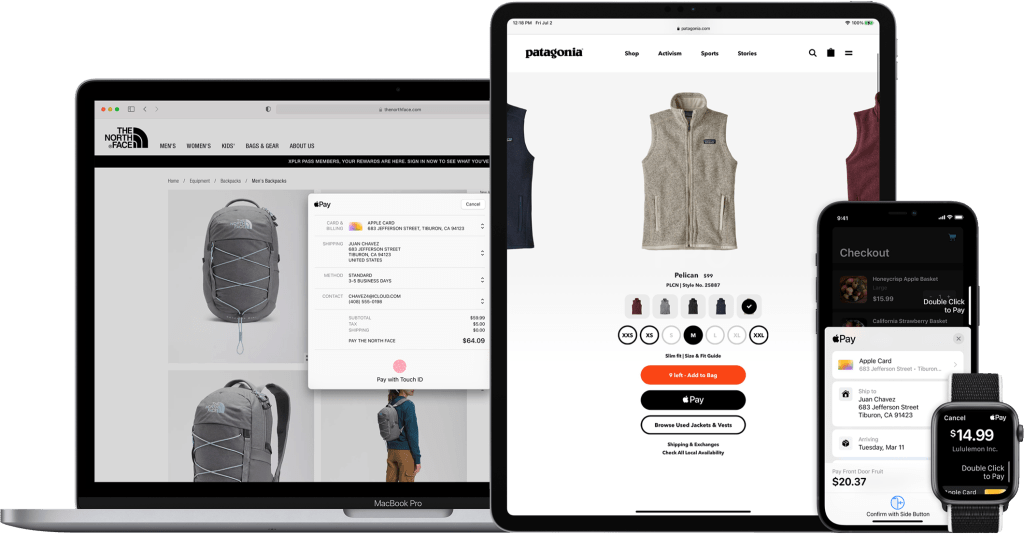
In the dynamic world of eCommerce, Apple Pay stands out with its seamless and secure transactions. To maintain its leadership and ensure an exceptional user experience, rigorous testing is essential. Join us as we explore the essentials of Apple Pay testing, focusing on optimizing every transaction to be both smooth and secure.
1. Introduction
1.1. Overview of Apple Pay Sandbox Testing
1.1.1. What is Apple Pay Sandbox Testing?
Apple Pay is a mobile wallet that enables secure purchases on the web and in iOS apps by encrypting cards in Apple Wallet and using a device-specific token called DPAN. Apple Pay Sandbox Testing is a risk-free environment for developers to test Apple Pay transactions and ensure proper functionality before launch.
1.1.2. Supported Regions
-
- Australia
- Canada
- China mainland
- Hong Kong
- Taiwan
- France
- Ireland
- Italy
- Japan
- New Zealand
- Russia
- Singapore
- Spain
- United Kingdom
- United States
Note: In production, real cards are required for testing; test cards won’t work.
To test Apple Pay in the sandbox, you’ll need:
- iPhone 6+, iPad mini 3+, iPad Air 2, iPad Pro, or Apple Watch
- App Store Connect sandbox account
- Test credentials
1.2. Purpose and Benefits
1.2.1. Purpose
The sandbox environment mimics real-world payment scenarios so you can test the performance and reliability of your Apple Pay setup. It helps in ensuring that your integration works smoothly before it goes live.
1.2.2. Benefits
- Security: Apple Pay uses tokenization and biometric authentication (Face ID, Touch ID) to protect user data, reducing the risk of fraud.
- Convenience: Users can make quick payments with just a tap of their device, both online and at physical stores.
- Privacy: Apple Pay does not store or share your card information with merchants, ensuring greater privacy for users.
- Wide Acceptance: Accepted by a vast number of merchants and online platforms globally, making it a versatile payment option.
- Integration: Seamlessly integrates with Apple’s ecosystem, including apps and services like Apple Watch and Siri, enhancing the user experience.
2. Getting Started
Get started with Apple Pay on the Web
2.1. Payment Flow
Apple Pay uses device-specific tokenized credit or debit card credentials (DPAN) in place of a Payment Account Number (PAN). When users authenticate the payment using Face ID, Touch ID or their passcode, the tokenized card data is returned to your app or website. This token can then be passed to your Payment Service Provider (PSP) to process as you would for a typical online credit or debit card payment.
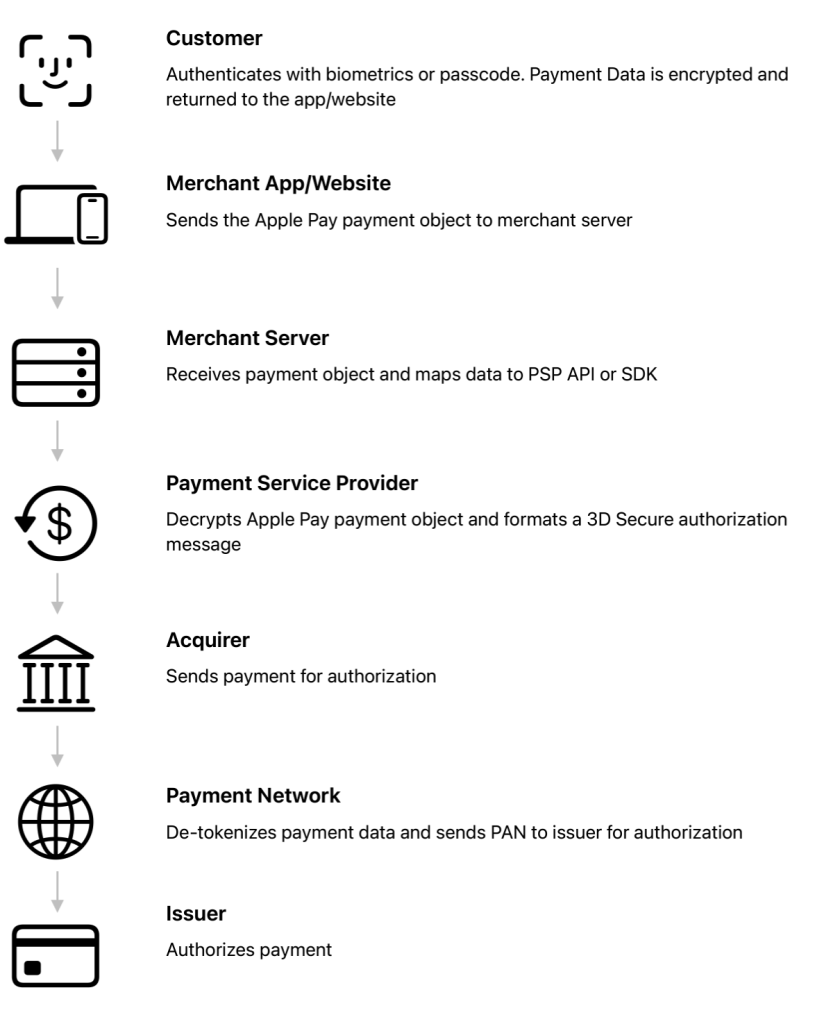

Image 3 – Apple pay model & flow
2.2. Setting up Apple Pay and Test Card
To set up Apple Pay with Apple Pay servers, configure your Apple Developer account.
In the Apple Pay sandbox, use designated test card numbers from American Express, Discover, Mastercard, and Visa to simulate transactions. These test cards come with predefined expiration dates and security codes. For China UnionPay, specific test cards require OTP and PIN. These cards are essential for verifying Apple Pay integration before going live.
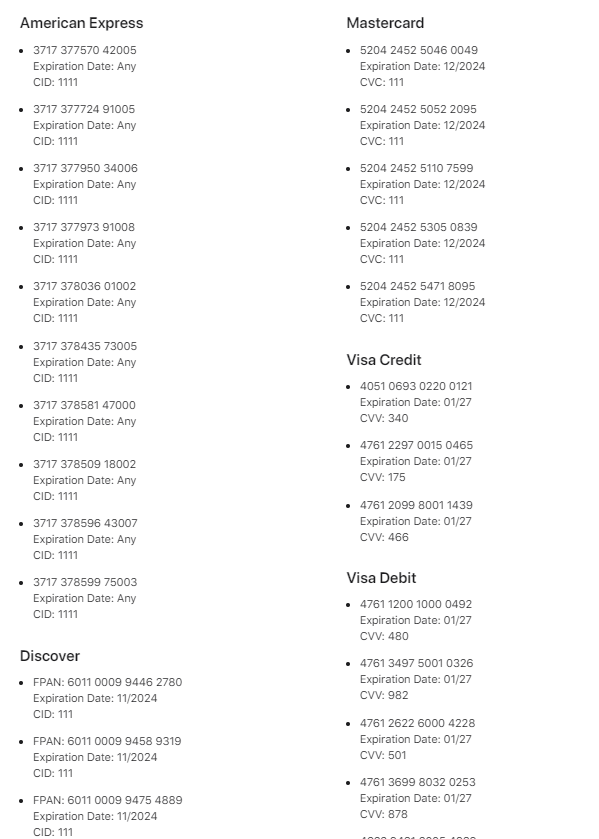
Image 4 – Test Cards
For detailed information, consult the Apple Pay sandbox documentation.
3. Configuring Your App
Adding a Test Card Number, to add a test card to Wallet for Apple Pay testing:
- Sign In: Log out of iCloud and sign in with your sandbox tester account.
- Open Wallet: Tap Add Credit or Debit Card.
- Enter Details: Use your test credentials to manually enter the card information.
- Begin Testing: After adding the card, you can start testing.
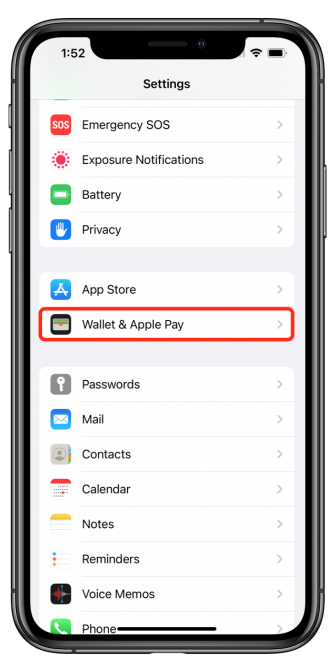
Image 5 – Tap Wallet & Apple Pay
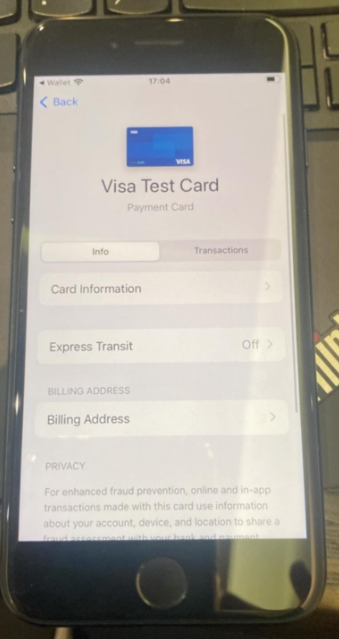
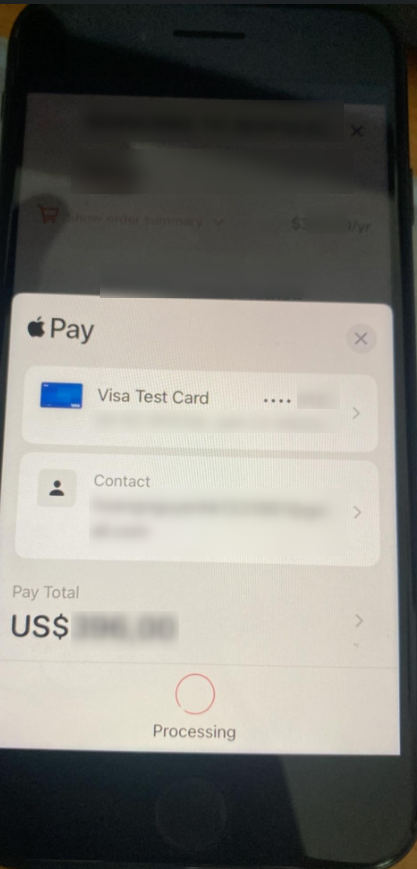
Image 7 – Payment success example
Note: Ensure your device’s region is set to a country that supports Apple Pay to use the test cards.
4. Testing Scenarios and Procedures for Apple Pay in eCommerce
| Scenario | Details | Outcome |
| Verifying Security Protocols | Test the encryption and tokenization of card data during the transaction process to ensure compliance with security standards. | Card data should be encrypted and tokenized correctly, with no sensitive information exposed at any point. |
| Testing Payment Authorizations | Simulate scenarios where additional payment authorization is required, such as 3D Secure, to ensure proper handling within Apple Pay. | The app should request and process additional authorization smoothly, with clear instructions for the user. |
| Assessing Performance Under Load | Perform stress tests by simulating multiple concurrent transactions to assess the system’s performance under high traffic conditions. | The system should maintain stability and performance under load, with no significant delays or failures. |
| Handling Refunds and Cancellations | Simulate refund and cancellation scenarios to ensure that the system correctly processes these actions and updates the customer and merchant. | Refunds and cancellations should be processed smoothly, with accurate updates to all involved parties. |
| Performance and Load Testing | Evaluate the payment system’s performance by testing its ability to handle maximum load with simultaneous transactions. | The system should demonstrate stable performance and handle peak loads without failures or significant delays, ensuring a seamless checkout experience for users. |
| Testing Discounts and Tax Calculations | Verify the application of discounts and ensure accurate tax calculations across different regions and countries. | Discounts should apply correctly, and tax calculations should be accurate for all applicable regions, ensuring compliance with local regulations. |
| Testing for Accessibility Compliance | Verify that the Apple Pay integration meets accessibility standards, ensuring it is usable by customers with disabilities (e.g., screen reader support). | Apple Pay should be fully accessible, with all features working seamlessly for users with disabilities. |
| Testing Integration with Other Systems | Ensure that Apple Pay integration works seamlessly with existing systems, such as inventory management, CRM, and order tracking systems. | All integrated systems should receive accurate data and function cohesively with Apple Pay, ensuring a smooth and efficient transaction process. |
| Testing Multiple Payment Methods | Test transactions with different payment methods (credit, debit, prepaid cards) to ensure that Apple Pay handles each type correctly. | Each payment method should be processed without issues, with correct handling of payment type-specific behaviors. |
| Post-Transaction Verification | Ensure that after a successful transaction, all related data (e.g., order confirmation, inventory updates) is correctly logged and processed. | All systems should reflect the transaction accurately, with no discrepancies in data records. |
| Using Test Card Numbers | Utilize provided test card numbers from different payment networks to simulate various transaction scenarios within the sandbox environment. | Transactions should be processed as expected using test cards, allowing developers to verify functionality without using real data. |
| Simulating Successful Transactions | Test a variety of successful payment scenarios with different amounts, currencies, and customer profiles. | Transactions should complete successfully, with accurate merchant details, and users should receive a clear confirmation. |
| Simulating Currency Conversions | Test scenarios where currency conversion is required for international transactions to ensure accuracy and compliance with regulations. | Currency conversions should be handled accurately, with clear and transparent information provided to the user. |
| Handling Payment Declines | Simulate scenarios where payments are declined due to insufficient funds, expired cards, or incorrect card details. | The payment should be declined with an appropriate error message displayed to the user, and no transaction should be recorded. |
| Testing with Different Devices | Perform tests on various devices, including iPhone, iPad, and Apple Watch, to ensure compatibility and consistent performance across platforms. | Apple Pay should function seamlessly across all supported devices, with consistent behavior and user experience. |
| Testing Regional Settings | Change the device region to different countries to test the behavior of Apple Pay in various locales. | Apple Pay should adapt to different regional settings, including currency changes and localization of payment information. |
| Cross-Browser Testing | Test the Apple Pay functionality on different web browsers (e.g., Safari, Chrome, Firefox) to ensure compatibility and proper performance. | Apple Pay should work consistently across all supported browsers, with no UI/UX issues. |
| Simulating Network Errors | Introduce network interruptions or slowdowns during the payment process to test the app’s ability to handle such conditions gracefully. | The app should handle errors smoothly, providing the user with clear instructions on how to retry or resolve the issue. |
| Evaluating Edge Cases | Test unusual or rare scenarios, such as duplicate transactions, partial payments, or extremely high-value transactions. | The app should handle edge cases gracefully, with clear feedback to the user and proper logging for investigation if needed. |
| Testing Sandbox Environment Stability | Regularly test the Apple Pay sandbox environment to ensure that it remains stable and accurate for ongoing development and testing purposes. | The sandbox should be stable, with consistent performance and accurate simulation of real-world scenarios. |
This table outlines essential and recommended testing scenarios for Apple Pay in eCommerce, detailing the description, expected results of each scenario’s importance.
5. Essential Tools for Apple Pay Testing
For effective Apple Pay sandbox testing, you need a few critical tools:
- Apple Developer Account: Access sandbox and manage test accounts.
- Test Cards: Simulate transactions without real credit cards.
- App Store Connect: Configure settings and manage tester accounts.
- Xcode: Develop and debug Apple Pay integrations.
- Charles Proxy / Wireshark: Monitor and troubleshoot network interactions.
- Postman: Validate API endpoints and responses.
- Bug Tracking: Tools like JIRA to track and resolve issues.
- Automation Tools: Selenium or Appium for efficient, automated testing.
These tools ensure a comprehensive and effective testing process for Apple Pay integrations.
6. Key Challenges and Strategies for Apple Pay Sandbox Testing in eCommerce
| Key Challenge | Description | Strategy | Details |
| Environment Setup | Ensuring that the sandbox environment is correctly configured with necessary test credentials and devices. | Comprehensive Testing: Use a variety of test cards to cover different scenarios. | Configure the sandbox environment with test credentials and certificates, and ensure that devices used are set up correctly. Register a Merchant ID and create required certificates. |
| Registering a Merchant ID and creating the required certificates. | Real-World Simulation: Simulate real-world conditions by testing in both sandbox and production. | Validate environment setup by testing with multiple scenarios, including edge cases, and compare sandbox results with production environment for accuracy. | |
| Testing Limitations | Test cards in the sandbox may not fully replicate real-world scenarios. | Continuous Monitoring and Updates: Regularly update test credentials and devices. | Use test cards to simulate various scenarios such as successful transactions, declines, and errors. Continuously monitor test results and update configurations as needed. |
| Some features available in the production environment might not be available in the sandbox. | Documentation and Training: Maintain detailed documentation of the testing process. | Document any discrepancies between sandbox and production environments. Train team members to understand these limitations and adjust testing strategies accordingly. | |
| Device Compatibility | Ensuring all testing devices are compatible with Apple Pay and set to a region that supports it. | Real-World Simulation: Test across multiple devices and browsers to ensure compatibility. | Verify that all testing devices support Apple Pay and are configured correctly. Test on a range of devices and browsers to cover different user experiences and configurations. |
| Security and Compliance | Ensuring that all webpages hosting an Apple Pay button are HTTPS and support TLS 1.2. | Continuous Monitoring and Updates: Monitor for issues and address discrepancies promptly. | Ensure that all test environments use HTTPS and support TLS 1.2. Regularly review and update security measures to comply with industry standards and Apple’s requirements. |
| Documentation and Training: Provide training on using the sandbox environment and troubleshooting. | Provide comprehensive documentation on security requirements and best practices. Train team members on security protocols and compliance issues related to Apple Pay. |
7. Best Practices
- Create Test Accounts: Set up sandbox accounts via App Store Connect.
- Test on Multiple Devices: Use various Apple devices for thorough coverage.
- Use Test Cards: Simulate transactions with Apple’s test cards.
- Simulate Scenarios: Test successes, declines, errors, and edge cases.
- Update Test Data: Keep credentials and data current.
- Validate Localization: Test with different currencies and languages.
- Monitor Transactions: Review and document all tests.
- Finalize in Production: Test with real cards before going live.
8. Conclusion
In eCommerce, Apple Pay Sandbox Testing is essential for ensuring a secure and efficient payment process. It enables developers to test integrations thoroughly with different scenarios and devices before going live. By adhering to best practices, you can identify and resolve potential issues, ensuring a seamless and reliable payment experience for customers.
Reference:
- Apple Pay – https://developer.apple.com/design/human-interface-guidelines/apple-pay
- Sandbox Testing – https://developer.apple.com/apple-pay/sandbox-testing/
- Overview of testing in sandbox – https://developer.apple.com/help/app-store-connect/test-in-app-purchases/overview-of-testing-in-sandbox
- Setting up Apple Pay – https://developer.apple.com/documentation/passkit_apple_pay_and_wallet/apple_pay/setting_up_apple_pay
- Create Sandbox Apple IDs – https://developer.apple.com/help/app-store-connect/test-in-app-purchases/create-sandbox-apple-ids/
- Countries and regions that support Apple Pay – https://support.apple.com/vi-vn/102775
- Apple Pay on the Web Interactive Demo – https://applepaydemo.apple.com/
- Apple Pay Merchant Integration Guide – https://developer.apple.com/apple-pay/Apple-Pay-Merchant-Integration-Guide.pdf
- Get started with Apple Pay on the Web – https://developer.apple.com/videos/play/tech-talks/111381
- Testing Apple Pay – https://testingbot.com/support/mobile/manual/apple-pay.html#:~:text=It%20is%20not%20possible%20to%20test%20the%20Apple,automated%20and%20manual%20iOS%20tests%20with%20Apple%20Pay
- Sandbox Apple Pay Testing – https://resource.payrix.com/resources/sandbox-apple-pay-testing
- Apple Pay Registration – https://resource.payrix.com/resources/apple-pay#button
- How to Set Up and Use Apple Pay on Your iPhone – https://www.hellotech.com/guide/for/how-to-set-up-and-use-apple-pay
- Pay the Apple way -https://www.apple.com/apple-pay/#setup
- Configure Apple Pay – https://developer.apple.com/help/account/configure-app-capabilities/configure-apple-pay#create-a-payment-processing-certificate
- Configuring Your Environment – https://developer.apple.com/documentation/apple_pay_on_the_web/configuring_your_environment
- Apple Pay on the Web – https://developer.apple.com/documentation/apple_pay_on_the_web
- What’s new in Wallet and Apple Pay – https://developer.apple.com/videos/play/wwdc2020/10662 -https://developer.apple.com/videos/play/wwdc2021/10092
- Apple Pay Marketing Guidelines – https://developer.apple.com/apple-pay/marketing/
- How to Add Cards to Apple Wallet on an iPhone and iPad – https://www.wikihow.com/Add-Cards-to-Apple-Wallet – https://www.youtube.com/watch?app=desktop&v=e8ZYjjw6Wt4 – https://beebom.com/how-set-up-apple-pay/
- Key Challenges and Strategies for Apple Pay Sandbox Testing in – Apple pay testing requirement in my New e… – Apple Community – Apple Pay Sandbox Testing: How to Get Started and Test (contrank.com) – Apple Pay sandbox testing setup (accesspaysuite.com)