



In this blog, we will see how Openkruise extends the features of Kubernetes by introducing ImagePullJob as an enhanced operation.
ImagePullJob
This is a new feature of Openkruise (v0.8.0).
ImagePullJob is a CRD that creates a Job to pull the image on the specified nodes. It is a namespaced-scope resource. It is not enabled by default so we have to set the value of FeatureGate as ImagePullJobGate=true.
Pre-requisites:
- Kubernetes cluster (>=1.16)
- Helm v3 installed
Install helm v3:
curl –fsSL -o get_helm.sh https://raw.githubusercontent.com/helm/helm/master/scripts/get-helm-3
chmod 700 get_helm.sh
./get_helm.sh
Install Openkruise:
We will begin by installing openkruise and its related components via helm. Use the following cli commands to install Openkruise:
- Add the helm repository
helm repo add openkruise https://openkruise.github.io/charts/ - Install the latest version of kruise
helm install kruise openkruise/kruise –version 1.5.2# You can check the official doc to see the latest version
- Install the Kruise state metrics
helm install kruise-state-metrics openkruise/kruise-state-metrics –version 0.1.0
Upgrade Kruise Chart to enable ImagePullJob feature:
helm upgrade kruise <CHART> –set featureGates=”ImagePullJobGate=true”
Working Example of an ImagePullJob
Lets first check the images present in the worker node node01.
Enter the node.
ssh node01
Check the images present in this node. IT uses CRI-O.
crictl images
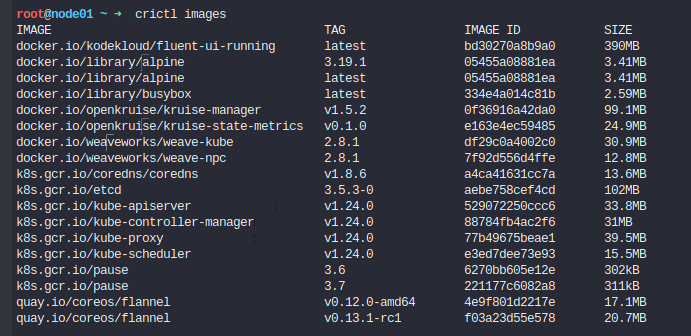
We don’t have an nginx image in the worker node as of now.
Manifest of an ImagePullJob
Let’s look at the ImagePullJob manifest first.
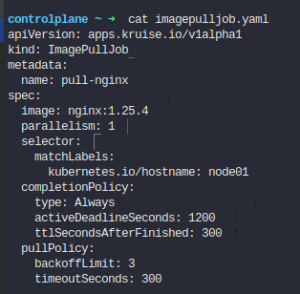
In this definition, we have added a selector field that will match the labels in every nodes. If a node has the same label, it will install the nginx image with tag 1.25.4. Parallelism defines the number of nodes that pulls this image at the same time. ImagePullJob will make sure that the nodes which match the labels given in the selector field of its manifest has the image we specify.
Apply the manifest.
kubectl apply imagepulljob.yaml

It has created the imagepulljob. This should create a job that installs the nginx image on node01.

Validate the operation of the ImagePullJob
Ssh into the node to check if the image is now present or now.
ssh node01
crictl images
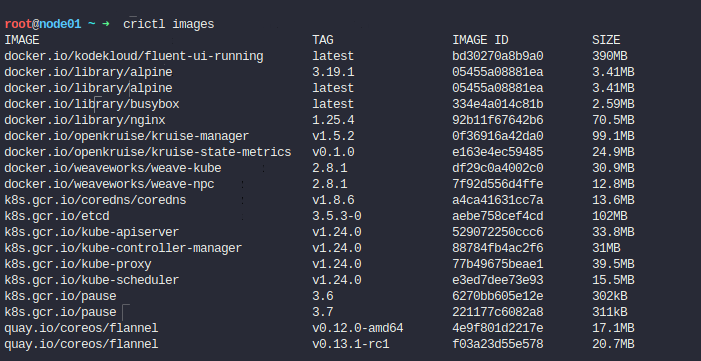
As we can see, it successfully installed the image of nginx with a tag 1.25.4 in node01.
Hey, readers! Thank you for sticking up till the end. This was a brief on spinning AWS resources using Spacelift and Terraform. If you have any questions/feedbacks regarding this blog, I am reachable at vidushi.bansal@nashtechglobal.com. You can find more of my blogs here.