



Introduction
Azure Cosmos DB is a globally distributed, multi-model database service designed for massive scale, low-latency applications. While its capabilities are impressive out of the box, optimizing throughput can further enhance its performance, scalability, and cost-effectiveness. In this guide, we’ll explore various strategies and best practices for maximizing throughput in Azure Cosmos DB.
Understanding Throughput in Azure Cosmos DB
Throughput in Azure Cosmos DB refers to the number of Request Units (RUs) available for database operations per second. RUs encapsulate the computational resources required to perform read and write operations. Properly configuring throughput ensures optimal performance without over-provisioning, which can lead to unnecessary costs.
Strategies for Throughput Optimization
1. Data Modeling
- Use Partitioning: Partition the data effectively to distribute workload evenly across physical partitions. Well-designed partition keys prevent hot partitions and maximize throughput.
- Denormalization: Denormalize data where appropriate to minimize the number of cross-partition queries, reducing RU consumption.
- Indexing: Choose indexing policies wisely to balance query performance with RU consumption. Avoid unnecessary indexes that can increase write latency.
2. Provisioning Throughput
- Estimate Workload: Analyze the application’s workload patterns to estimate the required throughput accurately. Tools like Azure Cosmos DB Capacity Planner can assist in this process.
- Autoscale: Leverage autoscale to dynamically adjust throughput based on workload demand. This ensures optimal performance during peak periods while minimizing costs during low-traffic times.
- Manual Provisioning: For predictable workloads, manually provision throughput to maintain consistent performance levels.
3. Query Optimization
- Query Metrics: Monitor query performance using Azure Monitor and Cosmos DB diagnostics to identify inefficient queries and optimize them.
- Query Tuning: Optimize queries by leveraging indexing, partition keys, and query hints to reduce RU consumption and improve execution efficiency.
- Batch Operations: Use bulk insert, update, and delete operations to minimize RU consumption and improve throughput for bulk data operations.
4. Network Optimization
-
- Virtual Network Integration: Securely connect Azure Cosmos DB to virtual network using Virtual Network Service Endpoints or Private Link to reduce latency and improve throughput.
- Multi-region Writes: Distribute write operations across multiple regions to leverage Azure Cosmos DB’s global distribution capabilities and improve throughput for geographically dispersed users.
5. Monitoring and Optimization
-
- Performance Monitoring: Continuously monitor Azure Cosmos DB performance metrics using Azure Monitor and Cosmos DB diagnostics to identify bottlenecks and optimize throughput.
- Cost Optimization: Regularly review and adjust throughput settings based on workload changes to ensure optimal performance and cost-effectiveness.
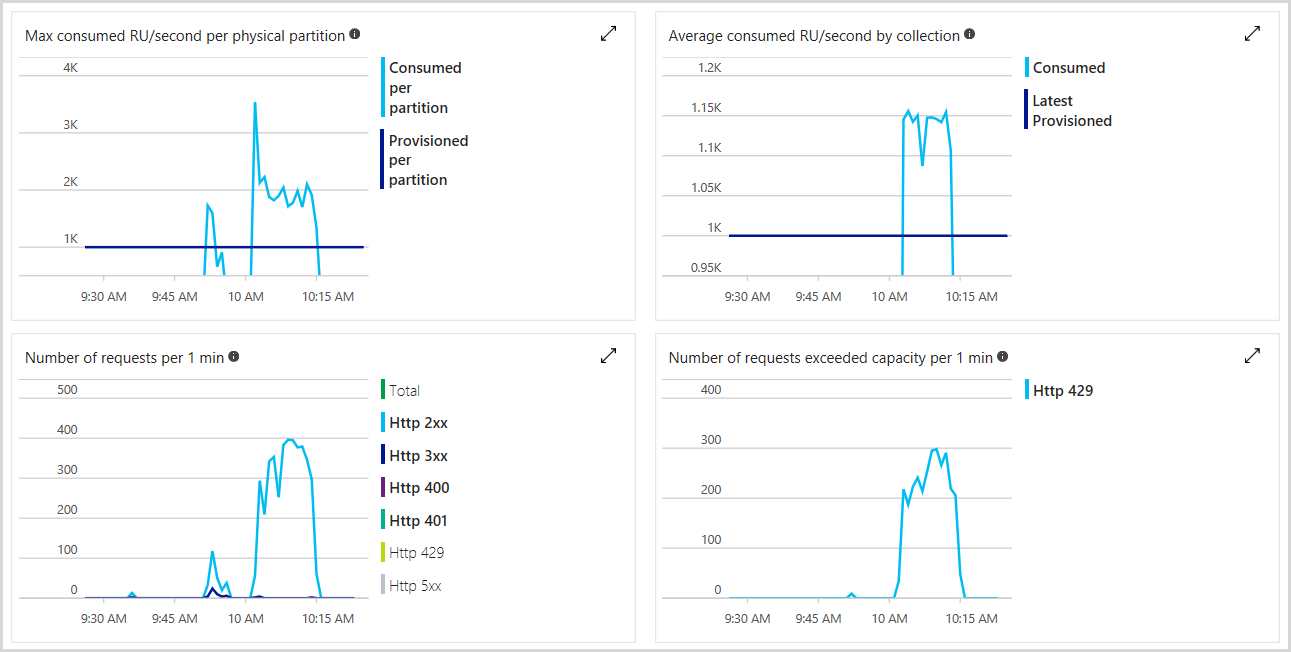
We can monitor the total number of RUs provisioned, number of rate-limited requests as well as the number of RUs we’ve consumed in the Azure portal. The following image shows an example usage metric
Example: E-commerce Application
Consider an e-commerce application that experiences fluctuating workload patterns, with peak traffic during sales events and holidays. The application utilizes Azure Cosmos DB to store product catalog, customer profiles, order history, and session data.
Challenges
Peak Workload Handling: During sales events, the application encounters spikes in traffic, resulting in increased read and write operations on the database.
Cost Management: Provisioning high throughput to handle peak loads can lead to unnecessary costs during off-peak periods.
Query Performance: Complex queries for product recommendations and order processing may consume excessive RUs, impacting overall database performance.
Optimization Strategies
Autoscaling Throughput
- Configure autoscale to automatically adjust throughput based on workload demand. During sales events, auto scale provisions additional RUs to handle increased traffic, ensuring optimal performance. During off-peak periods, autoscale reduces throughput to minimize costs.
Partitioning
- Partition the data based on access patterns, such as customer ID or product category, to distribute workload evenly across physical partitions. This prevents hot partitions and maximizes throughput.
- For example, partitioning orders by customer ID ensures that orders from different customers are distributed across partitions, preventing bottlenecks during order processing.
Indexing and Query Optimization
- Use selective indexing to optimize query performance while minimizing RU consumption. For instance, index frequently queried fields like product name or SKU.Utilize query hints to optimize complex queries and reduce RU consumption. For example, specifying the preferred index to use in a query can improve execution efficiency.
Network Optimization
- Leverage Virtual Network Integration to securely connect the e-commerce application to Azure Cosmos DB using Virtual Network Service Endpoints. This reduces latency and improves throughput for database operations.
- Enable multi-region writes to distribute write operations across multiple Azure regions, ensuring low-latency access for geographically dispersed users.
Results
By implementing these optimization strategies:
- The e-commerce application will achieves high performance and scalability during peak traffic periods, thanks to autoscaling throughput.
- Cost-effectiveness is improved as autoscale dynamically adjusts throughput based on workload demand, minimizing unnecessary costs during off-peak periods.
- Query performance is enhanced through selective indexing and query optimization, resulting in faster response times and reduced RU consumption.
- Network optimization measures reduce latency and improve throughput for database operations, ensuring a seamless user experience for customers worldwide.
Conclusion
Optimizing throughput in Azure Cosmos DB is crucial for achieving high performance, scalability, and cost-effectiveness in our applications. By implementing the strategies and best practices outlined here, we can maximize throughput while minimizing costs, ensuring a seamless user experience even under heavy workloads. Continuously monitor and optimize our Azure Cosmos DB deployment to adapt to changing workload patterns and maintain peak performance over time.