


Azure Durable Functions provide a robust framework for building complex, stateful applications in a serverless environment. This blog will guide you through creating a sample application using Azure Durable Functions, incorporating an HTTP trigger, a timer trigger, an orchestrator function, a sub-orchestrator function, and activity functions.
Introduction to Azure Durable Functions
Azure Durable Functions extend Azure Functions to manage stateful workflows and long-running operations. They enable you to define workflows using code, manage state transitions, and coordinate complex processes with ease.
Scenario Overview
In this sample application, we will build a workflow for processing user data. The workflow will be triggered by an HTTP request and periodically by a timer trigger. The orchestrator function will manage the overall workflow, which includes calling a sub-orchestrator and several activity functions to perform specific tasks.

Step-by-Step Guide
1. Create a function app project
- In Visual Studio, on the File menu, select New > Project.
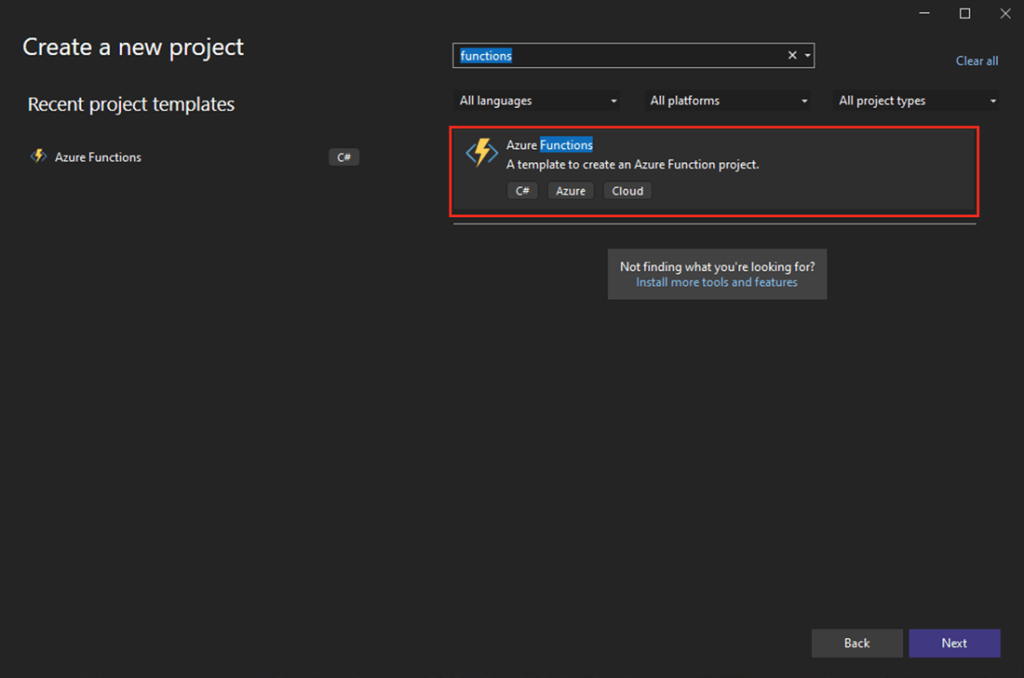
- On Create a new project, search for functions, select the Azure Functions template, and then select Next.
- For Project name, enter a name for your project, and then select OK. The project name must be valid as a C# namespace, so don’t use underscores, hyphens, or nonalphanumeric characters.
- On Additional information, use default settings.
Step 2: Define the HTTP Trigger Function
Create an HTTP trigger function that will start the orchestrator.
[FunctionName("Function1_HttpStart")]
        public static async Task<HttpResponseMessage> HttpStart(
            [HttpTrigger(AuthorizationLevel.Anonymous, "get", "post")] HttpRequestMessage req,
            [DurableClient] IDurableOrchestrationClient starter,
            ILogger log)
        {
            // Function input comes from the request content.
            string instanceId = await starter.StartNewAsync("OrchestratorFunction", null);

            log.LogInformation("Started orchestration with ID = '{instanceId}'.", instanceId);

            return starter.CreateCheckStatusResponse(req, instanceId);
        }
Step 3: Define the Timer Trigger Function
Create a timer trigger function that will also start the orchestrator on a schedule.
[FunctionName("TimerStart")]
public static async Task TimerStart(
    [TimerTrigger("0 */5 * * * *")] TimerInfo timer,
    [DurableClient] IDurableOrchestrationClient starter,
    ILogger log)
{
    string instanceId = await starter.StartNewAsync("OrchestratorFunction", null);

    log.LogInformation($"Started orchestration with ID = '{instanceId}' due to timer trigger.");
}
Step 4: Define the Orchestrator Function
Create an orchestrator function that coordinates the workflow.
[FunctionName("OrchestratorFunction")]
public static async Task OrchestratorFunction(
    [OrchestrationTrigger] IDurableOrchestrationContext context)
{
    var userId = context.GetInput<string>();

    // Call sub-orchestrator
    await context.CallSubOrchestratorAsync("SubOrchestratorFunction", userId);

    // Call activity functions
    await context.CallActivityAsync("SendNotification", userId);
}
Step 5: Define the Sub-Orchestrator Function
Create a sub-orchestrator function to handle part of the workflow.
[FunctionName("SubOrchestratorFunction")]
public static async Task SubOrchestratorFunction(
    [OrchestrationTrigger] IDurableOrchestrationContext context)
{
    var userId = context.GetInput<string>();

    // Call activity functions
    await context.CallActivityAsync("ValidateUserData", userId);
    await context.CallActivityAsync("ProcessUserData", userId);
}
Step 6: Define Activity Functions
Create the activity functions to perform the actual tasks.
Validate User Data Activity Function:
[FunctionName("ValidateUserData")]
public static async Task ValidateUserData([ActivityTrigger] string userId, ILogger log)
{
    log.LogInformation($"Validating user data for {userId}.");
    // Simulate validation logic
    await Task.Delay(1000);
}
Process User Data Activity Function:
[FunctionName("ProcessUserData")]
public static async Task ProcessUserData([ActivityTrigger] string userId, ILogger log)
{
    log.LogInformation($"Processing user data for {userId}.");
    // Simulate processing logic
    await Task.Delay(2000);
}
Send Notification Activity Function:
[FunctionName("SendNotification")]
public static async Task SendNotification([ActivityTrigger] string userId, ILogger log)
{
    log.LogInformation($"Sending notification for {userId}.");
    // Simulate sending notification
    await Task.Delay(500);
}
Step 7: Test the Application
- Test the HTTP Trigger:
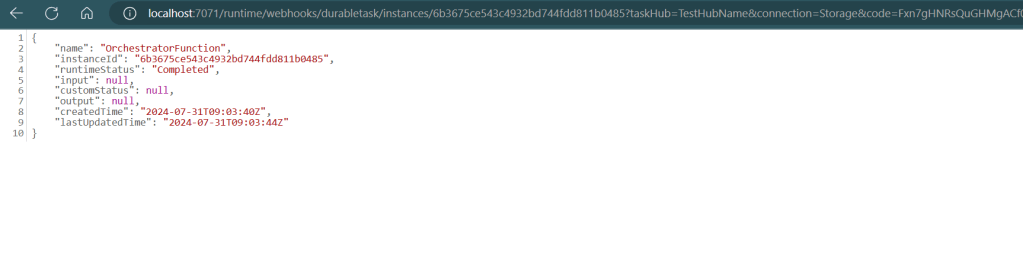
- Make an HTTP request to the function app’s URL to trigger the workflow and you will have output like this.

- Test the Timer Trigger:
- Verify that the timer trigger starts the orchestrator at the specified intervals (every 5 minutes in this example).
Conclusion
Azure Durable Functions enable the creation of complex, stateful workflows in a serverless environment. By using an orchestrator function, sub-orchestrator function, and multiple activity functions, you can manage long-running processes, coordinate tasks, and handle state efficiently. This sample application demonstrates how to trigger such workflows using both HTTP and timer triggers, showcasing the flexibility and power of Azure Durable Functions.