


Playwright has always been a powerful end-to-end testing platform, but now automation engineering is moving towards an AI-driven future with the release of Playwright Test Agents. These playwright agents can plan tests, generate playwright test scripts, and heal flaky tests. They also help teams achieve the best test coverage faster than ever. In this blog we will walk through:
What are Playwright Test Agents?
Now, Playwright offers three integrated AI-powered test agents that enhance and expedite the complete automation process.
Planner
The Planner Agent explores the application in real time and understands the UI structure, user experiences and actions. This agent generates a clear, human-readable markdown test plan that outlines the steps, validations, and anticipated results for each scenario. This test plan becomes the blueprint for test generation.
Generator
The Generator Agent takes the planner’s markdown test plan and converts it into executable Playwright test scripts. It communicates with the live application to verify selectors, find the best locators and build reliable test code.
Healer
The Healer Agent executes the test suites generated by the generator and automatically corrects failing tests. It checks the user interface (UI) during runtime, locates substitute selectors when elements change, modifies waits, and updates flows when the application behaves differently.
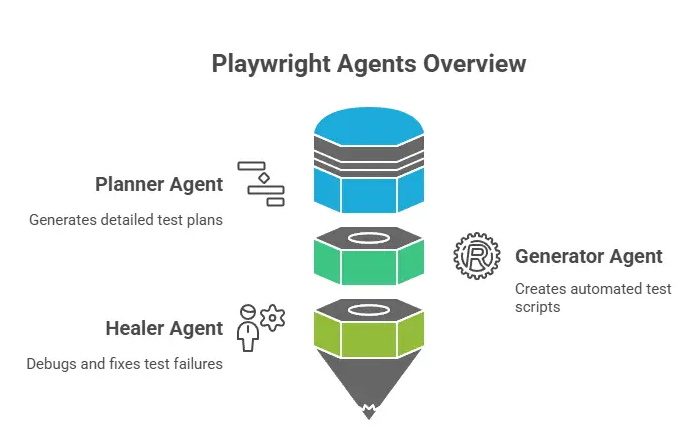
How They work together?
We can run these agents independently or chain them together in a sequence:
Planner → Generator → Healer
This agentic loop enables a fully AI-assisted automation workflow:
Explore the application → Create a test plan → Generate scripts → Self-heal failures → Expand coverage.
Playwright Test Agents significantly reduce manual effort, accelerate test creation, and help teams maintain stable automation even as the application evolves.
How I implemented Playwright Test Agents Locally
Playwright provides a built-in init-agents command that establishes all required definitions for AI agents.
Initialize Playwright Test Agents
npx playwright init-agents --loop=vscode
I ran this command on the vscode terminal. This generated:
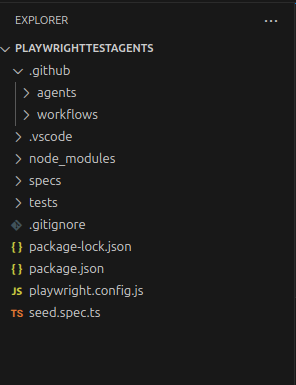
After the agents are created, you can instruct them to create Playwright tests using your preferred AI tool.
1. Planner – Explore the App & Create a Test Plan
The planner agent is responsible for understanding your application and creating a Markdown plan for the scenarios you want to automate.
Planner Inputs:
- A clear prompt, Example: “Explore the app and generate a test plan for Admin → Add Employee. Use seed.spec.ts as a base.”
- A seed test that creates the necessary environment to interact with your application.
Prompt:
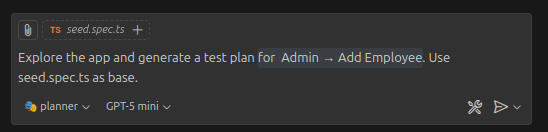
The planner will run this seed test file to execute all initialization necessary for your test case, including the overall setup, project dependencies and all the required fixtures and hooks.
Example Seed Test:

Planner Output: It produces a human-readable test plan like specs/add-employee-plan.md. This markdown plan contains scenarios, preconditions, steps, expected outcomes, success criteria, and failure criteria.
2. Generator: Convert Test Plan into Playwright Tests
The generator reads everything in specs/add-employee-plan.md and converts the Markdown steps into real Playwright Test scripts. It verifies selectors in real time as it executes the flows described in the plan.
Generator Input
- Markdown plan (
specs/add-employee-plan.md - A clear prompt, for example: “Generate tests from the test plan for scenario 1 – TC001.”
Prompt
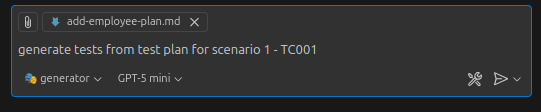
It will read the markdown test plan and perform the scenario step directly in the browser. It verifies each selector live and convert validated steps into playwright test script.
Generator Output: It will generate the playwright test suite under the tests folder, like tests/add-employee-tc001.spec.ts. This test file mirror the structure of your markdown plan scenario. It may include initial errors, but the healer agent will automatically repair them.
3. Healer – Fix failing Test Automatically
The healer agent automatically recommends solutions like locator updates, waits, or data modifications after replaying the problematic stages and checking the user interface for updated or comparable selectors. The test is then repeated until it succeeds.
Healer Input
- Name of the failing test: tests/add-employee-tc001.spec.ts
- A clear prompt, for example: “Run and fix the test add-employee-tc001.spec.ts.”
Prompt

After triggering, the Healer agent replayed the failing steps, fixed the broken locator automatically, and re-ran the test until it passed.
Healer Output: The healer agent repairs the test and ensures it passes successfully.
How Do These Agents Help Automation Testers?
- Reduce Manual Effort: The planner and generator automatically create test plans and test scripts. They are removing the need to write repetitive steps manually. This saves lots of time and lets testers focus on complex problems and validations.
- Improve Test Coverage: The planner explores the application thoroughly and finds out the key user flows. It ensures no important scenario is missed. It will lead to stronger, more comprehensive test coverage.
- Reduce test flakiness: The healer agent analyses failing tests, updates selectors, and fixes all issues automatically. This greatly reduces flaky failures and keeps the test suite stable.
- Faster onboarding: New testers can quickly make a lot of good tests without knowing a lot about application layout or selectors. This will increase onboarding and enhance team productivity.
Drawbacks
- Selector identification may still fail: AI isn’t always perfect, even when workers try to find the best locators. It might pick ones that are unstable or wrong. Human review is still necessary to ensure playwright test reliability and stability.
- Over-reliance risk: Because the agents automate planning and generate the test cases, teams may become too dependent on AI agents. Testers must still understand Playwright logic and fundamentals to maintain and validate test cases properly.
- Early-stage feature: Since Playwright Test Agents are still new for us, they might not always work perfectly. Sometimes their actions or suggestions can be unexpected or inaccurate. As we know technology grows and improves, these small issues will become more stable over time.
Conclusion
Playwright Test Agents introduce a fresh and smarter way of building automation test suites:
The Planner creates clear and structured test plans through the application, the Generator converts those plans into real Playwright test scripts, and the Healer runs and fixes failing tests when the UI changes. By working together, these three agents help testers write tests faster, cover more scenarios, and fix flaky test failures.
Overall, Playwright Test Agents make automation easier, smarter, and more efficient They are helping teams save time, reduce errors, and maintain stable test suites even as the application evolves.