


Understanding Polyglot Programming
Polyglot programming refers to the practice of utilizing multiple programming languages within a single project or across different projects. By doing so, developers can leverage the unique strengths and features of each language. Consequently, this approach enables developers to create more efficient, flexible, and robust applications. By selecting the most suitable language for each specific task or component of the system, developers can optimize performance and maintainability.
Leveraging Java and JavaScript with GraalVM for Polyglot Programming
I am going to build a use-case using both Java and JavaScript to leverage the features of both languages and demonstrate polyglot programming. Additionally, I will be leveraging GraalVM. Specifically, GraalVM provides a common runtime environment for various languages such as Java, JavaScript, Python. Consequently, this unified environment allows developers to run code written in different languages on the same virtual machine, thereby reducing the complexity of managing multiple runtimes.
Integrating React with Spring Boot: Displaying Worker Data
React Service
First, let’s create a service in React to interact with our Spring Boot backend. This service will make HTTP requests to fetch worker data.
import axios from 'axios';

const API_URL = 'http://localhost:8081/api/workers';

class WorkerService {
    getWorkersByCategory() {
      return axios.get(`${API_URL}`);
    }
  }

export default new WorkerService();
I used axios to make HTTP GET requests.
The getWorkersByCategory method fetches worker data filtered by category from our backend.
React Component
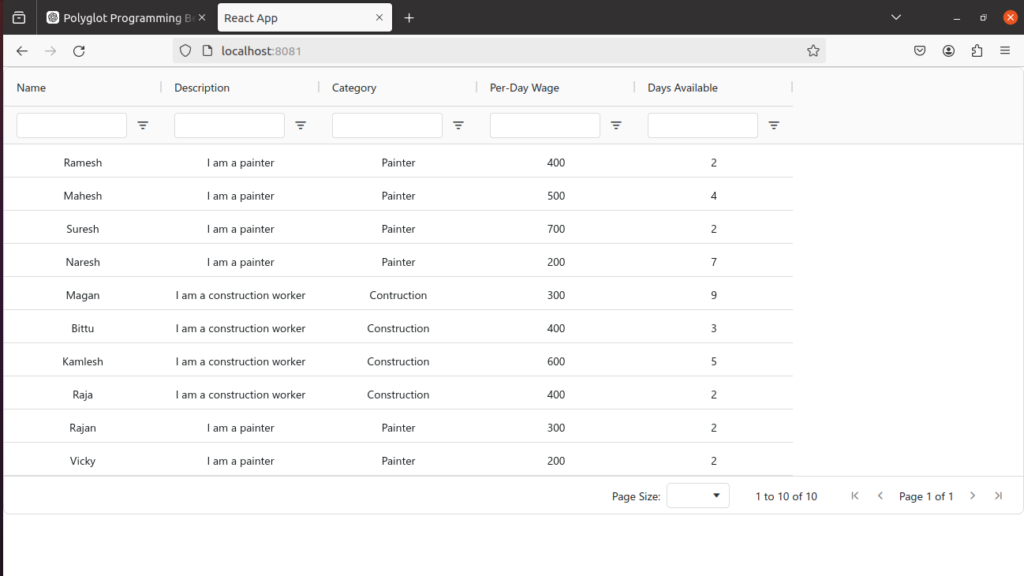
Next, let’s create a React component to display the worker data. I have used ag-Grid for a powerful and customizable data grid.
import React, { useState, useEffect } from 'react';
import WorkerService from '../services/workerservice';
import { AgGridReact } from 'ag-grid-react'; // React Data Grid Component
import "ag-grid-community/styles/ag-grid.css"; // Mandatory CSS required by the Data Grid
import "ag-grid-community/styles/ag-theme-quartz.css"; // Optional Theme applied to the Data Grid

const defaultColDef = {
    width: 200,
    sortable: true,
    filter: true,
    floatingFilter: true,
    resizable: true,
};

const columnDefs = [
    { headerName: 'Name', field: 'name', filter: true },
    { headerName: 'Description', field: 'description', filter: true },
    { headerName: 'Category', field: 'category', filter: true },
    { headerName: 'Per-Day Wage', field: 'perDayWage', filter: true },
    { headerName: 'Days Available', field: 'days', filter: true },
];

const WorkersList = () => {
  const [workers, setWorkers] = useState([]);

  useEffect(() => {
      WorkerService.getWorkersByCategory().then(response => {
        setWorkers(response.data);
      });
    }
  );

  return (
    <div>

      <div className="ag-theme-quartz" style={{ height: 600, width: '100%' }}>
        <AgGridReact
          rowData={workers}
          columnDefs={columnDefs}
          defaultColDef={defaultColDef}
          domLayout='autoHeight'
          pagination={true}
          paginationPageSize={10}
        />
      </div>
    </div>
  );
};

export default WorkersList;
We use React’s useState to manage the state for workers and the selected category.
The useEffect hook fetches worker data whenever the category changes.
The handleCategoryChange function updates the category state based on user input.
We use AgGridReact to display worker data in a grid with sorting, filtering, and pagination features.
Creating a RESTful Service with Spring Boot to Manage Workers
Service
public class WorkerService {
    @Autowired
    private WorkerRepository workerRepository;

    public List<Worker> getAllWorkers() { return  workerRepository.findAll();}

    public List<Worker> getWorkersByCategory(String category) {
        return workerRepository.findByCategory(category);
    }
}
The getAllWorkers method fetches all worker records from the database.
The getWorkersByCategory method fetches workers filtered by their category.
Controller
@RestController
@RequestMapping("/api/workers")
@CrossOrigin(origins = "http://localhost:3000")
public class WorkerController {

    @Autowired
    private WorkerService workerService;

    @GetMapping
    public List<Worker> getAllProducts() {
        return workerService.getAllWorkers();
    }

    @GetMapping("/{category}")
    public List<Worker> getProductsByCategory(@PathVariable String category) {
        return workerService.getWorkersByCategory(category);
    }
}
We use @RestController to mark the class as a REST controller.
@RequestMapping(“/api/workers”) defines the base URL for all endpoints in this controller.
@CrossOrigin(origins = “http://localhost:3000”) allows Cross-Origin Resource Sharing (CORS) for requests coming from our React frontend.
The getAllWorkers method maps to GET /api/workers and returns all workers.
The getWorkersByCategory method maps to GET /api/workers/{category} and returns workers filtered by the specified category.
Getting everything together using GraalVM
Now, I will walk you through the process of creating a native image, which bundles the Spring Boot application serving the React frontend into a single executable, ensuring they run on the same runtime. To achieve this, we’ll leverage GraalVM’s native image capabilities.
Step 1: Build Your React Application
First, you need to build your React application to generate static files that can be served by Spring Boot.
cd /path/to/your/react/app
npm run build
Step 2: Integrate React Static Files into Spring Boot
Now, copy the contents of the build directory of React application to the resources/static directory of Spring Boot application.
cp -r /path/to/your/react/app/build/* /path/to/your/springboot/app/src/main/resources/static/
Step 3: Configure Spring Boot to Serve Static Content
Spring Boot will automatically serve static content from the resources/static directory.
Step 4: Create a Native Image Using GraalVM And Run It
Run the following Maven command, in order to generate the native image:
mvn clean package -Pnative
./target/your-application
Conclusion
GraalVM’s native image capabilities, along with its support for multiple languages, make it an excellent tool for achieving polyglot programming. Consequently, this setup not only improves performance but also allows developers to choose the best language for each part of their application. As a result, this leads to more efficient and maintainable code.