


For now, DevOps plays an important role in the development lifecycle, and it improves the speed of release and the collaboration of the developers and operation team. It’s the same for TestOps, which focuses on the testing activities. In the previous article, I’ve shared about the definition of TestOps, its components and key aspects. In this one, let’s investigate more about the tools of Test Ops based on the key aspects.
1.How to choose appropriate tools for TestOps?
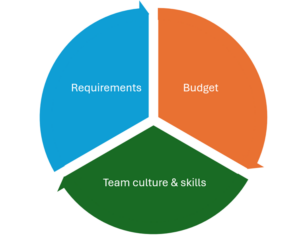
As we know, there are many aspects of TestOps, so for TestOps activities, we’ll need a toolset, not only 1 tool. For selecting the tools, we need to care about the following main points:
- Requirements: We need to clearly understand the requirements for TestOps by answering questions like why we need that tool, what is our goals, how that tool can solve the team problem, or how our system scales. We’ll focus on the existing development and operation process and investigate the paint points and areas we need to improve.
- Budget: Our budget directly impacts the select tools process. If you have a budget for enterprise tools, it will be easy. Otherwise, we need to research open-source tools or low-cost tools that can adapt to our requirements. We will consider the cloud or on-premises solution.
- Team culture and skills: We need to care about the size of the team, the tech stack being used, and the existing process. For example, if your developer team is using C#, I don’t think we should choose Selenium Java instead of Selenium C#. Another sample is about CI/CD tools. It will be hard for us to do the integration if we choose Jenkins for the testing pipeline while the team is using Azure DevOps pipeline.
- Beside the above key points, we will pay attention to the scalability, flexibility, security of the tools as well as their community or learning curves.
2.TestOps tools
Currently, there’re a lot of automation tools which implement TestOps like Katalon, Testim, TestSigma, Mabl, etc. Let’s call them all in one automation testing tools. They support the built-in features like creating test suites or test plans, continuous testing or insight dashboard for testing. However, the important thing is we need to check if it can solve our paint points, and their price may be high against our budget.
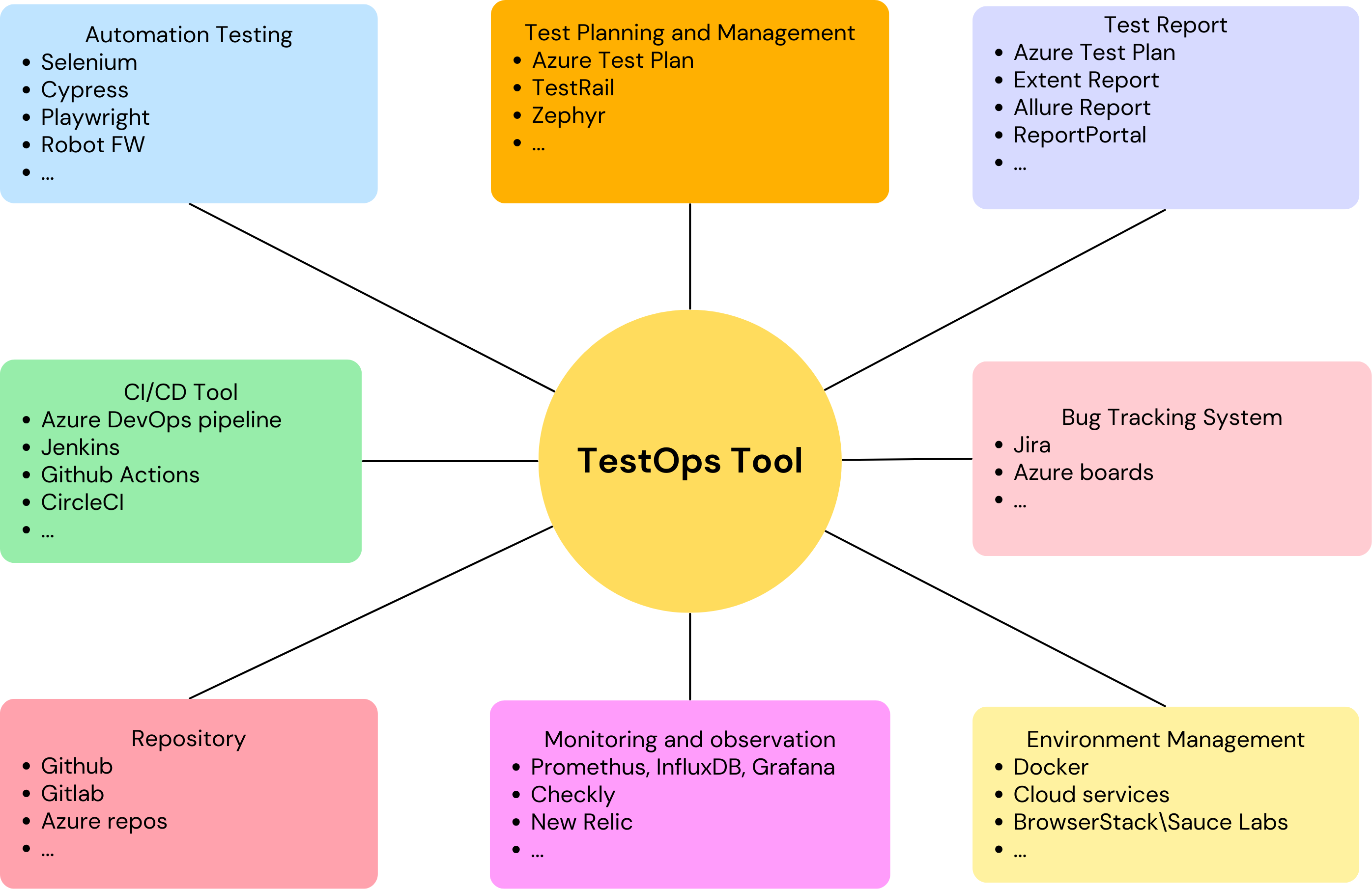
If all in one automation testing tools cannot adapt to our requirements, we will investigate the paint points, prioritize them and choose the tool which can help us to solve the problem. As I shared, for implementing TestOps in your development lifecycle, we maybe will need a toolset, not only one tool. Now, we’ll go into each TestOps aspect to see what tool we can use for each of them.
2.1 Automation Testing Tools
Automation testing is one of the key aspects of TestOps. It helps us to reduce the time for testing and increase the testing coverage. The most used tools can be listed as Selenium, Cypress, Playwright, Appium, etc. Codeless automation testing tools have become trendy now, and Robot FW, Mabl, Testim, Tricentis Tosca are the well-known tools. For choosing the right automation tool for your project, we can consider the following factors:
- Platform and application supported
- Programming language
- Usability
- Script maintainability
- Automation framework supported
- Test runner
- Cost
- Community
Please refer to this article for detailed information related to select the automation testing tool for your project.
2.2 Continuous testing

For now, continuous testing is a must-have item in the projects which apply Agile. We need to integrate automation testing into CI/CD pipeline to find the bug as soon as possible. Triggering the automation test nightly is also a good practice applied in many projects. For implementing this, we need to integrate the automation testing script with the popular CI/CD tools. If your team has already had the CI/CD tool, we should follow it. Otherwise, we need to consider a suitable CI/CD tool. Currently, we have a lot of CI/CD tools like Jenkins, Azure DevOps, Github Action, Bamboo, Circle CI, Travis CI, etc. Each tool has its pros and cons. In this article, we’ll focus on the most popular CI/CD tools including Azure DevOps, Jenkins. We can refer to the below table to have a quick comparison for these tools.
| Jenkins | Azure DevOps Pipeline | Github action | |
| Hosting | Self-hosted on premises or deployed on cloud platform.
|
Cloud-based service provided by Microsoft Azure. | Cloud-based service provided by Github. |
| Integration | Be able to integrate with many kinds of tools and technologies through plugins.
|
Easily integrate with Azure services and offer a lot of built-in support for various kind of development platform. | Integrate with Github repositories only and allow user to define workflow with their code. |
| Ease of use | High customization and flexibility
Require effort for configuration and maintenance |
User-friendly interface for creating and managing CI/CD pipelines.
Easily integrate with other Azure services like Azure Boards, Azure Repos, Azure Artifact
|
User-friendly interface for creating and managing CI/CD pipelines.
|
| Scalability and performance | With architecture of master and slave nodes, Jenkins is easy to scale by distributing with multiple nodes.
Performance depends on the infrastructure we set up. |
We can both rent the Azure agent and register the on-premises machine into the agent pool.
Have built-in features for monitoring and optimizing performance |
Offer highly scalability and reliability.
Have built-in features for monitoring and optimizing performance |
| Cost | Open-source tool.
Only need to care about infrastructure, maintenance or developing new plugins |
Azure DevOps Pipeline is a part of Microsoft Azure DevOps Service. Its price will depend on many factors like storage, number of parallel job, features, etc. Please refer to this url for the price. | GitHub Actions usage is free for standard GitHub-hosted runners in public repositories, and for self-hosted runners. For private repositories, each GitHub account receives a certain amount of free minutes and storage for use with GitHub-hosted runners, depending on the account’s plan. Please refer to this url for calculating the price. |
2.3 Code merging
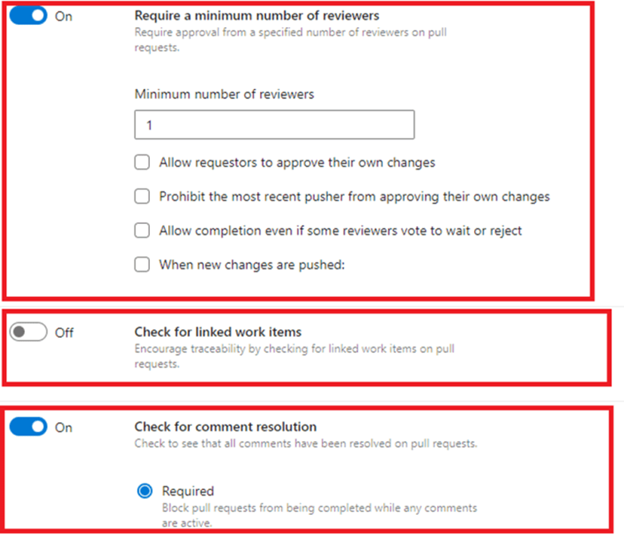
Github, Gitlab, Azure repos are the most popular code repository tools. They allow us to set the policy for merging code, so please make sure that we set policy to ensure the quality of merged code. The policy includes reviewer, linked work item, discussion/comment resolving, etc. Especially, Azure repos allows us to run a pipeline to make sure the merged code can run the given test cases successfully before merging. We can leverage these features to improve the process code review and merging. If we’re using the Azure DevOps service, Azure repos would be the best choice for us.
2.4 Test planning and management
Please consider the following points for selecting the test planning and management tool:
- Test case management: Be able to add basic necessary information for test case like title, objectives, steps, priority, test case type (positive/negative or functional/nonfunctional), test case status(automated/manual), attached files, test case owner.
- Easily create test suite/test plan.
- Integration with Bug management system.
- Integration with automation testing framework for test execution or updating test result.
TestRail, Zephyr, Azure Test Plan, Jira and Excel are usually used as the test management tool in most projects. If you don’t care about the price, let’s consider between TestRail and Azure Test Plan.
| TestRail | Azure Test Plan | |
| Test case management | -Quickly create test case.
-Have basic necessary fields for a test case -Support filtering test case with specific fields -Support shared step |
-Quickly create test case.
-Have basic necessary fields for a test case -Support dynamic filtering test case with query -Support shared step |
| Test planning | -Easily create test plan
-Support test configuration for different test environment. |
-Easily create test plan and test suite
-Support test configuration for different test environment. |
| Integration | Integration with various third-party tools such as JIRA, Jenkins, and many more through its APIs and plugins. | Easily integrate with other Azure DevOps services like Azure Boards, Azure Repos, and Azure Pipelines. |
| Test execution | -Manual test: can update test result via UI
-Automation test: cannot execute test from TestRail. We need to implement script to update the test result to TestRail through API. |
-Manual test: can update test result via UI
-Automation test: can execute automation test case from Azure Test Plan, and the test result is updated automatically. |
The team who is using Azure DevOps services may find Azure Test Plan as a suitable solution because of the seamless integration. In case you’re using Jira as test management tool or finding a standalone test management tool, TestRail can be a better choice.
2.5 Test Result Analysis
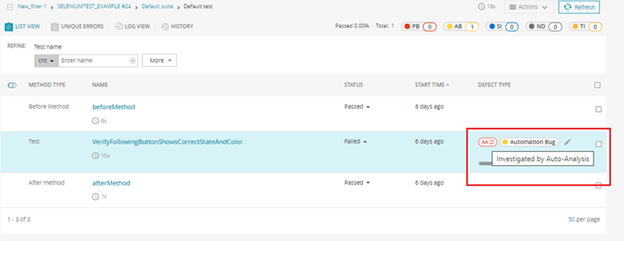
A good report tool can adapt the following criteria:
- Provide dashboard for overview status of product quality: number of passed/failed test cases, test coverage, categorize the test cases (positive/negative, functional/non-functional, related component).
- Provide detailed information of the test run: browsers, testing environments, build number.
- Easily investigate issues with the test report: the test report should include the detailed log and screenshot.
- Be able to show the history of the test run or test case: number of passed/failed result, time execution, flaky test statistic.
- Integrate with the test management tool and bug tracking system.
For automation tester, maybe we’ve already been familiar with the test report like Extent Report, Allure Report or Excel. After running tests, the report is generated automatically. We’ll need to customize or implement additional plugin to integrate the above reports with test management tool or bug tracking system. Their dashboard and widget are limited to show the overview of product quality.
Azure Test Plan is not only a test management tool but also a powerful report tool. It’s easily integrated with Azure DevOps services to associate test results or link bugs to the test cases. Moreover, it provides powerful query and widget to create a dashboard for product quality. We also can review the test result trend with Azure Test Plan.
If you’re looking for AI reporting solution, ReportPortal is a good name. It leverages AI to analyze test results automatically. It can help us to detect the root cause of the failed test cases quickly and link them to the existing bug.
2.6 Bug Tracking System
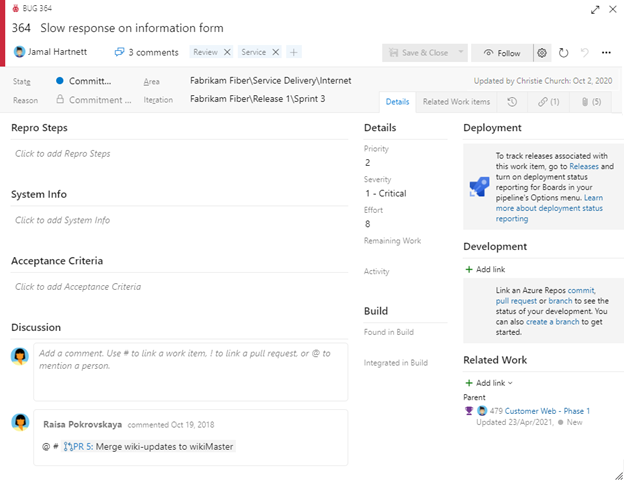
I believe that Jira is the most popular tool for Bug Tracking System. It provides most of the necessary features for a bug Tracking System. However, if your team is using Azure DevOps service, we can leverage the Bug item type for creating bugs.
The bug tracking system needs to allow us to add the basic information of a bug like title, step to reproduce, bug status, bug priority, bug severity, attached files. Besides, the tool should support the API so that we can create a bug or update the bug status automatically with automation testing framework or other tools. A bug dashboard can help us to have the overview about the product and development quality.
2.7 Collaboration
One of the main purposes of TestOps activities is to increase the collaboration between the testing team and others. We can increase the collaboration through:
- Use project management tools like Jira or Azure DevOps board: all information related to project like the task/test case owner, the estimation or remaining work will be transparent and visibility. This information can be displayed on chart/dashboard, so we can easily have the overview about the working progress.
- Build the alert mechanism for alert so that the team can receive message automatically for new issues, test result statistic, etc. Currently, we can do it with most CI/CD tools. The message can be sent to email, Slack, mobile phone message or other communication channels.
We can link the test suite/test plan into the user story or PBI so that all the development team can be aware of the testing activities for each component/feature.
2.8 Monitoring and observation
Promethus, InfluxDB and Grafana are powerful tools which supports us to collect the metric related to our server like CPU, memory, network, storage, etc. We can replace Promethus with Telegraf. The collected information from Promethus will be stored in InfluxDB and displayed on Grafana dashboard in real time, and we’re also able to check the history data of these metrics. When the metric value is over threshold, we can trigger alert to related recipient. It helps us prevent the servers from going down. If we’re using Azure DevOps services, we can consider using their own monitoring services.

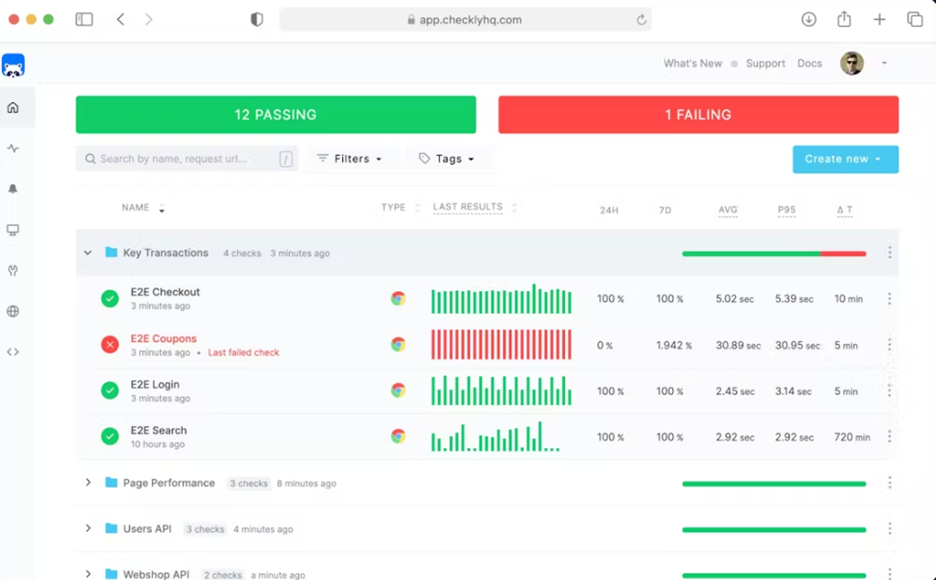
For synthetic monitoring, we can consider New Relic or Checkly. They allow us to run the automation script periodically to make sure that our application still works well. They also provide the chart for run history so that we can see the stability of our application. When the test script get failed, the alert will be triggered. The limitation of these tools is the execution time for each test script is limited (2-3 minutes/per script).
2.9 Environment management
If we need to run tests with various kinds of platform and environment, Cloud services would be our solution. Instead of installing OS and dependency packages on the on-premises machines, we can use the agent pool of Azure or AWS, which includes either Windows or Linux-based agents. We can use the Jenkins/Azure DevOps pipeline to set up the test environment automatically.
Docker is also a solution for creating isolated testing environments. For example, we can leverage the Selenium docker for running tests with specific kinds of browser and browser versions.
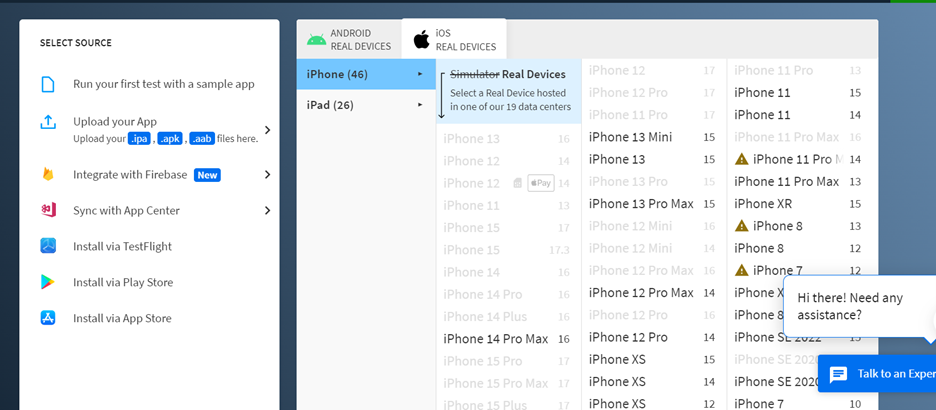
Cloud providers like SauceLabs or BrowserStack can be your solution for compatibility testing. Instead of purchasing many kinds of devices, we can use their services with many OS, devices, and browser versions. These devices are always up to date continuously.
3.Conclusion
Like DevOps, TestOps can help us reduce the effort for software development, especially in the testing area. For selecting tools and applying TestOps efficently in our projects, we need to clearly understand our paint point, our budget, toolset and process. We can see that there are a lot of tools which can support us in implementing Test Ops. If you want a seamless toolset without any pricing concerns, Azure DevOps services will be a good candidate.
Reference:
- https://learn.microsoft.com/en-us/
- https://grafana.com/
- https://www.checklyhq.com/