


Maybe you’ve already known, BDD is a popular software development methodology, and WebdriverIO is a powerful tool for creating reliable and maintainable automated tests for web applications. This blog aims to explain the concepts of BDD, its benefits, and how it helps in bridging the communication gap between stakeholders. Then, let’s see how to create a sample project quickly with WebdriverIO.
1. BDD introduction
1.1 BDD overview
Behavior-Driven Development (BDD) is a software development methodology that focuses on the behavior of an application from the user’s perspective. It encourages collaboration between developers, QC, BA, and non-technical stakeholders by using a common language to describe desired behaviors in plain English.
BDD emphasizes writing executable specifications in the form of scenarios using tools like Gherkin syntax, which are then automated to verify that the application behaves as expected. This approach helps ensure that software development efforts are aligned with business goals and user requirements, leading to more reliable and maintainable code.
The traditional development process provides many opportunities for misunderstandings and miscommunication:

BDD uses conversations around examples, expressed in a form that can be easily automated, to reduce lost information and misunderstandings:
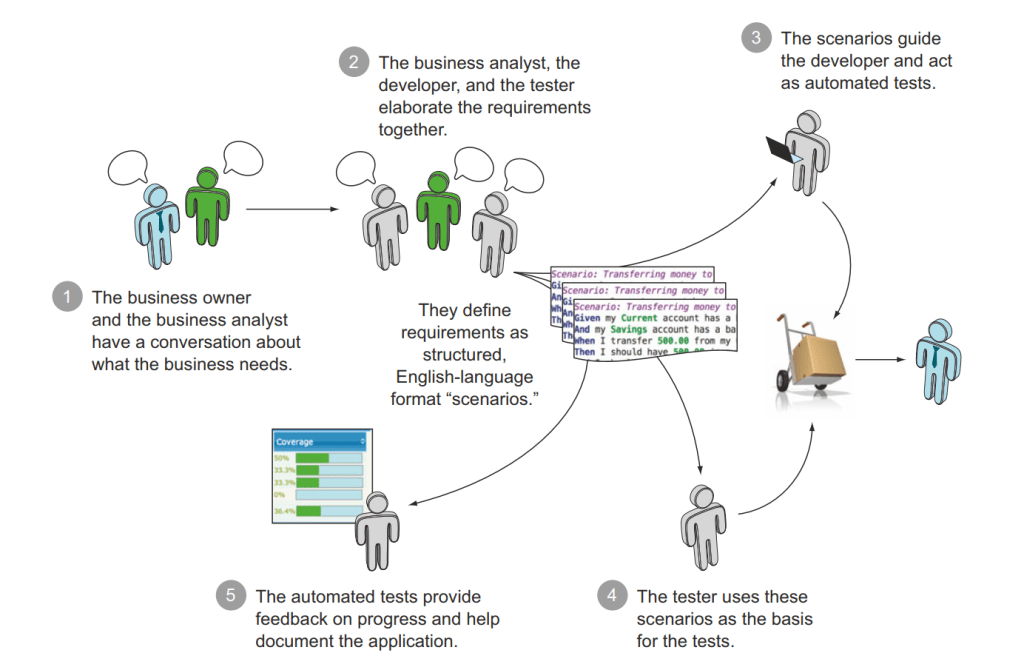
1.2 Cucumber
Cucumber is a popular BDD tool. It reads executable specifications written in plain text and validates that the software does what those specifications say. The specifications consists of multiple examples, or scenarios. Each scenario is a list of steps for Cucumber to work through.
1.3 Gherkin
Gherkin is a set of grammar rules that makes plain text structured enough for Cucumber to understand. The Cucumber grammar exists in different flavors for many spoken languages so that your team can use the keywords in your own language.
Gherkin documents are stored in .feature text files and are typically versioned in source control alongside the software.
1.4 Step Definitions
Step definitions connect Gherkin steps to programming code. A step definition carries out the action that should be performed by the step. So step definitions hard-wire the specification to the implementation. It can be implemented in different languages, including Java, Javascript, Python and .NET.

2. WebdriverIO introduction
3. Steps to create a BDD automation project with WebdriverIO
3.1 Pre requisite
Make sure you have Node.js and npm (Node Package Manager) installed.
3.2 Install dependency packages
- Initialize npm: Run
npm initto createpackage.jsonfile. You can press Enter to accept the default options or fill in the details as needed. - Install WebdriverIO: Run
npm install --save-dev @wdio/clito install it. - Install Cucumber: Now, you need to install Cucumber and related dependencies for BDD by running
npm install --save-dev @wdio/cucumber-framework cucumber. - Initialize WebdriverIO configuration: After installing WebdriverIO, you can initialize its configuration by running
npx wdio config. This command will guide you through setting up your configuration. Based on your requirement, we can select appropriate option for creating WebdriverIO sample project. Please make sure that you select Cucumber as the framework. 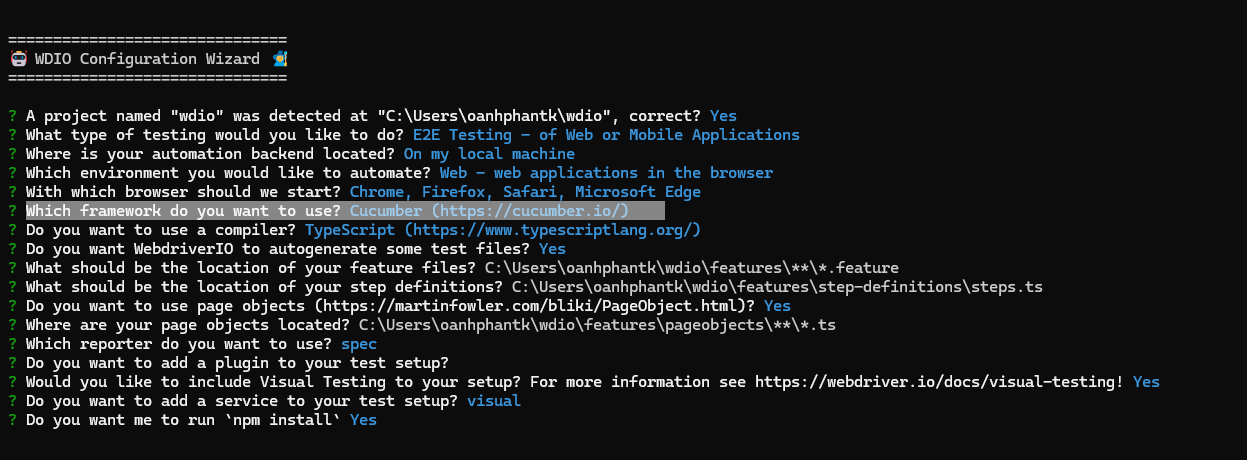
- Install Allure report:
npm install --save-dev @wdio/allure-report && npm install --save-dev allure-commandline.
3.3 Create feature files and step definition files
- Create your feature files in {project_directory}/features/githubSeach.feature
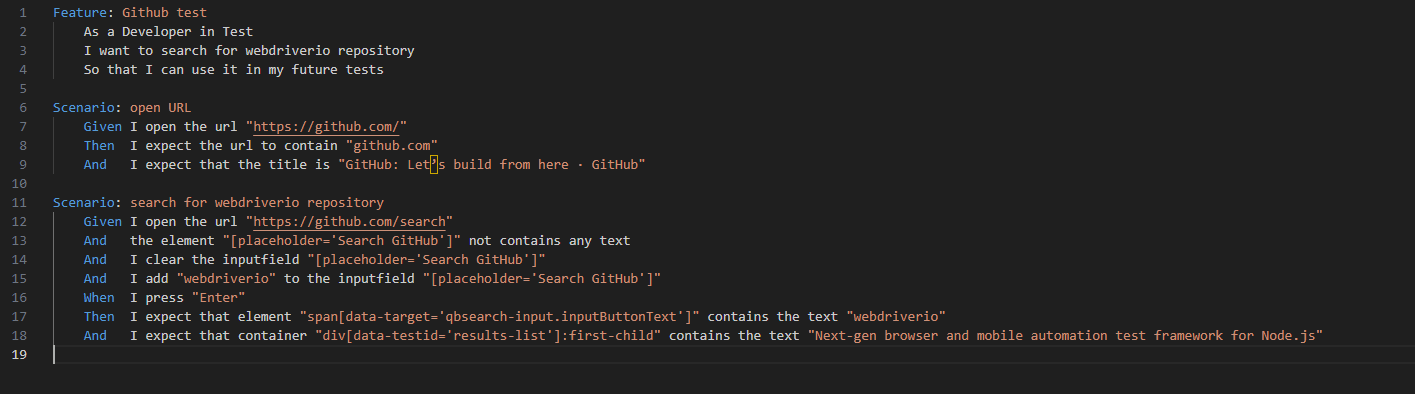
- Write your step definitions in {project_directory}/features/step-definitions/steps.js

- Of course, you can change the path for feature files and step definition files in the “spec” and ”
cucumberOpts” section of wdio.conf.ts file.
3.4 Allure report integration
Add Allure configuration into the reports section in wdio.conf.ts file. We need to define the output directory and enable showing Cucumber steps.

3.5 Test execution and result
- Run you tests: Once everything is set up, you can run your tests using WebdriverIO’s CLI. You can use
npx wdio run wdio.conf.jsto execute your tests. - After your tests complete, run Allure to convert the test results into an HTML report
npx allure serve allure-results.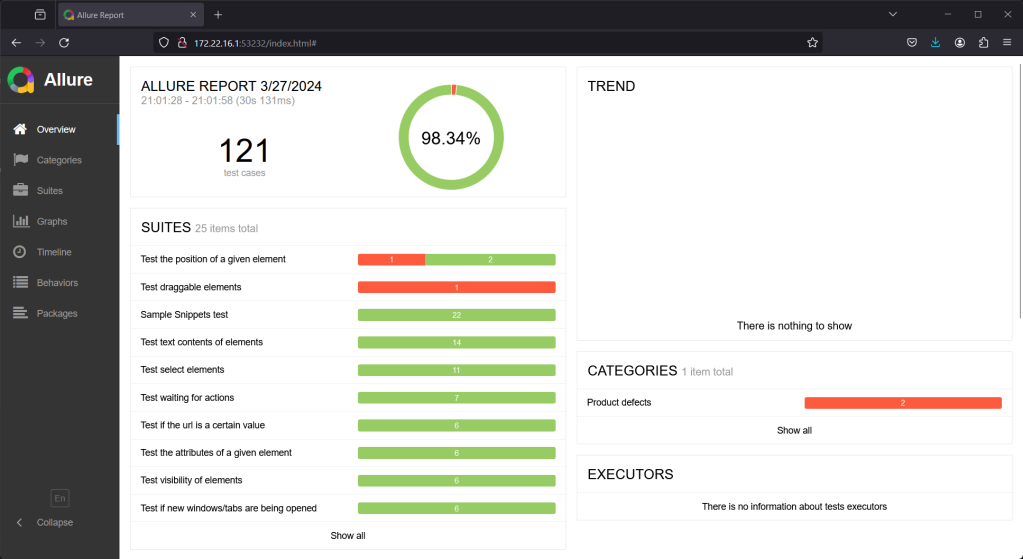
- We can review the detailed step of each test case

Conclusion
In this blog, I’ve introduced the BDD concept in software development as well as the integration between WebdriverIO and Cucumber. It can support us to increase the collaboration of the development team and stakeholder. Hope that you can try creating test cases in BDD format with Playwright easily based on this article.
References
- https://webdriver.io
- https://cucumber.io
- https://allurereport.org/docs/webdriverio
- BDD in Action: Behavior-driven development for the whole software lifecycle (John Ferguson Smart)