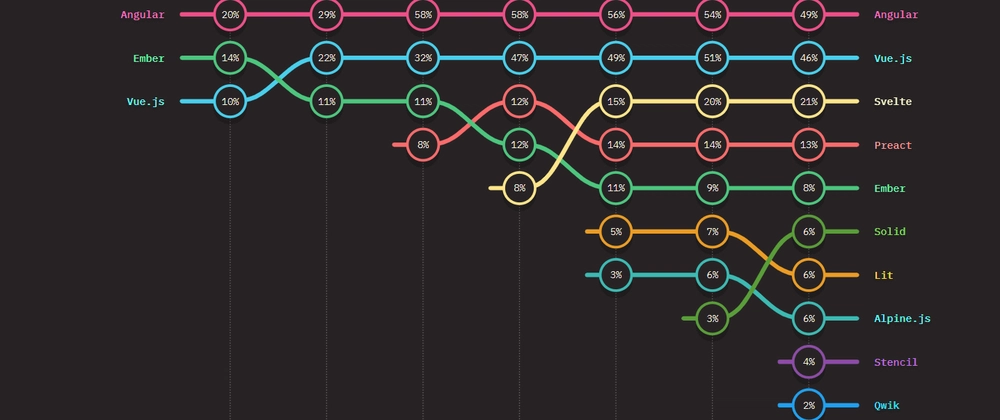
In recent years, frontend performance has become one of the most important differentiators for modern web applications. Frameworks like React have dominated the ecosystem for nearly a decade, shaping how we build interactive UIs.
However, a new generation of frameworks led by Qwik is challenging traditional rendering and hydration models. Qwik introduces a resumable architecture that promises instant interactivity and lightning-fast page loads, even for large applications.
So how does Qwik really compare to React? Let’s dive into their key differences in architecture, performance, developer experience, and ecosystem maturity.

Key Differences
| Feature | Quik | React |
| Type | Full-fledged Framework | Library |
| Rendering | Resumable Rendering with Instant Interactivity | Client-Side Rendering (CSR) with Virtual DOM |
| Performance | Ultra-fast (No hydration needed) | Good, but hydration can cause delays |
| SEO | Built-in SEO optimizations | Requires Next.js for better indexing |
| State Management | Built-in resumable state | Uses Redux, Context API, or third-party tools |
| Best Use Case | Ultra-fast loading websites, eCommerce, blogs | SPAs, interactive dashboards |
Core Concepts
React and Qwik take fundamentally different approaches to building web applications:
- React uses Virtual DOM and client-side hydration
- Qwik uses resumability and fine-grained lazy loading
The key difference is their approach to loading and executing JavaScript:
- React loads and hydrates the entire application on initial load
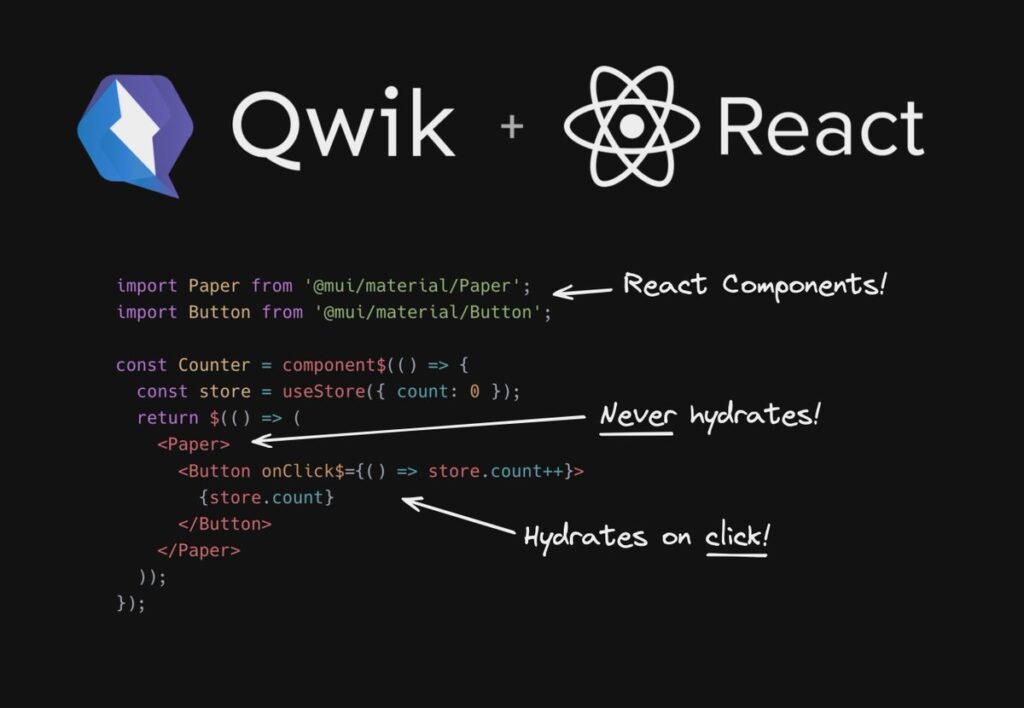
- Qwik only loads JavaScript when needed, using resumability instead of hydration
Performance Comparison
| Feature | Qwik | React |
| Initial Load Time | Very fast – optimizes performance by lazy-loading components only when necessary. | Moderate to slow – the full app must hydrate before interaction. |
| Hydration Time | None – resumes state instantly (resumability). | Required – rehydrates the entire DOM to attach event listeners. |
| SEO Friendliness | Built-in SSR support with Qwik City. | Requires frameworks like Next.js or Remix for SSR. |
| JS Payload | Minimal – ships only what’s needed per interaction. | Larger bundle sizes – full hydration JS downloaded upfront. |
| Core Web Vitals | Excellent by default – optimized FCP, LCP, and TTI. | Requires tuning and optimization for top scores. |
Reactivity and State Management
React uses hooks for state management:
import { useState } from "react";

export default function Counter() {
  const [count, setCount] = useState(0);

  function incrementCount() {
    setCount((count) => count + 1);
  }

  return (
    <>
      <p>Counter: {count}</p>
      <button onClick={incrementCount}>+1</button>
    </>
  );
}
Qwik uses signals and stores for fine-grained reactivity:
import { component$, useSignal, $ } from "@builder.io/qwik";

export const Counter = component$(() => {
  const count = useSignal(0);

  const incrementCount = $(() => {
    count.value++;
  });

  return (
    <>
      <p>Counter: {count.value}</p>
      <button onClick$={incrementCount}>Increment</button>
    </>
  );
});
Key differences:
- React’s state updates trigger re-renders of components
- Qwik’s signals provide fine-grained updates without full component re-renders
- Qwik’s
$syntax marks code for lazy loading
Component Lifecycle
React uses useEffect for lifecycle management:
import { useState, useEffect } from "react";

export default function Time() {
  const [time, setTime] = useState(new Date().toLocaleTimeString());

  useEffect(() => {
    const timer = setInterval(() => {
      setTime(new Date().toLocaleTimeString());
    }, 1000);

    return () => clearInterval(timer);
  }, []);

  return <p>Current time: {time}</p>;
}
Qwik uses specialized hooks like useVisibleTask$
import { component$, useVisibleTask$, useStore } from "@builder.io/qwik";

export const Time = component$(() => {
  const store = useStore({
    time: new Date().toLocaleTimeString(),
  });

  useVisibleTask$(({ cleanup }) => {
    const timer = setInterval(() => {
      store.time = new Date().toLocaleTimeString();
    }, 1000);

    cleanup(() => clearInterval(timer));
  });

  return <p>Current time: {store.time}</p>;
});
Form Handling
React requires explicit state management:
import { useState } from "react";

export default function InputHello() {
  const [text, setText] = useState("Hello world");

  function handleChange(event) {
    setText(event.target.value);
  }

  return (
    <>
      <p>{text}</p>
      <input value={text} onChange={handleChange} />
    </>
  );
}
Qwik provides two-way binding:
import { component$, useSignal } from "@builder.io/qwik";

const InputHello = component$(() => {
  const text = useSignal("");

  return (
    <>
      <p>{text.value}</p>
      <input bind:value={text} />
    </>
  );
});
Conclusion: Which One Should You Choose?
Both React.js and Qwik have their strengths:
- React.js is great for scalable, component-driven applications that require a large ecosystem.
- Qwik is ideal for SEO-heavy, performance-critical applications that demand instant interactivity.
If you need flexibility and scalability, go with React.js.
If you need instant page loads and extreme performance, Qwik is the future.
Final Tip: Consider your project’s complexity, interactivity level, and SEO goals before making a decision.