


React Key Concepts: 10 Topics That Often Challenge Beginners
React is a popular library for building user interfaces, but many developers find its core ideas confusing at first. This article explains the main React key concepts in a simple and practical way. Read on to build a clear mental model of how React works.
1. Components: The Foundation of React
React apps are built from components — small, reusable UI pieces.
- A component should handle a single responsibility.
- Combine small components to build larger user interfaces.
- Pages are simply components used by a routing system.
Think of components as LEGO bricks. You build complex structures by combining simple, self-contained bricks.
Class Component & Function Component
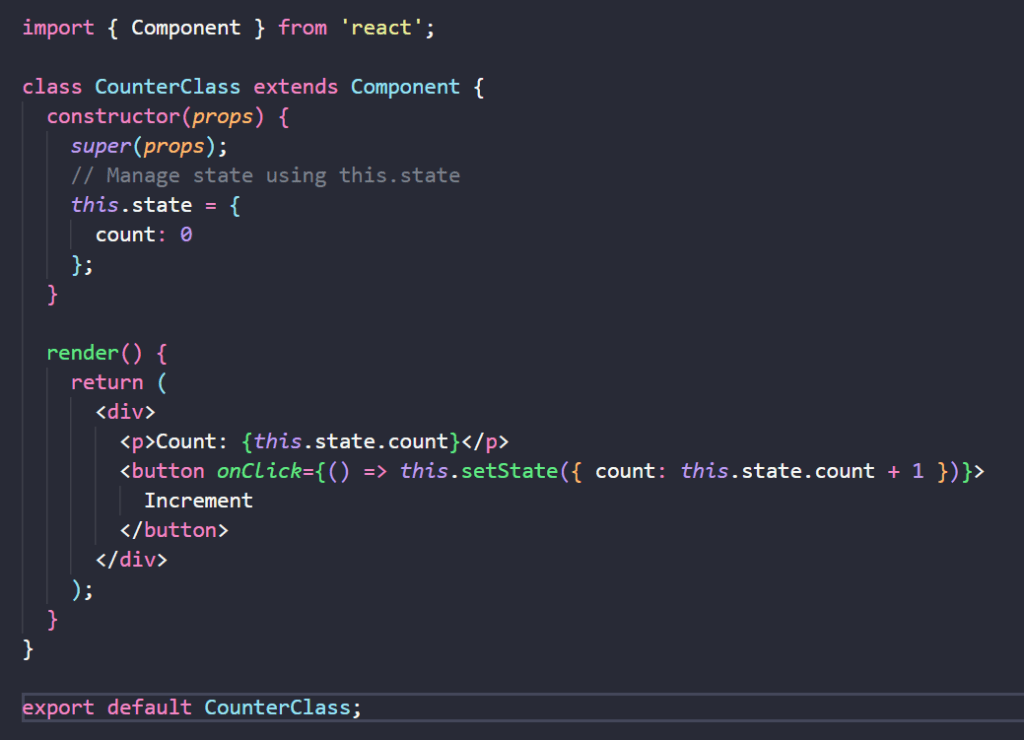
Class Components: The traditional approach, these are ES6 classes that extend React.Component. They manage state using this.state and handle logic using built-in lifecycle methods (e.g., componentDidMount).
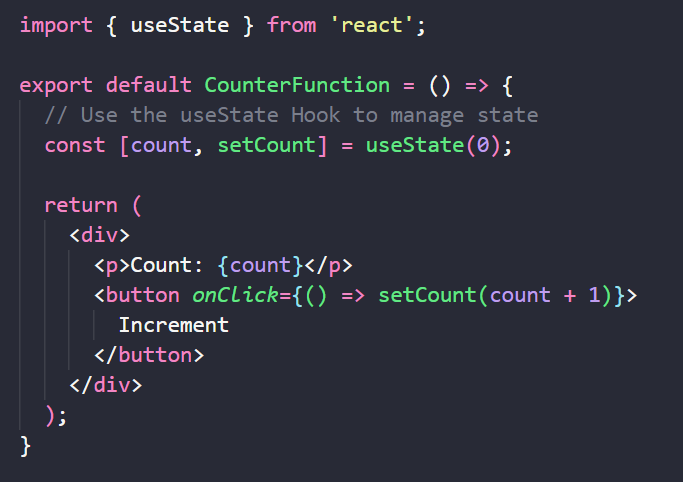
Function Components: The modern standard. They are simple JavaScript functions that utilize Hooks (such as useState and useEffect) to add state and side-effect capabilities without requiring a class.
2. Props: One-Way Data Flow
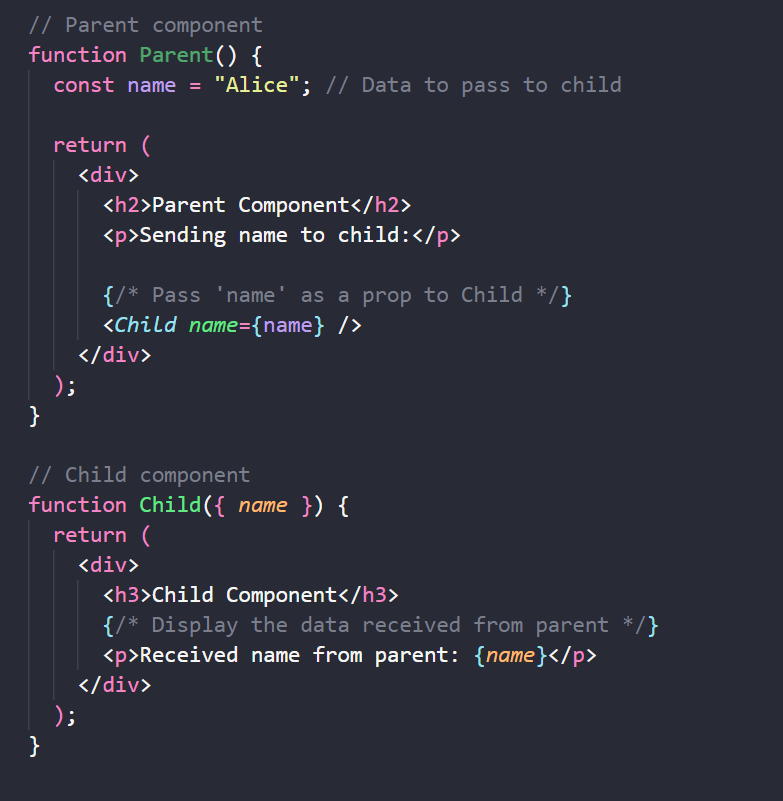
Props (short for properties) let a parent component pass values down to a child component. Data flows strictly from top to bottom:
Parent → Child: pass data via props.
Child → Parent: a child cannot directly modify parent data; it must call a function given by the parent via props.
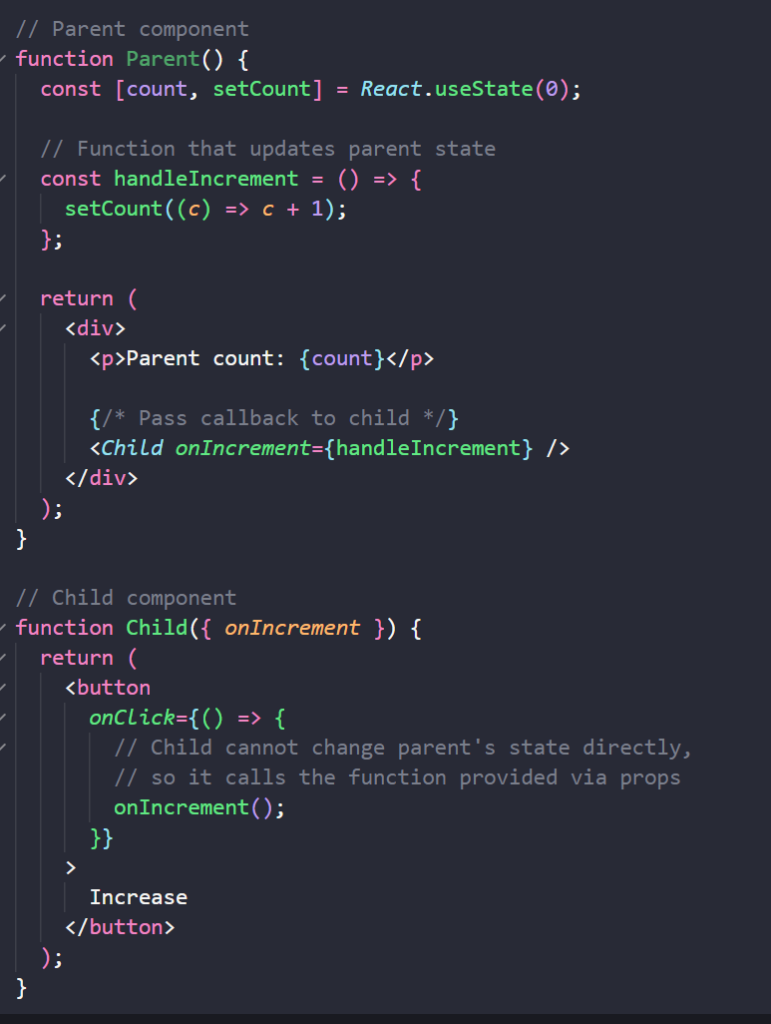
This one-way flow keeps data predictable and easier to trace.
3. State: Managing Changing Data
State holds values that change over time within a component (e.g., a counter, input field value, or a toggle switch).
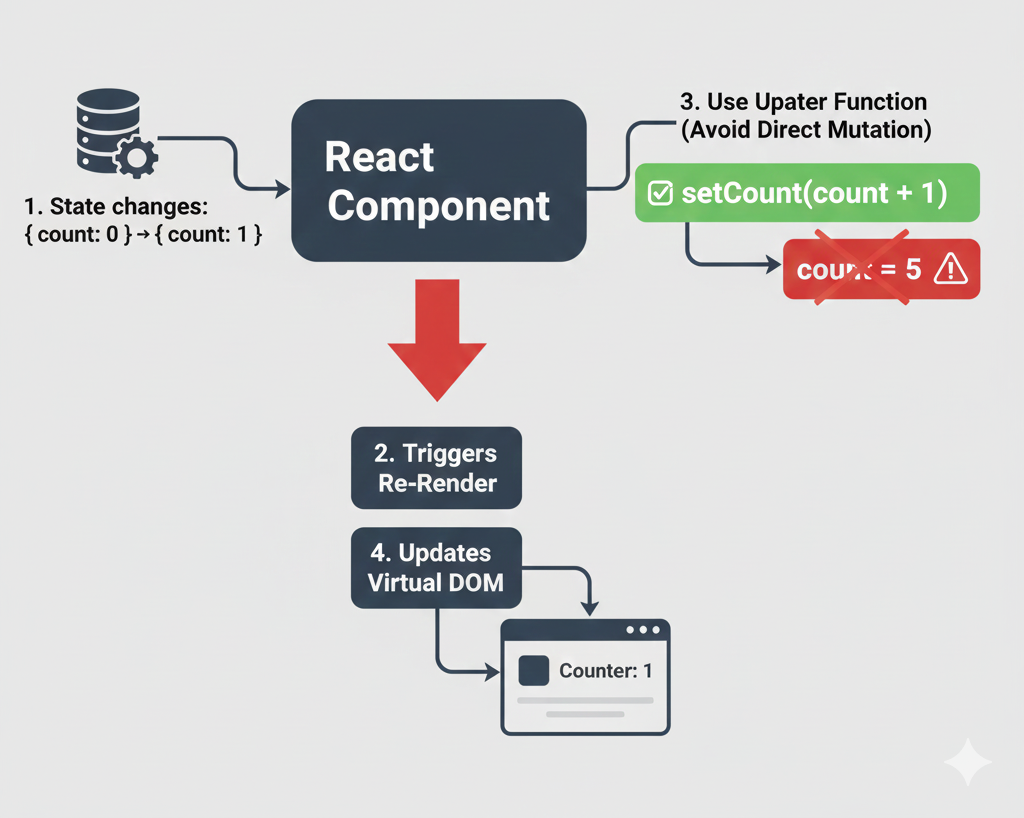
- Updating state triggers a re-render of the component.
- State updates are asynchronous; React may batch multiple updates for performance.
- Crucially, avoid mutating state directly (e.g.,
this.state.count = 1). Always use the state updater function (e.g.,setCount(newCount)). - React uses the Virtual DOM to efficiently update the UI when state changes.
4. Re-rendering & the Virtual DOM
React re-renders (re-executes its render logic) when:
- A component’s state changes.
- A component’s props change.
- A parent component re-renders.

However, writing changes directly to the browser’s DOM is slow. To solve this, React uses a Virtual DOM:
- React creates a lightweight copy of the UI in memory (the Virtual DOM).
- It compares this new version to the previous one.
- It updates only the specific parts of the real browser DOM that actually changed.
Key Takeaway: You don’t need to manually remove or add DOM elements. You change the state, and React handles the efficient DOM updates for you.
5. The Spread Operator (...) in React
The spread operator is essential for maintaining Immutability (not changing data directly).
{...props}: Passes all properties from a parent to a child efficiently.{...object}&[...array]: Creates a copy of the data.
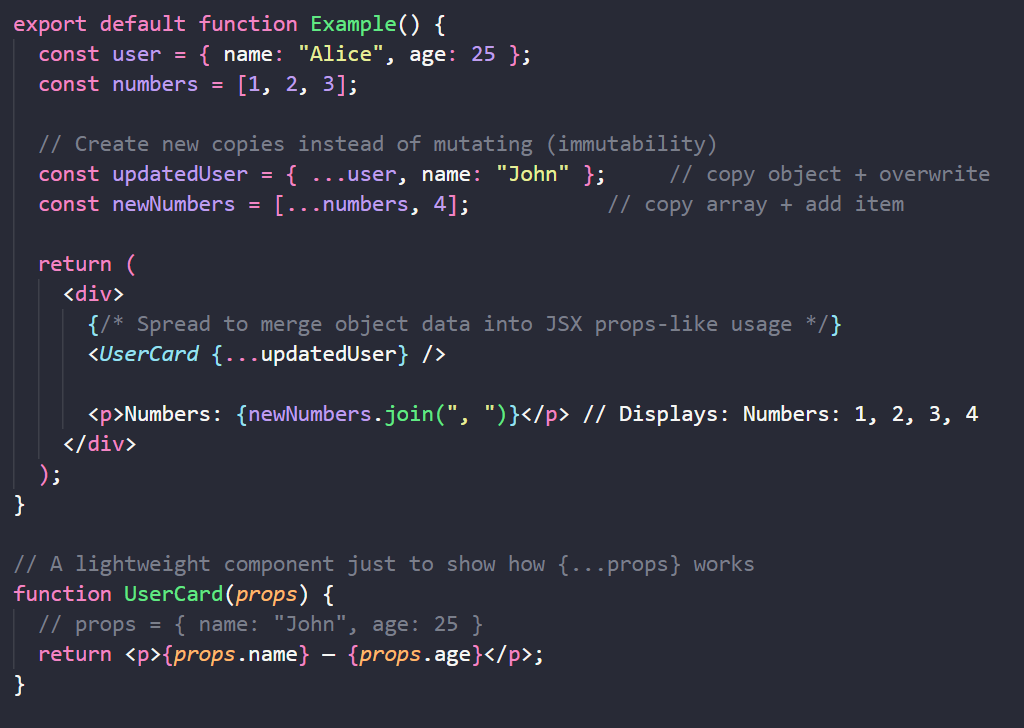
Why does this matter? React detects changes by comparing memory addresses (referential equality).
- If you modify an object directly (
user.name = 'John'), the memory address stays the same, so React won’t re-render. - If you create a copy (
const newUser = { ...user, name: 'John' }), the memory address changes, and React knows to re-render.
6. React Hooks: Organizing Logic
Hooks allow functional components to use features like state and lifecycle methods. They generally fall into these categories:
- State Hooks:
useState,useReducer(for managing data). - Effect Hooks:
useEffect(for side effects like API calls). - Ref Hooks:
useRef(for accessing DOM elements or values that persist without re-rendering). - Performance Hooks:
useMemo,useCallback(for optimization).
Pro Tip: Keep your hooks at the top level of your component. Never use hooks inside loops, conditions, or nested functions.
7. The useEffect Dependency Array
The dependency array [] tells React when to run your effect.
- No array: Runs after every render (⚠️Dangerous: Can cause infinite loops).

- Empty array
[]: Runs only once (on mount).

- Array with values
[data]: Runs whendatachanges.

The Golden Rule: If you use a variable inside useEffect (like a prop or state), it must be listed in the dependency array. If you omit it, your effect will run with “stale” (old) data.
8. Keys in Lists: Ensuring Stable Rendering
When rendering lists (arrays), React needs a key prop to identify items.
- Good Key: Unique IDs from your database (e.g.,
user.id). - Bad Key: Array Index (e.g.,
index).
Why avoid Index? If you reorder, add, or delete items, the indexes change. This confuses React, leading to bugs where input fields hold the wrong data or animations behave strangely. Always use stable, unique IDs.
9. Routing with react-router-dom
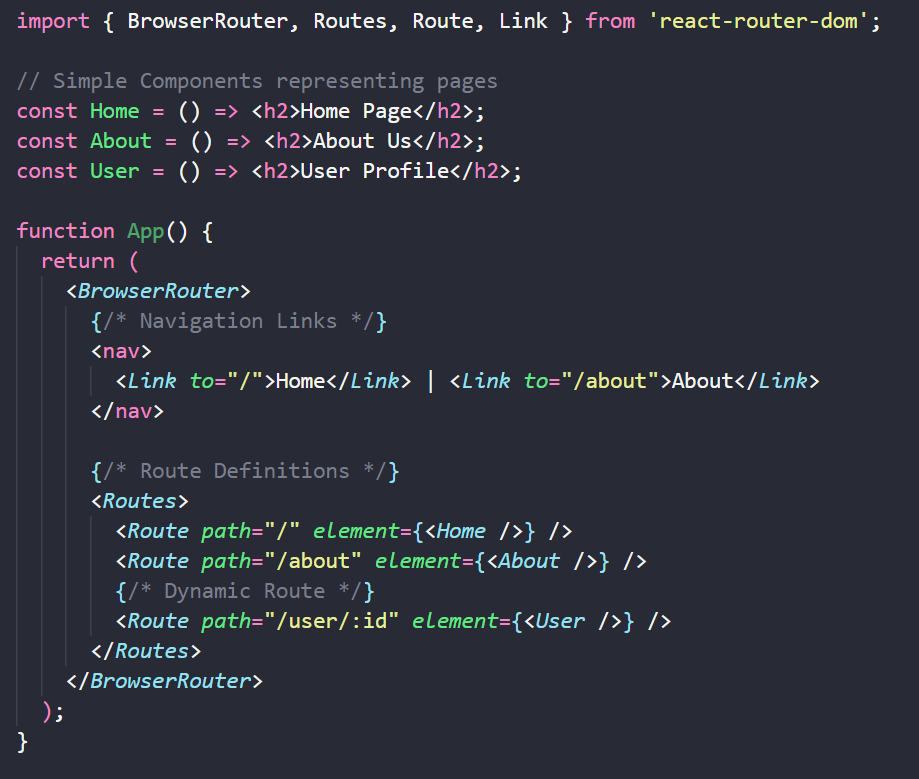
Routing turns a single-page application into a multi-page experience.
- Route Definitions: Map a URL path (e.g.,
/profile) to a specific Component. - Nested Routes: Allow you to render sub-components inside a parent layout (e.g., a Sidebar that stays visible while the main content changes).
- Dynamic Params (
:id): Capture values from the URL (e.g.,/products/42) to fetch specific data. - Layout Components: Wrappers that contain shared UI like Navigation Bars and Footers.
10. Export & Import in React
React relies heavily on the ES Module system, so understanding how export and import work is essential — especially as your project grows and components are split into multiple files.
There are two main export styles: Default export & Named export.
Default Export
A file can have only one default export.
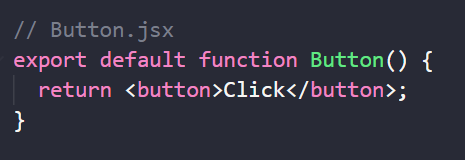
Imported without curly braces, and you can give it any name:
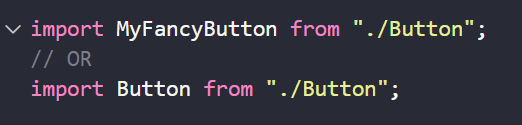
Default export is often used for components because each file typically exposes one main idea.
Named Export
A file can export multiple named items.
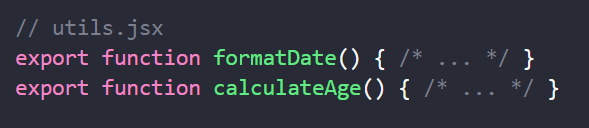
Imported with curly braces, and the name must match the export name:

Named exports are great for utility functions or when a file contains multiple related exports.
How React Developers Commonly Use Them
- Components: Usually default export.
- Hooks: Named exports (e.g.,
useToggle). - Context, constants, helpers: Named exports.
💡 Using Index Files
When organizing components, you often see an index.js file inside a component folder
(Example: src/components/Button/index.js).
This file’s job is to re-export the main component, allowing for cleaner imports:
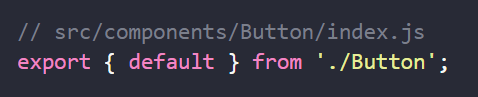
Benefit: Instead of writing import Button from "./Button/Button"; You can simply write:

Understanding module exports makes your codebase more organized, predictable, and easier to scale.
Conclusion
Understanding these key concepts—Components, One-way Data Flow, State, Hooks, and the Virtual DOM—builds the mental model you need to succeed with React. Don’t rush to memorize every syntax detail. Instead, focus on how data flows through your app and when your components render. Master these basics, and you will find React easier to reason about and enjoyable to use.