


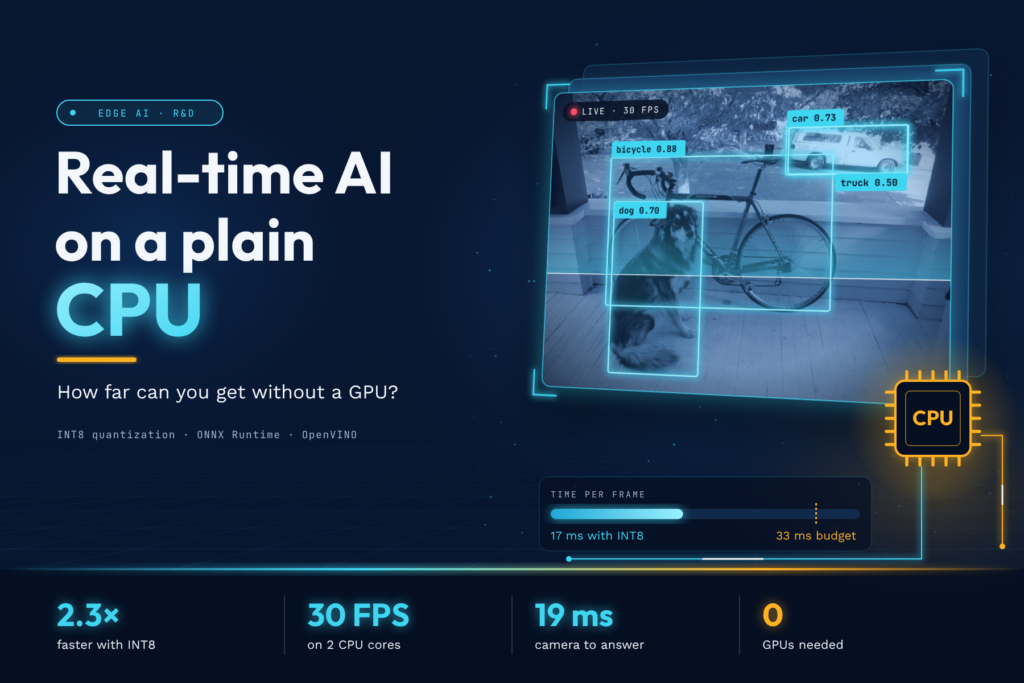
A 2-core CPU with no GPU ran a mid-size object detector at a steady 30 FPS with 19 ms end-to-end delay, but only after the right quantization and the right frame-handling policy. Five findings, all measured with the open demo repo:
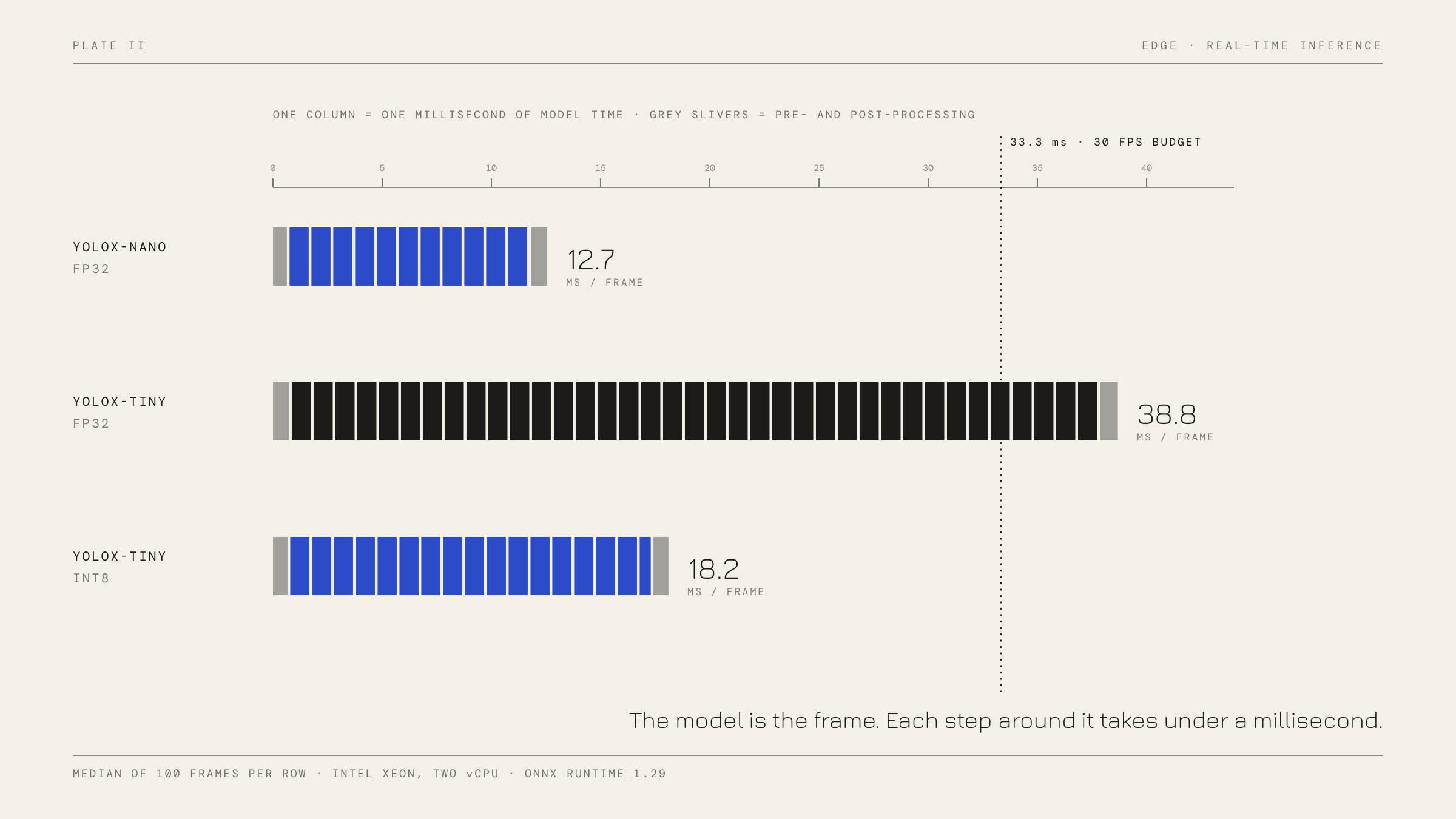
- Static INT8 quantization made mid-size models 2.3-2.5x faster (YOLOX-Tiny 39 ms to 17 ms, YOLOX-S 123 ms to 48 ms) for a 0.007-0.025 drop in mAP. That moved Tiny from missing the 33 ms budget to meeting it twice over.
- The smallest model did not survive quantization. YOLOX-Nano got no faster and lost 58% of its accuracy (mAP 0.34 to 0.14). Tiny models have no spare capacity to absorb rounding error.
- Dynamic INT8 is a trap for vision models: 4-6x slower than FP32 on every model tested.
- The runtime matters less than its defaults. OpenVINO and ONNX Runtime ran FP32 within 15% of each other, but OpenVINO’s default silently switched to bfloat16 on this AMX-capable Xeon and ran up to 3.4x faster. ONNX Runtime’s default thread count left half the CPU idle (59 ms vs 38 ms with both cores).
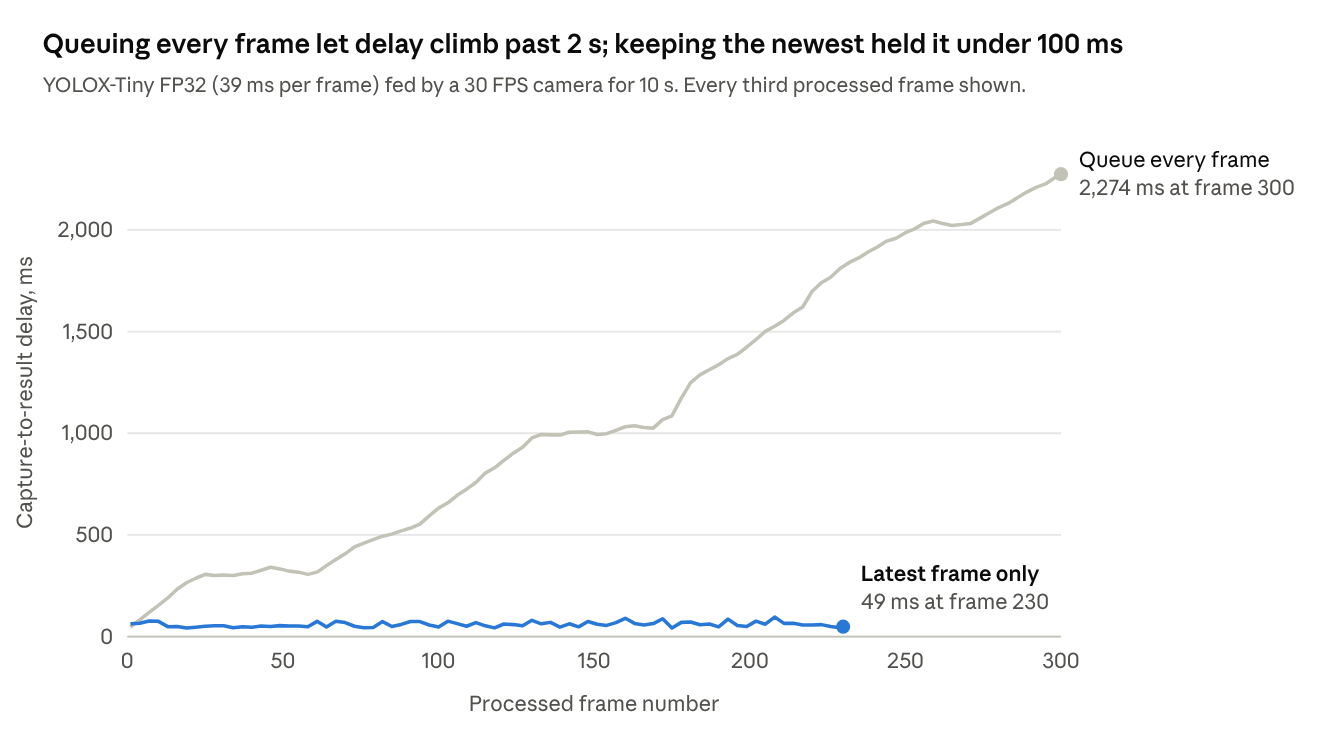
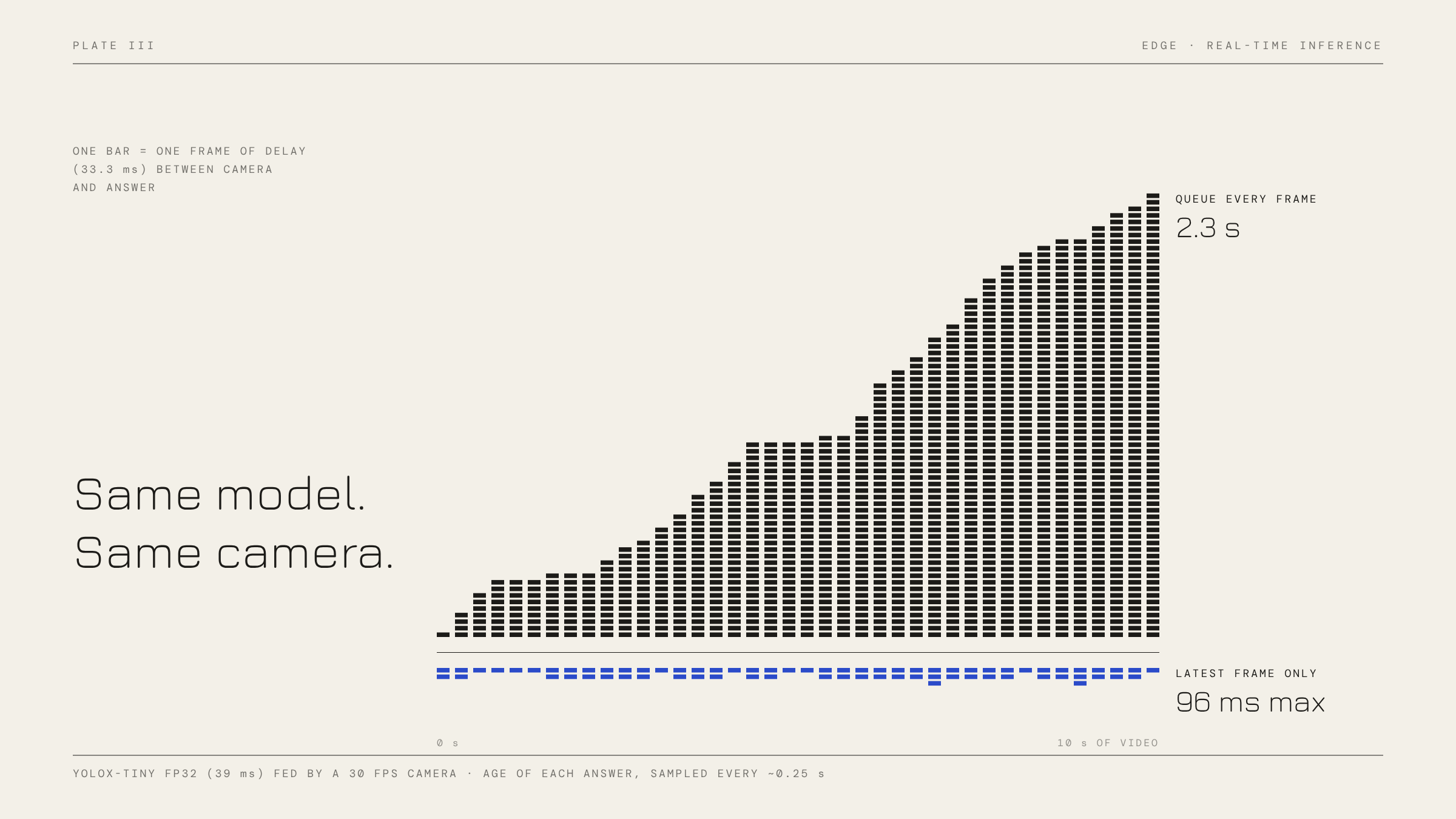
- Frame handling decides latency, not just the model. Queuing every frame let delay climb to 2.3 seconds over a 10-second clip; keeping only the newest frame held it at 60 ms with the same model.
Why run AI at the edge
Edge inference means running the model on the device that holds the data (a laptop, a kiosk, a camera box, a phone) instead of sending the data to a cloud endpoint. Teams usually choose it for four reasons:
- Latency. No network round trip. Upload, queueing and download sit on top of the model time, and they vary with the network.
- Privacy. Camera frames, audio and documents never leave the device, which simplifies data-protection reviews.
- Cost. No per-request GPU bill; the hardware is already paid for.
- Offline. It keeps working on a factory floor, a vehicle or a site with a poor connection.
The price is a weaker computer. Most edge hardware has no discrete GPU, so the question this study answers is concrete: how much real-time AI can a plain CPU deliver, and which levers matter?
What “real-time” means
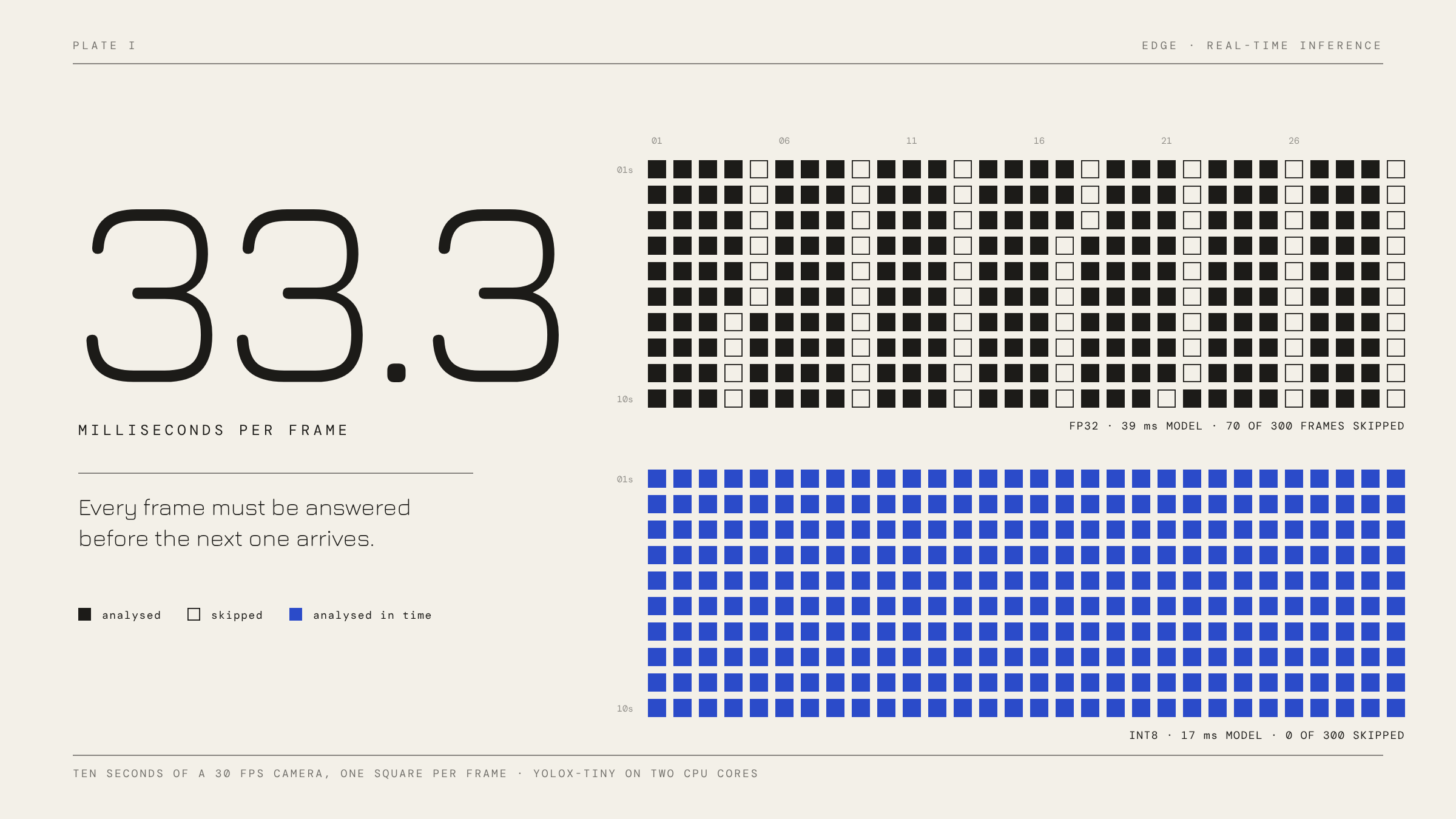
Real-time is a budget, not a speed. A 30 FPS camera delivers a frame every 33 ms. If capture, pre-processing, the model and post-processing together take longer than that, the system cannot keep up, and it must either skip frames or fall behind. Every number in this post is measured against that 33 ms line.
Two metrics matter, and they are different:
| Metric | Question it answers | Measured as |
|---|---|---|
| Throughput | How many frames per second get analysed? | Processed FPS |
| End-to-end latency | How old is the frame behind the answer I see now? | Capture time to result time, ms |
A system can have good throughput and terrible latency, as the real-time section shows.
The landscape: runtimes and levers
A trained model is a file of weights. An inference runtime loads it, rewrites the graph for the target chip and executes it. The runtime choice often matters as much as the model choice.
| Runtime | Backed by | Model format | Where it fits |
|---|---|---|---|
| ONNX Runtime | Microsoft | .onnx | Cross-platform default; pluggable “execution providers” for CPU, GPU and NPUs |
| OpenVINO | Intel | .onnx or its own IR | Tuned for Intel CPUs, iGPUs and NPUs |
| LiteRT (formerly TensorFlow Lite) | .tflite | Mobile and embedded; GPU and NPU acceleration | |
| ExecuTorch | PyTorch | .pte | PyTorch stack, from phone CPUs down to microcontrollers and DSPs |
This study uses ONNX Runtime as the main runtime, because ONNX is the most portable exchange format, and OpenVINO as a comparison, because it reads the same .onnx files.
Once a runtime is picked, five levers decide whether a model fits the frame budget:
- Model size. A smaller architecture does less arithmetic per frame. This is the biggest lever and costs accuracy.
- Quantization. Store weights and activations as 8-bit integers instead of 32-bit floats. Models get about 4x smaller, and CPUs with integer dot-product instructions (Intel VNNI, Arm dot-product) run them faster. ONNX Runtime recommends static quantization for CNNs and dynamic quantization for transformers and RNNs, and warns that older CPUs without these instructions may see no gain or a slowdown (ONNX Runtime docs).
- Threads. How many cores one inference may use.
- Graph optimization. The runtime fuses layers (for example convolution + activation) before running.
- Pipeline design. What happens to frames that arrive while the model is busy.
Quantization is not free. Google’s 2018 quantization whitepaper reports that 8-bit post-training quantization stays within about 2% of float accuracy across many CNNs, but also that networks with few parameters, such as MobileNets, are less robust to it (Krishnamoorthi, 2018). The results below hit exactly that case.
The experiment
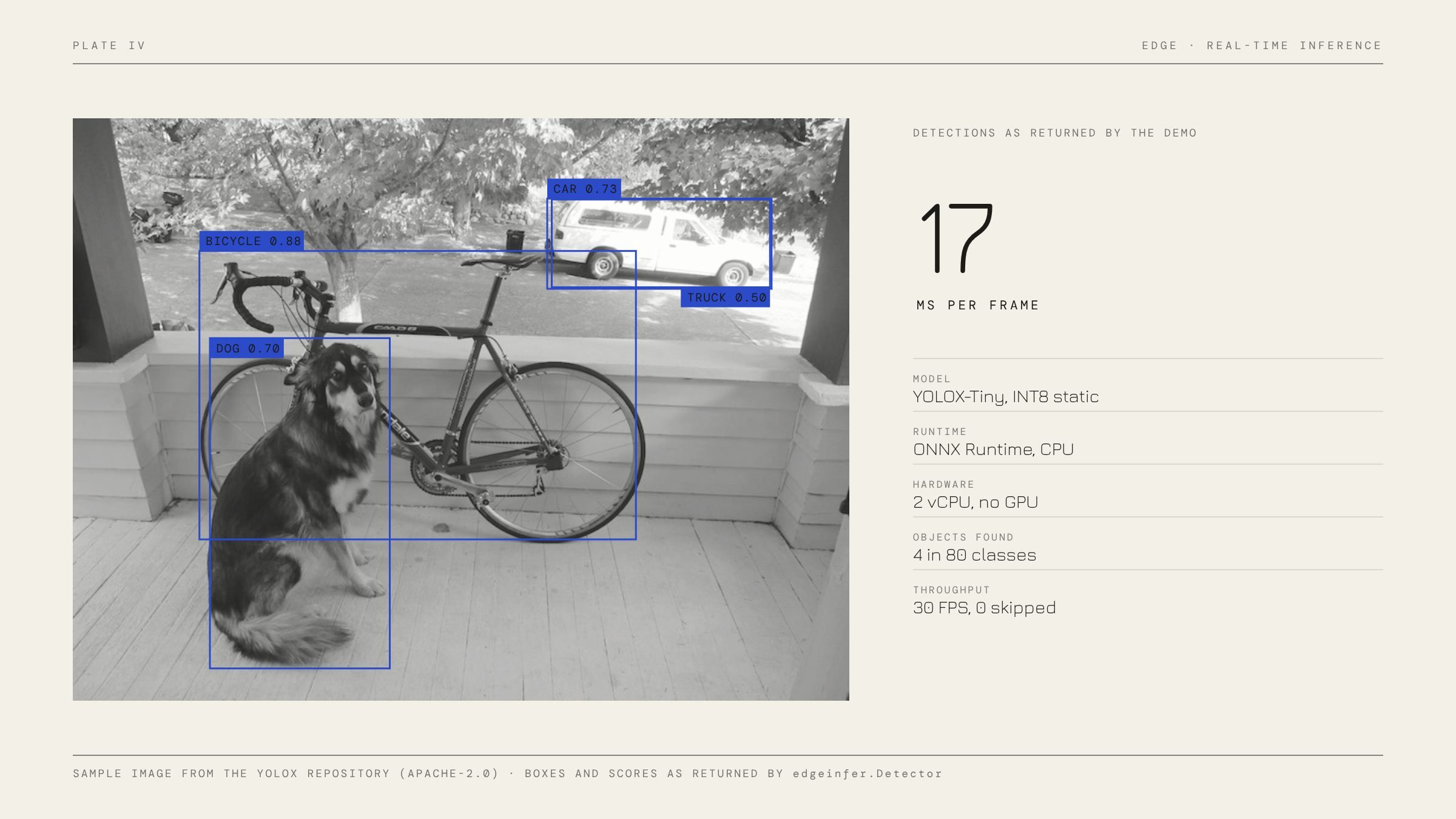
The workload is object detection: find and label people, cars, dogs and 77 other COCO classes in each video frame. It is the classic real-time edge task (retail analytics, safety cameras, robotics) and it stresses a CPU properly.
Models. Three sizes of YOLOX, an anchor-free detector released under Apache-2.0 with official ONNX exports. Figures from the YOLOX README:
| Model | Input (px) | Parameters | Compute per frame | Official COCO mAP |
|---|---|---|---|---|
| YOLOX-Nano | 416 | 0.91 M | 1.08 GFLOPs | 25.8 |
| YOLOX-Tiny | 416 | 5.06 M | 6.45 GFLOPs | 32.8 |
| YOLOX-S | 640 | 9.0 M | 26.8 GFLOPs | 40.5 |
Variants. Each model was run as FP32, INT8 dynamic and INT8 static (QDQ format, per-channel weights, calibrated on 32 images), on ONNX Runtime 1.29 and OpenVINO 2026.4.
Hardware. A 2-vCPU cloud VM (Intel Xeon at 2.1 GHz, AVX-512 with VNNI and AMX, 7 GB RAM), no GPU. Both runtimes were pinned to 2 threads so they compete on equal terms.
Data. COCO128 (128 labelled COCO images): 32 for quantization calibration, 96 held out for accuracy. Latency is the median of 100 timed runs after 10 warm-up runs.
Caveats, stated up front.
- COCO128 comes from COCO train 2017, which YOLOX trained on, so absolute mAP here is inflated (Nano scores 0.34 here against 0.258 officially). Use the numbers to compare FP32 with INT8, not as leaderboard scores.
- A server Xeon is not a laptop. AMX and AVX-512 are rare on client CPUs, so absolute times on a typical laptop will differ. The demo repo exists so anyone can rerun the whole study on their own target in one command.
Results
Static INT8 is the single biggest win for mid-size models, and the one result that changes which model you can afford.
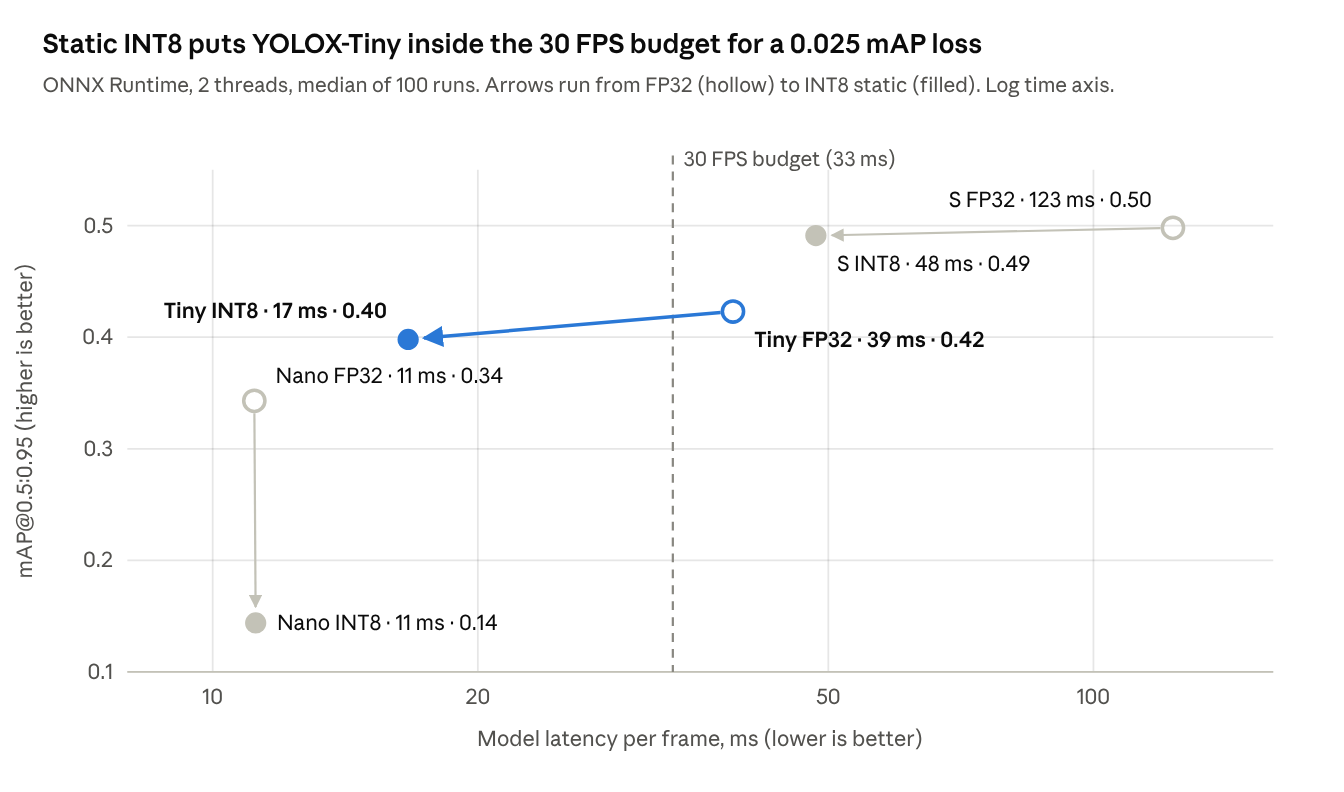
Read each arrow as “what quantization bought”. Tiny and S move far left and barely down: they get 2.3x and 2.5x faster and lose 0.025 and 0.007 mAP. Nano does not move left at all, it only drops. A useful consequence: YOLOX-S in INT8 (48 ms, 0.49) is more accurate than YOLOX-Tiny in FP32 (39 ms, 0.42) at a similar cost. Quantizing a bigger model can beat running a smaller one in full precision.
The variants that did not make the chart
| Variant | Nano (ms) | Tiny (ms) | S (ms) | Note |
|---|---|---|---|---|
| ONNX Runtime, INT8 dynamic | 71.5 | 162.1 | 596.1 | 4-6x slower than FP32; Nano mAP fell to 0 |
| OpenVINO, forced FP32 | 10.9 | 34.2 | 120.9 | Same accuracy as ONNX Runtime FP32 |
| OpenVINO, default precision (bf16 here) | 7.5 | 12.9 | 36.6 | mAP within 0.003 of FP32; needs AMX or AVX512-BF16 |
| OpenVINO, INT8 static | 13.4 | 18.7 | 47.0 | Close to ONNX Runtime INT8 |
Why dynamic INT8 is slow. It rewrites every convolution as a ConvInteger plus extra cast and scale nodes (83 of each in Tiny), and computes activation ranges on the fly for every frame. That path is far slower here than ONNX Runtime’s tuned FP32 convolutions. ONNX Runtime’s own guidance is to use static quantization for CNNs and keep dynamic for transformers and RNNs.
Why OpenVINO’s default was up to 3.4x faster. On CPUs with native bfloat16 (4th-gen Xeon and newer, with AMX), OpenVINO runs FP32 models in bf16 automatically unless INFERENCE_PRECISION_HINT is set to f32 (OpenVINO CPU device docs). Accuracy held here, but this hardware path is rare on laptops and edge boxes, so do not plan on it without checking the target CPU.
Why Nano broke. Error is already visible after the first convolutions and compounds through its 113 conv layers, 30 of them depthwise. Different calibration methods (min-max, entropy, percentile), keeping the detection head in FP32 and keeping depthwise layers in FP32 all left mAP at or below 0.16. Recovering it would need quantization-aware training. At 11 ms in FP32 it does not need INT8 anyway.
Threads, graph optimization and where the time goes
| Setting (YOLOX-Tiny FP32) | Median latency |
|---|---|
| ONNX Runtime default threads | 59.3 ms |
| 1 thread | 59.5 ms |
| 2 threads (both cores) | 37.5 ms |
| Graph optimization disabled | 49.8 ms |
| Graph optimization basic / extended | 50.6 / 47.3 ms |
| Graph optimization all (default) | 36.8 ms |
On this VM the default thread setting behaved exactly like one thread, so pinning intra_op_num_threads gave a free 1.6x. Graph optimization is on by default; only the top level (all, which adds CPU-specific layout changes) pays off.
Pre-processing (resize + pad) and post-processing (decode + NMS) took under 1 ms each for every model, so about 95% of each frame is the model itself. Optimising NumPy code around the model is not worth it here.
The real-time pipeline: drop frames, don’t queue them
When the model is slower than the camera, the frame-handling policy decides the delay you see, and the safe default is to keep only the newest frame.
The demo runs capture on its own thread, paced like a real sensor that never waits for the model. Frames reach the model through one of two buffers:
- Queue every frame: nothing is lost, but at 39 ms per frame against a frame every 33 ms the queue grew by about 5 frames every second, peaking at 57 waiting frames. Each answer describes the world further in the past.
- Latest frame only: a one-slot mailbox. A frame that arrives while the model is busy replaces the waiting one. 23% of frames were skipped, but no answer was ever more than 96 ms old.
With the INT8 model (17 ms per frame) both policies kept up with the camera: 30 FPS processed, 0 frames dropped, 19 ms median and 28 ms p95 end-to-end. The policy matters exactly when the model is too slow, which is when it is hardest to notice, because throughput looks fine (24.5 FPS queued vs 23 FPS latest-only).
The rule of thumb: real-time systems should be judged on the age of the answer, not on frames per second.
A checklist for shipping AI on a CPU
Most of the speed in this study came from settings, not from new hardware. In order of payoff:
- Set the budget first. Write down the frame rate and the maximum acceptable answer age (for example 30 FPS and 100 ms). Every other choice is measured against it.
- Measure on the target device. Results here swung 3x on CPU features alone (AMX bf16). A benchmark from another machine is a guess.
- Pick the largest model that fits after quantization, not before. S in INT8 beat Tiny in FP32 on accuracy at similar speed.
- Use static INT8 for vision models, and check accuracy every time. Calibrate on 30-100 representative images. A 0.01-0.03 mAP loss is typical; a collapse (as with Nano) means the model is too small for post-training quantization.
- Never use dynamic INT8 for CNNs. Keep it for transformers and RNNs.
- Pin threads and check what precision the runtime actually uses. Defaults differ between runtimes and between machines.
- Keep only the newest frame. Use a one-slot buffer between capture and inference, and monitor answer age, not just FPS.
- Leave graph optimization at its highest level and don’t spend effort on pre/post-processing until the model is under budget; together they were under 5% of frame time here.
What this study did not cover
- GPUs, NPUs and mobile chips, where LiteRT and vendor execution providers apply.
- Quantization-aware training, the usual fix when post-training INT8 hurts accuracy.
- Generative models (small LLMs on CPU), where memory bandwidth, not arithmetic, is usually the limit.
- Power draw and thermal throttling over long runs.
Try it yourself
Every number above comes from the companion repo, edge-realtime-inference (public on GitHub). It contains the detector, the real-time pipeline, the quantization script, the evaluator and the benchmark, with 16 tests and a CI workflow.
pip install -r requirements-dev.txt
python scripts/download_assets.py   # models + sample data
make bench                          # quantize, benchmark, draw charts
python run_realtime.py --source 0 --model models/yolox_tiny.int8-static.onnx
If you run it on a different machine, especially an AMD laptop, an Apple Silicon Mac or an Arm board, please share the results/ folder. Comparing hardware is the obvious next step for this study.
Sources
- YOLOX repository and model table, Megvii, Apache-2.0
- Quantize ONNX models, ONNX Runtime documentation
- CPU device: precision and bf16, OpenVINO documentation
- Quantizing deep convolutional networks for efficient inference: a whitepaper, R. Krishnamoorthi, 2018
- LiteRT: the universal framework for on-device AI, Google Developers Blog, January 2026
- ExecuTorch runtime overview, PyTorch documentation
- COCO128, the first 128 images of COCO train 2017, packaged by Ultralytics