



Introduction
Data replication plays a crucial role in building real-time analytics pipelines. GCP Datastream is a serverless, change data capture (CDC) and replication service that enables you to stream data from databases like CloudSQL PostgreSQL to BigQuery without manual intervention.
In this blog, we’ll walk through how to replicate CloudSQL PostgreSQL data to BigQuery using GCP Datastream,
Prerequisites
Before starting, ensure you have:
A GCP project with billing enabled.
CloudSQL PostgreSQL instance with sample data.
IAM roles:
roles/datastream.admin
roles/storage.admin
roles/bigquery.dataEditor
Create a Stream
In the GCP Console:
Go to Datastream → Create Stream.
Provide the details for your stream.
Select PostgreSQL in Source and BigQuery in Destination.
Scroll down, open PostgreSQL Source, select CloudSQL for PostgreSQL, and follow the guided steps.
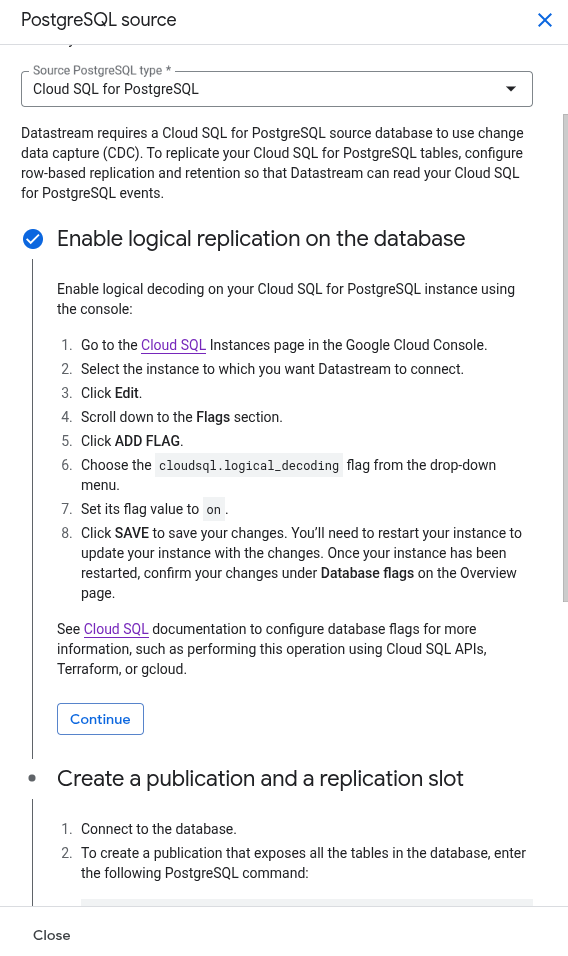
– After completion click continue.
Create PostgreSQL Connection Profile
Provide the details for connection profile like : (Connection profile name, Host IP, port, username, password, Database name).
In define connectivity method select IP Allowlisting and copy all the IPs that will appear. We need to add these IPs in PostgreSQL connection settings, to do this –
Edit the PostgreSQL Instance and open Connections -> Add a network. Add all the IPs one by one that you have copied before and save the configurations.
Now, run the test in the source connection profile and click Create
Configure stream source
Provide the details, such as the replication slot name and publication name, that you created earlier in guided steps.
Select what tables to include and what to exclude and click continue.
Define BigQuery connection profile
In this section click Create connection profile.
Provide connection profile name and click continue.
Configure Destination
Define the BigQuery dataset where Datastream will stream the data–
Select Single dataset for all schemas.
In next tab Create Dataset.
Provide other details and click continue.
Review stream details and create
Now you can see your stream details and run a validation to check everything is working fine.
After validation is successful, you can click on create & start the stream option.
After a few seconds, your stream will start replicating historical data (if any) and ongoing changes from the PostgreSQL database to the BigQuery dataset.
For more information visit – Datastream