


The problem: heavy work and the round trip
When a web app has to resize a large photo or validate a 100,000-row Excel file, the usual answer is to send the file to a server, process it there and send the result back. That works, but it has costs:
- Waiting on the network: large files must be uploaded and the result downloaded before the user sees anything.
- Server cost and load: every user’s CPU-heavy job runs on your servers.
- Privacy: sensitive files leave the user’s device just to be validated or resized.
- JavaScript has limits: it is fine for UI logic, but CPU-heavy loops are slower and some formats (such as xlsx) lack good libraries.
The question I wanted to answer: when is it worth moving this work into the browser with Rust and WebAssembly, and when is it not?
What are Rust and WebAssembly?
- Rust is a fast, memory-safe programming language.
- WebAssembly (WASM) is a compact binary format that every modern browser runs in a safe sandbox, next to JavaScript.
- Together: you write the heavy logic in Rust, compile it to a
.wasmfile, and JavaScript loads it and calls it like a normal function. The work stays on the user’s device.
In this project the Rust code is about 235 lines and compiles to a 539 KB file that the browser loads in roughly 30 ms.
The demo: same work, split screen
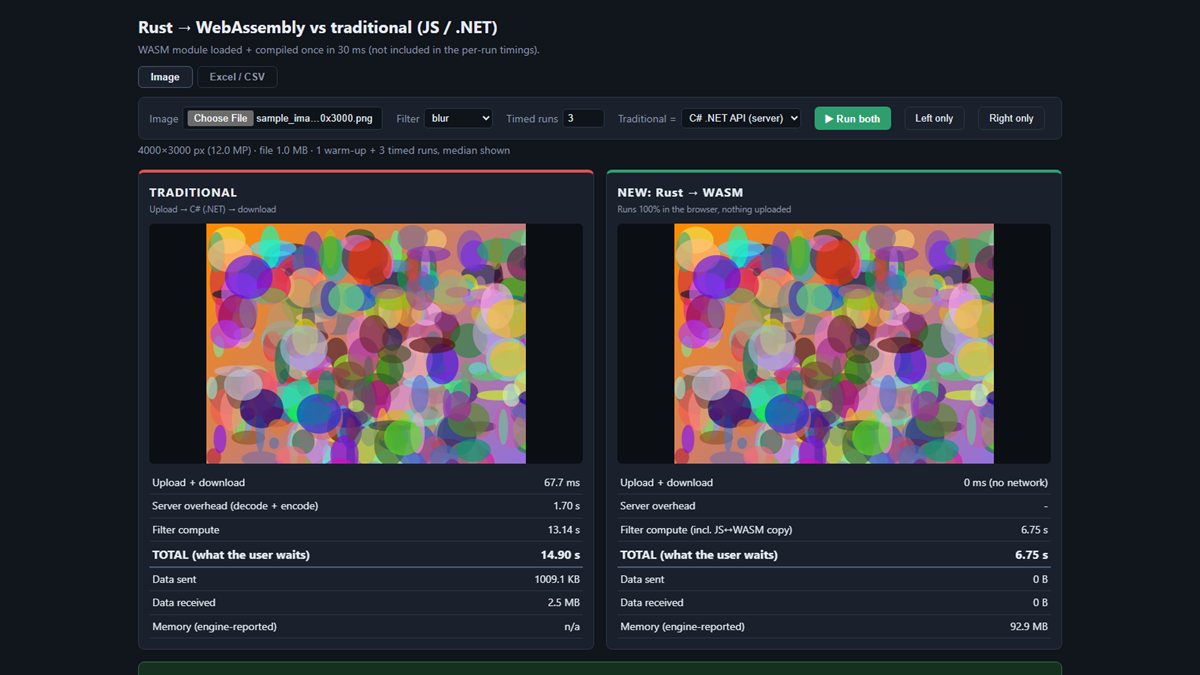
I built a split-screen app that runs the same work two ways and measures both. The left side is the traditional approach (JavaScript in the browser, or a C# .NET server with upload and download). The right side is Rust compiled to WASM in the browser, with nothing uploaded.
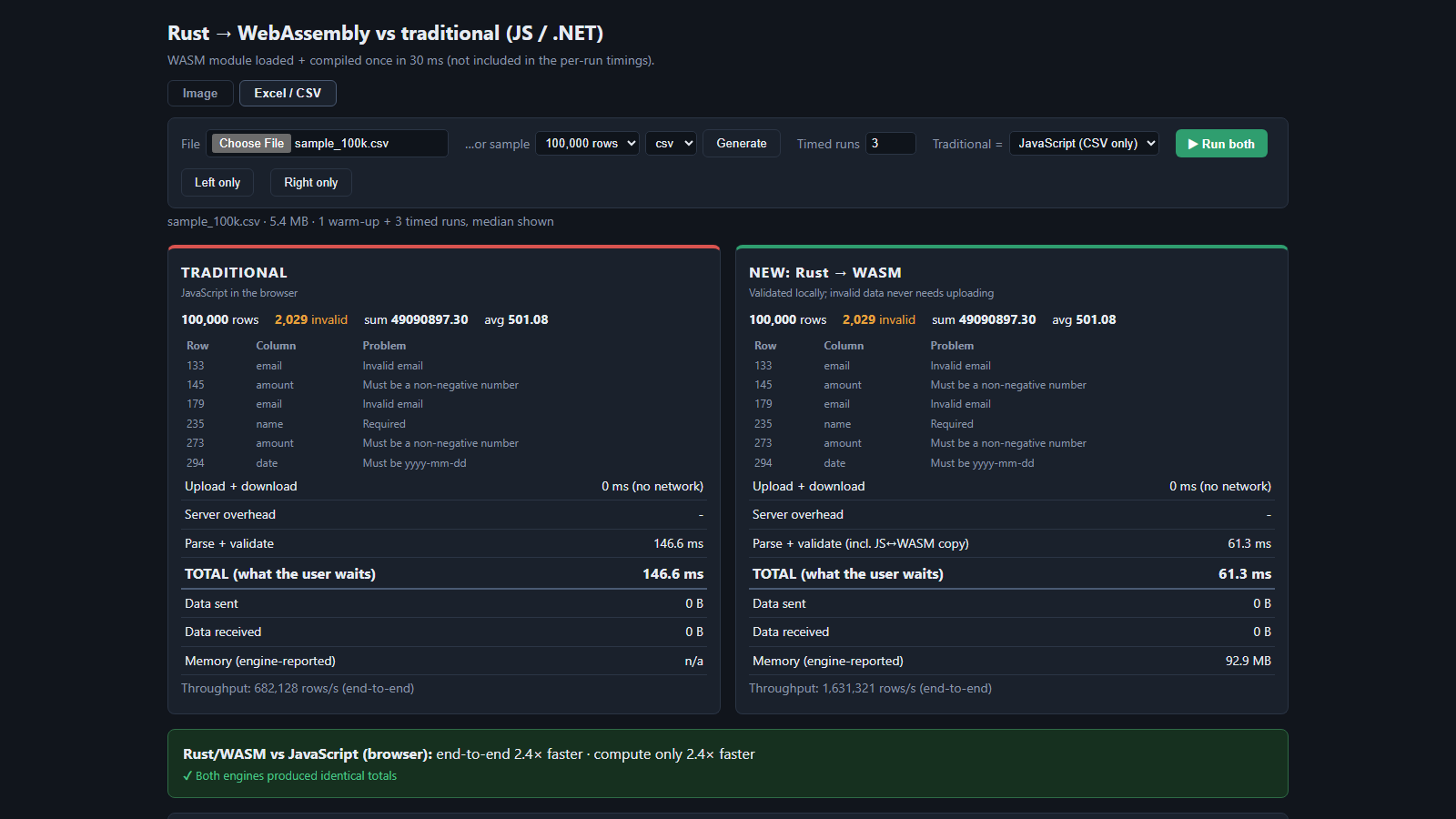
The workloads were a blur filter on a 12-megapixel image and validation of 100,000-row CSV and XLSX files (ids, emails, amounts and dates). Each side reports upload and download time, compute time, total time, data transferred and memory.
Full Demo
How I kept the comparison fair
- All three engines use the same integer algorithms and validation rules, and the app checks that their outputs match.
- JavaScript and WASM both run in Web Workers, so neither blocks the page.
- Each side does 1 warm-up run and 3 timed runs; I report the median.
- The server reports its own timings, so I can separate compute from network time.
- The WASM timing includes copying data between JavaScript and WASM, which is a real cost.
Results
End-to-end time the user waits (lower is better), measured on one machine with the API on localhost.
| Scenario | Compared with | Traditional | Rust → WASM | Speed-up |
|---|---|---|---|---|
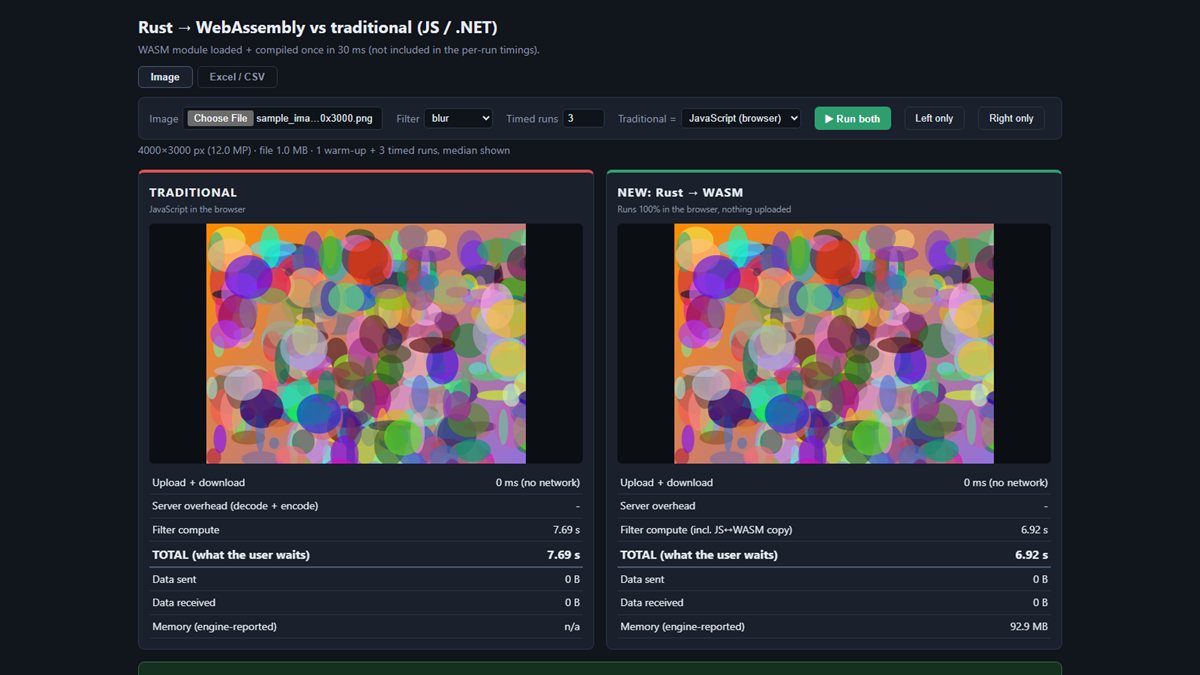
| Image blur, 12 MP | JavaScript (browser) | 7.69 s | 6.92 s | 1.1× |
| Image blur, 12 MP | C# server | 14.90 s | 6.75 s | 2.2× |
| CSV validate, 100k rows | JavaScript (browser) | 147 ms | 61 ms | 2.4× |
| CSV validate, 100k rows | C# server | 424 ms | 67 ms | 6.3× |
| XLSX validate, 100k rows | C# server | 3.98 s | 1.12 s | 3.6× |
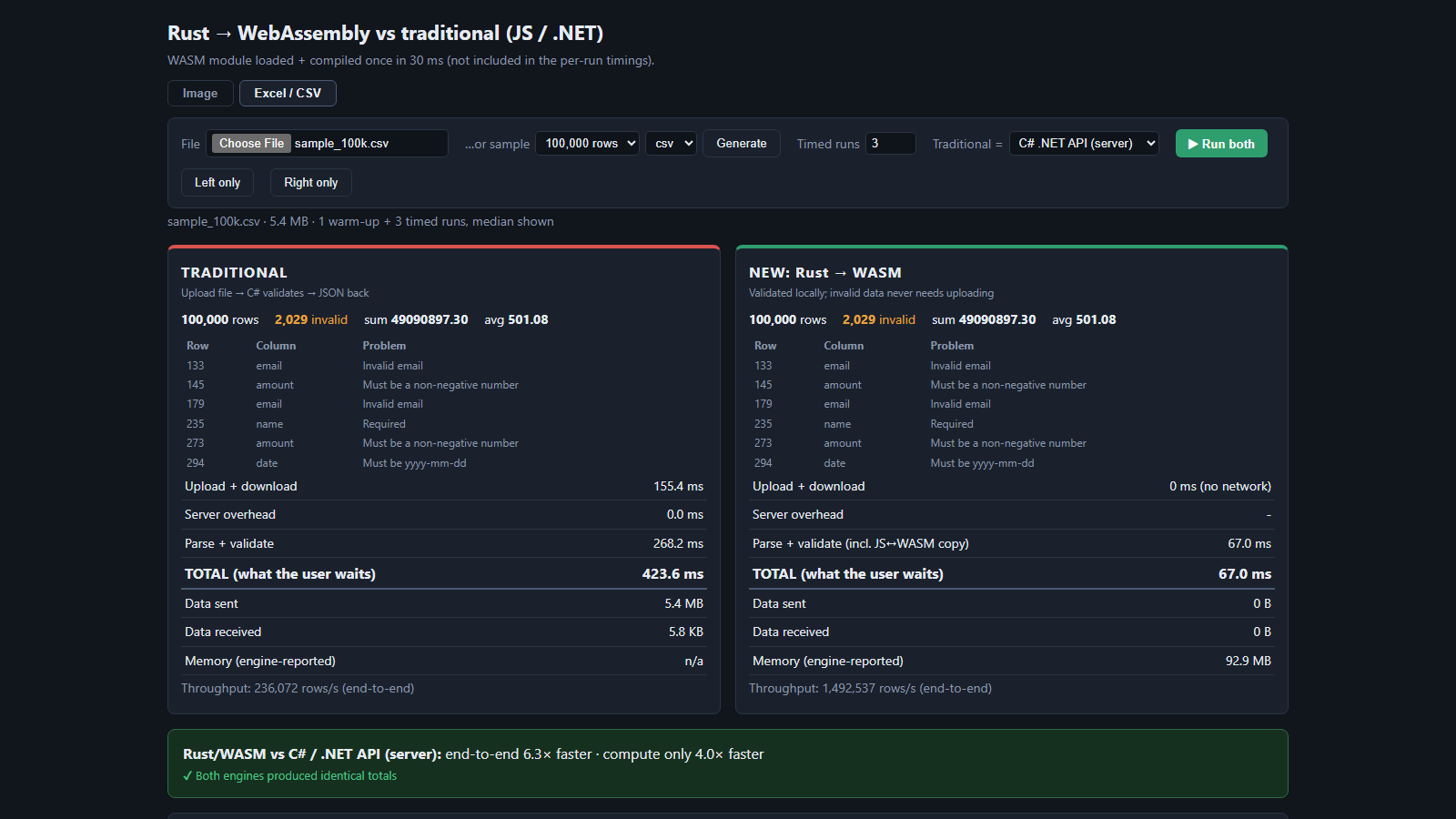
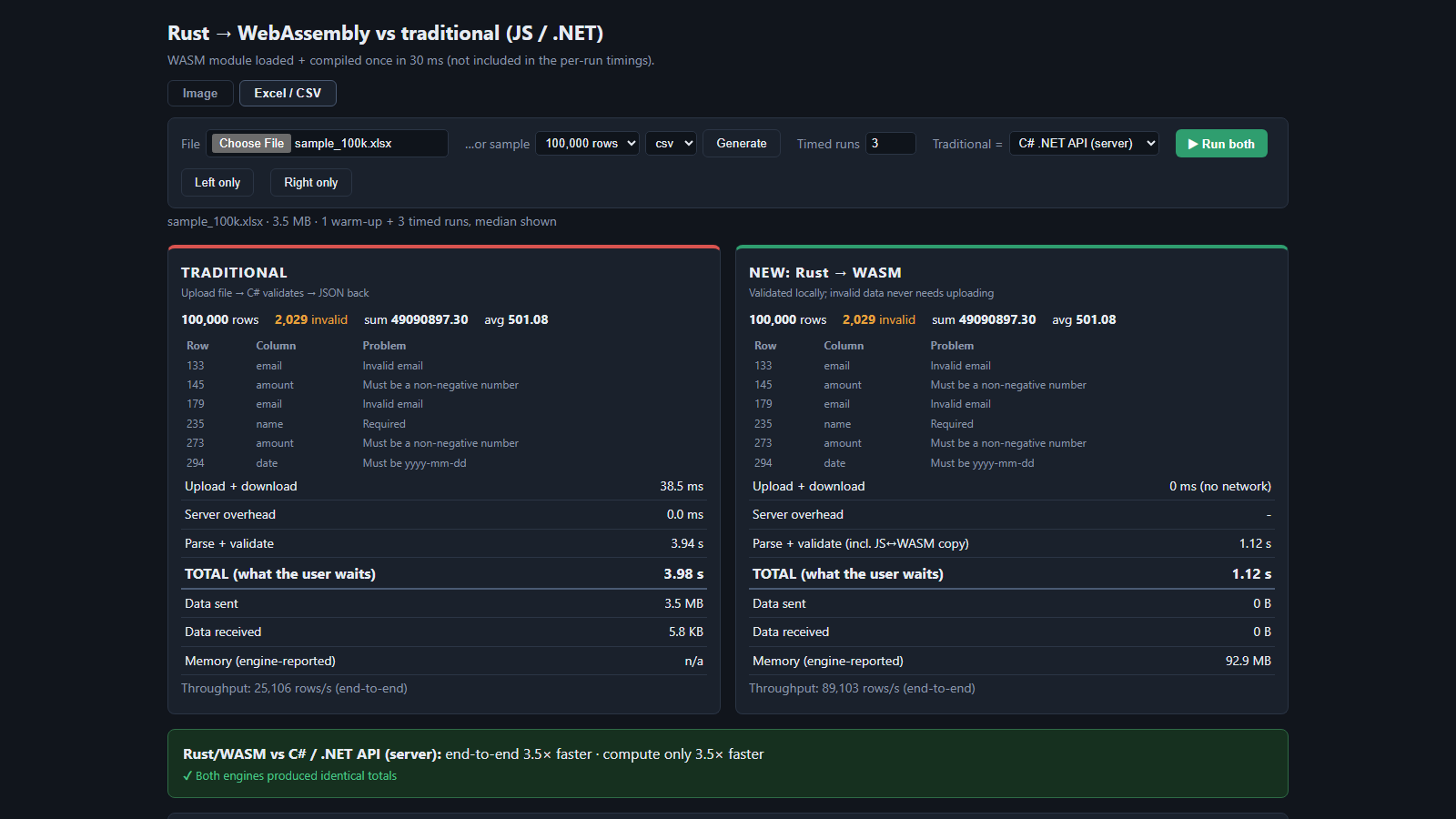
What stands out:
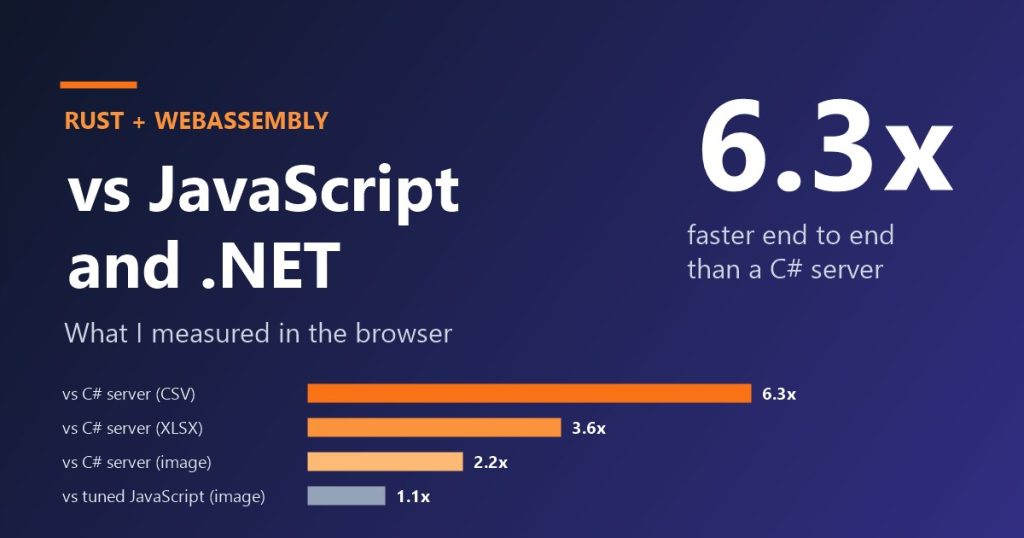
- The biggest wins come from removing the network, not only from faster compute. Against the server, WASM won by 2.2× to 6.3×.
- Against tuned JavaScript on pure compute, the gain was small (1.1× on the image blur). WASM is not magic; the architecture matters as much as the language.
- Absolute numbers will differ on your hardware. Compare the ratios, and note that real network latency would favour WASM even more than my
localhosttest.
Advantages
- Faster end to end in every scenario I tested, with the largest gains versus the server.
- Private by design: files are processed on the device and never uploaded.
- Cheaper to run: compute moves to the user’s machine, so server cost and load drop.
- Safe and reusable: one strongly typed Rust crate, with memory safety and no garbage collector.
- Works offline once the page and module are loaded, and Web Workers keep the interface responsive.
Disadvantages and limits
- Steep learning curve: ownership and lifetimes take time; Rust is slower to write than JavaScript or C#.
- Heavier toolchain: you need Rust and wasm-pack, and CI gets more complex.
- Boundary cost: data is copied between JavaScript and WASM, so tiny tasks may not benefit.
- Bundle size: my module is 539 KB (I have not applied
wasm-optyet), an extra download on first load. - Harder debugging: browser tooling for WASM is improving but trails JavaScript.
- Not always a win: tuned JavaScript is competitive on simple work.
Caveats on my own test: one machine, API on localhost, browser image-decode time not counted, and the JavaScript engine has no xlsx parser, so XLSX was compared only with the server.
When to use it, and when not to
Good fit
- CPU-heavy work in the browser (image, audio, parsing, crypto).
- Large files where upload time dominates.
- Privacy-sensitive data that should stay on the device.
- One core library shared across web, server and command line.
Poor fit
- Simple DOM or UI logic, where JavaScript is the right tool.
- Small inputs, where the JavaScript ↔ WASM copy dominates.
- Teams with no Rust skills and tight deadlines.
- Work that needs server-side data or central auditing.
What I learned and what is next
Beyond the numbers, this project built practical skills: Rust fundamentals (ownership, error handling, crates), the WebAssembly toolchain (wasm-pack, wasm-bindgen, Web Workers and the JavaScript ↔ WASM boundary), fair benchmarking (warm-ups, medians, output-match checks), and a full-stack comparison with React, Vite and a .NET 10 API.
Next I plan to apply wasm-opt and measure the size and speed gain, try SIMD and multi-threading for the image filters, and pilot WASM on one real internal workload with heavy client-side files.
Code: github.com/haima24/WASM_Demo. Questions or your own WASM results? Leave a comment below.