


Welcome to my blog! I’m truly grateful you’ve stopped by. Ready to learn something new? Stay curious, stay objective, get inspired—and most importantly, have fun!

If you’ve already gone through the previous blog, Say hello to boomi – Your new best friend in integration, then you’ve seen the introduction and overview of Boomi including why it has become a popular choice for organizations looking to simplify connectivity. We explored what Boomi is, why it matters in modern integration, and how it helps teams with its low-code, cloud-native approach.
In Part 2, we’ll go deeper and look at how Boomi is built behind the scenes. This is a beginner-friendly guide to Boomi’s architecture — covering its core components, runtime engines, and environment structure.
1 Boomi Architecture
Boomi’s architecture is built around a flexible, cloud-native model centered on the Atom, a self-updating runtime engine that executes integration processes. Atoms can run in Boomi’s cloud as a fully managed service or be self-hosted by the client. For scenarios that involve both cloud and on-premises systems, a hybrid Atom setup can be used.
When greater scalability and high availability are required, multiple Atoms can be clustered into a Molecule, enabling distributed processing without additional licensing complexity.
All of this is controlled through Boomi AtomSphere, the cloud-based platform where you design, deploy, and manage your integrations.

As you can see from the image above Boomi AtomSphere (the cloud control plane) manages and orchestrates your integrations, while Atoms and Molecules act as the runtime engines (data plane). Cloud-hosted Atoms handle integrations between cloud applications, and on-premises Atoms manage connections to internal systems and databases. Only metadata flows back to AtomSphere, the actual data stays within the Atom — ensuring security and isolation.
2 Boomi AtomSphere Platform Components
2.1 AtomSphere Overview
Boomi AtomSphere is a unified cloud platform that brings together everything you need to design, deploy, and manage integrations in one place. Instead of juggling multiple tools, AtomSphere centralizes all integration capabilities under a single interface, making it easier for teams to collaborate and maintain their workflows.
Within AtomSphere, Boomi provides several modules that support different integration needs:
- Integration – Build and manage integration processes using a low-code, drag-and-drop designer.
- API Management – Create, publish, and secure APIs built on top of your integration processes.
- Flow – Design lightweight workflows and business processes for human-centric automation.
- Master Data Hub (MDM) – Manage and synchronize critical business data across systems to maintain consistency.
Together, these modules give organizations a complete toolkit for connecting systems, orchestrating data, and building modern automation solutions.
2.2 The Component Library
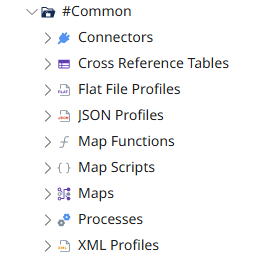
Boomi’s Component Library is where all reusable building blocks of your integration processes live. It includes:
2.2.1 Shapes and Connectors
Boomi provides a wide variety of shapes to support different integration scenarios. Here’s an overview of the major categories:
1. Start Shapes – These initiate integration processes:
- Connector: Connects to an application or data source (e.g., Salesforce, NetSuite, FTP).
- Message: Triggers a process when an inbound message is received.
- Schedule: Starts a process based on a defined schedule.
2. Execution Shapes – These perform actions or transform data:
- Data Process: Manipulates data using functions such as mapping, scripting, and more.
- Document Cache: Temporarily stores data for later use within the process.
3. Logic Shapes – These control the flow of the integration process:
- Branch: Splits the process into multiple paths for parallel execution.
- Route: Directs data down different paths based on conditions.
- Decision: Evaluates data against criteria to determine the correct path.
- Exception: Handles errors and unexpected events.
4. Connector Shapes – These interact with specific applications and systems:
- Database V2 Connector – Connects to relational databases like Oracle, PostgreSQL, and SQL Server, with improved performance and better support for stored procedures (REFCURSOR).
- HTTP / REST / OpenAPI Connectors – Integrate with web services and APIs, now with OAuth 2.0 support and advanced HTTP features.
- Event Streams Connector – Handles event-driven integrations with improved acknowledgment control.

2.2.2 Reusable Components
This “build once, use everywhere” model makes development faster, reduces duplication, and keeps your integrations consistent across the platform.
At the core of Boomi are reusable components that form the foundation of your integrations. Here are the most important ones:
1. Connections
- What they are: Digital bridges between Boomi and external systems, storing URLs, credentials, and authentication details.
- Why they matter: Boomi cannot communicate with other systems without them — think of connections as the phone lines for your integrations.
2. Connectors
- What they are: Components designed to interact with specific applications or technologies, including databases (SQL Server, MySQL), cloud services (Salesforce, AWS), file formats (CSV, XML, JSON), and protocols (FTP, HTTP).
- Why they matter: Connectors act as translators, enabling Boomi to understand and communicate with each system.
3. Processes
- What they are: The heart of an integration, made of connected “shapes” that define data flow and actions.
- Why they matter: Processes are your integration blueprints, automating how data is received, transformed, validated, and delivered.
4. Maps
- What they are: Tools that transform data from one format to another, visually defining field correspondences.
- Why they matter: They ensure data compatibility, making sure your target systems receive data in the correct format.
5. Profiles
- What they are: Definitions of data structures for flat files, XML, JSON, EDI, and more.
- Why they matter: Profiles guide Boomi in interpreting and processing data correctly.
6. Other Key Components
- Document Cache: Temporarily stores data during process execution for better performance.
- Trading Partners: Manages B2B integrations, especially EDI.
- Certificates: Secure connections with encryption and authentication.
- Custom Libraries: Reusable code blocks for extended functionality.
3 Boomi AtomSphere Platform (UI Overview)
3.1 Dashboard
Boomi provides a set of monitoring dashboards that give real-time visibility into the health and performance of your integrations. These dashboards help you quickly identify issues, track activity, and understand how your processes are behaving across environments.
Here are the three primary dashboards available in Atmosphere:
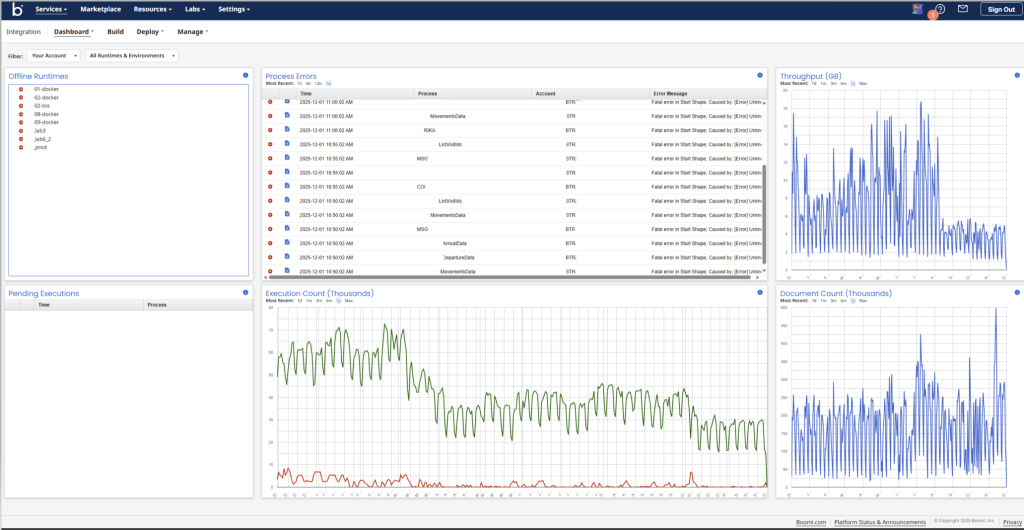
3.1.1 Account Dashboard
This dashboard gives a high-level overview of your entire Boomi account. It includes insights such as:
- Atom and Molecule online/offline status
- Recent process errors and failure trends
- Throughput metrics (executions, documents processed)
- Current running processes and queued executions
It’s the go-to view for understanding the overall health of your integration landscape.
3.1.2 HTTP Status Dashboard
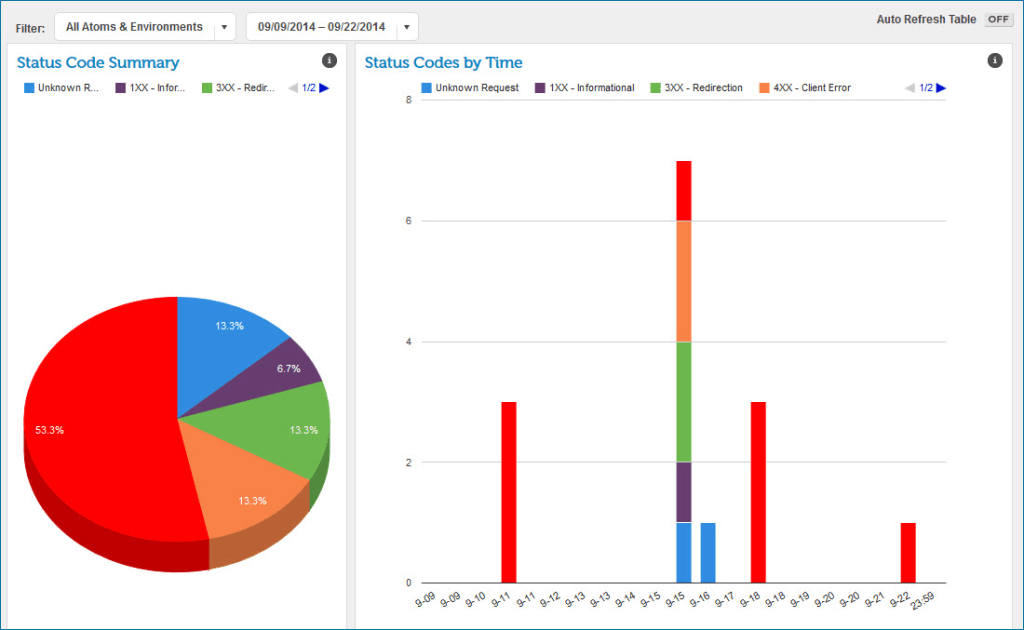
This dashboard focuses on API-related integrations. It visualizes API responses using a breakdown of HTTP status codes (e.g., 200, 400, 500).
You can quickly see:
- Which APIs are performing well
- Where errors or timeouts may be happening
- The distribution of successful vs. failed requests
It’s especially useful for teams managing APIs built or hosted within Boomi.
3.1.3 Real-Time Dashboard
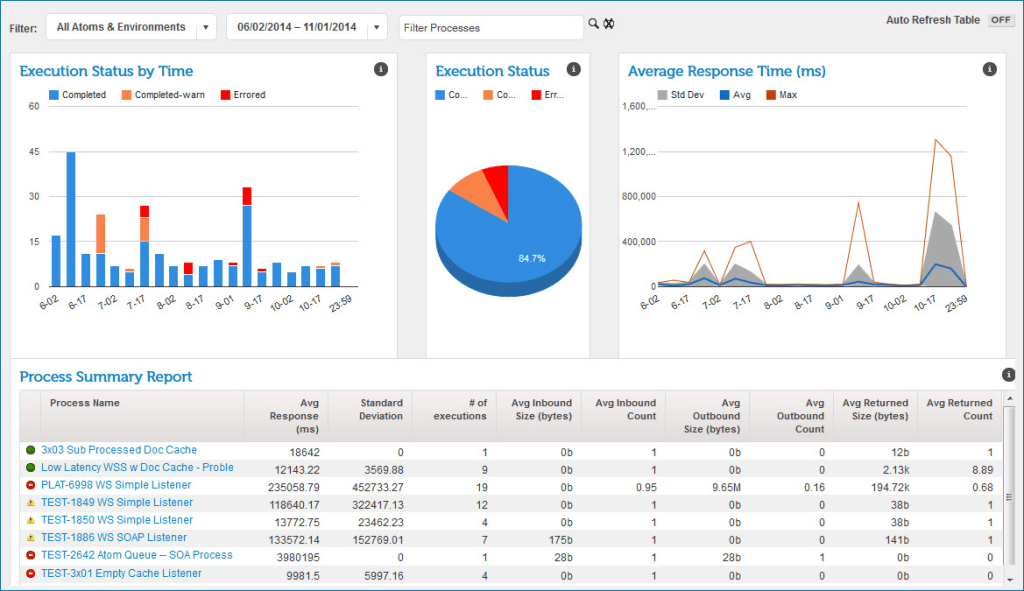
Designed for monitoring low-latency processes, this dashboard shows near-instantaneous activity for performance-optimized integrations.
Low-latency processes achieve speed by:
- Skipping detailed execution logs
- Only logging errors
- Running with an optimized execution path
This dashboard helps you verify that high-throughput, time-sensitive workflows are running smoothly.
3.2 Build
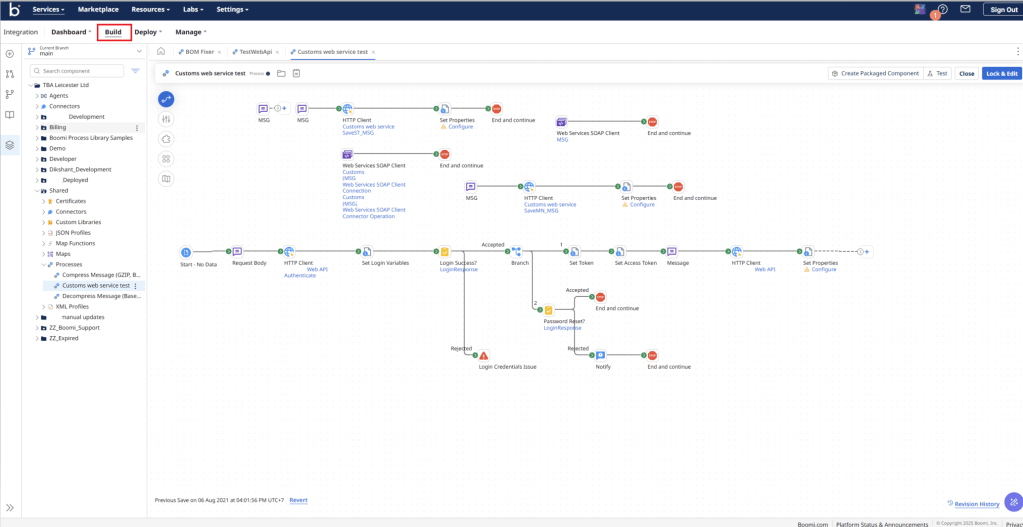
The Build tab is where you design and construct your integration workflows, known in Boomi as processes. Each process is made up of individual shapes (or steps), with each shape performing a specific function such as connecting to a system, transforming data, routing logic, or handling exceptions.
Boomi’s visual, drag-and-drop interface makes it easy to link these shapes together to define your integration flow—no coding required. You simply select the components you need and arrange them on the canvas to create your workflow logic.
Recent updates to the Build experience include:
- Improved process canvas performance for larger or more complex integrations
- Enhanced versioning tools for managing changes across updates
- Updated shape libraries with additional connectors and capabilities
- Better error highlighting to help detect configuration issues early
- Reusable components expansion, making it easier to build modular integrations
The Build area is essentially the design studio of Boomi—where ideas become automated workflows.
3.3 Deploy
The Deploy section is where you publish your integrations to different environments. Boomi’s deployment model is divided into two key stages: packaging and deployment.
- Packaging creates a deployable unit that contains a process and all of its dependencies—such as maps, profiles, connectors, and shared components.
- Deployment then pushes that package to a specific environment like Development, Test, or Production.

In addition to traditional single-process packages, Boomi now supports Integration Packages, a more modern and scalable way to manage deployments. Integration Packages allow you to group multiple related processes and components into a single, versioned deployment unit. This makes it easier to coordinate releases, track dependencies, and promote entire integration solutions across environments.

Recent updates to Boomi’s deployment capabilities include:
- Support for versioning and rollback across packages and integration packages
- Environment extensions for handling environment-specific configurations (e.g., different URLs or credentials)
- Improved dependency tracking to prevent incomplete deployments
- Audit logs for visibility into deployment history
- Scheduled deployments for controlled release timing
With these enhancements, Boomi provides a more reliable and enterprise-ready deployment experience, ensuring integrations can be safely promoted through the development lifecycle.
3.4 Manage
Once your integrations are built and deployed, the Manage area of Boomi Atmosphere gives you the tools to operate, monitor, and govern them — from everyday runtime health to partner-level EDI/Trading-Partner oversight.
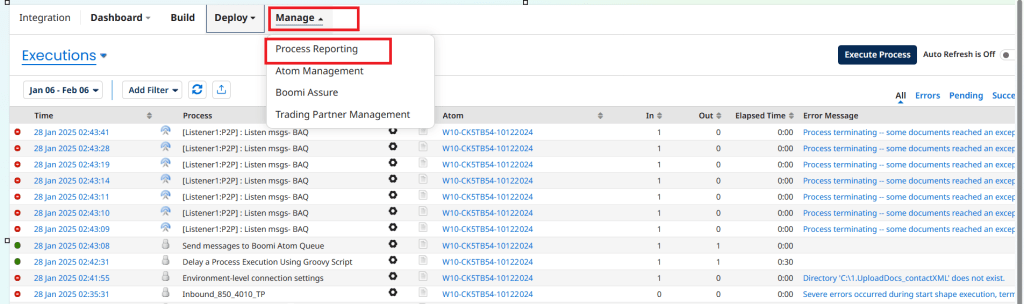
3.4.1 Process Reporting
- Boomi provides process-level reporting that lets you track execution history, success/failure rates, throughput (documents processed), and latency across all environments (Dev, Test, Prod). This helps you spot errors or bottlenecks quickly.
- With the optional analytics/monitoring add-on (Boomi Insights), you get enhanced real-time dashboards for runtime status, error tracking, listener issues, certificate expirations, and overall usage metrics — making governance and troubleshooting easier.
- These tools give you visibility into both batch and real-time processes, supporting operational oversight and long-term optimization.
3.4.2 Runtime Management
- In 2025, Boomi updated its runtime terminology (formerly “Atom” / “Molecule”) to more standard cloud-runtime terms — but the core concept remains: Atoms/Runtimes (cloud or on-prem) run your integrations.
- You can manage runtime health: check which runtimes are online/offline, restart runtimes, manage configurations, and monitor resource usage. The platform API now supports runtime restart to aid maintenance and automated management.
- For production environments, you can also leverage features like Elastic Executions (in private clouds) for better scalability and integrate with external monitoring systems via standard observability protocols for logs and metrics (e.g. with Open Telemetry in early access).

3.4.3 Boomi Assure
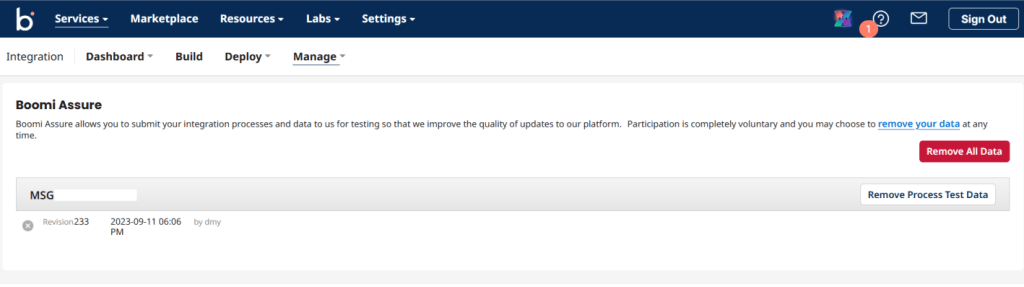
- Boomi Assure is Boomi’s automated regression testing and validation service. When enabled, Assure captures expected process behaviors and test payloads, then automatically verifies that platform updates or configuration changes do not break your integrations. It streamlines pre-release validation by running recorded test cases, highlighting regressions, and producing clear pass/fail reports so teams can deploy updates with greater confidence.
- Participation is completely voluntary and you may choose to remove your data at any time. Boomi only uses the submitted test cases to validate platform changes and does not execute them outside of controlled regression testing cycles.
3.4.4 Trading Partner Management
- For organizations using EDI or B2B integrations, Boomi offers a Trading Partner Management interface that gives a unified “single pane of glass” to configure, manage, and monitor all trading partner relationships, regardless of standard (X12, EDIFACT, Rosetta Net, etc.) or transport (AS2, FTP/SFTP, HTTP/S, VAN).
- One process can support multiple trading partners or VANs. This flexibility is valuable for businesses operating across many suppliers or clients.
- The centralised trading-partner dashboard and document-tracking features significantly simplify onboarding partners, managing EDI flows, and troubleshooting B2B communications.

4 Conclusion
A platform that enables organisations to efficiently integrate data from anywhere has become essential in today’s digital-first world, where businesses operate online and customers demand seamless experiences. This is where Boomi truly shines. It helps companies connect cloud applications, on-premise systems, and everything in between—regardless of where those systems live.
First, Boomi simplifies integration by providing tools that allow teams to build workflows quickly and accurately.
Next, its low-code environment dramatically shortens development cycles, improving developer productivity and reducing time-to-market.
Then, through its runtime, monitoring, and automation capabilities, Boomi ensures integrations remain reliable, scalable, and easy to maintain.
Finally, Boomi’s comprehensive ecosystem—covering integration, API management, workflow automation, MDM, and event-driven use cases—gives organisations a single platform to support all their connectivity needs.
In summary, Boomi offers a complete, modern integration platform that empowers businesses to streamline, automate, and scale their most important processes, ultimately driving greater efficiency, agility, and digital success.