


Welcome to my blog! I’m truly grateful you’ve stopped by. Ready to learn something new? Stay curious, stay objective, get inspired—and most importantly, have fun!
Businesses constantly face the challenge of integrating multiple applications and data sources to streamline operations and enhance efficiency in the ever-evolving landscape of digital transformation. Dell Boomi stands out as a leading integration platform, offering a comprehensive, cloud-native solution for connecting applications, data, and people. In this blog, we’ll explore an overview of Dell Boomi, its benefits, key features, advantages, and much more.

1. Overview, Introduction to Dell Boomi:
Dell Boomi is a cloud-native Integration Platform as a Service (iPaaS) that helps businesses connect applications, data, and devices—whether on-premises or in the cloud. Launched in 2007, Boomi is loved for its simplicity, flexibility, and scalability, making integration feel less like rocket science and more like plug-and-play.
With Boomi, you can:
- Integrate everything—apps, data, devices—fast and securely.
- Automate processes and manage APIs with ease.
- Accelerate digital transformation without breaking a sweat.
Think of Boomi as the ultimate connector that turns IT chaos into harmony

2. How Boomi Powers Seamless Integration
Boomi uses an intuitive, drag-and-drop workflow designer that lets users quickly build, deploy, and manage integration flows without heavy coding. Its user-friendly interface makes integration accessible to both technical and non-technical teams.
The platform is secure, scalable, and industry-compliant, capable of handling the needs of large enterprises while remaining simple for smaller organizations. With Boomi, you can:
- Create, monitor, and manage connections across applications, databases, and devices.
- Leverage extensive pre-built connectors for cloud, SaaS, and on-premises systems.
- Gain insights through data monitoring and analytics, helping you understand and optimize integrations.
Boomi also offers advanced security features like data masking, filtering, and granular access controls—ensuring sensitive information stays protected and only authorized users can access it.
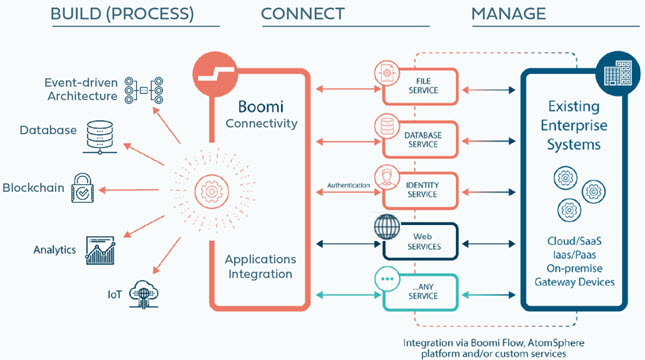
3. Boomi Architecture & Key Features
3.1 Boomi Architecture Overview
Boomi’s platform is built on a cloud-native, low-code foundation that enables seamless connectivity and intelligent data management across systems. The architecture is composed of several core components that work together to unify applications, data, and people.
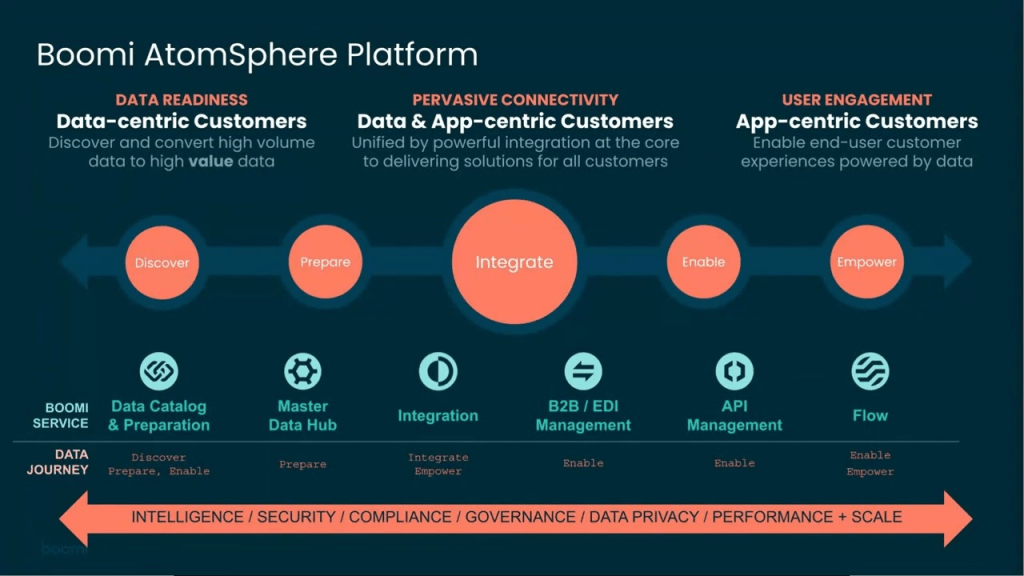
Integration
Boomi’s core offering is its Integration Platform as a Service (iPaaS), designed to seamlessly connect applications and data across environments. This is the primary focus of the Boomi ecosystem, enabling real-time and secure data synchronization between systems.
Boomi AI
Boomi’s architecture is enhanced by Boomi AI, which enables fast and intelligent integrations across systems. It leverages lightweight Atoms that execute integration processes securely, while Molecules and Atom Clouds ensure scalability and high availability.
Through Boomi AtomSphere, users can design, deploy, and manage integrations in a low-code environment. With Boomi AI, users benefit from automated data mapping, smart recommendations, and optimized workflows — making integrations faster, smarter, and more efficient.
Master Data Hub (MDH)
Boomi’s Master Data Management (MDM) solution ensures synchronized and accurate master data through the concept of “golden records,” providing a single source of truth for critical business information across the organization.
API Management
Boomi includes a robust API Management platform that allows organizations to easily create, publish, and manage APIs, enabling secure and efficient communication between systems.
B2B / EDI Management
As part of Boomi Integration, this feature specializes in managing Electronic Data Interchange (EDI) transactions and collaborating with trading partners to streamline B2B operations.
Flow
Boomi Flow is a low-code, cloud-native platform that enables businesses to build applications and automate human workflows quickly, reducing development complexity and improving agility.
Data Catalog & Preparation
This lightweight, cloud-native tool helps organizations analyze, organize, secure, and catalog data, ensuring better governance and accessibility for decision-making.
3.2 Key Features of the Boomi Platform
Low-Code Development
Boomi uses a low-code approach, making it easy to design, deploy, and manage integrations with minimal coding. This empowers both developers and business users to collaborate efficiently.
AI and Machine Learning–Assisted Integration
Boomi leverages previous integration patterns, machine learning, and “crowd intelligence” to accelerate mapping and integration tasks, improving accuracy and reducing manual effort.
Unified Platform
Boomi supports multiple integration patterns like A2A, B2B, and EDI, allowing organizations to handle all integration needs within a single, unified platform.
Pre-Built Connectors
Boomi offers a vast library of ready-to-use connectors for popular applications, databases, and services. These connectors simplify the process of connecting systems like CRM, ERP, and cloud apps, saving time and effort.
Master Data Hub
Centralize and synchronize key data — such as customer records, product details, and employee information — to maintain accuracy and consistency across all systems.
API Management
Create, publish, and manage APIs easily to improve connectivity and collaboration between systems.
Real-Time Integration
Boomi enables instant data synchronization across systems for real-time decision-making — ideal for e-commerce, finance, and other time-sensitive operations.
Monitoring & Analytics
Track integration performance, identify bottlenecks, and troubleshoot issues with powerful monitoring and analytics tools that ensure reliability and transparency.
4. Why Choose Dell Boomi?
4.1 Why Boomi?
Because Boomi keeps integration simple with a drag-and-drop interface that lets you build integrations fast—no coding required. Perfect for small teams or businesses without an army of developers.
Boomi also provides a smart dashboard to monitor all your integrations, quickly spot issues, and manage everything from scheduling to tracking. Plus, it includes handy data tools to help you stay in control with ease.
4.2 Benefits of Boomi
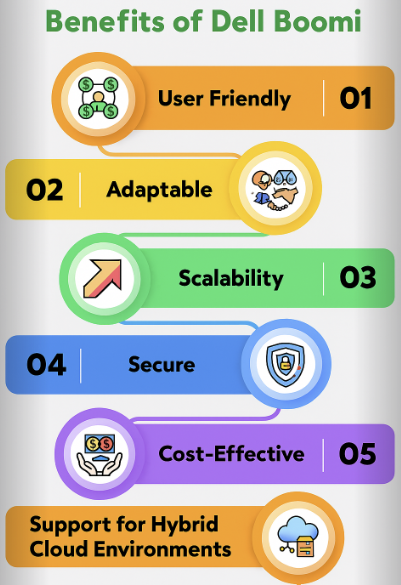
User-Friendly
Boomi makes integration simple and intuitive with its drag-and-drop interface, so users can get started quickly—no coding required. This ease of use is perfect for businesses of all sizes, from small teams to large enterprises.
Thanks to its low-code development approach, organizations can design, deploy, and manage integrations rapidly. The visual interface and pre-built connectors speed up the development lifecycle, reducing the time needed to implement and launch solutions.
Adaptable
Boomi is highly flexible and easy to customize for any business. It supports multiple languages, protocols, and standards, making it perfect for both on-premises and cloud integrations.
Scalability
Boomi grows with you. Whether you’re a small business or a global enterprise, the platform scales effortlessly to meet your needs. Start small and expand as your organization grows—no limits, no headaches.
Thanks to its cloud-native architecture, Boomi handles changing demands with ease. Whether your business is growing fast or dealing with seasonal spikes, Boomi adjusts automatically to keep integrations running smoothly.
Secure
Boomi ensures your data is safe and protected. The platform uses strong security measures, including advanced encryption and detailed audit trails, to safeguard sensitive information. These features guarantee data integrity and compliance, making Boomi a dependable choice for secure integrations.
Cost – Effective
Boomi helps organizations save money by reducing coding requirements and speeding up development cycles. Its pay-as-you-go pricing model ensures you only pay for what you use, making it a budget-friendly solution for businesses of all sizes.
5. Common Use Cases of Dell Boomi
Boomi’s flexible, cloud-native platform supports a wide range of integration scenarios across industries and systems. Below are some of the most common ways organizations use Boomi to simplify operations and drive efficiency:
Hybrid Cloud Integration
Boomi is ideal for organizations operating in hybrid environments, seamlessly connecting on-premises systems with multiple cloud applications. This ensures smooth data flow and consistent performance across all platforms.
E-Commerce Integration
In e-commerce, Boomi connects online storefronts with backend systems such as payment gateways, ERP, and inventory management tools. This automation helps synchronize orders, fulfillment, and billing — saving time and improving customer satisfaction.
Customer Data Integration (CRM)
Boomi integrates with popular CRM platforms like Salesforce, Microsoft Dynamics, Oracle CRM, and SugarCRM to ensure customer data is always accurate and up to date across all connected applications. This supports more personalized customer experiences and better insights.
Supply Chain Optimization
By linking supply chain management systems, Boomi enables real-time communication between suppliers, manufacturers, and distributors. This improves visibility, reduces delays, and enhances overall operational efficiency.
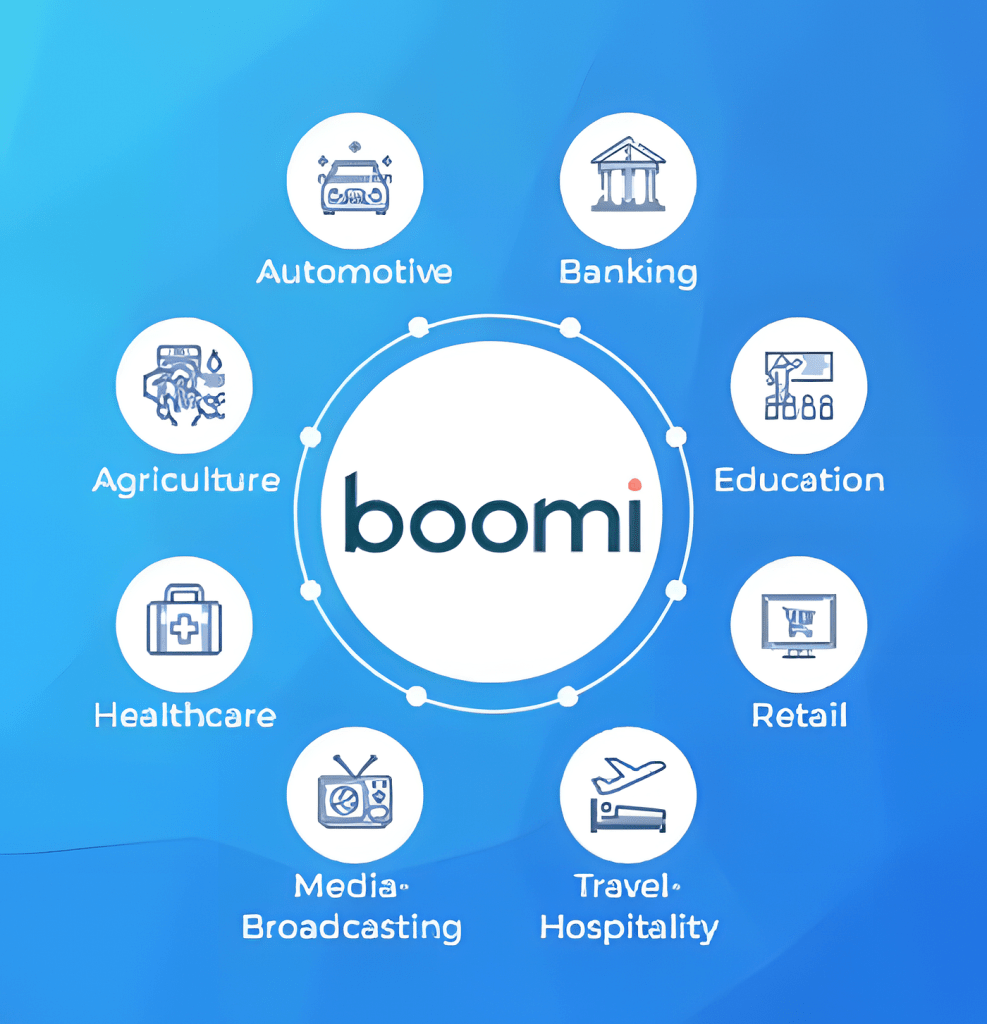
Healthcare Data Interoperability
In the healthcare industry, Boomi enables secure and seamless data exchange between systems such as Electronic Health Records (EHR), billing platforms, and clinical applications — supporting better patient care and compliance.
IoT and Real-Time Analytics
Boomi can integrate IoT devices and data sources to collect and analyze information in real time. Businesses can use this data for faster decision-making, predictive maintenance, and operational optimization.
Financial and Operational Automation
From order processing and invoicing to financial reporting and forecasting, Boomi automates repetitive workflows. Built-in data validation and error handling ensure that information is exchanged quickly, securely, and accurately.
6. Conclusion
In today’s fast-changing digital world, Dell Boomi is more than just an integration platform — it’s a key driver of digital transformation. With its cloud-native design, low-code tools, and powerful features, Boomi helps businesses connect systems, data, and people with speed and simplicity.
By simplifying complex integrations, Boomi enables organizations to link applications, automate workflows, and optimize data across hybrid and multi-cloud environments. This flexibility improves agility, reduces manual work, and keeps information consistent across the business.
Beyond technology, Boomi acts as a strategic partner in every organization’s digital journey — empowering teams to innovate, collaborate, and adapt.
In short, Dell Boomi combines agility, scalability, and intelligence to help businesses achieve seamless connectivity and smarter operations. Boomi doesn’t just connect systems — it connects possibilities.
If your organization is looking to simplify integrations, accelerate digital transformation, and future-proof your IT landscape, Dell Boomi is a practical and powerful choice to make it happen.
7. References
Boomi Official Documentation – https://boomi.com
Boomi AI Official Document – Generative AI for Integration & Automation | Boomi
Discoveringly: What is Boomi? Features, Benefits & Use Cases Explained
Blueflame Labs on Medium: Unlocking Seamless Integration: A Deep Dive into Dell Boomi – https://medium.com/@BlueflameLabs/unlocking-seamless-integration-a-deep-dive-into-dell-boomi-a41d72a0e6ea