



A few months ago our project team dropped some bad news. We couldn’t renew the Postman license for this project. There was no budget for enterprise SSO seats. Browser-extension-only usage wasn’t an option either. Our client had strict data-residency rules.
We needed a full-featured API client. It couldn’t need a subscription. It couldn’t phone home to a cloud workspace. And it still had to handle everything our test suite relied on: environments, scripting, assertions, and CI runs.
That search led us to Bruno. After two weeks of using it on a real project, I think it deserves a proper write-up.
1. What is Bruno?
Bruno is an open-source, offline-first API client. It tests REST, GraphQL, and gRPC APIs. It’s positioned as a lightweight alternative to Postman and Insomnia.
Here’s the core idea that sets it apart. Instead of storing your collections in a cloud account, Bruno saves every request as a plain-text file. It uses a small DSL called Bru. Files live directly on your filesystem, inside your project folder. That means your API collection can sit in the same Git repository as your code. It gets reviewed in pull requests like any other diff. It never touches a third-party server, unless you explicitly configure it to.
How to install it
Bruno ships as a desktop app for Mac, Windows, and Linux. There’s also a CLI for automation. A few ways to get it:
# macOS (Homebrew)
brew install bruno

# Windows (Chocolatey)
choco install bruno

# Windows (winget)
winget install Bruno.Bruno

# Windows (Scoop)
scoop bucket add extras
scoop install bruno

# Linux (Snap)
snap install bruno

# Linux (Flatpak)
flatpak install com.usebruno.Bruno

# Arch Linux (AUR)
yay -S bruno
You can also grab a binary installer directly from the downloads page. For CI/CD, install the CLI via npm:
npm install -g @usebruno/cli2. A hands-on example: testing the DemoQA APIs
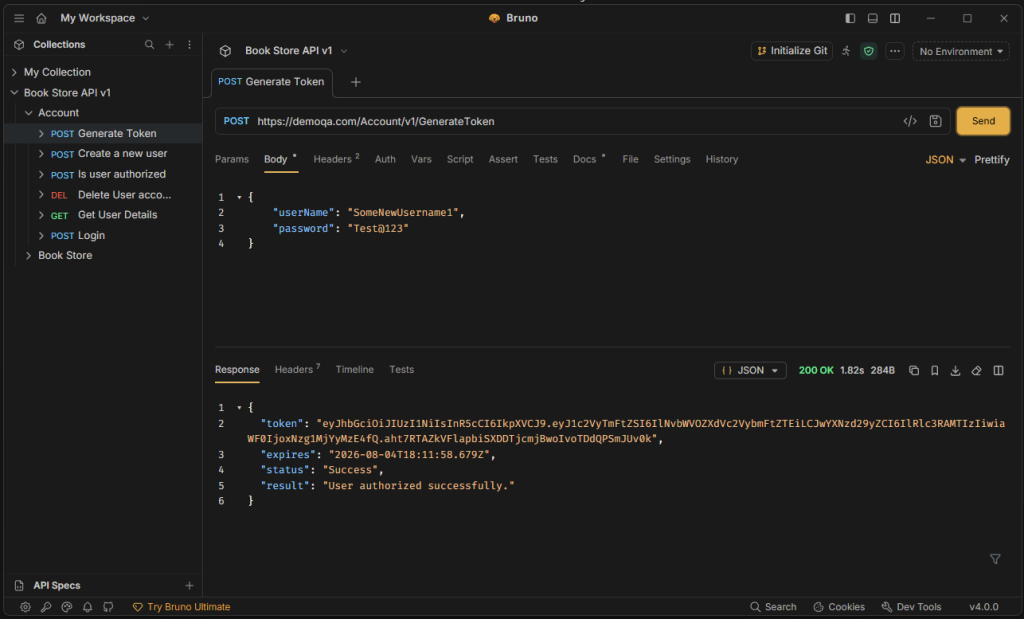
To kick the tires, I pointed Bruno at DemoQA’s BookStore API. It’s a popular free sandbox API used for API-testing practice. Here’s a typical flow: generate an auth token, then use it to fetch a list of books.
1. Create a collection and an environment
I created a collection called DemoQA. I added an environment called Sandbox with one variable:
baseUrl = https://demoqa.com2. Generate a token
Request: POST {{baseUrl}}/Account/v1/GenerateToken
Body (JSON):
{
  "userName": "your_username",
  "password": "Your_Password123!"
}
3. Fetch the book list
Request: GET {{baseUrl}}/BookStore/v1/Books
This particular endpoint needs no auth. But for anything under /Account/v1/Books, you’d add an Authorization: Bearer {{token}} header. That token comes from a variable set by the token request’s post-response script (see below).
Running either request feels exactly like Postman. There’s a request builder up top. A response viewer sits below, with Pretty/Raw/Preview tabs. A sidebar shows your collection tree.
4. Pre-request and post-response scripting
This is where Bruno feels immediately familiar to Postman users. There’s one structural difference, though. Postman splits scripting into separate “Pre-request Script” and “Tests” tabs. Bruno consolidates both into a single Script tab, with two panes: pre-request and post-response.
Scripts run in a JavaScript sandbox. Instead of Postman’s pm object, Bruno exposes a global bru object, along with req and res helpers.
Pre-request script (on the GenerateToken request). This stamps a timestamp header before the call goes out:
// Pre Request Script
bru.setVar("requestTime", new Date().toISOString());
req.setHeader("X-Request-Time", bru.getVar("requestTime"));
Post-response script (on the same request). This pulls the token out of the response. It stashes it as a collection variable, so later requests can reuse it:
// Post Response Script
const body = res.getBody();
bru.setVar("authToken", body.token);
Assertions and tests
Bruno gives you two ways to validate a response.
First, there’s a dedicated Assert tab. It’s a no-code UI. You pick a property (status, res.body.token, header value, etc.), an operator (eq, neq, contains, isDefined…), and an expected value. It’s handy for simple checks without touching JavaScript.
Second, there’s a Tests tab for scripted assertions. It uses a Chai-style expect API inside a test() block. This is the direct analog of Postman’s pm.test:
test("status code is 200", function () {
  expect(res.getStatus()).to.equal(200);
});

test("response has a token", function () {
  const body = res.getBody();
  expect(body).to.have.property("token");
  expect(body.token).to.be.a("string");
});
Scripts can attach at the request, folder, or collection level. Bruno runs them in a “sandwich” flow by default. The order goes: collection-level pre-request script, then folder-level pre-request script, then request pre-request script, then the actual call, then request post-response script, then folder post-response script, then collection post-response script.
That layering pays off once your collection grows past a handful of endpoints. A collection-level script, for example, can inject a common auth header into every request.
3. Bruno vs. Postman: feature comparison
| Feature | Postman | Bruno |
|---|---|---|
| Storage model | Cloud workspace (account required for most workflows) | Local files (.bru) on disk, no account required |
| Version control | Requires exporting JSON, or a paid Git-sync feature | Native – collections are a folder you git add |
| Pricing | Free tier is limited; team/enterprise plans are paid per seat | 100% free core product, MIT licensed; optional paid add-ons for teams |
| Scripting | pm.* JavaScript sandbox, separate pre-request/test tabs | bru/req/res JavaScript sandbox, combined script tab + UI-based Assert tab |
| Offline use | Increasingly cloud-dependent; the old offline “Scratch Pad” mode has been removed | Offline-first by design; no cloud sync exists or is planned |
| GraphQL / gRPC support | Yes | Yes |
| CLI / CI runner | Newman | bru CLI (@usebruno/cli), plus official Docker images |
| GUI polish, mock servers, API docs hosting, monitors | Mature, extensive | Improving, but noticeably thinner |
| Team collaboration at scale (roles, SSO, audit logs) | Strong (Enterprise plan) | Weaker – you’re leaning on Git permissions instead |
| Diff-friendliness of collections | Poor – one large JSON blob | Excellent – one plain-text file per request, readable in a PR diff |
Bruno vs Postman: Pros and Cons
Bruno’s advantages
✅ Free and open source. No per-seat licensing pressure.
✅ Collections live in Git. API changes get reviewed like code.
✅ No cloud dependency. Good fit for regulated or privacy-sensitive projects.
✅ Lightweight and fast to open. Minimal resource footprint.
✅ Scripting and assertions cover the same ground as Postman for most day-to-day testing.
Bruno’s disadvantages
❌ Smaller ecosystem. Fewer integrations. No built-in mock server or hosted docs comparable to Postman’s.
❌ Enterprise collaboration features are thin. Centralized permissions, SSO, and workspace-level governance lag behind Postman Enterprise.
❌ Community and third-party tutorials/plugins are still catching up.
❌ Some advanced Postman features may need workarounds. Think visualizer scripts, certain auth flows, and monitors – some aren’t supported yet.
When to choose which

Choose Bruno if:
- your team already works in Git.
- your organization can’t or won’t pay for Postman licenses.
- you need strict offline or data-sovereignty guarantees.
- your collections are tightly coupled to a codebase that benefits from code-review-style diffs.

Choose Postman if:
- you need enterprise-grade governance: SSO, granular roles, audit logs.
- you want hosted API documentation and mock servers out of the box.
- you need a large plugin or integration ecosystem.
- your organization already has budget and no data-residency constraints.
4. Migrating from Postman to Bruno
Here’s the good news: this is one of the more painless tool migrations you’ll do. The short version is export → import → review scripts → commit.
1. Export from Postman
- In Postman, right-click a collection. Choose Export, then pick Collection v2.1 (the current recommended format).
- If you rely on environments too, export those separately. Use the environment manager’s “…” menu next to each environment, then Export.
- Moving a whole team’s workspace? Postman also supports exporting multiple collections at once.
2. Import into Bruno
- In Bruno, choose Import Collection. Point it at the exported Postman JSON file. Pick, or create, a folder on disk to store the resulting
.brufiles. - Bruno’s importer converts requests, folders, headers, and query params automatically. It also handles auth configuration (Basic, Bearer, OAuth2, etc.) and variables.
- Import environments the same way, via Import Environment.
3. Script conversion and compatibility
This is the one step that isn’t fully automatic. Budget real review time here.
- Postman’s
pm.*calls don’t map 1:1 to Bruno’sbru/req/resobjects. You’ll need to manually rewrite things. For example:pm.environment.set(...)becomesbru.setEnvVar(...).pm.response.json()becomesres.getBody().pm.test(...)becomestest(...). - Chai-style
expect()assertions largely carry over with little to no change. Both tools use a similar assertion library under the hood. - Postman’s separate Pre-request Script and Tests tabs get imported into Bruno’s combined Script tab. Double-check nothing landed in the wrong pane.
- The
Asserttab is Bruno-specific. Want that no-code assertion style instead of scriptedtest()blocks? You’ll be creating those manually – imports don’t auto-generate them.
4. Edge cases to double-check manually
- OAuth2 / complex auth flows: token-refresh logic and some auth helpers behave slightly differently. Re-test these requests after import. Don’t assume parity.
- Pre-request scripts that depend on Postman-only APIs: things like
pm.sendRequestor certain crypto/visualizer helpers will need a rewrite or a polyfill. - Dynamic variables: Postman’s
{{$guid}}and{{$timestamp}}don’t automatically resolve the same way. Replace them with equivalent JS in a pre-request script, or use Bruno’s supported dynamic variables. - File uploads and binary bodies: verify the imported request still references the correct local file path. Paths from the original machine won’t carry over.
- Collection Runner order and data files: Postman’s CSV/JSON data-driven runs don’t convert automatically. Bruno’s CLI runner has its own syntax for iterating over data sets. Migrate these separately.
- Secrets: anything Postman stored as a “secret” variable type will need re-entering. That’s by design – secret values generally aren’t included in exports.
Once the import and script cleanup are done, drop the collection folder into your repo. Commit it. You’ve now got a fully version-controlled API test suite, at zero licensing cost.
Final thoughts
Bruno isn’t a drop-in replacement for every Postman workflow. If you lean heavily on Postman’s mock servers, hosted documentation, or enterprise governance features, you’ll feel the gap. But for the core job – building, scripting, and asserting against APIs – it covers the same ground. And its philosophy fits a lot of projects far better than a cloud-locked license ever did: local-first, Git-native, no subscription.
Ready to explore? Check out Bruno‘s official website and GitHub repository to discover a re-invented API client.