



In the realm of cybersecurity, automation is paramount, especially when it comes to conducting security tests. One powerful tool in this domain is the OWASP ZAP (Zed Attack Proxy), an open-source web application security scanner. ZAP offers robust scripting capabilities, enabling users to customize and automate security tests to suit their specific needs.
Why ZAP?
Security experts utilise ZAP, an open source programme that is totally free, extensively to automate the scanning of security flaws. In addition to its industry-best functionality and extensive support community (where you can discover scripts, plugins, add-ons, and other goodies), the tool is also used for manual penetration tests. Additionally, the tool has a well-defined and documented API that makes it easy to access ZAP’s functionalities without any issues.
Why Scripting?
ZAP is open source, but modifying its core and recompiling for specific needs is challenging. Through an easy-to-use interface, ZAP’s scripting engine may be used to expand its capabilities and change its functionality. ZAP gives us the power to create and modify several kinds of scripts directly within the tool. All internal data structures, including objects and methods, are accessible to ZAP. Any scripting language that complies with JSR 223 is supported, including Python, Ruby, Groovy, Zest, and ECMAScript/Javascript.
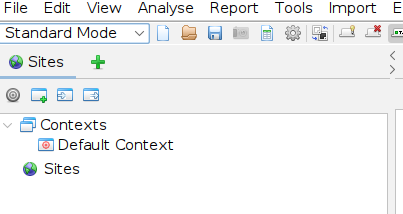
Step 1: Open ‘OSWAP ZAP’ tool & click on ‘Green Color Add Button’
Step 2: Click on ‘Scripts’
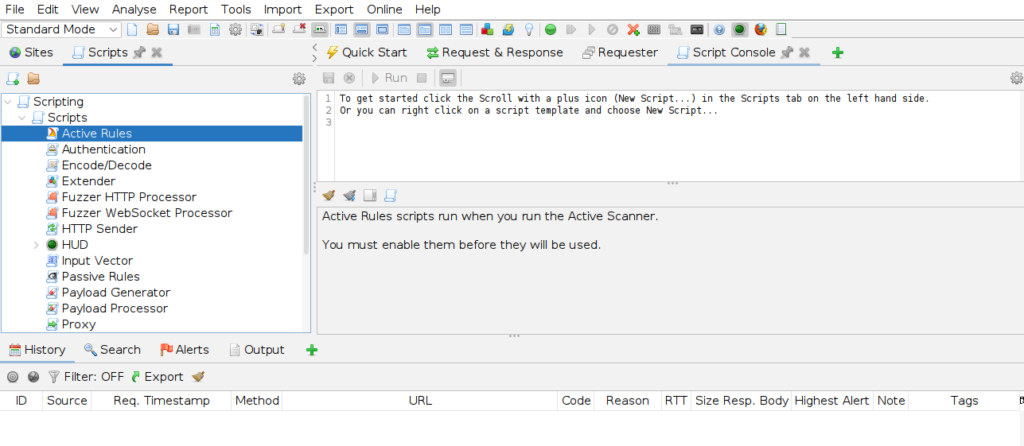
NOTE: There are mainly two tabs – Scripts tree tab and Script Console tab
Scripts Tree tab
This tab is used to write scripts which can be run within ZAP and also has a debug area which also displays error messages. Additionally, it offers a basic autocomplete function that helps with the accessible methods linked to an object.
Script Console Tab
The Scripts tab in ZAP organizes scripts by type and offers various functionalities. When creating a new script, users can choose from templates to provide a basic structure. Scripts can be managed by loading, saving, adding, removing, or disabling them as needed.
Scripts are categorized based on their specific functionalities:
- Stand Alone: These scripts have specific functions and are manually initiated.
- Targeted: Similar to Stand Alone scripts, they run on specific URLs from the site tree, invoked by right-clicking on the site tree.
- Proxy: Executed against messages ZAP proxies, these scripts can modify request or response parts.
- HTTP Sender: Run on all requests and responses in ZAP, unlike proxy scripts limited to messages flowing through the proxy.
- Passive Scan Rule: Meant for passive scans, they analyze messages captured by ZAP without making requests.
- Active Scan Rule: Executed during active scans to identify vulnerabilities by sending malicious requests.
- Authentication Scripts: Automate authentication processes, integrated into an application’s context for user authentication.
- Sequence Scripts: Mimic a series of organized actions, useful for scanning specific parts of a sequence during an active scan.
- Script Input Vectors: Specify custom input vectors for attacks during active scans, manipulating parameters retrieved from HTTP requests.
ZEST Scripts
The Mozilla security team created the language est. ZAP comes with a Zest addon that is pre-installed on the tool. Since Zest scripts are designed to be written with graphical interfaces in mind, developing them is made simple.
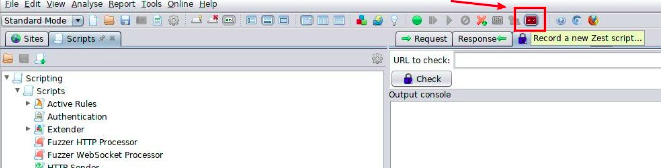
Clicking the “record new zest script” button on ZAP’s toolbar, as seen in the illustration below, will record a zest script.
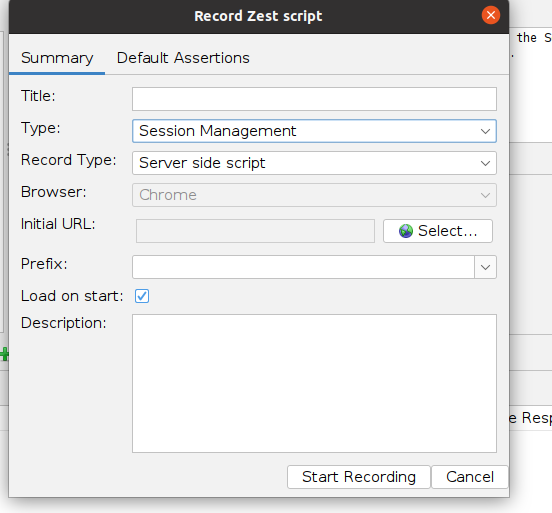
Upon selecting the record button, a tab with parameters linked to the zest script will be displayed. We can choose the type of script that we intend to record (stand alone, sequence or an authentication script). The messages proxied by ZAP will be converted to the Zest script in JSON format as soon as we begin recording, as seen in the image below.
Right-click a request to edit the Zest script, adding conditions, assertions, and loops. Zest scripts serve various tasks like authentication and vulnerability verification.
Conclusion