


Introduction
1. Why Security Matters in Spring Boot Application
Security is no longer just a backend concern; it’s a core part of building trustworthy and resilient applications. As Spring Boot becomes the go-to choice for developing microservices and REST APIs, ensuring strong security from the outset is critical. Whether you’re managing user identities, protecting APIs, or integrating with third-party services, a secure foundation is non-negotiable.
Modern applications face increasing complexity, from multiple client platforms to distributed services and cloud deployments. This landscape demands security approaches that are both robust and adaptable.
2. Key Players: Spring Security, JWT, and OAuth2
Spring Security equips developers with powerful features to handle user authentication, control access permissions, and protect applications against common security vulnerabilities. It integrates tightly with the Spring ecosystem, making it a natural fit for securing Spring Boot projects.
JWT (JSON Web Token) enables stateless authentication by embedding user details and access claims directly into digitally signed tokens. This approach is lightweight, scalable, and ideal for API-driven systems.
OAuth2 provides a standardised way to grant limited access without exposing user credentials — perfect for integrating with identity providers or enabling Single Sign-On (SSO).
Together, these tools empower developers to implement flexible, modern security architectures while keeping complexity under control.
Core Concepts in Spring Boot Security
1. Demystifying Spring Security: Features and Benefits
Spring Security acts as the primary defence layer for securing Spring Boot applications. It manages user authentication, role-based access, and guards against vulnerabilities like CSRF attacks and session hijacking.
Use Case: Imagine an online bookstore where only logged-in customers can access personalised recommendations and only admin users can modify inventory details. Spring Security makes it simple to set these rules.
2. OAuth2 Unpacked: Principles and Real-World Applications
OAuth2 allows applications to access user data securely without requiring their passwords. Instead, users grant permission via access tokens. This method builds trust by letting external services, like Google or Facebook, handle authentication.
Use Case: Consider a fitness app that lets users connect their Google Fit data. Instead of storing sensitive login information, the app uses OAuth2 to obtain a token that authorises access to just the necessary health metrics.
3. JWT (JSON Web Tokens): What They Are and When to Use Them
JWTs (JSON Web Tokens) are compact, signed tokens that carry user information securely between systems. Once a user logs in, the server issues a token that the client uses for subsequent requests, eliminating the need for server-side sessions.
Use Case: Picture a microservices-based travel booking platform. After a customer logs in, a JWT is issued. Each microservice (for flights, hotels, etc.) verifies the token to grant access, ensuring a scalable, stateless authentication process
Preparing Your Spring Boot Project for Security Integration
1. Essential Dependencies for Spring Security, JWT, and OAuth2
To get started, include the following dependencies in your project (pom.xml for Maven users):

2. Establishing Security Configurations: OAuth2 Authentication
Once our dependencies are in place, define a basic security configuration class:

In my setup, I’ve customised the Spring Security configuration to handle both JWT-based authentication and OAuth2 login.
Use Case: In this setup, I’m securing a REST API where users can log in using GitHub OAuth2 or via a frontend that fetches a JWT from /authenticate. The token is then sent in every API request for authorisation, no sessions needed.
Empowering Stateless Authentication with JWT
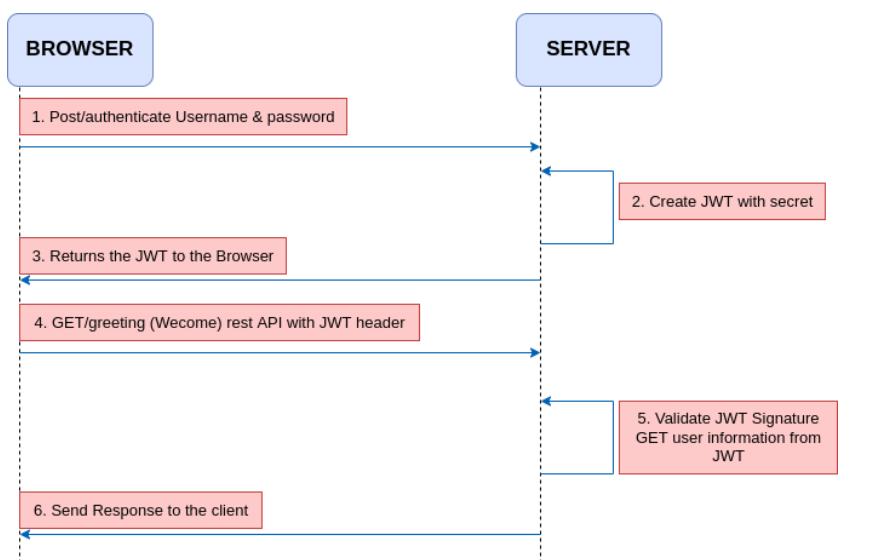
JWT (JSON Web Token) helps you move away from traditional session-based logins by enabling stateless, scalable authentication, perfect for REST APIs and microservices.
1. Inside JWT: Anatomy and Key Components
A JWT is a lightweight, URL-friendly token consisting of three distinct segments.
- Header – Indicates the token type (e.g., JWT) and the algorithm used for signing, like HS256.
- Payload – Holds the core data or claims, such as user ID, roles, and expiration details.
- Signature – Verifies the token’s integrity by using a secret key to detect any tampering.
Example Structure:

2. Implementing JWT Token Validation in Spring Boot
In my project, I used a custom JwtAuthenticationFilter that runs before Spring’s built-in filters. It checks for the presence of a token in the Authorization header, validates it, and sets the security context.
Key Steps:
- Extract JWT from the header.
- Validate its signature and expiration.
- Load user details from the token claims.
- Set the authentication context.
Combining OAuth2 and JWT for Robust Security
1. How OAuth2 and JWT Complement Each Other
OAuth2 takes care of authenticating the user, usually via a trusted provider like Google or GitHub. But once that’s done, we often don’t want to rely on session cookies or store tokens in memory.
That’s where JWT fits in:
- OAuth2 handles identity and login securely.
- JWT carries user identity across services after login, without needing the provider each time.
This setup allows you to authenticate once and authorise many times, making it ideal for REST APIs and distributed systems.
2. Implementing Custom Authentication Logic with JWT
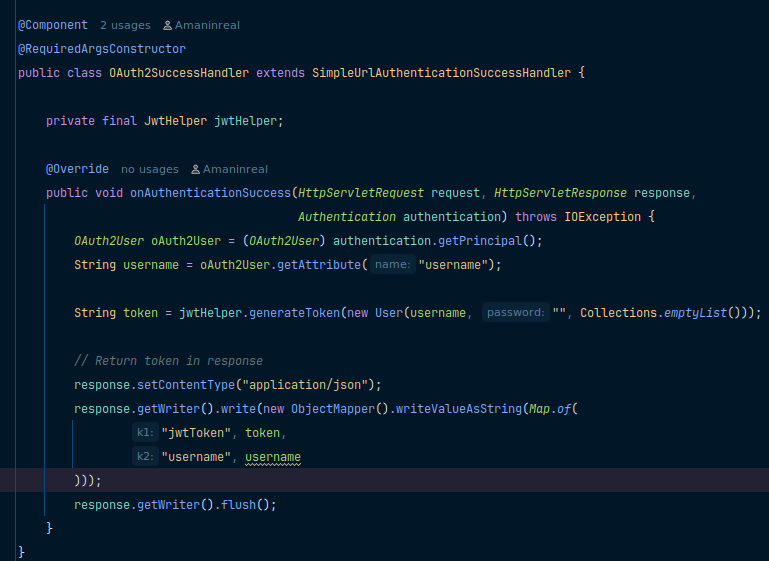
After a successful OAuth2 login, Spring Security gives you access to the user’s details. You can hook into this flow to generate a custom JWT.
Using a custom OAuth2SuccessHandler you can:
- Extract user details
- Create and sign a JWT with relevant claims
- Send the token back in the response or include it in a redirect URL
Your JWT can include roles, email, or even feature flags that help downstream services make access decisions.
Advanced Security Feature
1. Role-Based Access Control Using JWT
Roles such as ADMIN or USER can be included directly within the claims section of a JWT. Once the token is validated, Spring Security uses these roles to authorise access.

Spring Config:

2. Securing APIs with OAuth2 and JWT
For public-facing endpoints (like social login or third-party integration), OAuth2 handles authentication. After that, your app issues a JWT, which clients use to access protected resources.
Every secured API:
- Validates the JWT signature
- Checks expiration
- Reads claims like user ID or role
- Grants/denies access accordingly
3. Handling Token Expiry and Refresh Tokens—
Access tokens should expire; this is good security practice. But you don’t want users to log in every time a token expires. That’s where refresh tokens help.
Strategy:
- Issue a short-lived access token (e.g., 15 mins)
- Issue a longer-lived refresh token (e.g., 7 days)
- When the access token expires, the client calls
/refreshwith the refresh token - If valid, a new access token is issued
Testing and Debugging Security Configurations
1. Tools and Techniques for Testing OAuth2 and JWT
A. Postman and REST Client
Use Postman to simulate authentication flows and test secured endpoints. For JWT-secured APIs, include the token in the Authorization header:
Authorization: Bearer < Your JWT token >B. Spring Security Debug Logging
Enable detailed logging in application.properties:
logging.level.org.springframework.security=DEBUGThis helps trace the filter chain, request access decisions, and security context resolution.
C. JWT Debugging Tools
Sites like jwt.io are useful for decoding and inspecting tokens. They help confirm token structure, Claims Values, Expiry and issue times, Signing Algorithm.
D. Custom Exception Handlers
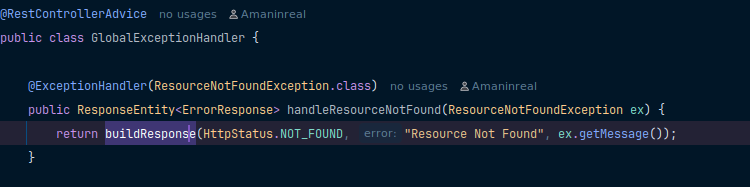
Implement a @ControllerAdvice to capture and return consistent error messages for security-related exceptions like expired tokens or missing credentials.
2. Common Pitfalls and How to Avoid Them
1. Token Not Passed in Header:
- Issue: The Backend keeps rejecting requests even though the user is authenticated.
- Fix: Always send the token using the correct HTTP header format.
2. 403 Forbidden Despite Valid Token:
- Issue: JWT is valid, but access is denied.
- Fix: Check if roles are properly mapped in your token, and also ensure
hasRole("USER")orhasAuthority("ROLE_USER")is used in your security config.
3. OAuth2 Login Redirect Loop
- Issue: App keeps redirecting to the OAuth2 provider without completing login.
- Fix: Verify that the redirect URI in your app matches exactly with the one registered in your provider settings (Google, GitHub, etc.). Also, confirm:
4. Token Expiry Not Handled
- Issue: The Token expires, and users get logged out without warning.
- Fix: Implement refresh token logic. When the access token expires, use the refresh token to request a new one without requiring the user to log in again.
5. Custom Filters Not Working
- Issue: Custom JWT filter not being triggered during requests.
- Fix: Register your
JwtAuthenticationFilterbeforeUsernamePasswordAuthenticationFilter:
.addFilterBefore(jwtFilter, UsernamePasswordAuthenticationFilter.class)Best Practices for Securing Spring Boot Applications
When working with security in Spring Boot, it’s not just about getting authentication and authorisation right; it’s also about ensuring the system is secure over time. Here are a few best practices I follow to keep my applications safe and production-ready.
1. Keeping Secrets and Keys Secure
- Avoid Hardcoding: Never hardcode secrets like client IDs, passwords, or signing keys in your source code.
- Use Environment Variables or Vaults: Store sensitive values in environment variables,
.envfiles (secured), or use secret managers like HashiCorp Vault, AWS Secrets Manager, or Spring Cloud Config. - Encrypt Sensitive Properties: Use Jasypt or Spring Cloud’s encryption support to encrypt configuration values.
2. Regularly Updating Dependencies
- Check for Vulnerabilities: Outdated dependencies can expose your app to known security threats. Use tools like OWASP dependency check, Snyk, Spring Boot Actuator with CVE Scanner.
- Keep Spring Boot & Spring Security Updated: Always stay close to the latest stable releases to benefit from security patches.
3. Monitoring and Logging Security Events
- Enable Detailed Security Logs: Log failed login attempts, unauthorised access, and token errors. Configure logging in
application.properties:
logging.level.org.springframework.security=DEBUG- Use Centralised Logging & Monitoring: Tools like ELK Stack (Elasticsearch, Logstash, Kibana) or Prometheus + Grafana help in real-time alerting and threat detection.
- Audit Trails: Maintain logs for user activity, especially sensitive actions like login, logout, and data modifications.
Conclusion
Securing a Spring Boot application is more than just configuring login—it requires building a scalable, reliable foundation. This guide showed how Spring Security, OAuth2, and JWT work together to provide flexible authentication and authorisation. From setting up filters and token management to role-based access and token expiry handling, each step strengthens your app’s security.
By adopting these practices, you protect sensitive data and build user trust. Integrating security throughout development, with regular updates and monitoring, ensures your application remains resilient against threats while delivering a seamless experience.
References
https://docs.spring.io/spring-security/reference/servlet/oauth2/resource-server/jwt.html
https://www.baeldung.com/spring-security-oauth-jwt
For Code Implementation: Click here.