


1. Overview & Architecture
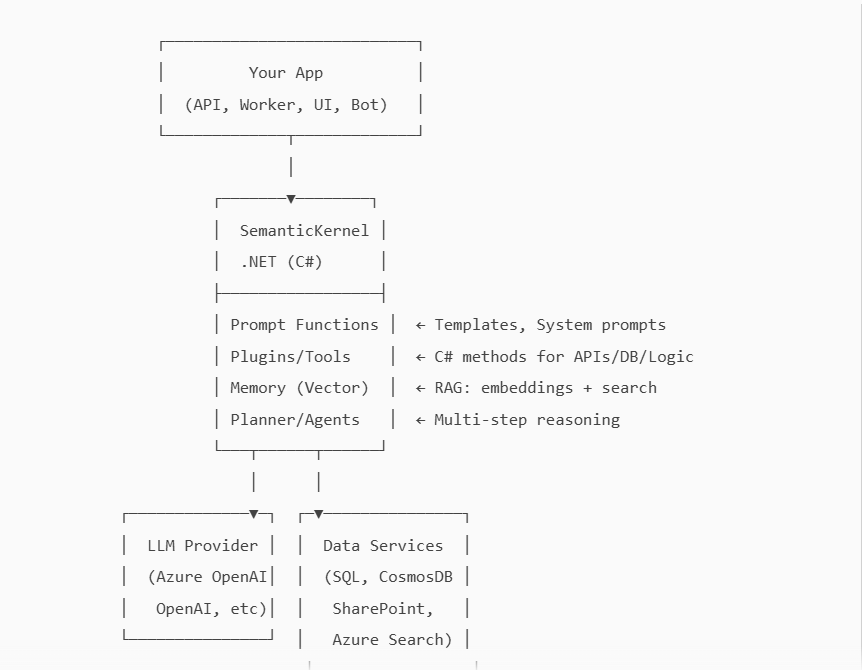
Semantic Kernel (SK) is Microsoft’s open-source AI orchestration framework. It lets you:
- Call LLMs (Azure OpenAI/OpenAI/local) with prompt functions
- Build plugins/tools (C# methods) callable by the LLM
- Add memory (vector search) and RAG
- Orchestrate multi‑step agent workflows (planning, tool‑calling)
- Integrate with enterprise services (SharePoint, DB, ERP, etc.)
High‑level Architecture (ASCII)
2. Prerequisites
- .NET 8 SDK (recommended)
- Visual Studio 2022 or VS Code (C# Dev Kit)
- Azure OpenAI (preferred for enterprise) or OpenAI API key
3. Project Setup
Create a console app:
dotnet new console -n SkDotnetDemo
cd SkDotnetDemo
Add NuGet packages (versions evolve; use latest stable):
dotnet add package Microsoft.SemanticKernel
dotnet add package Microsoft.SemanticKernel.Connectors.OpenAI
dotnet add package Azure.AI.OpenAI   # for advanced Azure OpenAI scenarios (optional)
dotnet add package Microsoft.Extensions.Configuration
dotnet add package Microsoft.Extensions.Configuration.Json
dotnet add package Microsoft.Extensions.Hosting
dotnet add package Microsoft.Extensions.Logging.Console
appsettings.json (add to project root):
{
  "AI": {
    "UseAzureOpenAI": true,
    "AzureOpenAI": {
      "Endpoint": "https://YOUR-RESOURCE.openai.azure.com/",
      "ApiKey": "YOUR-AZURE-OPENAI-KEY",
      "Deployment": "gpt-4o-mini"
    },
    "OpenAI": {
      "ApiKey": "YOUR-OPENAI-KEY",
      "Model": "gpt-4o-mini"
    }
  },
  "VectorMemory": {
    "Provider": "None", // or "AzureAISearch", "Pinecone", etc.
    "AzureAISearch": {
      "Endpoint": "https://YOUR-SEARCH.search.windows.net",
      "ApiKey": "YOUR-SEARCH-ADMIN-KEY",
      "Index": "sk-mem-index"
    }
  }
}
4. Quick Start (Hello, Kernel)
Program.cs
using Microsoft.Extensions.Configuration;
using Microsoft.Extensions.DependencyInjection;
using Microsoft.Extensions.Hosting;
using Microsoft.Extensions.Logging;
using Microsoft.SemanticKernel;
using Microsoft.SemanticKernel.Connectors.OpenAI;

var host = Host.CreateDefaultBuilder(args)
    .ConfigureAppConfiguration(cfg =>
    {
        cfg.AddJsonFile("appsettings.json", optional: false, reloadOnChange: true);
    })
    .ConfigureLogging(lb => lb.AddConsole())
    .Build();

var config = host.Services.GetRequiredService<IConfiguration>();
var useAzure = config.GetValue<bool>("AI:UseAzureOpenAI");

var builder = Kernel.CreateBuilder();

if (useAzure)
{
    builder.AddAzureOpenAIChatCompletion(
        deploymentName: config["AI:AzureOpenAI:Deployment"]!,
        endpoint: config["AI:AzureOpenAI:Endpoint"]!,
        apiKey: config["AI:AzureOpenAI:ApiKey"]!
    );
}
else
{
    builder.AddOpenAIChatCompletion(
        modelId: config["AI:OpenAI:Model"]!,
        apiKey: config["AI:OpenAI:ApiKey"]!
    );
}

var kernel = builder.Build();

// Create a prompt function inline
var summarizeFn = kernel.CreateFunctionFromPrompt("""
You are a concise assistant. Summarize the following in 1-2 sentences:
---
{{$input}}
""");

var text = """
Semantic Kernel helps orchestrate LLMs, plugins (tools), memory, and plans
to build production AI apps in .NET.
""";

var result = await kernel.InvokeAsync(summarizeFn, new()
{
    ["input"] = text
});

Console.WriteLine("Summary:");
Console.WriteLine(result);
Run:
dotnet run
5. Prompt Functions & Streaming
Prompt with Parameters & System Role
var analyzer = kernel.CreateFunctionFromPrompt("""
SYSTEM:
You are a precise technical reviewer. Respond in markdown, with bullets.
USER:
Analyze this code for clarity and correctness. Highlight risks and improvements.
CODE:
{{$code}}
""");

var analysis = await kernel.InvokeAsync(analyzer, new() {
    ["code"] = "public int Add(int a, int b) => a + b;"
});
Console.WriteLine(analysis);
``
Token Streaming (real‑time output)
using Microsoft.SemanticKernel.ChatCompletion;

var chat = kernel.GetRequiredService<IChatCompletionService>();

var stream = chat.GetStreamingChatMessageContentsAsync(
    new ChatHistory("You are a helpful assistant."),
    new ChatRequestSettings
    {
        Temperature = 0.4,
        MaxTokens = 500
    });

await foreach (var chunk in stream)
{
    Console.Write(chunk.Content);
}
6. Building Plugins/Tools (C# Methods callable by LLM)
Create a plugin class:
using Microsoft.SemanticKernel;

public sealed class TimePlugin
{
    [KernelFunction, Description("Get current time in ISO 8601")]
    public string Now() => DateTimeOffset.UtcNow.ToString("O");

    [KernelFunction, Description("Add minutes to current time")]
    public string AddMinutes([Description("Minutes to add")] int minutes)
        => DateTimeOffset.UtcNow.AddMinutes(minutes).ToString("O");
}
``
Register the plugin:
var time = new TimePlugin();
kernel.ImportPluginFromObject(time, "time");

var plannerPrompt = kernel.CreateFunctionFromPrompt("""
Given the user's need, call tools if helpful.
User asks: "What time is it now and in 90 minutes?"
""");

var output = await kernel.InvokeAsync(plannerPrompt);
Console.WriteLine(output);
The LLM can reference tools by name when guided via system prompts or planner capabilities. In more advanced scenarios, use function/tool calling interfaces for structured calls (see §8).
7. Memory & RAG (Retrieval Augmented Generation)
7.1 Embeddings + Vector Store
To implement RAG:
- Split content into chunks
- Embed each chunk
- Store embeddings + metadata in a vector DB (Azure AI Search, Pinecone, Qdrant, Redis, etc.)
- At query time: embed the question → similarity search → feed top chunks to LLM as grounding context.
Example: Simple Retrieval Flow (Pseudo/RAG-lite)
var embedService = kernel.GetRequiredService<ITextEmbeddingGenerationService>();

// 1) Prepare document chunks
var docs = new[]
{
    ("doc1#p1", "Semantic Kernel enables plugins and planning."),
    ("doc1#p2", "RAG combines retrieval with LLM generation for grounded answers.")
};

// 2) Create embeddings and store (in-memory or your vector DB)
var store = new List<(string Id, float[] Embedding, string Text)>();

foreach (var (id, text) in docs)
{
    var emb = await embedService.GenerateEmbeddingAsync(text);
    store.Add((id, emb.ToArray(), text));
}

// 3) Query
var question = "How does SK support building agents with tools and RAG?";
var qEmb = await embedService.GenerateEmbeddingAsync(question);

// 4) Simple cosine similarity (example only)
float CosSim(float[] a, float[] b) {
    var dot = 0f; var na = 0f; var nb = 0f;
    for (int i = 0; i < a.Length; i++){ dot += a[i]*b[i]; na += a[i]*a[i]; nb += b[i]*b[i]; }
    return dot / (float)(Math.Sqrt(na)*Math.Sqrt(nb));
}

var top = store
    .Select(s => new { s.Id, s.Text, Score = CosSim(qEmb.ToArray(), s.Embedding) })
    .OrderByDescending(x => x.Score)
    .Take(3)
    .ToList();

// 5) Grounded prompt
var ragFn = kernel.CreateFunctionFromPrompt("""
Answer the question using ONLY this context. If unsure, say "I don't know".
Context:
{{#each ctx}}- {{this}}
{{/each}}

Question: {{$q}}
""");

var args = new KernelArguments { ["q"] = question };
args["ctx"] = string.Join("\n", top.Select(t => t.Text));

var ragAnswer = await kernel.InvokeAsync(ragFn, args);
Console.WriteLine(ragAnswer);
7.2 Azure AI Search Connector (Typical)
- Create an index with vector fields (
contentVector) and metadata - Embed documents (offline ingestion)
- Query vectors at runtime and pass results as context to LLM
- Use chunking and a context window budget (e.g., 6–12 short chunks)
Recommendations
- Chunk size ~500–1,200 tokens with overlap (50–150)
- Maintain source links and page numbers
- Apply citations in the final answer
- Cache frequent queries (app layer)
8. Agentic Patterns: Planner & Tool‑Calling
8.1 Planner (High‑level)
Planner lets the LLM break tasks into steps and choose tools.
// Conceptual: Use a planning prompt or SK planner extension
var planPrompt = kernel.CreateFunctionFromPrompt("""
You are a planner. Decide which tools to use and in what order to fulfill the goal.
List steps, then execute them.
Goal: "Summarize the latest policy PDF and add a meeting for tomorrow 9am."
Tools available: time, calendar.AddEvent, files.GetLatestPolicy
Follow: Think → Plan → Act → Observe → Answer.
""");

var planResult = await kernel.InvokeAsync(planPrompt);
Console.WriteLine(planResult);
8.2 Function/Tool Calling (Structured)
Many model providers support “function calling” where the LLM emits a structured call (name + JSON args). SK surfaces this through chat completion services. Pattern:
- Register functions as callable tools with JSON schemas
- Run chat with tool choice enabled
- When the model requests a tool call, execute C# method → append result → continue the chat
This yields deterministic integration and safer execution.
9. Quality: Prompting, Grounding, Evaluation & Tests
- System prompts: define role, style, constraints
- Grounding: require the model to cite retrieved context; instruct it to say “I don’t know” if not grounded
- Parameters: tune
temperature,max_tokensper use case (creative vs. deterministic) - Hallucination controls:
- Constrain to context
- Use tool results and schema validation
- Add content filters for sensitive domains
- Unit tests:
- Mock chat and embedding services (DI in SK)
- Snapshot test prompts and outputs for regressions
- Offline eval:
- Golden sets: questions → expected nuggets
- Metrics: groundedness, faithfulness, toxicity, latency, cost
- Canary
- Shadow traffic before full rollout
10. Observability & Performance
- Logging: Use
Microsoft.Extensions.Logging. Log:- Request IDs, token usage, duration, cache hits
- Tool calls (name + args size)
- Metrics: latency per turn, cost per request, hit rate on retrieval
- Tracing: adopt OpenTelemetry where possible; correlate user request → LLM calls → tool invocations
- Performance:
- Prefer streaming for better UX
- Use smaller/cheaper models for simple steps, escalate only when needed
- Cache embedding & retrieval results
- Batch embedding jobs during ingestion