


Introduction
Sending emails programmatically is a common task in many applications. In this guide, we’ll cover how to send emails using SMTP (Simple Mail Transfer Protocol) with Scala. This beginner-friendly tutorial will walk you through the necessary steps to set up your Scala environment and send an email via an SMTP server.
What is SMTP?
SMTP (Simple Mail Transfer Protocol) is the standard protocol for sending emails across the internet. SMTP servers are used to relay emails from the sender to the recipient. For this guide, we’ll use an SMTP server (like Gmail or any SMTP service you have access to) to send emails.
Prerequisites
- Scala Setup: Make sure you have Scala installed on your system.
- SMTP Server Details: You’ll need an SMTP server and its details (for example, Gmail’s SMTP server: smtp.gmail.com, port 587).
- Email Account: If you are using a third-party SMTP service like Gmail, ensure your email account allows access to less secure apps (if applicable). For Gmail, you might need to enable “App Passwords” and allow access through OAuth2.
Step-by-Step Guide to Send an Email Using SMTP in Scala
Step 1: Set up Your Scala Project
Create a new Scala project. If you’re using SBT (Scala Build Tool), set up your project by creating the following structure:
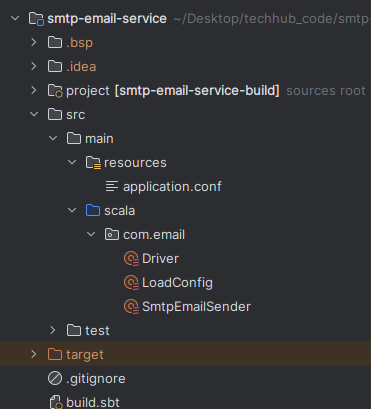
Step 2: Add Dependencies
To send an email, you’ll need a library to work with SMTP. One popular library is JavaMail, which is part of the Java standard library but often needs to be added as a dependency for ease of use.
In your build.sbt, add the following dependency:
libraryDependencies ++= Seq(
  "com.sun.mail" % "javax.mail" % "1.6.2",
  "com.typesafe" % "config" % "1.4.2",
  "ch.qos.logback" % "logback-classic" % "1.2.3"
)
This will allow you to use JavaMail’s APIs to interact with the SMTP server.
Step 3: Create the SmtpEmailSender File
Create a Scala file (SmtpEmailSender.scala) under src/main/scala/. In this file, you’ll write the code to send the email. Here’s an example of how to send an email using Gmail’s SMTP server:
package com.email

import org.slf4j.LoggerFactory

import java.util.Properties
import javax.mail.internet.{InternetAddress, MimeMessage}
import javax.mail.{Authenticator, Message, MessagingException, PasswordAuthentication, Session, Transport}

object SmtpEmailSender {

  private val logger = LoggerFactory.getLogger("SmtpEmailSender")

  def sendEmail(receiver: String, subject: String, body: String, smtpHost: String, smtpPort: String, username: String, password: String): String = {

    /* Set the credentials */
    val properties = new Properties()
    properties.put("mail.smtp.host", smtpHost)
    properties.put("mail.smtp.port", smtpPort)
    properties.put("mail.smtp.ssl.protocols", "TLSv1.2")
    properties.put("mail.smtp.auth", "true")
    properties.put("mail.smtp.starttls.enable", "true")

    /* To authenticate the user */
    val session = Session.getInstance(properties, new Authenticator() {
      override def getPasswordAuthentication: PasswordAuthentication = {
        new PasswordAuthentication(username, password)
      }
    })

    /* To debug the issue */
    session.setDebug(true)

    try {
      val message = new MimeMessage(session)
      message.setFrom(new InternetAddress(username))

      message.addRecipient(Message.RecipientType.TO, new InternetAddress(receiver)) // Correct way to add multiple recipients

      message.setSubject(subject)
      message.setContent(body, "text/html")

      Transport.send(message)
      logger.info(s"Email sent successfully to $receiver")
      s"Email sent successfully to $receiver"
    } catch {
      case e: MessagingException =>
        logger.error(s"Error sending email to $receiver: ", e)
        s"Error sending email to $receiver"
    }
  }

}
Explanation of the Code:
Session Setup: We set up a Properties object to specify SMTP server details (host, port, authentication, and TLS settings).
Authentication: You’ll need to provide your Gmail address and your App Password if you use two-factor authentication. Visit this link to know how to generate app password.
Message Creation: We create an email message with a subject and body text. The setFrom, addRecipient, setSubject, and setContent methods are used to configure the email’s basic information.
Sending the Email: The Transport.send() method sends the email.
Step 4: Run Your Scala Program
To run your Scala program, create a Driver object in which directly call sendEmail method after passing all the values like smtp host, smtp port, username, and password etc. For code refer this link.
In below image I have taken the value from Application Conf file. For more clarification click on above code link.

After that run the below command from project directory through terminal.
sbt runConclusion
Now you’ve learned how to send an email programmatically using SMTP with Scala! You can expand upon this code by adding attachments, HTML content, or custom configurations as needed. Whether you’re sending notifications, newsletters, or automated emails from your Scala application, this basic setup can be adapted to suit many use cases.
If you’re looking to send more complex emails, consider using libraries like ScalaMailer or integrating third-party APIs such as SendGrid or Amazon SES. But for simple tasks, this Scala-based SMTP solution should work well. For more blogs refer this link.