


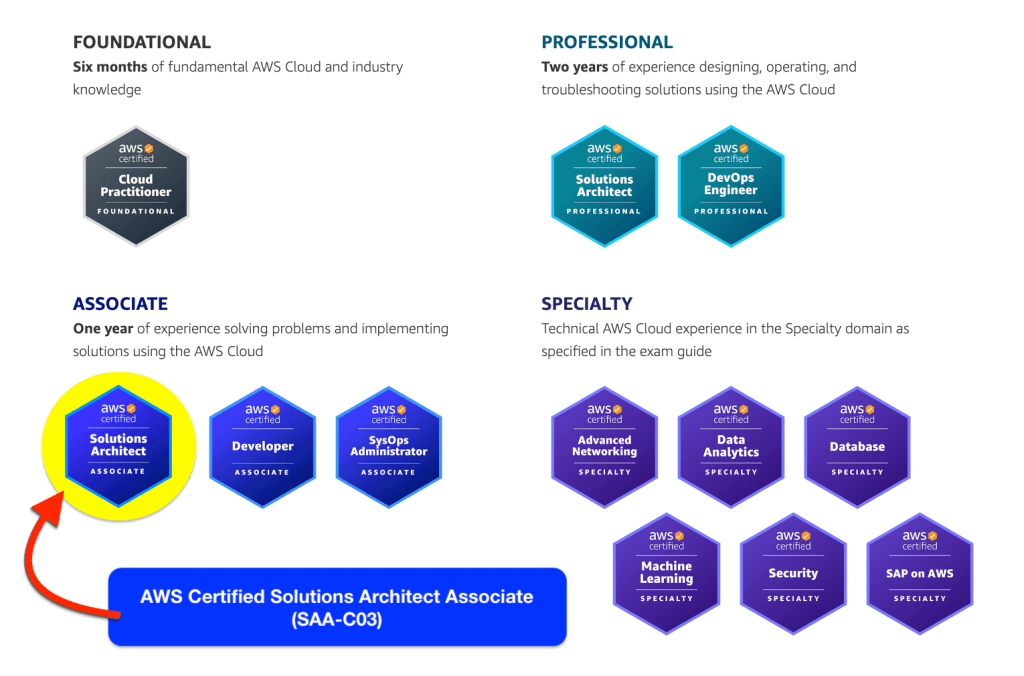
Today, I want to share my experience preparing for and passing the AWS Certified Solutions Architect – Associate (SAA-C03) exam, updated to reflect how this certification fits into the AWS ecosystem in 2025.
This post covers:
- My real-world AWS background
- Why I chose this certification
- What services matter most for the exam today
- How I prepared
- Exam tips and lessons learned
Why I Chose the AWS Solutions Architect Associate
I originally planned to take this exam much earlier. By the time I officially sat for it, I already had 1–2 years of hands-on AWS experience, which aligns well with AWS’s own recommendations.
Even in 2025, the SAA certification remains one of the most valuable entry-to-mid-level cloud certifications because:
- AWS still dominates the global cloud market
- AWS is widely adopted by enterprises in Vietnam and Southeast Asia
- AWS supports Vietnamese business invoicing, making it very enterprise-friendly
- Many companies (including mine) still offer financial incentives for AWS certifications
👉 For someone “short on money and love,” that motivation still hits hard 😎
Most importantly, SAA is a solid foundation for:
- DevOps Engineer
- Security Specialty
- Data Engineer
- Solutions Architect Professional
My AWS Background Before the Exam
In early 2021, my team completed the first phase of a GameFi project deployed 100% on AWS Cloud.
Architecture at the Time:
- Containerized frontend & backend
- CI/CD using GitLab CI
- Infrastructure provisioning with AWS CLI
- EKS for container orchestration
- ECR for container images
Later, I was tasked with deploying a landing page that needed:
- High performance
- Global delivery
- Low cost (classic “low budget, high expectations” problem 😅)
That’s when I worked directly with:
- Amazon S3
- CloudFront
- Edge locations
- Caching strategies
After go-live, I was assigned to research AWS cost optimization and architecture best practices. This pushed me to study EC2 and VPC in depth—two services I now consider the true backbone of AWS Cloud, even in 2025.
Deep Diving into AWS Through Real Projects
After that first GameFi project, I joined another GameFi project with an external partner. Thanks to prior AWS experience, the deployment process was much smoother.
At that point, I decided to deep dive seriously into AWS architecture and validate my knowledge with a certification. I chose AWS Solutions Architect Associate as my first official AWS exam.
In this newer project, I worked extensively with AWS serverless and managed services, including:
- Lambda
- Aurora (Serverless)
- SQS & SNS
- Kinesis
- API Gateway
The early phase was intense. I spent many late nights debugging infrastructure issues (yes, OT was involved 😅). But that pain helped me deeply understand AWS’s design philosophy and service integration—what I like to call learning the hard way, but learning it well.
Due to project workload, I postponed structured exam preparation until 2022, and later updated my knowledge again to match 2024–2025 exam patterns.
Is This Exam Suitable for Beginners in 2025?
By the time I took the exam, I had 1–2 years of real AWS experience.
👉 If you are:
- Completely new to cloud
- Or new to AWS
I strongly recommend:
- Starting with AWS Cloud Practitioner
- Doing hands-on labs with:
- EC2
- S3
- IAM
- VPC
- Then moving to SAA-C03
This approach significantly improves understanding and confidence.
AWS Services That Appear Most in the SAA-C03 Exam (2025)
Below are the services that still dominate the exam today:
🌐 Networking & Security (Very Important)
- VPC
- Subnets
- Public vs Private IPs
- Security Groups
- NACLs
- NAT Gateway
- Internet Gateway
- VPC Endpoints
- Hybrid connectivity basics
🖥 Compute
- EC2
- Instance families (especially Graviton/ARM)
- Cost optimization strategies
- Auto Scaling Groups
- Elastic Load Balancing
- ALB vs NLB
- Health checks
- Sticky sessions
👤 Identity & Security
- IAM
- Roles vs users
- Policies
- Least privilege
- AWS Organizations & SCPs (basic awareness)
📦 Storage (Extremely Important)
- Amazon S3
- Storage classes
- Lifecycle policies
- Versioning
- Replication
- Transfer Acceleration
- Integration with Athena & analytics
🗄 Databases
- RDS
- Aurora (especially Aurora Serverless v2)
- DynamoDB
- Global tables
- On-demand vs provisioned
⚡ Serverless & Event-Driven
- Lambda
- API Gateway
- SQS / SNS
- EventBridge
- Kinesis
📊 Analytics & Big Data
- Athena
- Glue
- Redshift (basic understanding)
🔄 Hybrid & Migration
- Direct Connect
- VPN
- Snow Family
- Storage Gateway
📈 Monitoring & Governance
- CloudWatch
- CloudTrail
- AWS Config
🛡 Security & Protection
- WAF
- Shield
- Inspector
- Secrets Manager (more common now)
🤖 AI / Machine Learning (Low Weight, Easy Points)
- Polly
- Transcribe
- Textract
- Translate
- Rekognition
- Bedrock (basic awareness in 2025)
🚀 Deployment & Infrastructure as Code
- CloudFormation
- Elastic Beanstalk
- CodeDeploy / CodePipeline
How I Prepared for the Exam
📘 Learning Resources
- AWS Official Documentation
https://docs.aws.amazon.com/ - Stephane Maarek – Udemy Course (SAA-C03)
https://www.udemy.com/course/aws-certified-solutions-architect-associate-saa-c03/ - Practice Exams
https://www.udemy.com/course/practice-exams-aws-certified-solutions-architect-associate/ - AWS Well-Architected Framework
https://aws.amazon.com/architecture/well-architected/
💡 Important Tip
Practice exams are usually harder than the real test:
- First attempt: ~50%
- Second attempt: ~80% → you’re ready
Always read all explanations, even for correct answers.
Exam Registration & Test-Day Tips (Still Relevant in 2025)
📝 Registration
- Visit: https://www.aws.training/
- Certification → Login → Create AWS Training account
⚠️ Your name must exactly match your ID
🏢 Exam Location
I strongly recommend:
- Pearson VUE or PSI test centers
- More stable than online exams
- Less stress from technical issues
✅ Exam-Day Advice
- You can leave your seat, but time keeps running
- Don’t eat too much before the exam
- Flag difficult questions and move on
- Watch for multi-answer questions
- Take short breaks if needed
- Review flagged questions calmly at the end
My Result 🎉
AWS Certified Solutions Architect – Associate
Score: 832 / 1000
A solid result 😄
People say AWS rarely gives extremely high scores anyway 😆
The official result arrived about 1 day later, and interestingly, Credly sent the badge before AWS emailed the score.
👉 My badge:
https://www.credly.com/users/quangnv1311
Final Thoughts for 2025
- Study 30–60 minutes per day
- Avoid cramming—AWS knowledge is wide, not deep
- Focus on architecture trade-offs, not memorization
- Hands-on experience makes everything easier
Good luck to everyone preparing for the SAA exam!
Feel free to reach out if this post helps you.
Next goal: AWS DevOps Engineer → Professional level 🚀
I’ll continue sharing my journey and lessons learned.
Stay sharp and keep building 😎