



Managing file storage in the cloud is a crucial aspect of many modern applications. Azure provides robust storage solutions that can be provisioned and managed using Terraform, an infrastructure-as-code tool. In this blog post, we’ll explore how to streamline file storage provisioning on Azure using Terraform, focusing on creating a storage account, a file share, and uploading files to it.
Why Terraform for Azure?
Terraform simplifies the management of cloud resources by allowing you to define infrastructure as code. With Terraform, you can automate the provisioning and configuration of Azure resources, ensuring consistency and repeatability across deployments.
Provisioning Azure Resources with Terraform
Let’s dive into the Terraform configuration to provision Azure file storage resources.
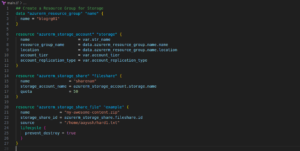
Deploying File Share with Terraform
Once you have defined your AKS and Azure Monitor configurations in Terraform, you can initialize and apply the Terraform configuration to deploy the AKS cluster.
- terraform init
- terraform apply
Understanding the Configuration
- We use the
azurerm_resource_groupdata source to retrieve details of an existing resource group. - The
azurerm_storage_accountresource creates a storage account within the specified resource group. - Next, the
azurerm_storage_shareresource creates a file share within the storage account. - Finally, the
azurerm_storage_share_fileresource uploads a file to the created file share.
Conclusion
In this blog post, we’ve demonstrated how to simplify provisioning on Azure using Terraform. By defining infrastructure as code, you can automate the creation and configuration of Azure resources, reducing manual effort and ensuring consistency across deployments.