
Introduction
In today’s fast-paced digital workspace, businesses and professionals seek efficiency, automation, and accuracy in their daily tasks. SmartDesk AI is an innovative solution that revolutionizes how teams generate reports, write code, and execute tasks – all powered by AI.
What is SmartDesk AI?
Designed to enhance productivity, SmartDesk AI automates repetitive tasks, generates insightful reports, and seamlessly writes and executes code. As a reliable office assistant, it streamlines operations across industries, making workflows more efficient.
AI-Powered Report Generation
Creating reports manually is often time-consuming and prone to errors. SmartDesk AI automates this process by collecting, analyzing, and structuring data into well-organized reports. Whether generating financial summaries, performance analytics, or project updates, it ensures accuracy and efficiency.
Code Writing & Execution
For developers and technical teams, SmartDesk AI provides valuable support in writing and executing code. By analyzing project requirements, it generates optimized code snippets, debugs existing scripts, and runs them in a secure environment. This reduces development time and enhances software quality.
Seamless Task Automation
SmartDesk AI integrates smoothly with workplace tools to handle routine tasks such as drafting emails, formatting documents, and extracting data. By automating these functions, professionals can focus on strategic decision-making instead of repetitive manual work.
Real-Time Collaboration & Assistance
Enhancing teamwork, SmartDesk AI facilitates smooth collaboration through real-time suggestions, document sharing, and workflow automation. Team members can delegate tasks to the AI, ensuring projects meet deadlines with precision.
Understanding SmartDesk AI: Behind the Scenes
To provide a comprehensive understanding, we will explore:
How SmartDesk AI functions
The mechanisms driving its operations
The systematic breakdown of its lifecycle, covering each crucial aspect step by step
Technology Stack Behind SmartDesk AI
SmartDesk AI is built on a robust and scalable technology stack, integrating modern tools and frameworks to ensure efficiency, security, and seamless execution.
Artificial Intelligence
Powered by advanced Large Language Models, this AI assistant efficiently handles natural language processing, code generation, and report automation. Consequently, it enhances accuracy and productivity.
Programming Language
Python serves as the backbone, enabling AI-powered automation and seamless task execution. Given its flexibility, it allows smooth integration with various tools.
Framework
CrewAI orchestrates AI-driven task execution and automation efficiently.
Integration & Implementation
What is CrewAI?
CrewAI is an independent framework designed from the ground up without relying on LangChain or other agent frameworks. It enables AI agents to assume specific roles, collaborate toward shared goals, and function as a unified team – similar to a well-coordinated crew. Whether for intelligent assistants, automated customer service systems, or multi-agent research platforms, CrewAI provides the foundation for advanced AI interactions.
Getting Started with CrewAI
1. Installation Guide-Check Python Version
Ensure you have Python (≥3.10, <3.13) installed. CrewAI relies on UV for dependency management.
Install CrewAI
Run the following command:
pip install crewai
pip install 'crewai[tools]'
This includes extra components requiring additional dependencies.
2. Setting Up Your Crew with the YAML Configuration
Create a new CrewAI project, run the following CLI (Command Line Interface) command:
crewai create crew <project_name>
Executing this command generates a structured project folder with essential files:
For effective utilisation of CrewAI in building a structured professional team, we have defined our agents and their respective tasks in two separate configuration files: agents.yaml and tasks.yaml.
Agents Configuration (agents.yaml)
					researcher:
  role: "{topic} Senior Data Researcher"
  goal: "Discover advancements in {topic} to support IT project needs."

project_manager:
  role: "Project Manager for {topic} IT Project"
  goal: "Oversee project execution, ensuring timely delivery and resource allocation."
Tasks Configuration (tasks.yaml)
					research_task:
  description: "Conduct research on {topic} to support IT project needs, ensuring alignment with {current_year} trends."
  expected_output: "A research report covering key insights, technologies, best practices, and industry trends."
  agent: researcher

planning_task:
  description: "Define project goals, milestones, and risks while collaborating with the Tech Lead."
  expected_output: "A structured project plan with task breakdowns, timelines, and risk management strategies."
  agent: project_manager
Implementing CrewAI (crew.py)
					from crewai import Agent, Crew, Process, Task
from crewai.project import CrewBase, agent, crew, task
from crewai_tools import CodeInterpreterTool
					@CrewBase
class AiOffice:
    """AI Office Crew"""

    agents_config = 'config/agents.yaml'
    tasks_config = 'config/tasks.yaml'

    @agent
    def researcher(self) -> Agent:
        return Agent(
            config=self.agents_config['researcher'],
            verbose=True
        )

    @agent
    def python_developer(self) -> Agent:
        return Agent(
            config=self.agents_config['python_developer'],
            verbose=True,
            allow_code_execution=True,
            llm="claude-3-5-sonnet-20241022",
            tools=[CodeInterpreterTool()]
        )

    @task
    def research_task(self) -> Task:
        return Task(
            config=self.tasks_config['research_task'],
            output_file='/solution/docs/research.md'
        )

    @task
    def development_task(self) -> Task:
        return Task(
            config=self.tasks_config['development_task'],
            output_file='/solution/code/base.py'
        )

    @crew
    def crew(self) -> Crew:
        return Crew(agents=self.agents, tasks=self.tasks, process=Process.sequential, verbose=True)
Now that we have created our crew, let’s understand some key parameters defined within it:
1: Agent Attributes-
- role: str – Defines the agent’s function and expertise within the crew.
- goal: str – The individual objective that guides the agent’s decision-making.
- backstory: str – Provides context and personality to the agent, enriching interactions.
- llm: Union[str, LLM, Any] – Language model that powers the agent. Defaults to the model specified in OPENAI_MODEL_NAME or “gpt-4”.
- tools: List[BaseTool] – Capabilities or functions available to the agent. Defaults to an empty list.
- allow_code_execution: Optional[bool] – Enable code execution for the agent. Default is False.
- function_calling_llm: Optional[Any] – Language model for tool calling, overrides crew’s LLM if specified.
2: Task Attributes-
- description: str – A clear, concise statement of what the task entails.
- expected_output: str – A detailed description of what the task’s completion looks like.
- name: Optional[str] – A name identifier for the task.
- agent: Optional[BaseAgent] – The agent responsible for executing the task.
- tools: List[BaseTool] – The tools/resources the agent is limited to use for this task.
- context: Optional[List[“Task”]] – Other tasks whose outputs will be used as context for this task.
Know more about the attributes please refer to official “CrewAI Documentation”
Got too much technical? 
No worries! Let me simplify it for you nowso you can better understand how it’s actually working!


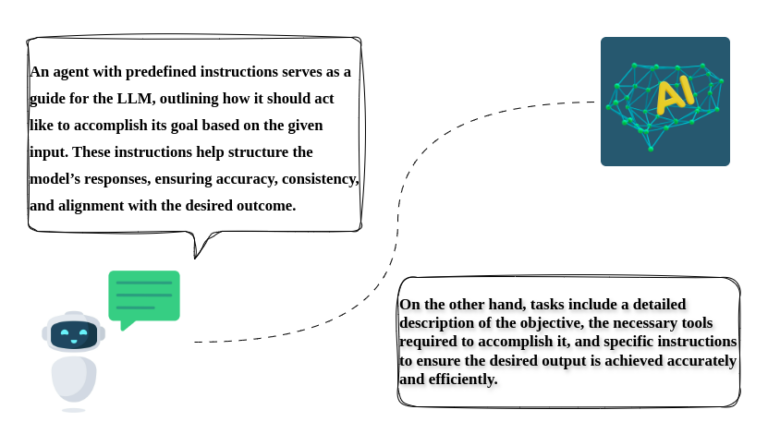
Let’s say we have a powerful LLM capable of handling a wide range of tasks, including text generation, coding, and more. It can assist with content creation, automate repetitive processes, and enhance decision-making, making it a versatile tool for various applications across industries.
Then to efficiently handle the input task, we will define multiple agents, mirroring the standard roles required in the real world. This approach ensures that no single LLM is overloaded with multiple tasks simultaneously, which could otherwise lead to inaccuracies due to hallucinations or token length limitations. By distributing tasks strategically, we enhance both reliability and performance.
Running the Crew
					# main.py
import sys
from src.ai_office.crew import AiOffice

def run():
    """
    Run the crew.
    """
    inputs = {
        'topic': 'Your Topic Input'
    }
    AiOffice().crew().kickoff(inputs=inputs)
Conclusion-
In this guide, we explored how CrewAI enables the creation of a Smart AI Office Team by defining specialized AI agents with distinct tasks. By distributing responsibilities effectively, we prevent overloading a single LLM, ensuring accuracy and efficiency.
With CrewAI, intelligent, task-driven AI systems can be built to streamline automation while enhancing reliability and performance.
For more help please refer: “CrewAi”
Learn about “Agentic AI vs AI Agent”