



What is BDD?
Behavior Driven Development (BDD) is about understanding, documenting & verifying business requirements through illustrative scenarios. BDD is composed of 3 practices: Discovery, Formulation, and Automation.
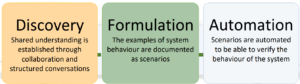
Business rules have been already discussed by the team during “discovery” and we identified key examples to illustrate them. Formulation is used to document examples and make them ready for automation in a more proper/formal way as the supported tools (in this case of Specflow), when we document domain examples as BDD scenarios with Given/When/Then. The scenarios should be connected to business rules.
In this section, we focused on how to work on Formulation practice effectively by overviewing the best practices for writing SpecFlow BDD scenarios
The BRIEF principles
Business language
- Scenarios are written in business domain/terminology to aid cross-discipline collaboration
Real data
- Sometimes a concrete piece of real data can better illustrate the story that we want to explain
- Using actual data helps reveal assumptions and edge cases
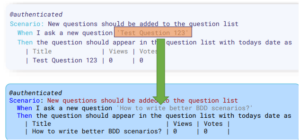
Intention revealing
- Describe the desired outcomes, rather than the mechanism of how they are achieved
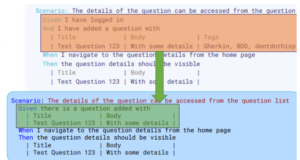
Essential
- Omit any information that doesn’t directly illustrate behavior. Unnecessary, unimportant, irrelevant and incidental details might cause confusion and also bad for maintainability.
- Details can be logged during execution to make audit/debugging easier
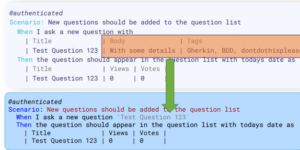
Focused
- Identify the business rules that need to verified
- Make a scenario focused by illustrating a single rule. Multi-rule, multi-purpose scenarios cause bottlenecks in the development process. Small and focused scenarios are much better!
Brief
- Shorter scenarios are easier to read, understand and maintain
Data-driven scenarios
In Gherkin, we can use scenario outlines to avoid duplicating the same scenario multiple time:
- Scenario outline preserves the input-output table we discussed during discovery.
- It allows you to provide a scenario template, where the placeholders will be replaced by the example values.
- Hint: Use “description” column to document the purpose of the example.
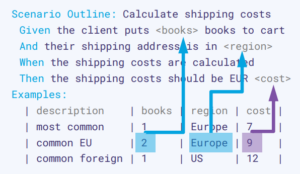
Moreover, Specflow allows you to extend scenario outlines in plain text from the other external data sources (e.g: Excel, CSV..) by installing the appropriate plugins (External Data plugin, SpecFlow+ Excel plugin), you need to extend the scenario outline examples blocks with a special tag to access the data.
Some improvements
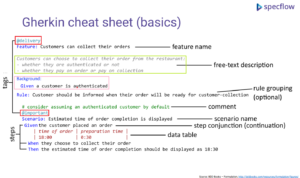
Making scenarios even more readable by Tags, feature description and background
Use tags for categorizing/grouping scenarios:
- Selecting a subset of related scenarios (e.g. @smoke, @fast)
- Creating targeted reports for different areas of the business (e.g. @pricing)
- Indicating scenarios that are reliant on external systems (e.g. @twitter)
- Tracking scenario automation lifecycle with tags (e.g. @formulated, @inprogress)
- Tagging scenarios with external identifiers (e.g. @feature:1234)
- Tagging scenarios with automation details (@manual, @browser, @authenticated)
Use feature description:
- The feature description can contain useful background information about the feature .
- Be careful: descriptions (and comments) are not validated, so they became outdated!
- The feature description can be enhanced with Markdown formats, including images.
Use the Background section:
- With the Background section you can avoid duplicating the same context (Given) statements within a file
- BUT: The readability is not necessarily improved by that
- And there will be always one scenario that needs a different context…
Conclusion
The more efficiently you write the BDD scenarios, the better the business and technical people collaborate on executable specifications, business flows, and rules. It helps to ensure that the application meets the business goals and requirements in a high standard of quality.
Reference: Documentation Home — documentation (specflow.org)