


In automation testing, script implementation is one of the parts which take a lot of human effort. In NashTech, we keep finding the solution for improving our process and increasing productivity. In automation testing, codeless automation tools can help us write test case easily, but they’re usually enterprise tools which need to be purchased with high price. With Code-based tools like Selenium, Cypress or Playwright, programming skill will be the challenge. Based on our research, we found that Github Copilot can support us in this. Let’s see how we can save the effort for automation scripting with Github Copilot.
1.Github Copilot overview
1.1 What is Github Copilot?
GitHub Copilot is an AI-powered code completion tool developed by GitHub in collaboration with OpenAI. It assists developers by providing code suggestions and autocompletions directly within their integrated development environment (IDE).
Here are some key features of Github Copilot:
- Code completion: Github Copilot can suggest the script for us in the meantime. It can generate the script based on our comment or suggest the necessary functions automatically. Thanks to that, we can implement the script faster
- Context-aware: Github Copilot not only supports us to generate script for a single file but also understands the context of the project. It can be based on the existing script or module in our project to suggest script which adapts to the framework we apply in projects.
- Multiple language support: Github Copilot supports various kinds of programming languages like Python, Java, Javascript, Ruby, Go, etc.
- Learning from repository: The tool is trained from the public repository, so it can understand and suggest different kinds of framework or pattern or code styles.
1.2 Benefit of Github Copilot
- Increased productivity: Instead of typing the script or finding solutions for basic functions, Github Copilot can generate the script quickly. It helps us reduce the effort for implementing new features, fixing bugs or optimizing the existing code.
- Learning tool: If you’re new to programming or some technologies which are used in project, Github Copilot can guide you the step for initializing project, explaining the code or error, introducing libraries for implementation.
- Rapid prototyping: Copilot can help quickly generate boilerplate code and make it easier to prototype and iterate on new ideas.
1.3. Github Copilot installation
For Github Copilot installation, please refer to this url.
1.4 Github Copilot pricing

2. How Github Copilot supports automation testing
2.1 Generate automation script
We can generate the test script quickly by opening the Github Copilot chat or creating a comment like the picture below.
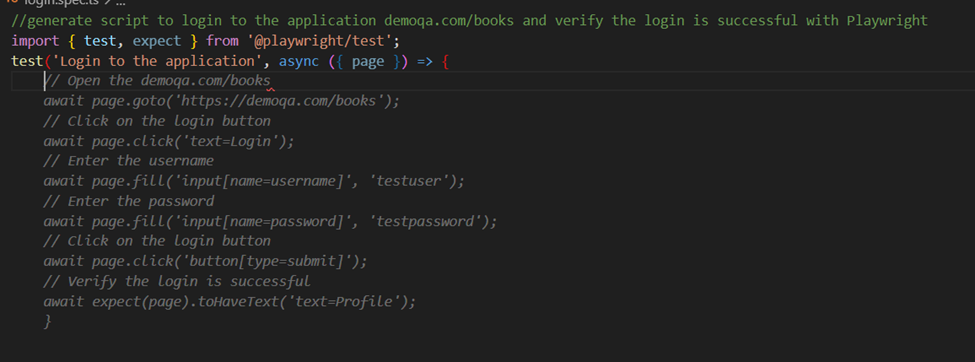
After Github Copilot generates the script, we need to review the steps and update the related locator. Github Copilot can’t suggest the right locator for all locators or generate the script for wait handling. We also need to make sure that the verified point is implemented correctly.
2.2 Apply Page Object Model (POM) design pattern
POM is a popular design pattern in implementing automation testing because it helps us maintain script easily. We can bold the existing script and then open Github Copilot chat to tell it to guide us apply POM for the current script.
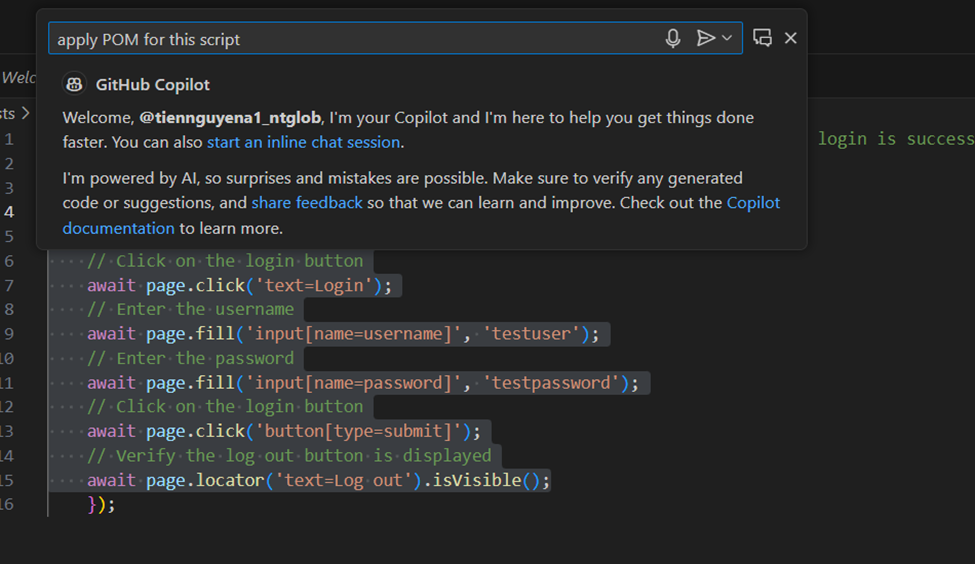
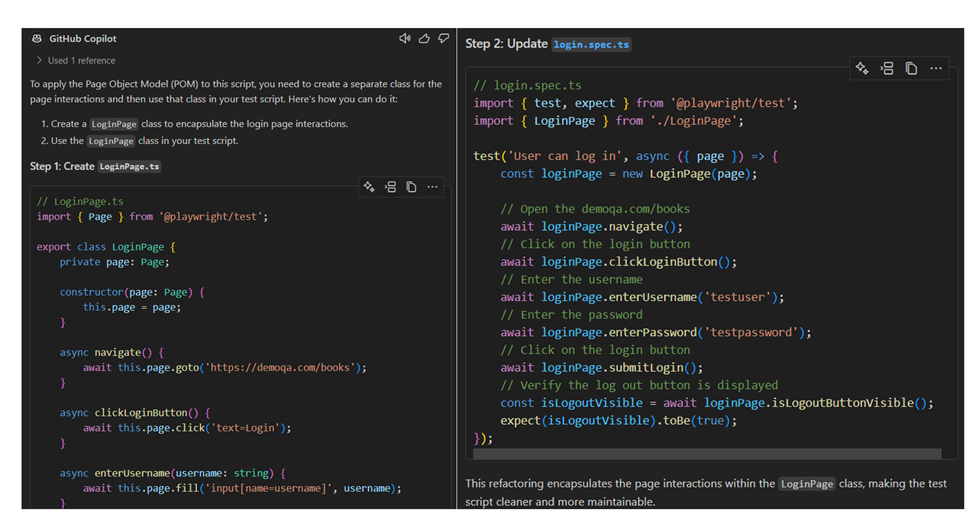
Github Copilot will tell us to create the new file and add related script into them for implementing POM.
2.3 Generate test data for test script
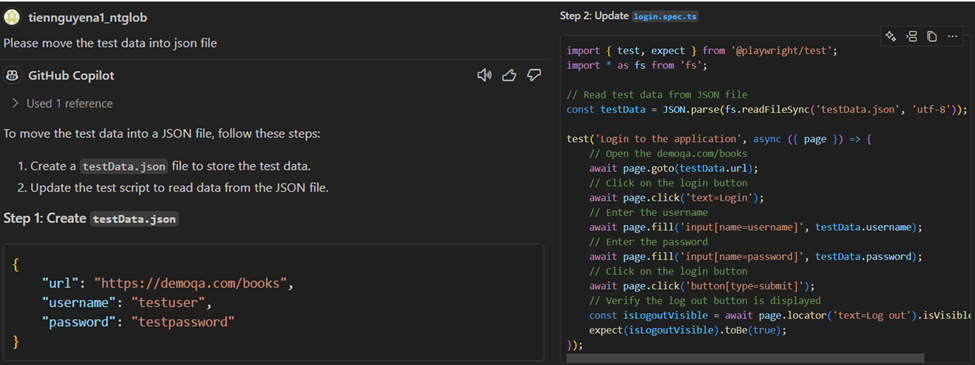
In automation test, we usually apply data-driven for the script to avoid hardcode the test data in the test case. Instead of moving the test data to json or csv or any kind of test data file and updating the main test case manually, we can tell Github Coplilot to do that for us.
2.4 Optimize the script
The script generated maybe cannot be enough dynamic or optimized, we can tell Github Copilot to do it for us.
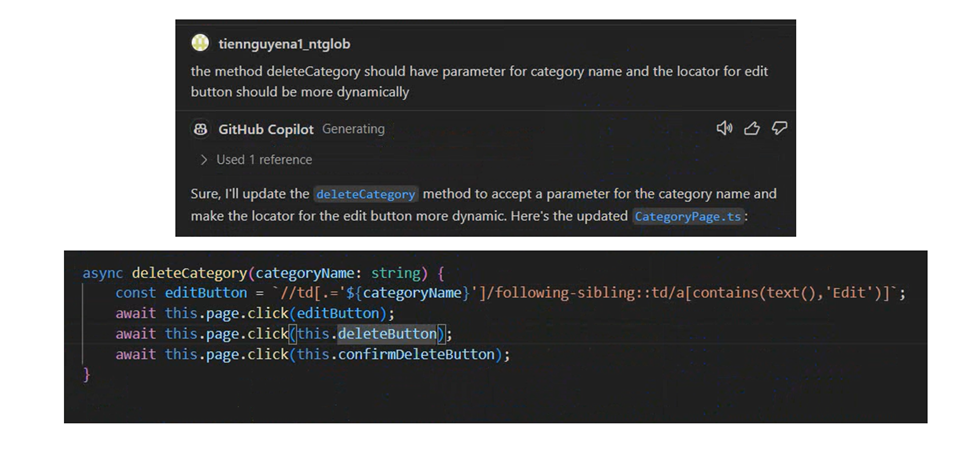
Github Copilot has added the argument for the function and used the dynamic xPath in it.
2.5 Suggest fixing the script
Once there is error in your script, we can leverage Github Copilot for fixing this.

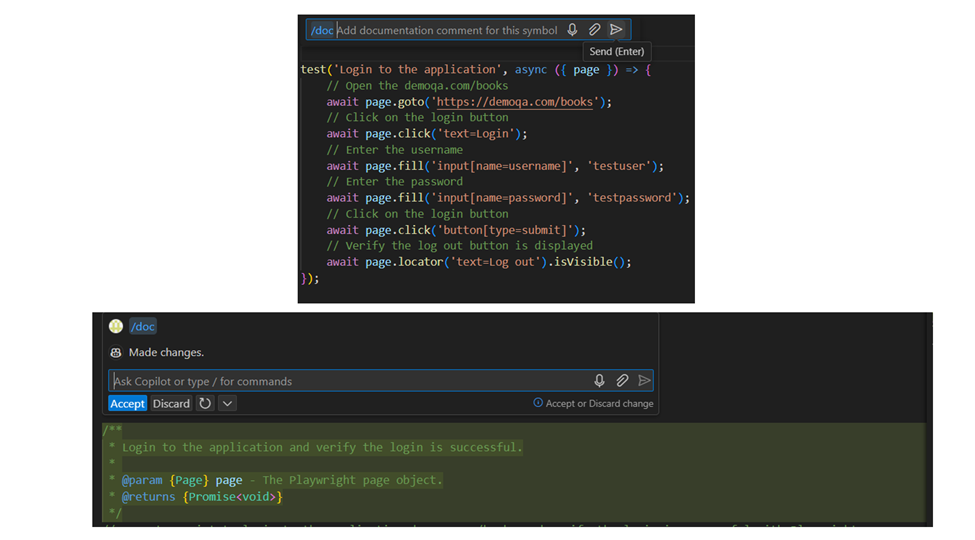
2.6 Generate the documentation for the script
2.7 Explain existing code or error
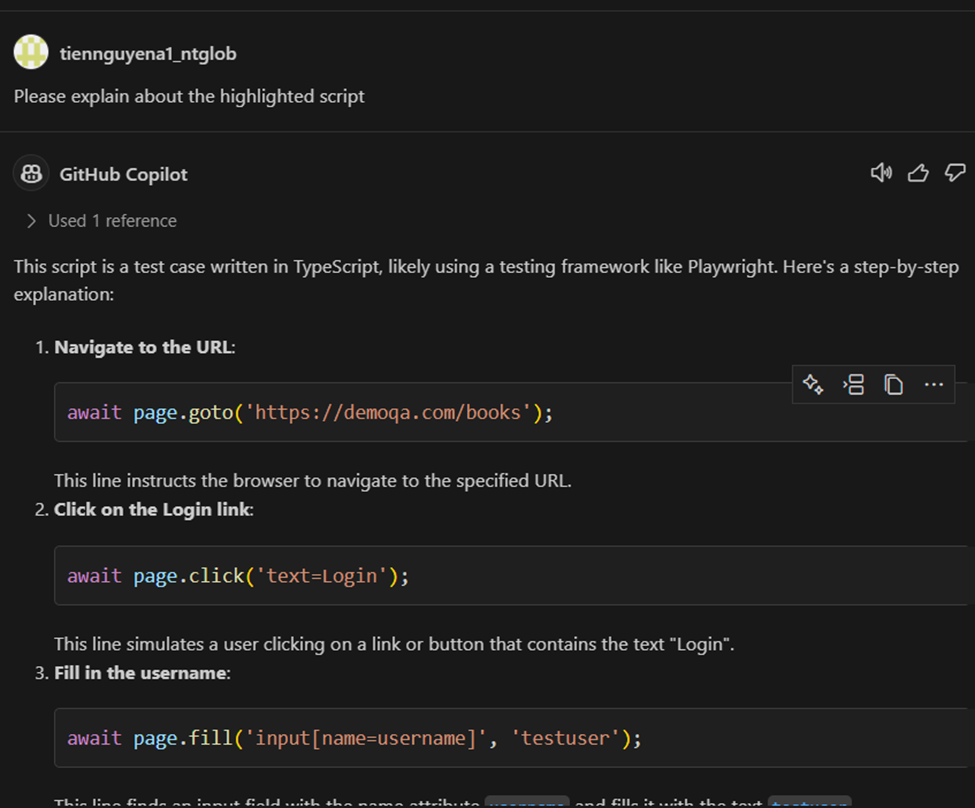
If you’re getting acquainted with the new framework or you don’t understand about the script/error, we can ask Github Copilot about this.
Conclusion
Although Github Copilot cannot do everything for us, we still can leverage its features to increase our productivity or learn new technologies with a reasonable price. Especially for automation test, we’ll need to care about the locators or the verified point suggested by Github Copilot. In the next article, I’d share with you more how to use Github Copilot effectively.
Reference:
- https://github.com/features/copilot
- https://github.blog/developer-skills/github/how-to-use-github-copilot-in-your-ide-tips-tricks-and-best-practices/