


Introduction
Cloudflare offers various SSL/TLS encryption modes to safeguard servers and secure the traffic between client requests and servers. In today’s blog, we’ll delve into the SSL/TLS encryption mode on Cloudflare. Before exploring these modes, let’s gain insight into how Cloudflare handles requests. Consider a scenario: You operate an origin server, like a virtual machine or a Kubernetes cluster, where your application runs. Additionally, your domain, such as mylearning.com, is managed by Cloudflare. When a user sends a request to mylearning.com, Cloudflare’s nameservers receive the request, which is then forwarded to your origin server.

What is SSL/TLS encryption?
SSL/TLS encryption enables secure communication by converting plain text requests into ciphertext, ensuring that data remains confidential during transmission. Additionally, it verifies the identity of the server to the client using SSL/TLS certificates during the initial handshake process.
Types of SSL/TLS encryption mode on CloudFlare
There are 5 options available for SSL/TLS encryption mode on CloudFlare let’s understand each of them one by one:
-
off ( Not Secure )
In this option, neither Cloudflare’s nameserver encrypts communication with the user’s request nor does it encrypt communication with the origin server. This lack of encryption makes requests vulnerable to potential theft of information. Cloudflare does not issue certificates to either the nameserver or the origin server in this scenario.

-
Flexible
In this option, the communication between the user’s request and Cloudflare’s nameserver is encrypted, but the communication between Cloudflare’s nameserver and the origin server is unencrypted. This option can be used when we don’t have a valid SSL certificate on our origin server. It’s suitable if we have a self-signed certificate or are unable to install an SSL certificate on our origin server.

-
Full
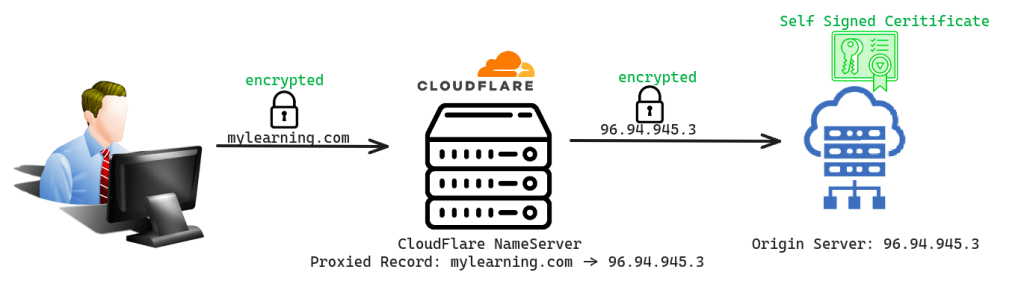
In this option, both the communication between the user’s request and Cloudflare’s nameserver and the communication between Cloudflare’s nameserver and the origin server are encrypted but require a self-signed certificate on your origin server. This option is used when you don’t have a valid SSL certificate signed from an authorized CA’s on your origin server. It’s suitable if you have a self-signed certificate or are unable to install an SSL certificate on your origin server.

-
Full ( Strict )
In this option, both the communication between the user’s request and Cloudflare’s nameserver and the communication between Cloudflare’s nameserver and the origin server is encrypted but requires a Cloudflare origin certificate or certificate signed by trusted CA for example lets-encrypt on your origin server. We can use this option when we have a valid SSL certificate on our origin server. This will not work if you have a self-signed certificate on your origin server.

-
Strict (SSL-Only Origin Pull)
This option ensures that both the communication between the user’s request and Cloudflare’s nameserver and the communication between Cloudflare’s nameserver and the origin server are encrypted, ensuring that only requests from Cloudflare are accepted by your server.