


What is System Testing?
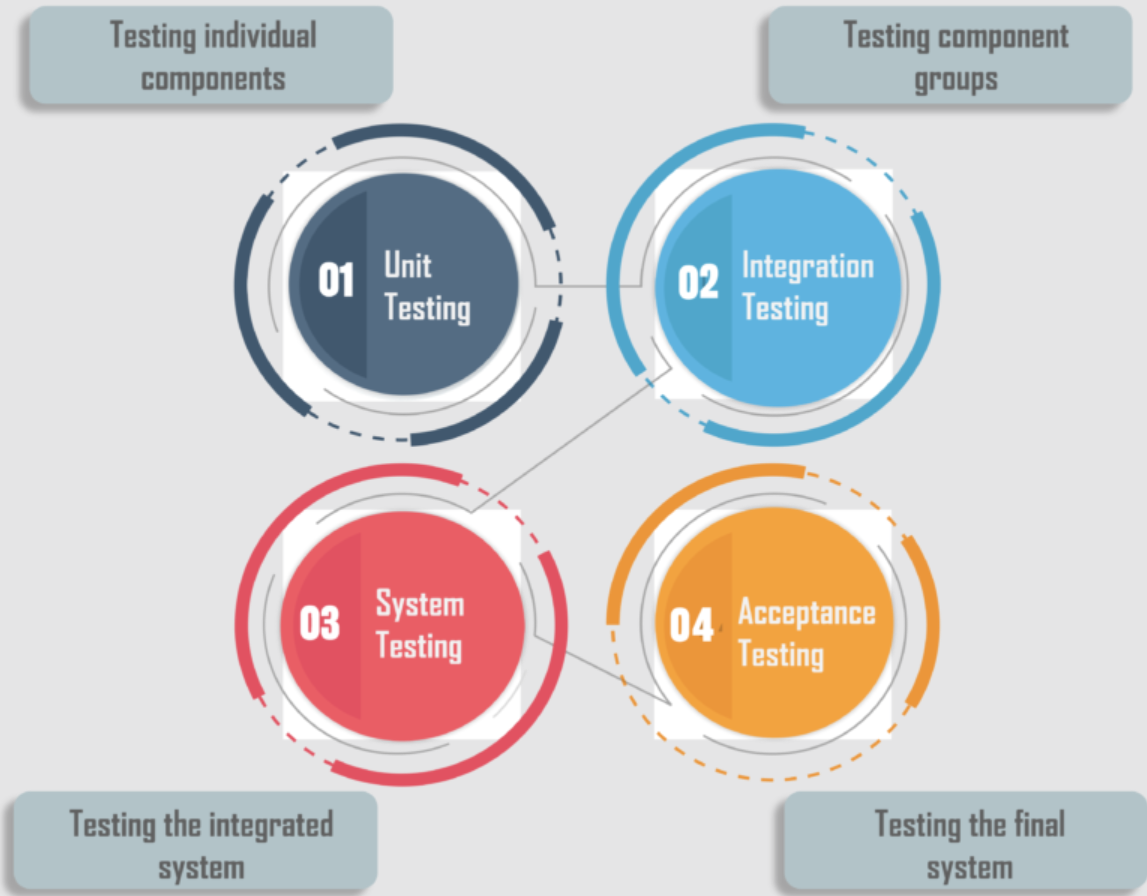
System testing is a form of black-box testing that assesses the complete functionality and performance of a fully integrated software system. It is conducted after integration testing and before acceptance testing.
It aims to identify any flaws in the integrated components of the system and to guarantee that the system complies with the specified requirements and operates as expected by the end users.

When to Use System Testing?
System Testing is typically performed at the following stages in the software development lifecycle:
- After Unit and Integration Testing: System testing is conducted after unit testing and integration testing. It takes place once the individual components of the software have been tested in isolation (unit testing) and then as a group (integration testing).
- Before Acceptance Testing: It is performed before acceptance testing, which is the final testing phase before the software is released to the end users.
- When the System is Fully Integrated: System testing is done when the system is fully integrated, and it is intended to test the system as a whole.
- To Validate Software Requirements: System testing is used to validate that the software meets the specified requirements and behaves as expected for the end users.
Why System Testing?
System Testing is a key phase in software development for several reasons:
- Requirement Fulfillment: It ensures the software meets all user requirements and expectations.
- Defect Identification: It uncovers any defects or issues before the software is deployed.
- Quality Improvement: By identifying and fixing defects, it enhances the software’s quality.
- Cost and Time Efficiency: Early defect detection and resolution in system testing can save time and money.
- Confidence Building: It aims to instill confidence in the system’s quality.
- Defect Prevention: It helps prevent defects from reaching higher test levels or production.
- Troubleshooting Reduction: It aids in reducing troubleshooting and support calls post-deployment.
- Compliance Assurance: It verifies whether the software complies with the specified system requirements.
In essence, system testing is a critical step in the software development lifecycle, ensuring the delivery of a high-quality, reliable, and efficient software product to end users.
How to Perform System Testing?
System Testing involves several steps:
- Understand Requirements: Comprehend the software requirements and specifications.
- Develop a Test Plan: Formulate a detailed test plan outlining the testing strategy, resources, schedule, and deliverables.
- Design Test Cases: Develop test cases and scripts based on the requirements.
- Prepare Test Data: Arrange the necessary test data for executing the test cases.
- Set Up the Test Environment: Establish a test environment that mirrors the production environment.
- Execute Test Cases: Run each test case and script.
- Report and Track Issues: Document any bugs and rectify them. Use a bug tracking system for issue management.
- Validate System Behavior: Confirm the system behavior post bug-fixing.
- Conduct Regression Testing: Perform regression testing to assess the impact of code changes.
- Obtain Stakeholder Feedback: Gather feedback from stakeholders and integrate it into the testing process.
- Finalize Test: Conclude the test after all test cases are executed and bugs are fixed.
Several testing types/techniques can be applied to System Testing:
- Functional Testing: Evaluates the system’s features and functions for requirement fulfillment.
- Performance Testing: Assesses the system’s performance under various conditions.
- Usability Testing: Examines the system’s user interface and overall user experience.
- Manual Testing: Involves human tester for manual inspection and testing of the software.
- Automated Testing: Utilizes software tools for automating the testing process.
- Integration Testing: Tests the integration of different software components.
- Acceptance Testing: Ensures the software meets customer’s or end-user’s expectations.
- Regression Testing: Tests the software post changes or modifications.
- Security Testing: Identifies vulnerabilities and ensures security requirements are met.
- Exploratory Testing: Involves active exploration of the software to find defects without a specific test plan.
- Boundary Value Testing: Tests the software at input value boundaries to identify defects.
- User Acceptance Testing (UAT): Determines if the software meets the end-user’s needs and expectations.
Each testing technique helps to identify a specific type of defect. Techniques that may find structural defects might not be able to find defects against the end-to-end business flow. Hence, multiple testing techniques are applied in a testing project to ensure acceptable quality.
Challenges in System Testing
Challenges in System Testing and How to Overcome Them
Challenges:
- Communication Issues: Misunderstandings between the development and testing teams about the requirements or features to be tested.
- Resource Constraints: Insufficient human resources or software licenses for testing tools.
- Handling Changes: Constant changes in the software require testers to ensure test cases remain valid and cover new features.
- Time Constraints: Limited time to thoroughly test the software before release or tight deadlines.
- Missing Documentation: Teams sometimes fail to document the project’s scope and specific requirements after verbal interactions with clients.
- Inadequate Testing: Time constraints may lead to overlooked or inadequately tested scenarios, causing potential production issues.
- Unstable Environment: An unstable test environment can lead to inconsistent test results.
- Compatibility Issues: The software may need to be tested on different platforms, presenting compatibility issues.
- Test Completion: Determining when testing is sufficient and when it should be stopped can be challenging.
- Test Prioritization: Prioritizing tests, especially with a large number of test cases, can be a challenge.
- Regression Testing: Ensuring that changes or modifications haven’t introduced new defects can be challenging.
- Defect Management: Tracking and managing defects effectively can be a challenge.
- Test Environment Duplication: Creating a test environment that closely mimics the production environment can be challenging.
- Test Data Management: Managing and maintaining test data can be a challenge.
- Undefined Quality Standards: Lack of clear quality standards can make it difficult to assess the software’s quality.
- Lack of Traceability: There might be a lack of traceability between requirements and test cases.
Overcoming Challenges:
- Clear Communication: Ensure clear communication between teams to avoid misunderstandings.
- Resource Management: Plan for resource constraints and consider using automation tools to increase efficiency.
- Change Management: Have a process to deal with software changes and ensure test cases remain valid.
- Time Management: Plan for time constraints and consider using automation and parallel testing to save time.
- Documentation: Ensure project scope and specific requirements are documented after verbal interactions with clients.
- Test Coverage: Ensure all test scenarios are covered and adequately tested.
- Stable Test Environment: Ensure the test environment is stable to avoid inconsistent test results.
- Compatibility Testing: Test the software on different platforms to check for compatibility issues.
- Test Prioritization: Prioritize tests, especially when dealing with a large number of test cases.
- Regression Testing: Ensure changes or modifications haven’t introduced new defects.
- Defect Management: Use a bug tracking system to manage and track issues effectively.
- Test Environment Duplication: Create a test environment that closely mimics the production environment.
- Test Data Management: Manage and maintain test data effectively.
Conclusion
System Testing is a crucial phase in the software development lifecycle that validates the complete functionality and performance of a fully integrated software system. It is typically performed after unit and integration testing and before acceptance testing. The goal of system testing is to ensure that the software meets all requirements and behaves as expected by the end users.
However, system testing can present several challenges, including communication issues, lack of resources, dealing with changes, time constraints, missing documentation, inadequate testing, unstable environment, compatibility issues, and more. These challenges can be mitigated with proper planning, communication, and the use of appropriate testing tools and methodologies.
In conclusion, despite the challenges, system testing is an essential step in ensuring the delivery of a high-quality, reliable, and efficient software product to the end users. It helps to improve the software’s quality, save time and money, build confidence in the system, prevent defects from escaping to higher test levels or production, reduce troubleshooting and support calls, ensure compliance with specifications, and manage and maintain test data effectively.
References
What is System Testing: It’s Types With Best Practices
What is System Testing – A Ultimate Beginner’s Guide (softwaretestinghelp.com)