


Introduction The art of connecting test script with POM file
Welcome, automation enthusiasts! In the ever-evolving realm of software testing, where agility and efficiency reign supreme. The art of connecting test scripts with POM files emerges as a cornerstone for success. Today, we embark on a journey to explore the art of seamlessly connecting test scripts with POM files, unraveling the potential for robust, maintainable, and scalable automation frameworks.
Imagine a scenario where your test scripts effortlessly interact with a well-organized and purposeful set of Page Object Models. A scenario where changes in the application are met with minimal script modifications, and maintenance becomes a breeze.
What is POM?
In the context of automation testing, a POM file refers to a “Page Object Model” file. The POM is a design pattern used in test automation that creates an object repository for storing all web elements to enhance maintainability and readability reduce code duplication and improve test case maintenance.
Benefits of Connection
1. Maintainability and scalability
The primary advantage of connecting test scripts with POM files lies in the enhanced maintainability of your automation suite. Changes are easier to handle when your test scripts work well with a clear Page Object Model.
2. Reduced Redundancy
With a connected approach, gone are the days of repeating lines of code to interact with common elements across multiple scripts. Encapsulating these interactions within Page Objects minimizes redundancy, making your test scripts concise, readable, and easy to manage.
3. Easy Debugging and Troubleshooting
The clear separation of concerns between test scripts and Page Objects simplifies the debugging process. When an issue arises, pinpointing the problem becomes more straightforward, facilitating quicker troubleshooting and issue resolution.
Ways to use POM file
1. Traditional way to use POM
In traditional automation practices, test scripts and Page Object Model(POM) files were often co-located co-located within the same folder or repository, leading to challenges in maintainability and scalability. Recognizing the limitations of the limitations of this approach, modern best practices advocate for a more refined connection between test scripts and POM files.
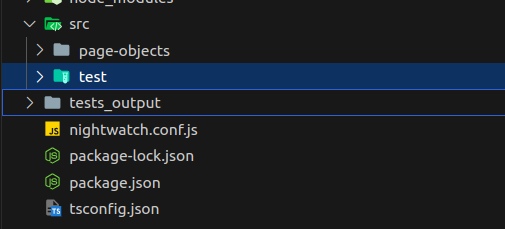
2. Linking Separate POM files with Test scripts
By linking separate POM files with our test scripts, we enable a seamless interaction with a well-organized and purposeful set of Page Object Models. This linkage ensures that our test scripts seamlessly engage with a meticulously organized and purpose-driven collection of Page Object Models.
The process is quite simple and elegant: first, set up both the POM and test script repositories separately, each containing its components. Then, cleverly connect them by using the ‘npm link’ command. This linking establishes a dynamic bridge, enabling the test scripts to effortlessly tap into the well-organized structure of the Page Object Models.
How to use ‘npm link’ for linking
All we need to do is connect our POM and test script folder together using the ‘npm link’.
Now let’s see how we can connect POM with test scripts using the ‘npm link’
- Step 1: Start by making a POM file and test file separately.
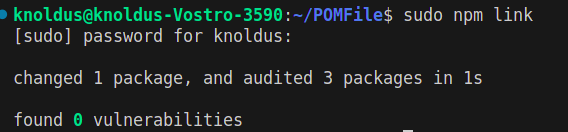
- Step 2: Next to connect the POM file, open the terminal and type ‘npm link’ If ‘npm link’ gives an error, attempt ‘sudo npm link’ and press enter. This command establishes a symbolic link between the global package or project installation and our local development environment.
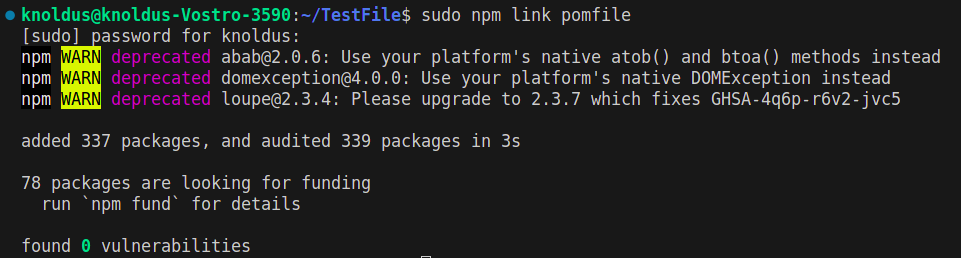
- Step 3: Open your test file and run ‘npm link your_package_name’ like ‘sudo npm link pomfile’ Here pomfile is the name of my Page Object Model.
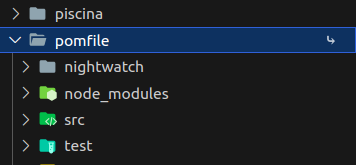
- Step 4: Now go to node modules and check your POM file is present with the link symbol on it.
Examples of the above steps are given below:-
Now running ‘npm link package_name’ in our test file
After executing the commands, you will find your file in the ‘node_modules’ directory with a linked symbol.
What we cover in the next section
In this section, we explored the process of connecting the test script with the POM file using the ‘npm link’ command. In the upcoming segment, our focus will shift towards the intricacies of publishing our package on npm. This will lead to a successful integration of the npm package into our POM file. Introducing a holistic approach to modular automation development.
For reference, you can use official documentation: npm-link
For more blogs regarding different topics please visit: NashtechBlogs